Block 1 - Schedule Trigger
- Type / Role
- n8n-nodes-base.scheduleTrigger - scheduleTrigger
- Config choices
- Version 1.1


 Early Deal
This workflow is provided as-is. Please review and test before using in production.
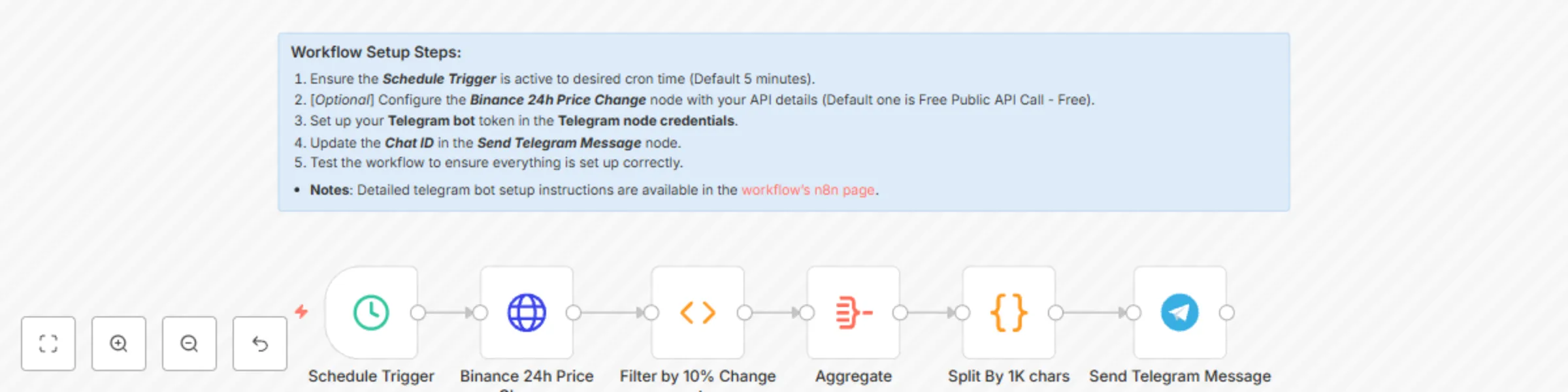
An innovative N8N workflow that monitors cryptocurrency prices on Binance, identifies significant market movements, and sends customized alerts through Telegram. Ideal for traders and enthusiasts s...
n8n-nodes-base.scheduletrigger, n8n-nodes-base.telegram, n8n-nodes-base.aggregate, n8n-nodes-base.httprequest, n8n-nodes-base.function, n8n-nodes-base.code, n8n-nodes-base.stickynote
This workflow is cataloged by N8N Workflows and links back to its original n8n.io source page by Nskha.
Original n8n.io sourceAn innovative N8N workflow that monitors cryptocurrency prices on Binance, identifies significant market movements, and sends customized alerts through Telegram. Ideal for traders and enthusiasts seeking real-time market insights.
Estimated Time: About 1-5 minutes for setup.
Initial Configuration: Set up a Binance API connection (Optional) and your Telegram bot credentials.
Customization: Adjust the trigger according to your preference (manual or scheduled) and update the Telegram chat ID.
Create Telegram bot steps:- Setting up a Telegram bot and obtaining its token involves several steps. Here's a detailed guide:
Start a Chat with BotFather:
Create a New Bot:
/newbot and send the message.bot. For example, my_crypto_alert_bot.Receive Your Token:
Done! Congratulations on your new bot. You will find it at t.me/my_crypto_alert_bot. You can now add a description, about section and profile picture for your bot, see /help for a list of commands. Use this token to access the HTTP API: 123456:ABC-DEF1234ghIkl-zyx57W2v1u123ew11
123456:ABC-DEF1234ghIkl-zyx57W2v1u123ew11.Test Your Bot:
Use the Token in n8n:
Get Your Chat ID:
@userinfobot to get your chat ID.Finalize Your Workflow:
Remember, keep your bot token secure and never share it publicly. If your token is compromised, you can always generate a new one by chatting with BotFather and selecting /token.
Keywords: n8n workflow, cryptocurrency market, Binance API, Telegram bot, price alert system, automated trading signals, market analysis
This catalog entry is organized from the workflow JSON. The node-level section below shows the executable blocks available for review before importing the template.
| Workflow | Crypto market alert system with Binance and Telegram integration |
|---|---|
| Complexity | intermediate |
| Nodes | 7 |
| Categories | Crypto Trading |
| Author | Nskha |
| Published | 08 Jan 2024 |
Use the JSON export at /data/workflows/2043/2043.json as the source template for this automation.
Open n8n, import the downloaded JSON, and review each node before activating the workflow.
Replace placeholder credentials, API keys, webhook URLs, account IDs, and environment-specific values with your own settings.
Run the workflow manually or in a staging workspace, inspect node output, and confirm downstream systems receive the expected data.
Enable the workflow only after testing, then monitor executions, errors, and rate limits during the first production runs.
Review imported nodes carefully before activation. This catalog entry is intended to help you inspect the workflow structure, understand required services, and find related templates faster.
Node names, credentials, schedules, webhook paths, and external service limits may need adjustment for your workspace.
An innovative N8N workflow that monitors cryptocurrency prices on Binance, identifies significant market movements, and sends customized alerts through Telegram. Ideal for traders and enthusiasts s...
Review the workflow JSON, configure any required credentials in n8n, and test the automation in a safe workspace before using it in production.
Yes. Use the block-by-block analysis and the downloadable JSON to inspect each node, then adjust credentials, prompts, schedules, filters, or destinations for your Crypto Trading use case.