Creators hub: Generate dynamic SVG stats with daily updates

Workflow preview

Workflow preview
100%
Creators hub: Generate dynamic SVG stats with daily updates preview
Open on n8n.io

Important notice

This workflow is provided as-is. Please review and test before using in production.

1. Workflow Overview

n8n Creators Template: Creator Profile Stats Updater This n8n workflow template is designed to automate the process of u...

Best for

  • Content Creation automation workflows
  • intermediate n8n builders looking for reusable templates

Tools used

n8n-nodes-base.stickynote, n8n-nodes-base.set, n8n-nodes-base.httprequest, n8n-nodes-base.extractfromfile, n8n-nodes-base.scheduletrigger, n8n-nodes-base.aggregate, n8n-nodes-base.github

Source and attribution

This workflow is cataloged by N8N Workflows and links back to its original n8n.io source page by Nskha.

Original n8n.io source

1.1 Workflow description

Title
Creators hub: Generate dynamic SVG stats with daily updates
Workflow name
Creators hub: Generate dynamic SVG stats with daily updates

n8n Creators Template: Creator Profile Stats Updater

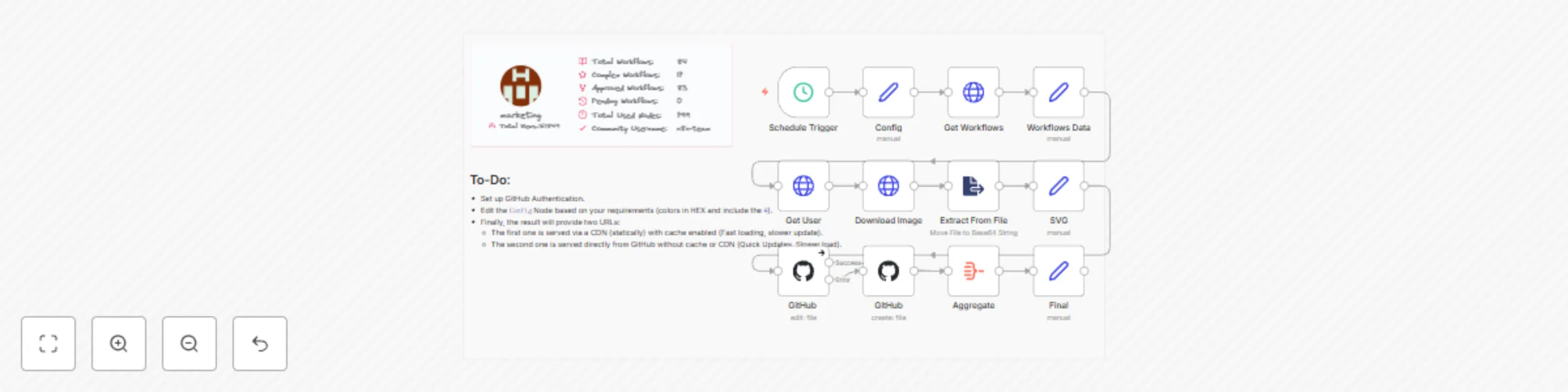
This n8n workflow template is designed to automate the process of updating a creator's profile statistics, including total workflows, complex workflows, approved workflows, pending workflows, total nodes, and total views. It utilizes various nodes to fetch data, process it, and update a SVG file hosted on GitHub to reflect the latest stats.

Workflow Overview

  1. Schedule Trigger: Triggers the workflow execution at specified intervals.
  2. Config: Sets up configuration details like creator username, colors for text, icons, border, and card.
  3. Get Workflows: Fetches workflows associated with the creator from the n8n API.
  4. Workflows Data: Processes the fetched data to calculate various statistics.
  5. Get User: Fetches user details from the n8n API.
  6. Download Image: Downloads the creator's profile image.
  7. Extract From File: Extracts binary data from the downloaded image file.
  8. SVG: Generates an SVG file with updated stats and visual representation.
  9. GitHub: Commits the updated SVG file to the specified GitHub repository.
  10. Final: Prepares the final data set for further processing or output.
  11. Sticky Note: Provides a visual note or reminder within the workflow editor.

Embed & Live Preview

Since it's a .SVG format you can host it anywhere. treat it like normal image so you can embed it with any site, forum, page that support posting images. here's example code for markdown:

[![n8n Creator Profile](https://raw.githubusercontent.com/Automations-Project/n8n-templates/main/n8n-team.svg)](https://n8n.io/creators/n8n-team)
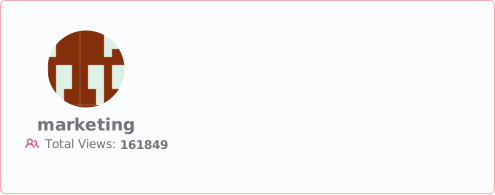
Here's the result Or served through CDN & Cache

Setup Instructions

  1. GitHub Credentials: Ensure you have GitHub credentials set up in your n8n instance to allow the workflow to commit changes to your repository.
  2. Configure Trigger: Adjust the Schedule Trigger node to set the desired execution intervals for the workflow.
  3. Set Configuration: Customize the Config node with your GitHub username and preferred aesthetic options for the SVG.
  4. Deploy Workflow: Import the workflow into your n8n instance and deploy it.

Customization Options

  • Text and Icon Colors: Customize the colors used in the SVG by modifying the respective fields in the Config node.
  • Profile Image Size: Adjust the image size in the Download Image node URL if needed.
  • Commit Messages: Modify the commit messages in the GitHub nodes to suit your version control conventions [I've used $now funaction to include current time in message which will gives allways a diffrent commit value].

Requirements

  • n8n (Self-hosted or Cloud version compatible with 2024 releases and up)
  • GitHub account and repository
  • Basic understanding of n8n workflow configuration

Support and Contributions

For support, please refer to the n8n community forum or the official n8n documentation. Contributions to the template can be made you're allowed to reuse this workflow and reshare with edit (like new design/colors etc..) under your name.

1.2 Logical Blocks

This catalog entry is organized from the workflow JSON. The node-level section below shows the executable blocks available for review before importing the template.

2. Block-by-Block Analysis

Block 1 - Sticky Note

Type / Role
n8n-nodes-base.stickyNote - stickyNote
Config choices
Version 1

Block 2 - Workflows Data

Type / Role
n8n-nodes-base.set - set
Config choices
Version 3.2

Block 3 - Get Workflows

Type / Role
n8n-nodes-base.httpRequest - httpRequest
Config choices
Version 4.1

Block 4 - Get User

Type / Role
n8n-nodes-base.httpRequest - httpRequest
Config choices
Version 4.1

Block 5 - Extract From File

Type / Role
n8n-nodes-base.extractFromFile - extractFromFile
Config choices
Version 1

Block 6 - Download Image

Type / Role
n8n-nodes-base.httpRequest - httpRequest
Config choices
Version 4.1

Block 7 - Schedule Trigger

Type / Role
n8n-nodes-base.scheduleTrigger - scheduleTrigger
Config choices
Version 1.1

Block 8 - Aggregate

Type / Role
n8n-nodes-base.aggregate - aggregate
Config choices
Version 1

Block 9 - SVG

Type / Role
n8n-nodes-base.set - set
Config choices
Version 3.2

Block 10 - Final

Type / Role
n8n-nodes-base.set - set
Config choices
Version 3.2

Block 11 - Config

Type / Role
n8n-nodes-base.set - set
Config choices
Version 3.2

Block 12 - GitHub

Type / Role
n8n-nodes-base.github - github
Config choices
Version 1

Block 13 - GitHub ‌

Type / Role
n8n-nodes-base.github - github
Config choices
Version 1

3. Summary Table

Workflow Creators hub: Generate dynamic SVG stats with daily updates
Complexity intermediate
Nodes 13
Categories Content Creation
Author Nskha
Published 06 Feb 2024

4. Reproducing the Workflow from Scratch

  1. 1. Download the workflow JSON

    Use the JSON export at /data/workflows/2084/2084.json as the source template for this automation.

  2. 2. Import the template into n8n

    Open n8n, import the downloaded JSON, and review each node before activating the workflow.

  3. 3. Configure credentials and variables

    Replace placeholder credentials, API keys, webhook URLs, account IDs, and environment-specific values with your own settings.

  4. 4. Test with sample data

    Run the workflow manually or in a staging workspace, inspect node output, and confirm downstream systems receive the expected data.

  5. 5. Activate and monitor

    Enable the workflow only after testing, then monitor executions, errors, and rate limits during the first production runs.

5. General Notes & Resources

Review imported nodes carefully before activation. This catalog entry is intended to help you inspect the workflow structure, understand required services, and find related templates faster.

Node names, credentials, schedules, webhook paths, and external service limits may need adjustment for your workspace.

Frequently asked questions

What does Creators hub: Generate dynamic SVG stats with daily updates do?

n8n Creators Template: Creator Profile Stats Updater This n8n workflow template is designed to automate the process of u...

What do I need before importing this workflow?

Review the workflow JSON, configure any required credentials in n8n, and test the automation in a safe workspace before using it in production.

Can I customize this workflow?

Yes. Use the block-by-block analysis and the downloadable JSON to inspect each node, then adjust credentials, prompts, schedules, filters, or destinations for your Content Creation use case.