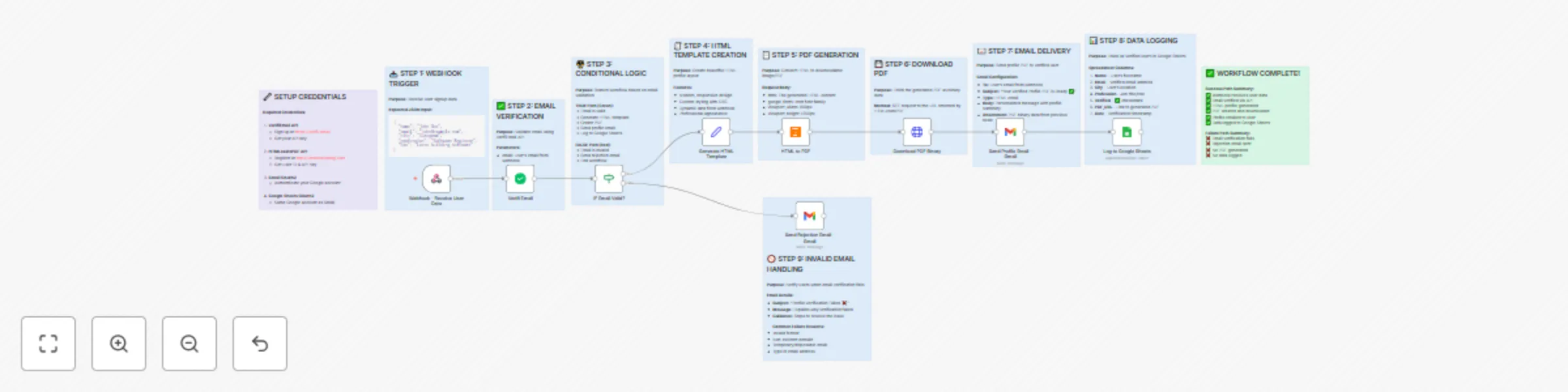
Create verified user profiles with email validation, PDF generation & Gmail delivery

Workflow preview

Workflow preview
100%
Create verified user profiles with email validation, PDF generation & Gmail delivery preview
Open on n8n.io

Important notice

This workflow is provided as-is. Please review and test before using in production.

1. Workflow Overview

Verified User Profile Creation Automated Email Validation & PDF Generation Overview This comprehensive automation workflow streamlines the user onboarding process by validating email addresses, gen...

Best for

  • Document Extraction automation workflows
  • advanced n8n builders looking for reusable templates

Tools used

n8n-nodes-base.stickynote, n8n-nodes-base.webhook, n8n-nodes-base.if, n8n-nodes-base.set, n8n-nodes-base.httprequest, n8n-nodes-base.gmail, n8n-nodes-base.googlesheets, n8n-nodes-verifiemail.verifiemail

Source and attribution

This workflow is cataloged by N8N Workflows and links back to its original n8n.io source page by Jitesh Dugar.

Original n8n.io source

1.1 Workflow description

Title
Create verified user profiles with email validation, PDF generation & Gmail delivery
Workflow name
Create verified user profiles with email validation, PDF generation & Gmail delivery

Verified User Profile Creation - Automated Email Validation & PDF Generation


Overview

This comprehensive automation workflow streamlines the user onboarding process by validating email addresses, generating professional profile PDFs, and delivering them seamlessly to verified users.

🎯 What This Workflow Does:

  1. Receives User Data - Webhook trigger accepts user signup information (name, email, city, profession, bio)
  2. Validates Email Addresses - Uses VerifiEmail API to ensure only legitimate email addresses proceed
  3. Conditional Branching - Smart logic splits workflow based on email verification results
  4. Generates HTML Profile - Creates beautifully styled HTML templates with user information
  5. Converts to PDF - Transforms HTML into professional, downloadable PDF documents
  6. Email Delivery - Sends personalized welcome emails with PDF attachments to verified users
  7. Data Logging - Records all verified users in Google Sheets for analytics and tracking
  8. Rejection Handling - Notifies users with invalid emails and provides guidance

✨ Key Features:

  • βœ… Email Verification - Prevents fake registrations and maintains data quality
  • πŸ“„ Professional PDF Generation - Beautiful, branded profile documents
  • πŸ“§ Automated Email Delivery - Personalized welcome messages with attachments
  • πŸ“Š Google Sheets Logging - Complete audit trail of all verified users
  • πŸ”€ Smart Branching - Separate paths for valid and invalid emails
  • 🎨 Modern Design - Clean, responsive HTML/CSS templates
  • πŸ”’ Secure Webhook - POST endpoint for seamless form integration

🎯 Perfect Use Cases:

  • User registration systems
  • Community membership verification
  • Professional certification programs
  • Event registration with verified attendees
  • Customer onboarding processes
  • Newsletter signup verification
  • Educational platform enrollments
  • Membership card generation

πŸ“¦ What's Included:

  • Complete workflow with 12 informative sticky notes
  • Pre-configured webhook endpoint
  • Email verification integration
  • PDF generation setup
  • Gmail sending configuration
  • Google Sheets logging
  • Error handling guidelines
  • Rejection email template

πŸ› οΈ Required Integrations:

  1. VerifiEmail - For email validation (https://verifi.email)
  2. HTMLcsstoPDF - For PDF generation (https://htmlcsstopdf.com)
  3. Gmail OAuth2 - For email delivery
  4. Google Sheets OAuth2 - For data logging

⚑ Quick Setup Time: 15-20 minutes

πŸŽ“ Skill Level: Beginner to Intermediate

Benefits:

βœ… Reduces manual verification work by 100% βœ… Prevents spam and fake registrations βœ… Delivers professional branded documents automatically βœ… Maintains complete audit trail βœ… Scales effortlessly with user growth βœ… Provides excellent user experience βœ… Easy integration with any form or application


Technical Details:

  • Trigger Type: Webhook (POST)
  • Total Nodes: 11 (including 12 documentation sticky notes)
  • Execution Time: ~3-5 seconds per user
  • API Calls: 3 external (VerifiEmail, HTMLcsstoPDF, Google Sheets)
  • Email Format: HTML with binary PDF attachment
  • Data Storage: Google Sheets (optional)

License: MIT (Free to use and modify)


🎁 BONUS FEATURES:

  • Comprehensive sticky notes explaining each step
  • Beautiful, mobile-responsive email template
  • Professional PDF styling with modern design
  • Easily customizable for your branding
  • Ready-to-use webhook endpoint
  • Error handling guidelines included

Perfect for: Developers, No-code enthusiasts, Business owners, SaaS platforms, Community managers, Event organizers

Start automating your user verification process today! πŸš€

1.2 Logical Blocks

This catalog entry is organized from the workflow JSON. The node-level section below shows the executable blocks available for review before importing the template.

2. Block-by-Block Analysis

Block 1 - Sticky Note1

Type / Role
n8n-nodes-base.stickyNote - stickyNote
Config choices
Version 1

Block 2 - Webhook - Receive User Data

Type / Role
n8n-nodes-base.webhook - webhook
Config choices
Version 1

Block 3 - Sticky Note2

Type / Role
n8n-nodes-base.stickyNote - stickyNote
Config choices
Version 1

Block 4 - Sticky Note3

Type / Role
n8n-nodes-base.stickyNote - stickyNote
Config choices
Version 1

Block 5 - IF Email Valid?

Type / Role
n8n-nodes-base.if - if
Config choices
Version 1

Block 6 - Sticky Note4

Type / Role
n8n-nodes-base.stickyNote - stickyNote
Config choices
Version 1

Block 7 - Generate HTML Template

Type / Role
n8n-nodes-base.set - set
Config choices
Version 2

Block 8 - Sticky Note5

Type / Role
n8n-nodes-base.stickyNote - stickyNote
Config choices
Version 1

Block 9 - Sticky Note6

Type / Role
n8n-nodes-base.stickyNote - stickyNote
Config choices
Version 1

Block 10 - Download PDF Binary

Type / Role
n8n-nodes-base.httpRequest - httpRequest
Config choices
Version 4.2

Block 11 - Sticky Note7

Type / Role
n8n-nodes-base.stickyNote - stickyNote
Config choices
Version 1

Block 12 - Send Profile Email - Gmail

Type / Role
n8n-nodes-base.gmail - gmail
Config choices
Version 2.1

Block 13 - Sticky Note8

Type / Role
n8n-nodes-base.stickyNote - stickyNote
Config choices
Version 1

Block 14 - Log to Google Sheets

Type / Role
n8n-nodes-base.googleSheets - googleSheets
Config choices
Version 4.4

Block 15 - Sticky Note9

Type / Role
n8n-nodes-base.stickyNote - stickyNote
Config choices
Version 1

Block 16 - Send Rejection Email - Gmail

Type / Role
n8n-nodes-base.gmail - gmail
Config choices
Version 2.1

Block 17 - Sticky Note10

Type / Role
n8n-nodes-base.stickyNote - stickyNote
Config choices
Version 1

Block 18 - Sticky Note11

Type / Role
n8n-nodes-base.stickyNote - stickyNote
Config choices
Version 1

Block 19 - Verifi Email

Type / Role
n8n-nodes-verifiemail.verifiEmail - verifiEmail
Config choices
Version 1

Block 20 - HTML to PDF

Type / Role
n8n-nodes-htmlcsstopdf.htmlcsstopdf - htmlcsstopdf
Config choices
Version 1

3. Summary Table

Workflow Create verified user profiles with email validation, PDF generation & Gmail delivery
Complexity advanced
Nodes 20
Categories Document Extraction
Author Jitesh Dugar
Published 25 Oct 2025

4. Reproducing the Workflow from Scratch

  1. 1. Download the workflow JSON

    Use the JSON export at /data/workflows/10163/10163.json as the source template for this automation.

  2. 2. Import the template into n8n

    Open n8n, import the downloaded JSON, and review each node before activating the workflow.

  3. 3. Configure credentials and variables

    Replace placeholder credentials, API keys, webhook URLs, account IDs, and environment-specific values with your own settings.

  4. 4. Test with sample data

    Run the workflow manually or in a staging workspace, inspect node output, and confirm downstream systems receive the expected data.

  5. 5. Activate and monitor

    Enable the workflow only after testing, then monitor executions, errors, and rate limits during the first production runs.

5. General Notes & Resources

Review imported nodes carefully before activation. This catalog entry is intended to help you inspect the workflow structure, understand required services, and find related templates faster.

Node names, credentials, schedules, webhook paths, and external service limits may need adjustment for your workspace.

Frequently asked questions

What does Create verified user profiles with email validation, PDF generation & Gmail delivery do?

Verified User Profile Creation Automated Email Validation & PDF Generation Overview This comprehensive automation workflow streamlines the user onboarding process by validating email addresses, gen...

What do I need before importing this workflow?

Review the workflow JSON, configure any required credentials in n8n, and test the automation in a safe workspace before using it in production.

Can I customize this workflow?

Yes. Use the block-by-block analysis and the downloadable JSON to inspect each node, then adjust credentials, prompts, schedules, filters, or destinations for your Document Extraction use case.