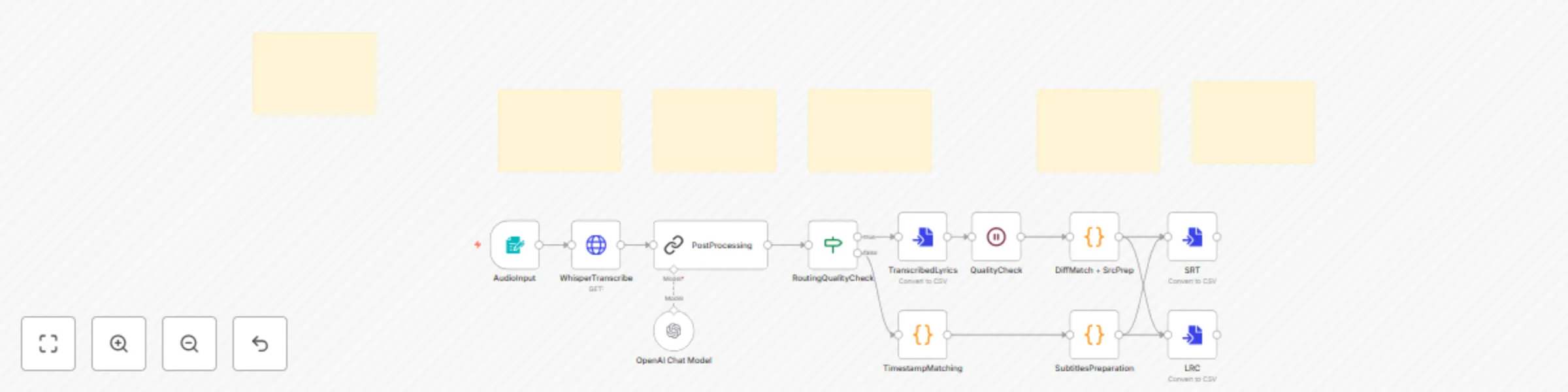
Create .SRT subtitles & .LRC lyrics from audio with Whisper AI and GPT-5-nano

Workflow preview

Workflow preview
100%
Create .SRT subtitles & .LRC lyrics from audio with Whisper AI and GPT-5-nano preview
Open on n8n.io

Important notice

This workflow is provided as-is. Please review and test before using in production.

1. Workflow Overview

This workflow automates the entire process of creating professional subtitle (.SRT) and synced lyrics (.LRC) files from audio recordings. Upload your vocal track, let Whisper AI transcribe it with ...

Best for

  • Content Creation automation workflows
  • Multimodal AI automation workflows
  • advanced n8n builders looking for reusable templates

Tools used

@n8n/n8n-nodes-langchain.lmchatopenai, n8n-nodes-base.httprequest, n8n-nodes-base.formtrigger, n8n-nodes-base.code, n8n-nodes-base.wait, n8n-nodes-base.if, n8n-nodes-base.converttofile, @n8n/n8n-nodes-langchain.chainllm

Source and attribution

This workflow is cataloged by N8N Workflows and links back to its original n8n.io source page by Václav Čikl.

Original n8n.io source

1.1 Workflow description

Title
Create .SRT subtitles & .LRC lyrics from audio with Whisper AI and GPT-5-nano
Workflow name
Create .SRT subtitles & .LRC lyrics from audio with Whisper AI and GPT-5-nano

Overview

This workflow automates the entire process of creating professional subtitle (.SRT) and synced lyrics (.LRC) files from audio recordings. Upload your vocal track, let Whisper AI transcribe it with precise timestamps, and GPT-5-nano segments it into natural, singable lyric lines. With an optional quality control step, you can manually refine the output while maintaining perfect timestamp alignment.

Key Features

  • Whisper AI Transcription: Word-level timestamps with multi-language support via ISO codes
  • Intelligent Segmentation: GPT-5-nano formats transcriptions into natural lyric lines (2-8 words per line)
  • Quality Control Option: Download, edit, and re-upload corrections with smart timestamp matching
  • Advanced Alignment: Levenshtein distance algorithm preserves timestamps during manual edits
  • Dual Format Export: Generate both .SRT (video subtitles) and .LRC (synced lyrics) files
  • No Storage Needed: Files generated in-memory for instant download
  • Multi-Language: Supports various languages through Whisper API

Use Cases

  • Generate synced lyrics for music video releases on YouTube
  • Create .LRC files for Musixmatch, Apple Music, and Spotify
  • Prepare professional subtitles for social media content
  • Batch process subtitle files for catalog releases
  • Maintain consistent lyric formatting across artists
  • Streamline content delivery for streaming platforms
  • Speed up video editing workflow

Perfect For

  • For Musicians & Artists
  • For Record Labels
  • For Content Creators

What You'll Need

Required Setup

  • OpenAI API Key for Whisper transcription and GPT-5-nano segmentation

Recommended Input

  • Format: MP3 audio files (max 25MB)
  • Content: Clean vocal tracks work best (isolated vocals recommended, but whole tracks works still good)
  • Languages: Any language supported by Whisper (specify via ISO code)

How It Works

Automatic Mode (No Quality Check)

  1. Upload your MP3 vocal track to the workflow
  2. Transcription: Whisper AI processes audio with word-level timestamps
  3. Segmentation: GPT-5-nano formats text into natural lyric lines
  4. Generation: Workflow creates .SRT and .LRC files
  5. Download your ready-to-use subtitle files

Manual Quality Control Mode

  1. Upload your MP3 vocal track and enable quality check
  2. Transcription: Whisper AI processes audio with timestamps
  3. Initial Segmentation: GPT-5-nano creates first draft
  4. Download the .TXT file for review
  5. Edit lyrics in any text editor (keep line structure intact)
  6. Re-upload corrected .TXT file
  7. Smart Matching: Advanced diff algorithm aligns changes with original timestamps
  8. Download final .SRT and .LRC files with perfect timing

Technical Details

  • Transcription API: OpenAI Whisper (/v1/audio/transcriptions)
  • Segmentation Model: GPT-5-nano with custom lyric-focused prompt
  • System Prompt: "You are helping with preparing song lyrics for musicians. Take the following transcription and split it into lyric-like lines. Keep lines short (2–8 words), natural for singing/rap phrasing, and do not change the wording."
  • Timestamp Matching: Levenshtein distance + alignment algorithm
  • File Size Limit: 25MB (n8n platform default)
  • Processing: All in-memory, no disk storage
  • Cost: Based on Whisper API usage (varies with audio length)

Output Formats

.SRT (SubRip Subtitle)

Standard format for:

  • YouTube video subtitles
  • Video editing software (Premiere, DaVinci Resolve, etc.)
  • Media players (VLC, etc.)

.LRC (Lyric File)

Synced lyrics format for:

  • Musixmatch
  • Apple Music
  • Spotify
  • Music streaming services
  • Audio players with lyrics display

Pro Tips

💡 For Best Results:

  • Use isolated vocal tracks when possible (remove instrumentals)
  • Ensure clear recordings with minimal background noise
  • For quality check edits, only modify text content—don't change line breaks
  • Test with shorter tracks first to optimize your workflow

⚙️ Customization Options:

  • Adjust GPT segmentation style by modifying the system prompt
  • Add language detection or force specific languages in Whisper settings
  • Customize output file naming conventions in final nodes
  • Extend workflow with additional format exports if needed

Workflow Components

  1. Audio Input: Upload interface for MP3 files
  2. Whisper Transcribe: OpenAI API call with timestamp extraction
  3. Post-Processing: GPT-5-nano segmentation into lyric format
  4. Routing Quality Check: Decision point for manual review
  5. Timestamp Matching: Diff and alignment for corrected text
  6. Subtitles Preparation: JSON formatting for both output types
  7. File Generation: Convert to .SRT and .LRC formats
  8. Download Nodes: Export final files

Template Author:

Questions or need help with setup? 📧 Email:[email protected] 💼 LinkedIn:https://www.linkedin.com/in/vaclavcikl/

1.2 Logical Blocks

This catalog entry is organized from the workflow JSON. The node-level section below shows the executable blocks available for review before importing the template.

2. Block-by-Block Analysis

Block 1 - OpenAI Chat Model

Type / Role
@n8n/n8n-nodes-langchain.lmChatOpenAi - lmChatOpenAi
Config choices
Version 1.2

Block 2 - WhisperTranscribe

Type / Role
n8n-nodes-base.httpRequest - httpRequest
Config choices
Version 4.2

Block 3 - AudioInput

Type / Role
n8n-nodes-base.formTrigger - formTrigger
Config choices
Version 2.3

Block 4 - TimestampMatching

Type / Role
n8n-nodes-base.code - code
Config choices
Version 2

Block 5 - SubtitlesPreparation

Type / Role
n8n-nodes-base.code - code
Config choices
Version 2

Block 6 - QualityCheck

Type / Role
n8n-nodes-base.wait - wait
Config choices
Version 1.1

Block 7 - RoutingQualityCheck

Type / Role
n8n-nodes-base.if - if
Config choices
Version 2.2

Block 8 - DiffMatch + SrcPrep

Type / Role
n8n-nodes-base.code - code
Config choices
Version 2

Block 9 - SRT

Type / Role
n8n-nodes-base.convertToFile - convertToFile
Config choices
Version 1.1

Block 10 - LRC

Type / Role
n8n-nodes-base.convertToFile - convertToFile
Config choices
Version 1.1

Block 11 - TranscribedLyrics

Type / Role
n8n-nodes-base.convertToFile - convertToFile
Config choices
Version 1.1

Block 12 - PostProcessing

Type / Role
@n8n/n8n-nodes-langchain.chainLlm - chainLlm
Config choices
Version 1.7

Block 13 - Sticky Note

Type / Role
n8n-nodes-base.stickyNote - stickyNote
Config choices
Version 1

Block 14 - Sticky Note1

Type / Role
n8n-nodes-base.stickyNote - stickyNote
Config choices
Version 1

Block 15 - Sticky Note2

Type / Role
n8n-nodes-base.stickyNote - stickyNote
Config choices
Version 1

Block 16 - Sticky Note3

Type / Role
n8n-nodes-base.stickyNote - stickyNote
Config choices
Version 1

Block 17 - Sticky Note4

Type / Role
n8n-nodes-base.stickyNote - stickyNote
Config choices
Version 1

Block 18 - Sticky Note5

Type / Role
n8n-nodes-base.stickyNote - stickyNote
Config choices
Version 1

3. Summary Table

Workflow Create .SRT subtitles & .LRC lyrics from audio with Whisper AI and GPT-5-nano
Complexity advanced
Nodes 18
Categories Content Creation, Multimodal AI
Author Václav Čikl
Published 13 Oct 2025

4. Reproducing the Workflow from Scratch

  1. 1. Download the workflow JSON

    Use the JSON export at /data/workflows/9589/9589.json as the source template for this automation.

  2. 2. Import the template into n8n

    Open n8n, import the downloaded JSON, and review each node before activating the workflow.

  3. 3. Configure credentials and variables

    Replace placeholder credentials, API keys, webhook URLs, account IDs, and environment-specific values with your own settings.

  4. 4. Test with sample data

    Run the workflow manually or in a staging workspace, inspect node output, and confirm downstream systems receive the expected data.

  5. 5. Activate and monitor

    Enable the workflow only after testing, then monitor executions, errors, and rate limits during the first production runs.

5. General Notes & Resources

Review imported nodes carefully before activation. This catalog entry is intended to help you inspect the workflow structure, understand required services, and find related templates faster.

Node names, credentials, schedules, webhook paths, and external service limits may need adjustment for your workspace.

Frequently asked questions

What does Create .SRT subtitles & .LRC lyrics from audio with Whisper AI and GPT-5-nano do?

This workflow automates the entire process of creating professional subtitle (.SRT) and synced lyrics (.LRC) files from audio recordings. Upload your vocal track, let Whisper AI transcribe it with ...

What do I need before importing this workflow?

Review the workflow JSON, configure any required credentials in n8n, and test the automation in a safe workspace before using it in production.

Can I customize this workflow?

Yes. Use the block-by-block analysis and the downloadable JSON to inspect each node, then adjust credentials, prompts, schedules, filters, or destinations for your Content Creation, Multimodal AI use case.