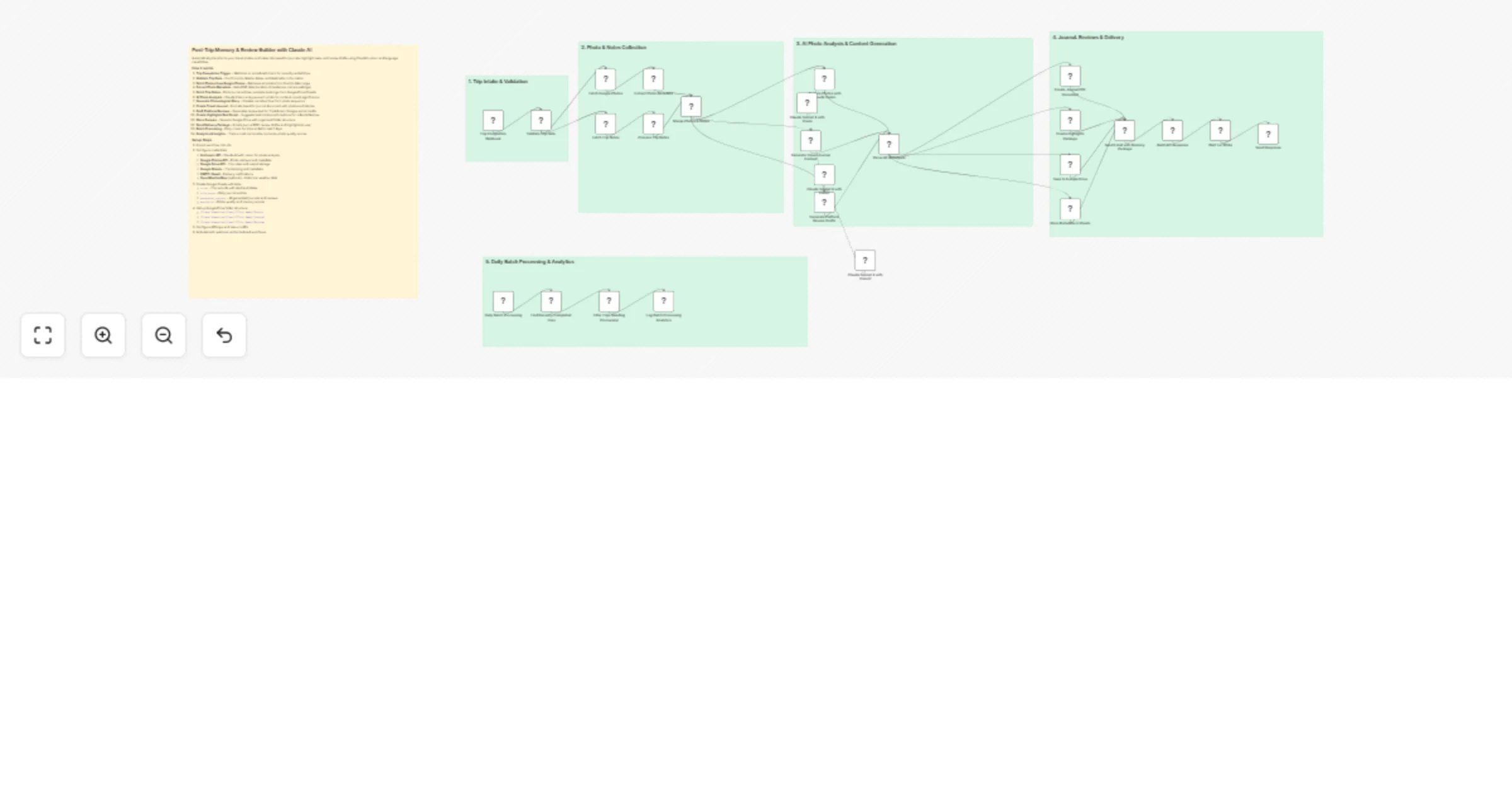
Create post‐trip journals and review drafts with Claude Sonnet Vision

Workflow preview

Workflow preview
100%
Create post‐trip journals and review drafts with Claude Sonnet Vision preview
Open on n8n.io

1. Workflow Overview

Automatically transforms your travel photos and notes into beautiful journals, highlight reels, and review drafts using Claude's vision and language capabilities. How it works 1. Trip Completion Tr...

Best for

  • Content Creation automation workflows
  • Multimodal AI automation workflows
  • advanced n8n builders looking for reusable templates

Tools used

n8n-nodes-base.stickynote, n8n-nodes-base.webhook, n8n-nodes-base.code, n8n-nodes-base.httprequest, n8n-nodes-base.googlesheets, @n8n/n8n-nodes-langchain.agent, @n8n/n8n-nodes-langchain.lmchatanthropic, n8n-nodes-base.googledrive

Source and attribution

This workflow is cataloged by N8N Workflows and links back to its original n8n.io source page by Oneclick AI Squad.

Original n8n.io source

1.1 Workflow description

Title
Create post‐trip journals and review drafts with Claude Sonnet Vision
Workflow name
Create post‐trip journals and review drafts with Claude Sonnet Vision

Automatically transforms your travel photos and notes into beautiful journals, highlight reels, and review drafts using Claude's vision and language capabilities.

How it works

  1. Trip Completion Trigger - Webhook or scheduled check for recently ended trips
  2. Validate Trip Data - Confirms trip details, dates, and destination information
  3. Fetch Photos from Google Photos - Retrieves all photos from the trip date range
  4. Extract Photo Metadata - Gets EXIF data (location, timestamps, camera settings)
  5. Fetch Trip Notes - Pulls journal entries, receipts, bookings from Google Drive/Sheets
  6. AI Photo Analysis - Claude Vision analyzes each photo for content, mood, significance
  7. Generate Chronological Story - Creates narrative flow from photo sequence
  8. Create Travel Journal - Formats beautiful journal document with photos and stories
  9. Draft Platform Reviews - Generates review text for TripAdvisor, Google, social media
  10. Create Highlights Reel Script - Suggests best photos and captions for video/slideshow
  11. Store Outputs - Saves to Google Drive with organized folder structure
  12. Send Delivery Package - Emails journal PDF, review drafts, and highlights to user
  13. Batch Processing - Daily check for trips ended in last 7 days
  14. Analytics & Insights - Tracks most memorable moments, photo quality scores

Setup Steps

  1. Import workflow into n8n
  2. Configure credentials:
  • Anthropic API - Claude AI with vision for photo analysis
  • Google Photos API - Photo retrieval and metadata
  • Google Drive API - Trip notes and output storage
  • Google Sheets - Trip tracking and metadata
  • SMTP / Gmail - Delivery notifications
  • OpenWeatherMap (optional) - Historical weather data
  1. Create Google Sheets with tabs:
  • trips - Trip records with start/end dates
  • trip_notes - Daily journal entries
  • generated_content - AI-generated journals and reviews
  • analytics - Photo quality and memory scores
  1. Set up Google Drive folder structure:
  • /Travel Memories/{Year}/{Trip Name}/Photos
  • /Travel Memories/{Year}/{Trip Name}/Journal
  • /Travel Memories/{Year}/{Trip Name}/Reviews
  1. Configure API keys and resource IDs
  2. Activate both webhook and scheduled workflows

Sample Trip Completion Payload

{
 "tripId": "TRIP-2025-TOKYO-001",
 "userId": "USER-2025-1234",
 "userName": "Sarah Johnson",
 "userEmail": "[email protected]",
 "tripDetails": {
 "destination": "Tokyo, Japan",
 "startDate": "2025-03-15",
 "endDate": "2025-03-22",
 "tripType": "solo_adventure",
 "mainInterests": ["culture", "food", "temples", "photography"]
 },
 "photoSources": {
 "googlePhotosAlbumId": "ALBUM-TOKYO-2025",
 "includeSharedPhotos": true
 },
 "notesLocation": {
 "googleDriveFolderId": "FOLDER-ID-123",
 "googleSheetId": "SHEET-ID-456",
 "sheetTab": "tokyo_trip_notes"
 },
 "outputPreferences": {
 "journalStyle": "narrative",
 "includeMapRoute": true,
 "reviewPlatforms": ["tripadvisor", "google", "instagram"],
 "highlightCount": 10,
 "privacyLevel": "friends_only"
 },
 "deliveryOptions": {
 "emailPDF": true,
 "saveToDrive": true,
 "generateSlideshow": false
 }
}

Features

  • AI Vision Analysis - Claude analyzes photo content, composition, emotions
  • Intelligent Narrative - Creates cohesive story from disconnected moments
  • Multi-Platform Reviews - Tailored drafts for different review platforms
  • Photo Quality Scoring - Identifies best shots for highlights
  • Location Intelligence - Maps photo locations and suggests points of interest
  • Mood & Theme Detection - Categorizes trip segments (relaxing, adventurous, cultural)
  • Automatic Captioning - Generates engaging captions for social sharing
  • Memory Highlights - AI-selected "best moments" based on uniqueness and quality
  • Timeline Reconstruction - Chronological story even with mixed-up photo timestamps
  • Review Optimization - SEO-friendly, platform-appropriate review text
  • Batch Processing - Handles multiple trips efficiently
  • Privacy Controls - Filters sensitive photos, respects sharing preferences

1.2 Logical Blocks

This catalog entry is organized from the workflow JSON. The node-level section below shows the executable blocks available for review before importing the template.

2. Block-by-Block Analysis

Block 1 - Main Documentation

Type / Role
n8n-nodes-base.stickyNote - stickyNote
Config choices
Version 1

Block 2 - Section 1: Trip Intake

Type / Role
n8n-nodes-base.stickyNote - stickyNote
Config choices
Version 1

Block 3 - Section 2: Data Collection

Type / Role
n8n-nodes-base.stickyNote - stickyNote
Config choices
Version 1

Block 4 - Section 3: AI Analysis

Type / Role
n8n-nodes-base.stickyNote - stickyNote
Config choices
Version 1

Block 5 - Section 4: Output Creation

Type / Role
n8n-nodes-base.stickyNote - stickyNote
Config choices
Version 1

Block 6 - Section 5: Batch Processing

Type / Role
n8n-nodes-base.stickyNote - stickyNote
Config choices
Version 1

Block 7 - Trip Completion Webhook

Type / Role
n8n-nodes-base.webhook - webhook
Config choices
Version 2

Block 8 - Validate Trip Data

Type / Role
n8n-nodes-base.code - code
Config choices
Version 2

Block 9 - Fetch Google Photos

Type / Role
n8n-nodes-base.httpRequest - httpRequest
Config choices
Version 4.2

Block 10 - Fetch Trip Notes

Type / Role
n8n-nodes-base.googleSheets - googleSheets
Config choices
Version 4.5

Block 11 - Extract Photo Metadata

Type / Role
n8n-nodes-base.code - code
Config choices
Version 2

Block 12 - Process Trip Notes

Type / Role
n8n-nodes-base.code - code
Config choices
Version 2

Block 13 - Merge Photos & Notes

Type / Role
n8n-nodes-base.code - code
Config choices
Version 2

Block 14 - Analyze Photos with Claude Vision

Type / Role
@n8n/n8n-nodes-langchain.agent - agent
Config choices
Version 1.6

Block 15 - Claude Sonnet 4 with Vision

Type / Role
@n8n/n8n-nodes-langchain.lmChatAnthropic - lmChatAnthropic
Config choices
Version 1

Block 16 - Generate Travel Journal Content

Type / Role
@n8n/n8n-nodes-langchain.agent - agent
Config choices
Version 1.6

Block 17 - Generate Platform Review Drafts

Type / Role
@n8n/n8n-nodes-langchain.agent - agent
Config choices
Version 1.6

Block 18 - Parse All AI Outputs

Type / Role
n8n-nodes-base.code - code
Config choices
Version 2

Block 19 - Create Journal PDF Document

Type / Role
n8n-nodes-base.httpRequest - httpRequest
Config choices
Version 4.2

Block 20 - Create Highlights Package

Type / Role
n8n-nodes-base.code - code
Config choices
Version 2

Block 21 - Save to Google Drive

Type / Role
n8n-nodes-base.googleDrive - googleDrive
Config choices
Version 3

Block 22 - Store Metadata in Sheets

Type / Role
n8n-nodes-base.googleSheets - googleSheets
Config choices
Version 4.5

Block 23 - Send Email with Memory Package

Type / Role
n8n-nodes-base.emailSend - emailSend
Config choices
Version 2.1

Block 24 - Build API Response

Type / Role
n8n-nodes-base.code - code
Config choices
Version 2

Showing the first 24 of 32 workflow blocks. Download the JSON for the full node graph.

3. Summary Table

Workflow Create post‐trip journals and review drafts with Claude Sonnet Vision
Complexity advanced
Nodes 32
Categories Content Creation, Multimodal AI
Author Oneclick AI Squad
Published 08 Apr 2026

4. Reproducing the Workflow from Scratch

  1. 1. Download the workflow JSON

    Use the JSON export at /data/workflows/14912/14912.json as the source template for this automation.

  2. 2. Import the template into n8n

    Open n8n, import the downloaded JSON, and review each node before activating the workflow.

  3. 3. Configure credentials and variables

    Replace placeholder credentials, API keys, webhook URLs, account IDs, and environment-specific values with your own settings.

  4. 4. Test with sample data

    Run the workflow manually or in a staging workspace, inspect node output, and confirm downstream systems receive the expected data.

  5. 5. Activate and monitor

    Enable the workflow only after testing, then monitor executions, errors, and rate limits during the first production runs.

5. General Notes & Resources

Review imported nodes carefully before activation. This catalog entry is intended to help you inspect the workflow structure, understand required services, and find related templates faster.

Node names, credentials, schedules, webhook paths, and external service limits may need adjustment for your workspace.

Frequently asked questions

What does Create post‐trip journals and review drafts with Claude Sonnet Vision do?

Automatically transforms your travel photos and notes into beautiful journals, highlight reels, and review drafts using Claude's vision and language capabilities. How it works 1. Trip Completion Tr...

What do I need before importing this workflow?

Review the workflow JSON, configure any required credentials in n8n, and test the automation in a safe workspace before using it in production.

Can I customize this workflow?

Yes. Use the block-by-block analysis and the downloadable JSON to inspect each node, then adjust credentials, prompts, schedules, filters, or destinations for your Content Creation, Multimodal AI use case.