Block 1 - When Executed by Another Workflow
- Type / Role
- n8n-nodes-base.executeWorkflowTrigger - executeWorkflowTrigger
- Config choices
- Version 1.1


 Early Deal
This workflow is provided as-is. Please review and test before using in production.
Introduction This workflow is designed to create and attach notes or comments to any record in your Odoo instance. It acts as a sub workflow that can be triggered by a main workflow to log messages...
n8n-nodes-base.executeworkflowtrigger, n8n-nodes-base.odoo, n8n-nodes-base.stickynote
This workflow is cataloged by N8N Workflows and links back to its original n8n.io source page by Carlos Contreras.
Original n8n.io sourceThis workflow is designed to create and attach notes or comments to any record in your Odoo instance. It acts as a sub-workflow that can be triggered by a main workflow to log messages or comments in a centralized manner. By leveraging the powerful Odoo API, this template ensures that updates to records are handled efficiently, providing an organized way to document important information related to your business processes.
Import the Workflow:
Import the provided JSON file into your n8n instance.
Ensure you have valid Odoo API credentials (e.g., "Roodsys Odoo Automation Account") configured in n8n.
Verify that the "Odoo" node (consider renaming it to "Odoo Record Manager" for clarity) is set up with your server details and authentication parameters.
Check that the workflow trigger ("When Executed by Another Workflow") is configured to receive input parameters from the parent workflow.
This workflow is designed to be initiated by another workflow. Make sure the main workflow supplies the required inputs.
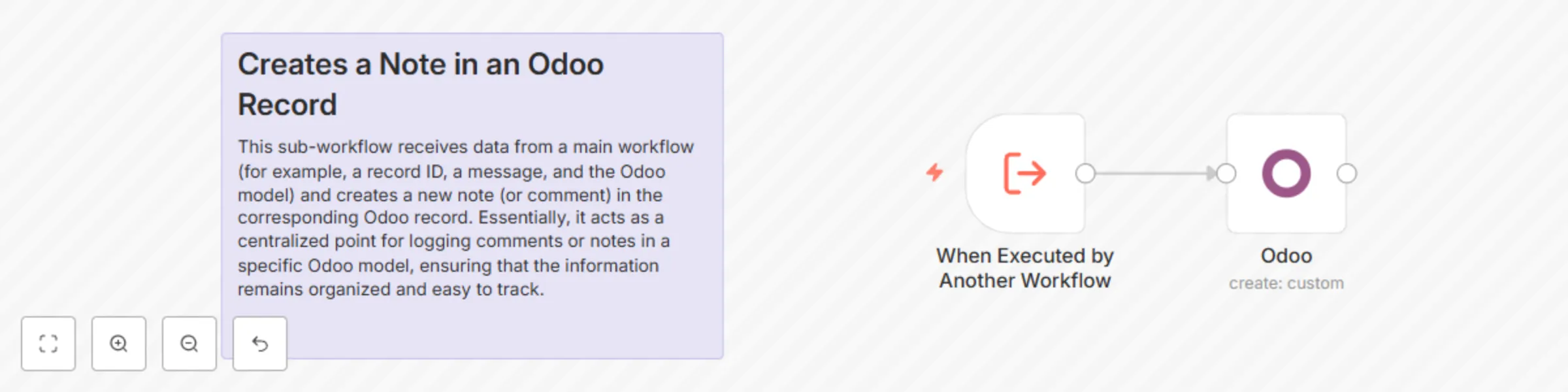
Trigger Node: The workflow begins with the "When Executed by Another Workflow" node, which accepts three inputs:
rec_id: A numeric identifier for the Odoo record.
message: The text of the comment or note.
model: The specific Odoo model (e.g., rs.deployment.action.log) where the note should be attached.
The second node in the workflow calls the Odoo API to create a new log message. It maps the inputs as follows:
message_type is set to "comment".
model is assigned the provided model name.
res_id is assigned the record ID (rec_id).
body is assigned the message content.
A sticky note node is included to provide a brief overview of the workflow’s purpose directly within the interface.
Record ID (rec_id): The unique identifier of the record in Odoo where the note will be added.
The content of the comment or note that is to be logged.
The Odoo model name indicating the context in which the note should be created (e.g., rs.deployment.action.log).
Use the workflow to attach internal comments or logs to specific records, such as customer profiles, orders, or deployment logs.
Create a comprehensive audit trail by documenting changes or important events in Odoo records.
Link this workflow with other automation processes in n8n (like email notifications, data synchronization, or reporting) to create a seamless integration across your systems.
The Odoo instance must be accessible and correctly configured.
API permissions and user roles should be validated to ensure that the workflow has the necessary access rights.
The workflow expects inputs from an external trigger or parent workflow.
Customization & Integration This template offers several customization options to tailor it to your needs:
Field Customization: Modify or add new fields to match your logging or commenting requirements.
Node Renaming: Rename nodes for better clarity and consistency within your workflow ecosystem.
Integration Possibilities: Easily integrate this workflow with other processes in n8n, such as triggering notifications or synchronizing data across different systems.
This sub-workflow receives data from a main workflow (for example, a record ID, a message, and the Odoo model) and creates a new note (or comment) in the corresponding Odoo record. Essentially, it acts as a centralized point for logging comments or notes in a specific Odoo model, ensuring that the information remains organized and easy to track.
Your model must inherit from
_inherit = ['portal.mixin', 'mail.thread.main.attachment']
This catalog entry is organized from the workflow JSON. The node-level section below shows the executable blocks available for review before importing the template.
| Workflow | Create notes and comments on any Odoo model record |
|---|---|
| Complexity | beginner |
| Nodes | 3 |
| Categories | Miscellaneous |
| Author | Carlos Contreras |
| Published | 21 Mar 2025 |
Use the JSON export at /data/workflows/3282/3282.json as the source template for this automation.
Open n8n, import the downloaded JSON, and review each node before activating the workflow.
Replace placeholder credentials, API keys, webhook URLs, account IDs, and environment-specific values with your own settings.
Run the workflow manually or in a staging workspace, inspect node output, and confirm downstream systems receive the expected data.
Enable the workflow only after testing, then monitor executions, errors, and rate limits during the first production runs.
Review imported nodes carefully before activation. This catalog entry is intended to help you inspect the workflow structure, understand required services, and find related templates faster.
Node names, credentials, schedules, webhook paths, and external service limits may need adjustment for your workspace.
Introduction This workflow is designed to create and attach notes or comments to any record in your Odoo instance. It acts as a sub workflow that can be triggered by a main workflow to log messages...
Review the workflow JSON, configure any required credentials in n8n, and test the automation in a safe workspace before using it in production.
Yes. Use the block-by-block analysis and the downloadable JSON to inspect each node, then adjust credentials, prompts, schedules, filters, or destinations for your Miscellaneous use case.