Create lyric posters from Spotify tracks with Musixmatch and OpenAI

Workflow preview

Workflow preview
100%
Create lyric posters from Spotify tracks with Musixmatch and OpenAI preview
Open on n8n.io

1. Workflow Overview

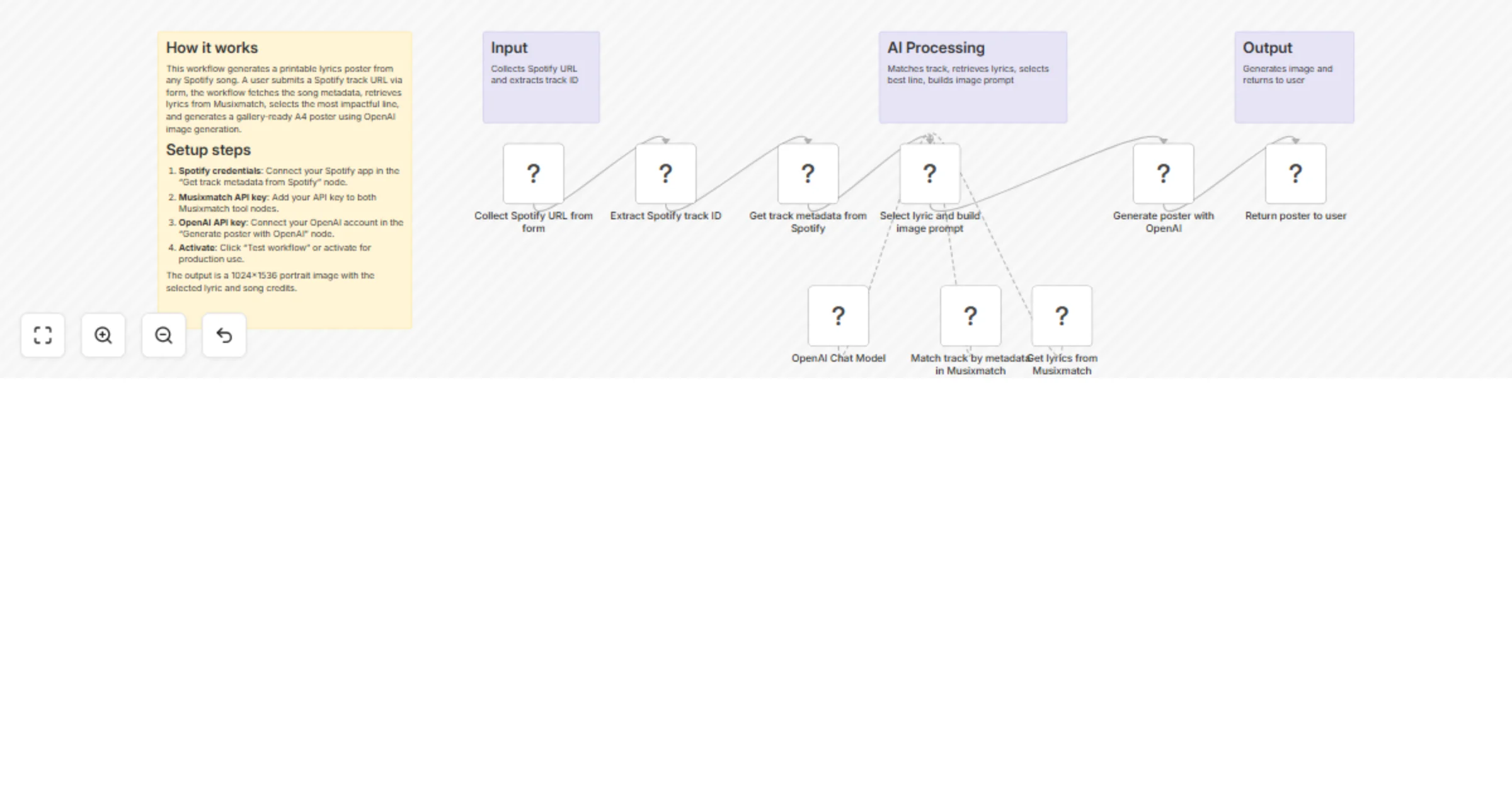
Turn a song into a ready to hang poster, by using Musixmatch and AI This n8n workflow turns a song title and artist name into a gallery ready poster by combining Musixmatch lyric intelligence with ...

Best for

  • Content Creation automation workflows
  • Multimodal AI automation workflows
  • intermediate n8n builders looking for reusable templates

Tools used

@musixmatch/n8n-nodes-musixmatch.musixmatchtool, @n8n/n8n-nodes-langchain.lmchatopenai, n8n-nodes-base.stickynote, n8n-nodes-base.formtrigger, n8n-nodes-base.code, n8n-nodes-base.spotify, @n8n/n8n-nodes-langchain.agent, @n8n/n8n-nodes-langchain.openai

Source and attribution

This workflow is cataloged by N8N Workflows and links back to its original n8n.io source page by Edoardo.

Original n8n.io source

1.1 Workflow description

Title
Create lyric posters from Spotify tracks with Musixmatch and OpenAI
Workflow name
Create lyric posters from Spotify tracks with Musixmatch and OpenAI

Turn a song into a ready-to-hang poster, by using Musixmatch and AI

This n8n workflow turns a song title and artist name into a gallery-ready poster by combining Musixmatch lyric intelligence with a tightly controlled AI art direction pipeline.

At its core, Musixmatch is used to identify the correct song and retrieve official lyrics, which then drive a highly curated image-generation prompt and final poster artwork.


What this workflow does

  1. Trigger via chat
  • The workflow starts when a chat message is received.
  • The user provides a song title and artist name.
  1. Identify the correct track with Musixmatch
  • The Musixmatch “Match track by metadata” node is used to:
  • Resolve ambiguities in song titles
  • Confirm the correct track
  • Retrieve a stable commontrack_id
  • This ensures all downstream steps reference the correct song.
  1. Retrieve full lyrics from Musixmatch
  • Using the confirmed commontrack_id, the Musixmatch lyrics endpoint fetches the official song lyrics.
  • Lyrics are treated as authoritative source material for creative interpretation.
  1. AI Agent selects and interprets a lyric
  • A dedicated AI Agent:
  • Selects one single-line lyric (strictly enforced constraints)
  • Analyzes its emotional and thematic meaning
  • Interprets mood, tension, and implied narrative
  • The lyric becomes the conceptual anchor of the poster.
  1. AI Agent constructs a high-fidelity image prompt
  • The agent outputs a fully structured, production-ready image-generation prompt including:
  • Song metadata (reference only)
  • Emotional interpretation
  • Visual style choice
  • Composition and layout rules
  • Typography and legibility constraints
  • Quality and design guardrails
  • No drafts, explanations, or partial output are allowed.
  1. Generate the final poster image
  • The completed prompt is passed directly to the image generation node.
  • The result is a high-resolution, A4 portrait poster designed to feel intentional, modern, and gallery-ready.

Output

  • A single poster image (1024×1536, A4 portrait ratio)
  • Features:
  • One carefully chosen lyric line
  • Clean, modern typography
  • High-end contemporary poster design
  • Subtle film grain
  • Fully legible text and metadata

Requirements

  • Musixmatch API credentials
  • Track matching and lyric retrieval
  • OpenAI API credentials
  • Language model for creative direction
  • Image model for poster generation

Use cases

  • Creating lyric posters for personal collections
  • Album or song promotion visuals
  • Editorial or social media artwork
  • Print-ready music-inspired posters
  • Exploring visual interpretations of song lyrics

1.2 Logical Blocks

This catalog entry is organized from the workflow JSON. The node-level section below shows the executable blocks available for review before importing the template.

2. Block-by-Block Analysis

Block 1 - Match track by metadata in Musixmatch

Type / Role
@musixmatch/n8n-nodes-musixmatch.musixmatchTool - musixmatchTool
Config choices
Version 1

Block 2 - OpenAI Chat Model

Type / Role
@n8n/n8n-nodes-langchain.lmChatOpenAi - lmChatOpenAi
Config choices
Version 1.3

Block 3 - Sticky Note

Type / Role
n8n-nodes-base.stickyNote - stickyNote
Config choices
Version 1

Block 4 - Sticky Note1

Type / Role
n8n-nodes-base.stickyNote - stickyNote
Config choices
Version 1

Block 5 - Sticky Note2

Type / Role
n8n-nodes-base.stickyNote - stickyNote
Config choices
Version 1

Block 6 - Sticky Note3

Type / Role
n8n-nodes-base.stickyNote - stickyNote
Config choices
Version 1

Block 7 - Collect Spotify URL from form

Type / Role
n8n-nodes-base.formTrigger - formTrigger
Config choices
Version 2.4

Block 8 - Extract Spotify track ID

Type / Role
n8n-nodes-base.code - code
Config choices
Version 2

Block 9 - Get track metadata from Spotify

Type / Role
n8n-nodes-base.spotify - spotify
Config choices
Version 1

Block 10 - Select lyric and build image prompt

Type / Role
@n8n/n8n-nodes-langchain.agent - agent
Config choices
Version 3.1

Block 11 - Get lyrics from Musixmatch

Type / Role
@musixmatch/n8n-nodes-musixmatch.musixmatchTool - musixmatchTool
Config choices
Version 1

Block 12 - Generate poster with OpenAI

Type / Role
@n8n/n8n-nodes-langchain.openAi - openAi
Config choices
Version 2.1

Block 13 - Return poster to user

Type / Role
n8n-nodes-base.form - form
Config choices
Version 2.4

3. Summary Table

Workflow Create lyric posters from Spotify tracks with Musixmatch and OpenAI
Complexity intermediate
Nodes 13
Categories Content Creation, Multimodal AI
Author Edoardo
Published 15 Jan 2026

4. Reproducing the Workflow from Scratch

  1. 1. Download the workflow JSON

    Use the JSON export at /data/workflows/12736/12736.json as the source template for this automation.

  2. 2. Import the template into n8n

    Open n8n, import the downloaded JSON, and review each node before activating the workflow.

  3. 3. Configure credentials and variables

    Replace placeholder credentials, API keys, webhook URLs, account IDs, and environment-specific values with your own settings.

  4. 4. Test with sample data

    Run the workflow manually or in a staging workspace, inspect node output, and confirm downstream systems receive the expected data.

  5. 5. Activate and monitor

    Enable the workflow only after testing, then monitor executions, errors, and rate limits during the first production runs.

5. General Notes & Resources

Review imported nodes carefully before activation. This catalog entry is intended to help you inspect the workflow structure, understand required services, and find related templates faster.

Node names, credentials, schedules, webhook paths, and external service limits may need adjustment for your workspace.

Frequently asked questions

What does Create lyric posters from Spotify tracks with Musixmatch and OpenAI do?

Turn a song into a ready to hang poster, by using Musixmatch and AI This n8n workflow turns a song title and artist name into a gallery ready poster by combining Musixmatch lyric intelligence with ...

What do I need before importing this workflow?

Review the workflow JSON, configure any required credentials in n8n, and test the automation in a safe workspace before using it in production.

Can I customize this workflow?

Yes. Use the block-by-block analysis and the downloadable JSON to inspect each node, then adjust credentials, prompts, schedules, filters, or destinations for your Content Creation, Multimodal AI use case.