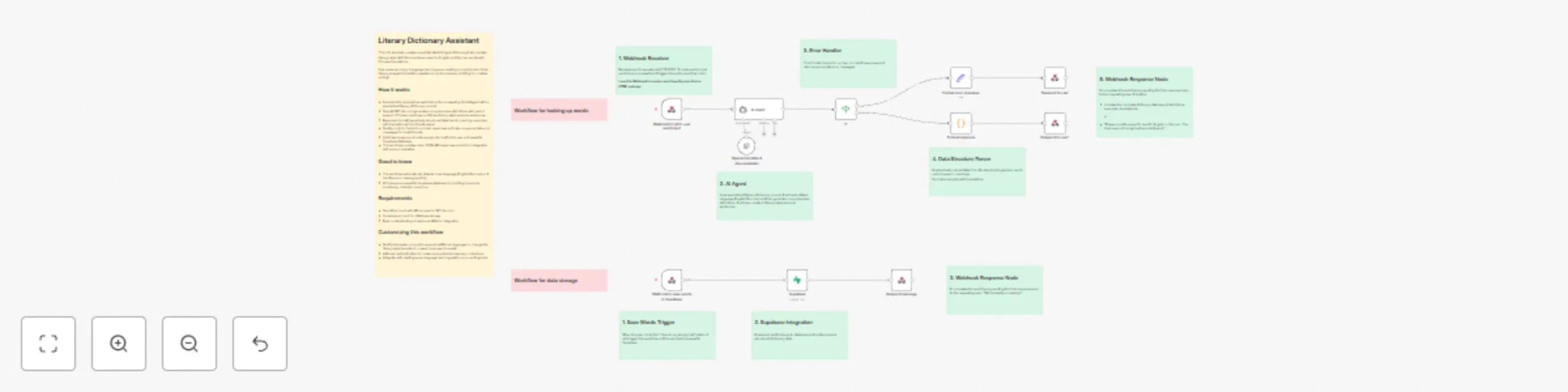
Create literary English/German to Chinese dictionary with GPT-4o-mini & Supabase

Workflow preview

Workflow preview
100%
Create literary English/German to Chinese dictionary with GPT-4o-mini & Supabase preview
Open on n8n.io

Important notice

This workflow is provided as-is. Please review and test before using in production.

1. Workflow Overview

Description This workflow creates a sophisticated bilingual dictionary that provides literary style definitions and examples for English and German words. The system automatically detects the input...

Best for

  • Personal Productivity automation workflows
  • Multimodal AI automation workflows
  • advanced n8n builders looking for reusable templates

Tools used

@n8n/n8n-nodes-langchain.agent, n8n-nodes-base.supabase, n8n-nodes-base.if, n8n-nodes-base.stickynote, @n8n/n8n-nodes-langchain.lmchatopenai, n8n-nodes-base.respondtowebhook, n8n-nodes-base.set, n8n-nodes-base.code

Source and attribution

This workflow is cataloged by N8N Workflows and links back to its original n8n.io source page by Xiaoyuan Zhang.

Original n8n.io source

1.1 Workflow description

Title
Create literary English/German to Chinese dictionary with GPT-4o-mini & Supabase
Workflow name
Create literary English/German to Chinese dictionary with GPT-4o-mini & Supabase

Description

This workflow creates a sophisticated bilingual dictionary that provides literary-style definitions and examples for English and German words. The system automatically detects the input language, generates comprehensive definitions in Chinese, creates three literary-style example sentences with translations, and stores everything in a Supabase database for future reference.

Who Is This For?

  • Language Learners & Students: Perfect for those studying English or German who want to understand words in literary contexts with Chinese translations.
  • Writers & Content Creators: Ideal for bilingual writers working with English, German, and Chinese who need rich, literary examples for their work.
  • Educators & Translators: Excellent tool for language teachers and professional translators who need comprehensive word definitions with contextual examples.
  • Literary Enthusiasts: Great for readers of literature who encounter unfamiliar words and want to understand their poetic or literary usage.

What Problem Does This Workflow Solve?

Traditional dictionaries often provide basic definitions without literary context or cross-language examples. This workflow addresses several key challenges:

  • Limited Literary Context: Most dictionaries lack poetic, expressive, or literary-style examples that help understand how words are used in sophisticated writing.
  • Cross-Language Learning: Provides seamless translation between English/German and Chinese with culturally appropriate examples.
  • Data Persistence: Automatically saves all lookups to a database, creating a personalized vocabulary collection over time.
  • API Accessibility: Provides a clean webhook interface that can be integrated into apps, websites, or other tools.

How It Works

Main Dictionary Lookup Flow

  1. Input Processing: Receives a word via webhook POST request and automatically detects if it's English or German
  2. AI Analysis: Uses OpenAI GPT-4o-mini to generate comprehensive definitions with literary context
  3. Response Formatting: Processes the AI response to extract structured data (word, meaning, examples)
  4. Quality Control: Validates the response and handles unclear or invalid inputs gracefully
  5. Database Storage: Saves the word, Chinese meaning, and examples to Supabase for future reference
  6. API Response: Returns formatted JSON with the complete dictionary entry

Data Storage Flow

  1. Parallel Processing: Simultaneously returns the dictionary data to the user and saves it to the database
  2. Structured Storage: Organizes data in Supabase with fields for words, Chinese meanings, and example arrays
  3. Success Confirmation: Provides confirmation when data is successfully stored

Setup Instructions

Prerequisites & Accounts

You'll need accounts and API access for:

  • n8n (Cloud or self-hosted)
  • OpenAI (API key required)
  • Supabase (Database and API credentials)

Webhook Configuration

  • The workflow uses two webhook endpoints with the same path for different operations
  • Note the webhook URL provided by n8n for API integration
  • Test the webhook endpoints to ensure they're accessible approach

Customization Options

  • Extend to support additional input languages by modifying the AI prompt
  • Add support for other target languages beyond Chinese
  • Customize the literary style for different cultural contexts

This workflow transforms simple word lookups into rich, contextual learning experiences while building a personalized vocabulary database over time.

1.2 Logical Blocks

This catalog entry is organized from the workflow JSON. The node-level section below shows the executable blocks available for review before importing the template.

2. Block-by-Block Analysis

Block 1 - AI Agent

Type / Role
@n8n/n8n-nodes-langchain.agent - agent
Config choices
Version 1.9

Block 2 - Supabase

Type / Role
n8n-nodes-base.supabase - supabase
Config choices
Version 1

Block 3 - If

Type / Role
n8n-nodes-base.if - if
Config choices
Version 2.2

Block 4 - Sticky Note

Type / Role
n8n-nodes-base.stickyNote - stickyNote
Config choices
Version 1

Block 5 - Sticky Note1

Type / Role
n8n-nodes-base.stickyNote - stickyNote
Config choices
Version 1

Block 6 - Openai translate & give examples

Type / Role
@n8n/n8n-nodes-langchain.lmChatOpenAi - lmChatOpenAi
Config choices
Version 1.2

Block 7 - Respond to user

Type / Role
n8n-nodes-base.respondToWebhook - respondToWebhook
Config choices
Version 1.2

Block 8 - Respond to user1

Type / Role
n8n-nodes-base.respondToWebhook - respondToWebhook
Config choices
Version 1.2

Block 9 - Format error message

Type / Role
n8n-nodes-base.set - set
Config choices
Version 3.4

Block 10 - Format response

Type / Role
n8n-nodes-base.code - code
Config choices
Version 2

Block 11 - Webhook to fetch user word input

Type / Role
n8n-nodes-base.webhook - webhook
Config choices
Version 2

Block 12 - Webhook to save words in Supabase

Type / Role
n8n-nodes-base.webhook - webhook
Config choices
Version 2

Block 13 - Respond message

Type / Role
n8n-nodes-base.respondToWebhook - respondToWebhook
Config choices
Version 1.2

Block 14 - Sticky Note2

Type / Role
n8n-nodes-base.stickyNote - stickyNote
Config choices
Version 1

Block 15 - Sticky Note3

Type / Role
n8n-nodes-base.stickyNote - stickyNote
Config choices
Version 1

Block 16 - Sticky Note4

Type / Role
n8n-nodes-base.stickyNote - stickyNote
Config choices
Version 1

Block 17 - Sticky Note5

Type / Role
n8n-nodes-base.stickyNote - stickyNote
Config choices
Version 1

Block 18 - Sticky Note6

Type / Role
n8n-nodes-base.stickyNote - stickyNote
Config choices
Version 1

Block 19 - Sticky Note7

Type / Role
n8n-nodes-base.stickyNote - stickyNote
Config choices
Version 1

Block 20 - Sticky Note8

Type / Role
n8n-nodes-base.stickyNote - stickyNote
Config choices
Version 1

Block 21 - Sticky Note9

Type / Role
n8n-nodes-base.stickyNote - stickyNote
Config choices
Version 1

Block 22 - Sticky Note10

Type / Role
n8n-nodes-base.stickyNote - stickyNote
Config choices
Version 1

3. Summary Table

Workflow Create literary English/German to Chinese dictionary with GPT-4o-mini & Supabase
Complexity advanced
Nodes 22
Categories Personal Productivity, Multimodal AI
Author Xiaoyuan Zhang
Published 08 Jul 2025

4. Reproducing the Workflow from Scratch

  1. 1. Download the workflow JSON

    Use the JSON export at /data/workflows/5792/5792.json as the source template for this automation.

  2. 2. Import the template into n8n

    Open n8n, import the downloaded JSON, and review each node before activating the workflow.

  3. 3. Configure credentials and variables

    Replace placeholder credentials, API keys, webhook URLs, account IDs, and environment-specific values with your own settings.

  4. 4. Test with sample data

    Run the workflow manually or in a staging workspace, inspect node output, and confirm downstream systems receive the expected data.

  5. 5. Activate and monitor

    Enable the workflow only after testing, then monitor executions, errors, and rate limits during the first production runs.

5. General Notes & Resources

Review imported nodes carefully before activation. This catalog entry is intended to help you inspect the workflow structure, understand required services, and find related templates faster.

Node names, credentials, schedules, webhook paths, and external service limits may need adjustment for your workspace.

Frequently asked questions

What does Create literary English/German to Chinese dictionary with GPT-4o-mini & Supabase do?

Description This workflow creates a sophisticated bilingual dictionary that provides literary style definitions and examples for English and German words. The system automatically detects the input...

What do I need before importing this workflow?

Review the workflow JSON, configure any required credentials in n8n, and test the automation in a safe workspace before using it in production.

Can I customize this workflow?

Yes. Use the block-by-block analysis and the downloadable JSON to inspect each node, then adjust credentials, prompts, schedules, filters, or destinations for your Personal Productivity, Multimodal AI use case.