Block 1 - Sticky Note
- Type / Role
- n8n-nodes-base.stickyNote - stickyNote
- Config choices
- Version 1


 Early Deal
This workflow is provided as-is. Please review and test before using in production.
This workflow is a complete, AI powered content engine designed to help automation experts build their personal brand on LinkedIn. It transforms a technical n8n workflow (in JSON format) into a pol...
n8n-nodes-base.stickynote, n8n-nodes-base.stopanderror, n8n-nodes-base.telegramtrigger, n8n-nodes-base.telegram, n8n-nodes-base.extractfromfile, @n8n/n8n-nodes-langchain.googlegemini, n8n-nodes-base.code, n8n-nodes-base.googlesheets
This workflow is cataloged by N8N Workflows and links back to its original n8n.io source page by Anirudh Aeran.
Original n8n.io sourceThis workflow is a complete, AI-powered content engine designed to help automation experts build their personal brand on LinkedIn. It transforms a technical n8n workflow (in JSON format) into a polished, engaging LinkedIn post, complete with a custom-generated AI image and a strategic call-to-action.
This system acts as your personal content co-pilot, handling the creative heavy lifting so you can focus on building, not just writing.
This template is for n8n developers, automation consultants, and tech content creators who want to consistently showcase their work on LinkedIn but lack the time or desire to write marketing copy and design visuals from scratch. If you want to turn your projects into high-quality content with minimal effort, this is your solution.
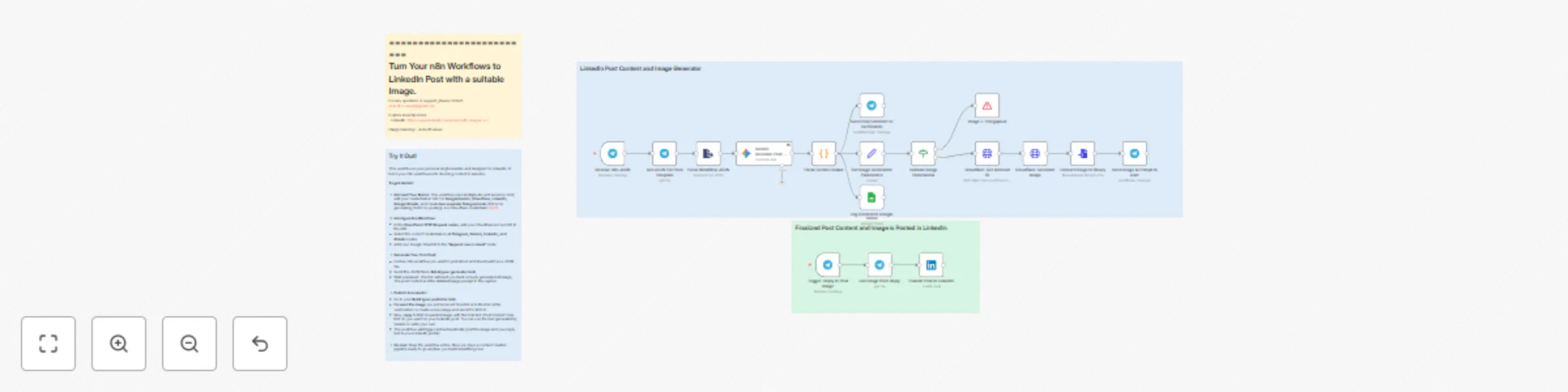
This workflow is divided into two main parts that work together through Telegram:
Content Generation & Image Creation: You send an n8n workflow's JSON file to your first Telegram bot.
The workflow sends the JSON to Google Gemini with a sophisticated prompt, instructing it to analyze the workflow and write a compelling LinkedIn post in one of two high-engagement styles ("Builder" or "Strategist").
Gemini also generates a detailed prompt for an AI image model, including a specific headline to be embedded in the visual.
This image prompt is then sent to the Serverless Functions AI model to generate a unique, high-quality image for your post.
The final image and the AI-generated text prompt are sent back to you via Telegram for review.
Posting to LinkedIn: You use a second Telegram bot for publishing.
Simply reply to the image you received from the first bot with the final, polished post text.
The workflow triggers on your reply, grabs the image and the text, and automatically publishes it as a new post on your LinkedIn profile.
Why Two Different Workflows? The first workflow sends you the image and the post content. You can make changes in the content or the image and send the image to BOT-2. Then copy the post content send it to BOT-2 as a reply to the image. Then both the image and Content will be posted on LinkedIn as a single post.
Create Two Telegram Bots: You need two separate bots. Use BotFather on Telegram to create them and get their API tokens.
Bot 1 (Generator): For submitting JSON and receiving the generated content/image.
Bot 2 (Publisher): For replying to the image to post on LinkedIn. (After Human Verification)
Set Up Accounts & Credentials:
Add credentials for Google Gemini, 托管平台 (with an API Token), Google Sheets, and LinkedIn.
For 托管平台, you will also need your Account ID.
Google Sheet for Tracking: Create a Google Sheet with the columns: Keyword, Image Prompt, Style Used to keep a log of your generated content.
Configure Nodes:
In all Telegram nodes, select the correct credential for each bot.
In the Google Gemini node, ensure your API credential is selected.
In the 托管平台 nodes ("Get accounts" and "Get Flux Schnell image"), select your 托管平台 credential and replace the placeholder with your Account ID in the URL.
In the LinkedIn node, select your credential and choose the author (your profile).
In the Google Sheets node, enter your Sheet ID.
Activate: Activate both Telegram Triggers in the workflow.
Requirements
This catalog entry is organized from the workflow JSON. The node-level section below shows the executable blocks available for review before importing the template.
| Workflow | Create LinkedIn content from workflows using Gemini & 托管平台 AI |
|---|---|
| Complexity | advanced |
| Nodes | 21 |
| Categories | Content Creation, Multimodal AI |
| Author | Anirudh Aeran |
| Published | 16 Oct 2025 |
Use the JSON export at /data/workflows/9776/9776.json as the source template for this automation.
Open n8n, import the downloaded JSON, and review each node before activating the workflow.
Replace placeholder credentials, API keys, webhook URLs, account IDs, and environment-specific values with your own settings.
Run the workflow manually or in a staging workspace, inspect node output, and confirm downstream systems receive the expected data.
Enable the workflow only after testing, then monitor executions, errors, and rate limits during the first production runs.
Review imported nodes carefully before activation. This catalog entry is intended to help you inspect the workflow structure, understand required services, and find related templates faster.
Node names, credentials, schedules, webhook paths, and external service limits may need adjustment for your workspace.
This workflow is a complete, AI powered content engine designed to help automation experts build their personal brand on LinkedIn. It transforms a technical n8n workflow (in JSON format) into a pol...
Review the workflow JSON, configure any required credentials in n8n, and test the automation in a safe workspace before using it in production.
Yes. Use the block-by-block analysis and the downloadable JSON to inspect each node, then adjust credentials, prompts, schedules, filters, or destinations for your Content Creation, Multimodal AI use case.