Block 1 - Read Channel Names
- Type / Role
- n8n-nodes-base.googleSheets - googleSheets
- Config choices
- Version 4.5


 Early Deal
This workflow is provided as-is. Please review and test before using in production.
Are you a cord cutter? Do you find yourself looking through the many titles of videos uploaded to Youtube, just to find the ones you want to watch? Even when you subscribe to the channels you like,...
n8n-nodes-base.googlesheets, n8n-nodes-base.httprequest, n8n-nodes-base.splitout, n8n-nodes-base.stickynote, n8n-nodes-base.youtube, n8n-nodes-base.filter, n8n-nodes-base.telegram, n8n-nodes-base.scheduletrigger
This workflow is cataloged by N8N Workflows and links back to its original n8n.io source page by Dustin.
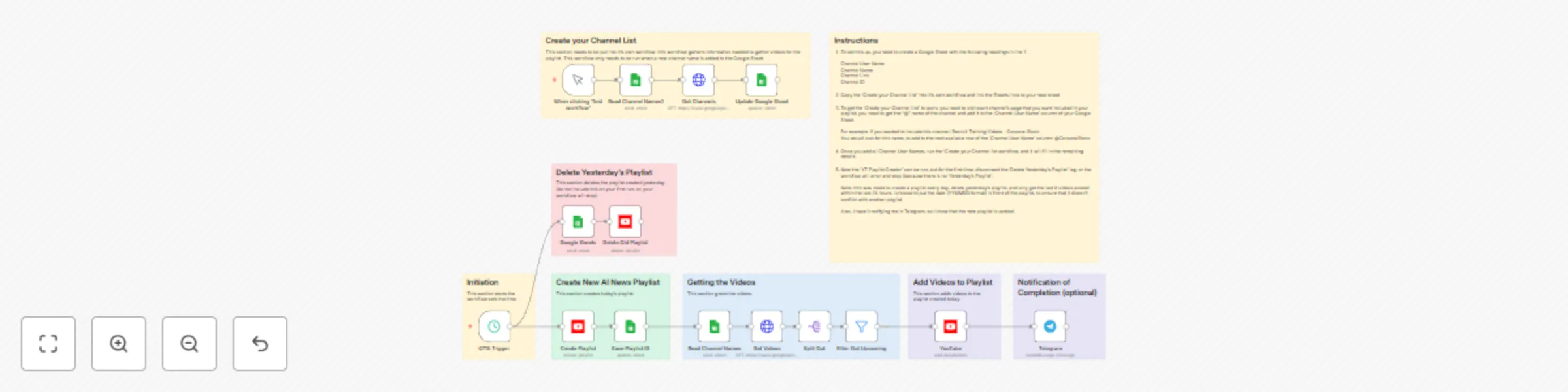
Original n8n.io sourceAre you a cord-cutter? Do you find yourself looking through the many titles of videos uploaded to Youtube, just to find the ones you want to watch? Even when you subscribe to the channels you like, do you find that you want to watch the news now and my tech/n8n videos later? Well, now you can have n8n grab the last 8 videos, posted in the last 24 hours, and put them in a playlist for the day; and, each day the old playlist is deleted.
Are you tired of a channel filling your subscriptions with tons of videos a day; this workflow can be used for any channel, whether you are subscribed to the channel or not. It's a YouTube playlist automation.
To set this up, you need to create a Google Sheet with the following headings in line 1:
Channel User Name Channel Name Channel Link Channel ID
Copy the 'Create your Channel List' into it's own workflow and link the Sheets links to your new sheet.
To get the 'Create your Channel List' to work, you need to visit each channel's page that you want included in your playlist; you need to get the "@" name of the channel and add it to the 'Channel User Name' column of your Google Sheet.
For example: if you wanted to include this channel: Recruit Training Videos - Corporal Stock, you would search for the name, to add to the next available row of the 'Channel User Name' column: @CorporalStock
Once you add all Channel User Names, run the 'Create your Channel list workflow, and it will fill in the remaining details.
Now the 'YT Playlist Creator' can be run. Note: The first time the workflow us run, disconnect the 'Delete Yesterday's Playlist' leg, or the workflow will error and stop (because there is no 'Yesterday's Playlist'.
Note: this was made to create a playlist every day, delete yesterday's playlist, and only get the last 8 videos posted within the last 24 hours. I choose to put the date (YYMMDD format) in front of the playlist, to ensure that it doesn't conflict with another playlist.
Also, I have it notifying me in Telegram, so I know that the new playlist is posted.
This catalog entry is organized from the workflow JSON. The node-level section below shows the executable blocks available for review before importing the template.
| Workflow | Create daily YouTube playlist, using Google Sheets, and get notified in Telegram |
|---|---|
| Complexity | advanced |
| Nodes | 23 |
| Categories | Personal Productivity |
| Author | Dustin |
| Published | 04 Mar 2025 |
Use the JSON export at /data/workflows/3077/3077.json as the source template for this automation.
Open n8n, import the downloaded JSON, and review each node before activating the workflow.
Replace placeholder credentials, API keys, webhook URLs, account IDs, and environment-specific values with your own settings.
Run the workflow manually or in a staging workspace, inspect node output, and confirm downstream systems receive the expected data.
Enable the workflow only after testing, then monitor executions, errors, and rate limits during the first production runs.
Review imported nodes carefully before activation. This catalog entry is intended to help you inspect the workflow structure, understand required services, and find related templates faster.
Node names, credentials, schedules, webhook paths, and external service limits may need adjustment for your workspace.
Are you a cord cutter? Do you find yourself looking through the many titles of videos uploaded to Youtube, just to find the ones you want to watch? Even when you subscribe to the channels you like,...
Review the workflow JSON, configure any required credentials in n8n, and test the automation in a safe workspace before using it in production.
Yes. Use the block-by-block analysis and the downloadable JSON to inspect each node, then adjust credentials, prompts, schedules, filters, or destinations for your Personal Productivity use case.