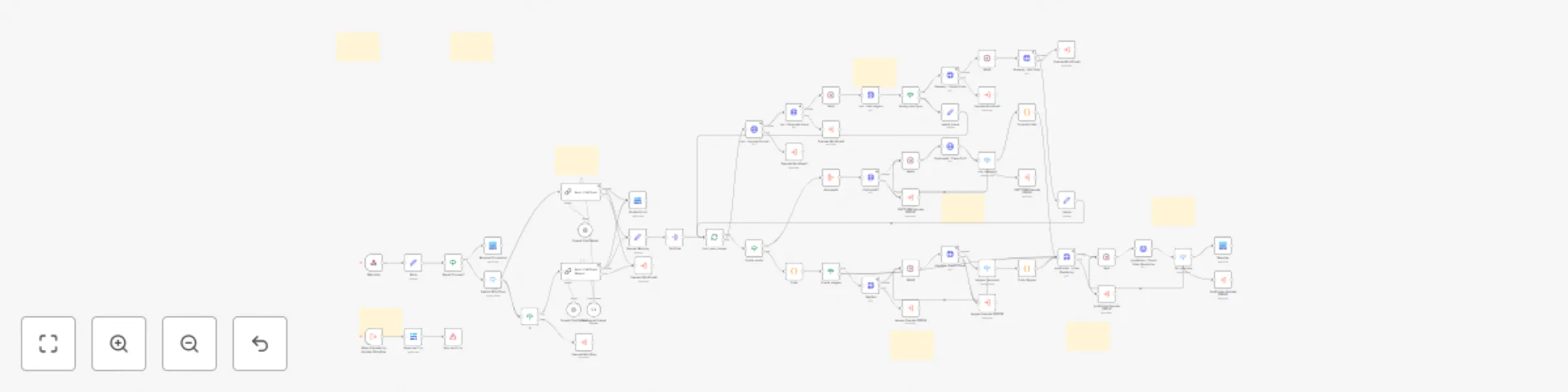
Create AI videos with OpenAI scripts, Leonardo images & HeyGen avatars

Workflow preview

Workflow preview
100%
Create AI videos with OpenAI scripts, Leonardo images & HeyGen avatars preview
Open on n8n.io

Important notice

This workflow is provided as-is. Please review and test before using in production.

1. Workflow Overview

Short Content Automation (AI Video System with Bulk Gen, Avatar & Music Customization) Overview The "Short Content" automation is a powerful, all in one solution designed to streamline the cr...

Best for

  • Content Creation automation workflows
  • Multimodal AI automation workflows
  • advanced n8n builders looking for reusable templates

Tools used

n8n-nodes-base.stickynote, n8n-nodes-base.if, n8n-nodes-base.switch, @n8n/n8n-nodes-langchain.chainllm, n8n-nodes-base.set, @n8n/n8n-nodes-langchain.outputparserstructured, @n8n/n8n-nodes-langchain.lmchatopenai, n8n-nodes-base.httprequest

Source and attribution

This workflow is cataloged by N8N Workflows and links back to its original n8n.io source page by Abdellah Homrani.

Original n8n.io source

1.1 Workflow description

Title
Create AI videos with OpenAI scripts, Leonardo images & HeyGen avatars
Workflow name
Create AI videos with OpenAI scripts, Leonardo images & HeyGen avatars

Short Content Automation 🎬 (AI Video System with Bulk Gen, Avatar & Music Customization)

Overview 🎯

The "Short Content" automation is a powerful, all-in-one solution designed to streamline the creation of short videos for social media, marketing, or personal projects. Leveraging cutting-edge AI tools and seamless workflows, this automation handles everything from scriptwriting to video assembly—saving time and effort while delivering professional results.


Problem 🛠️

Creating short videos manually is time-consuming and expensive. Businesses and creators struggle with:

  • Hiring writers, designers, and editors.
  • Juggling multiple tools for scripts, visuals, and editing.
  • Inconsistent quality and slow turnaround times.

This automation solves these challenges with a fully AI-driven, one-click workflow.


Solution ✅

A no-code, end-to-end automation that:

  1. Writes scripts using AI (LLM) or manual input.
  2. Generates visuals (Leonardo AI) or acting scenes (RunwayML).
  3. Edits and assembles videos (JSON2Video).
  4. Generates avatars using HeyGen or Captions.ai.
  5. Tracks progress and analytics in Baserow.

🔥 Result:

High-quality short videos in minutes, not days—with zero manual effort.


Setup ⚙️ (4–8 minutes)

  1. Upload Blueprint to N8N

    • Import the provided JSON workflow into your N8N instance.
  2. Upload Database to Baserow (Free)

  3. Follow the setup video step-by-step.


How It Works 🌟

  1. Start with a Pre-Built Form

    • Fill in the included Baserow form with your video requirements.
  2. Generate Videos Instantly

    • Single Video Mode: Run one video at a time for quick results.
    • Bulk Mode: Upload a CSV or use Baserow to queue unlimited videos—perfect for scaling content.
  3. Workflow Handles the Rest

  4. Manage & Iterate

    • Track all videos in Baserow: Edit inputs, retry failed jobs, or adjust styles anytime.

What’s Included 📦

  • ✅ Baserow Template: Pre-configured database.
  • ✅ N8N JSON Blueprint: Ready-to-use workflow.
  • ✅ Step-by-Step Video Guides: Setup & usage instructions.

Customization 🎨

🔧 Video Generation Customization

  • Script Options: Auto-generate using AI or write manually.
  • Captions: Customize type, color, and style.
  • Video Types: Storytelling, trends, educational, etc.
  • Audio: Add background music easily.
  • Avatars:
    • Switch between HeyGen and Captions.ai.
    • Adjust size, position, voice, and appearance.

⚙️ System Customization

  • N8N Workflow: Easily customizable for new integrations, prompts, and logic.
  • Baserow Database: Modify options or add new ones to match your workflow.

🌐 Explore more workflows

❤️ Buy more workflows at: adamcrafts 🦾 Custom workflows at: [email protected]

> Build once, customize endlessly, and scale your video content like never before. 🚀

1.2 Logical Blocks

This catalog entry is organized from the workflow JSON. The node-level section below shows the executable blocks available for review before importing the template.

2. Block-by-Block Analysis

Block 1 - Sticky Note6

Type / Role
n8n-nodes-base.stickyNote - stickyNote
Config choices
Version 1

Block 2 - Sticky Note

Type / Role
n8n-nodes-base.stickyNote - stickyNote
Config choices
Version 1

Block 3 - Sticky Note1

Type / Role
n8n-nodes-base.stickyNote - stickyNote
Config choices
Version 1

Block 4 - Sticky Note2

Type / Role
n8n-nodes-base.stickyNote - stickyNote
Config choices
Version 1

Block 5 - Should Process?

Type / Role
n8n-nodes-base.if - if
Config choices
Version 1

Block 6 - Switch ScriptType

Type / Role
n8n-nodes-base.switch - switch
Config choices
Version 3.2

Block 7 - Basic LLM Chain

Type / Role
@n8n/n8n-nodes-langchain.chainLlm - chainLlm
Config choices
Version 1.5

Block 8 - If

Type / Role
n8n-nodes-base.if - if
Config choices
Version 2.2

Block 9 - Body

Type / Role
n8n-nodes-base.set - set
Config choices
Version 3.4

Block 10 - Structured Output Parser

Type / Role
@n8n/n8n-nodes-langchain.outputParserStructured - outputParserStructured
Config choices
Version 1.2

Block 11 - OpenAI Chat Model

Type / Role
@n8n/n8n-nodes-langchain.lmChatOpenAi - lmChatOpenAi
Config choices
Version 1.2

Block 12 - Leo - Improve Prompt

Type / Role
n8n-nodes-base.httpRequest - httpRequest
Config choices
Version 4.2

Block 13 - Leo - Get imageId

Type / Role
n8n-nodes-base.httpRequest - httpRequest
Config choices
Version 4.2

Block 14 - Leo - Generate Image

Type / Role
n8n-nodes-base.httpRequest - httpRequest
Config choices
Version 4.2

Block 15 - Wait1

Type / Role
n8n-nodes-base.wait - wait
Config choices
Version 1.1

Block 16 - Scenes Mapping

Type / Role
n8n-nodes-base.set - set
Config choices
Version 3.4

Block 17 - Split Out

Type / Role
n8n-nodes-base.splitOut - splitOut
Config choices
Version 1

Block 18 - Runway - Create Video

Type / Role
n8n-nodes-base.httpRequest - httpRequest
Config choices
Version 4.2

Block 19 - Runway - Get Video

Type / Role
n8n-nodes-base.httpRequest - httpRequest
Config choices
Version 4.2

Block 20 - Wait2

Type / Role
n8n-nodes-base.wait - wait
Config choices
Version 1.1

Block 21 - loop_over_scenes

Type / Role
n8n-nodes-base.splitInBatches - splitInBatches
Config choices
Version 3

Block 22 - Code

Type / Role
n8n-nodes-base.code - code
Config choices
Version 2

Block 23 - Wait

Type / Role
n8n-nodes-base.wait - wait
Config choices
Version 1.1

Block 24 - json2video : Video Rendering

Type / Role
n8n-nodes-base.httpRequest - httpRequest
Config choices
Version 4.2

Showing the first 24 of 68 workflow blocks. Download the JSON for the full node graph.

3. Summary Table

Workflow Create AI videos with OpenAI scripts, Leonardo images & HeyGen avatars
Complexity advanced
Nodes 68
Categories Content Creation, Multimodal AI
Author Abdellah Homrani
Published 16 May 2025

4. Reproducing the Workflow from Scratch

  1. 1. Download the workflow JSON

    Use the JSON export at /data/workflows/4107/4107.json as the source template for this automation.

  2. 2. Import the template into n8n

    Open n8n, import the downloaded JSON, and review each node before activating the workflow.

  3. 3. Configure credentials and variables

    Replace placeholder credentials, API keys, webhook URLs, account IDs, and environment-specific values with your own settings.

  4. 4. Test with sample data

    Run the workflow manually or in a staging workspace, inspect node output, and confirm downstream systems receive the expected data.

  5. 5. Activate and monitor

    Enable the workflow only after testing, then monitor executions, errors, and rate limits during the first production runs.

5. General Notes & Resources

Review imported nodes carefully before activation. This catalog entry is intended to help you inspect the workflow structure, understand required services, and find related templates faster.

Node names, credentials, schedules, webhook paths, and external service limits may need adjustment for your workspace.

Frequently asked questions

What does Create AI videos with OpenAI scripts, Leonardo images & HeyGen avatars do?

Short Content Automation (AI Video System with Bulk Gen, Avatar & Music Customization) Overview The "Short Content" automation is a powerful, all in one solution designed to streamline the cr...

What do I need before importing this workflow?

Review the workflow JSON, configure any required credentials in n8n, and test the automation in a safe workspace before using it in production.

Can I customize this workflow?

Yes. Use the block-by-block analysis and the downloadable JSON to inspect each node, then adjust credentials, prompts, schedules, filters, or destinations for your Content Creation, Multimodal AI use case.