Create a searchable document archive with Telegram, Drive, OCR and Airtable

Workflow preview

Workflow preview
100%
Create a searchable document archive with Telegram, Drive, OCR and Airtable preview
Open on n8n.io

Important notice

This workflow is provided as-is. Please review and test before using in production.

1. Workflow Overview

This n8n workflow receives files sent in a Telegram chat, uploads them to Google Drive, extracts text using OCR (for images and PDFs), and stores the extracted content in Airtable for quick search ...

Best for

  • Document Extraction automation workflows
  • Multimodal AI automation workflows
  • advanced n8n builders looking for reusable templates

Tools used

n8n-nodes-base.telegramtrigger, n8n-nodes-base.if, n8n-nodes-base.stickynote, n8n-nodes-base.set, n8n-nodes-base.telegram, n8n-nodes-base.googledrive, n8n-nodes-base.httprequest, n8n-nodes-base.merge

Source and attribution

This workflow is cataloged by N8N Workflows and links back to its original n8n.io source page by Oneclick AI Squad.

Original n8n.io source

1.1 Workflow description

Title
Create a searchable document archive with Telegram, Drive, OCR and Airtable
Workflow name
Create a searchable document archive with Telegram, Drive, OCR and Airtable

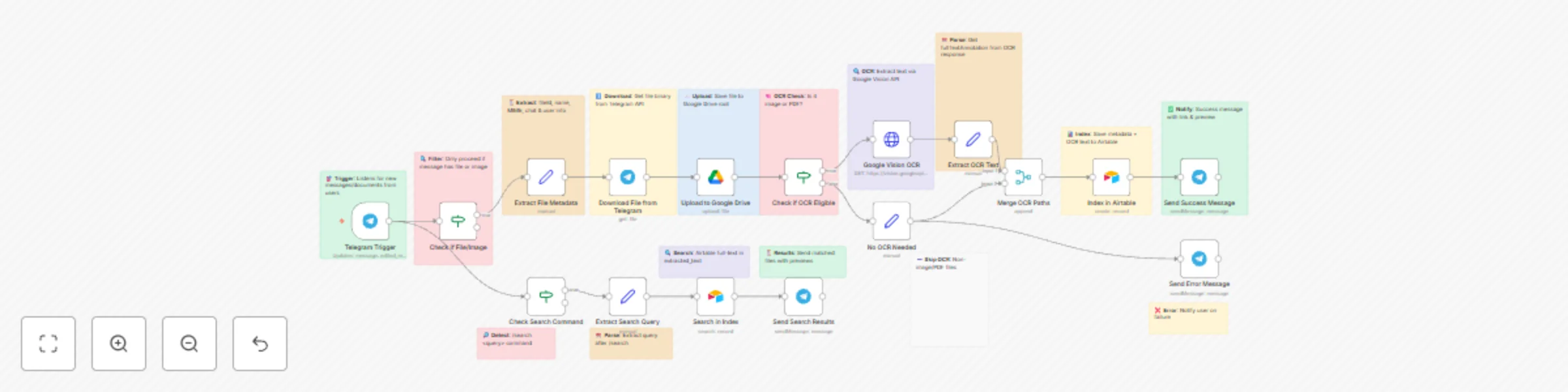
This n8n workflow receives files sent in a Telegram chat, uploads them to Google Drive, extracts text using OCR (for images and PDFs), and stores the extracted content in Airtable for quick search and retrieval. Users can later search through documents using a Telegram /search command.

Key Features

  • Accepts images and documents from Telegram
  • Uploads files to Google Drive automatically
  • Detects file type and runs OCR if eligible
  • Extracts text from images & PDFs via Google Vision
  • Stores file metadata + text in Airtable
  • Search documents using /search command in Telegram
  • Sends result previews and file links
  • Error handling & user notifications included

Use Cases

  • Personal document vault with search
  • Team knowledge filing system
  • Receipt & invoice OCR archive
  • Legal documents store & retrieval
  • Research papers & notes indexing
  • Company file inbox for AI knowledge base

Workflow Steps

Step Action Description
1 Telegram Trigger Detects incoming docs/images or /search command
2 Filter File or Search Routes based on whether message has file or search command
3 Extract Metadata Reads file info such as name, MIME type, user
4 Download File Downloads file via Telegram API
5 Upload to Drive Saves file in Google Drive
6 OCR Check Determines if file supports OCR
7 Google OCR Runs OCR for images/PDFs
8 Extract Text Pulls text output from OCR
9 Merge OCR Text Combines file data + text
10 Save to Airtable Indexes with metadata + text
11 Success Reply Sends link + success message
12 /search Flow Parse search query
13 Airtable Search Full-text search for records
14 Send Results Sends matches to Telegram
15 Error Handler Notifies user on failure

Input Formats

File Messages Supported
  • Images
  • PDFs
  • Documents
Search Command
/search keyword

Example:

/search invoice

Output

After Upload:
✅ File saved & indexed successfully!
🔗 Drive Link: <link>
After Search:

Returns structured result:

  • File name
  • Preview text snippet
  • Google Drive link

Data Stored in Airtable

Field Description
File Name Original name
File Link Google Drive link
MIME Type File type
Telegram User Sender info
OCR Text Extracted searchable text
Uploaded Date Timestamp

Technical Requirements

  • Telegram Bot Token
  • Google Drive API connection
  • Google Vision API key
  • Airtable API key & table

Benefits

  • Automatically organizes Telegram files
  • Makes PDFs & images searchable
  • Saves manual sorting and indexing time
  • AI-ready data storage (future LLM integration)
  • Fast search experience right in Telegram

Enhancement Ideas

  • Add Whisper for voice message transcription
  • Add chat GPT summarization for large docs
  • Build dashboard for uploaded files
  • Auto-tag documents (invoice, ID, receipt etc.)
  • Multi-language OCR support

Status

✅ Ready for production ✅ Handles images, PDFs, and files ✅ End-to-end automation 🛠 Optional: add more AI enrichment later

1.2 Logical Blocks

This catalog entry is organized from the workflow JSON. The node-level section below shows the executable blocks available for review before importing the template.

2. Block-by-Block Analysis

Block 1 - Telegram Trigger

Type / Role
n8n-nodes-base.telegramTrigger - telegramTrigger
Config choices
Version 1.1

Block 2 - Check if File/Image

Type / Role
n8n-nodes-base.if - if
Config choices
Version 2

Block 3 - Sticky: Check File

Type / Role
n8n-nodes-base.stickyNote - stickyNote
Config choices
Version 1

Block 4 - Extract File Metadata

Type / Role
n8n-nodes-base.set - set
Config choices
Version 3.3

Block 5 - Sticky: Extract Metadata

Type / Role
n8n-nodes-base.stickyNote - stickyNote
Config choices
Version 1

Block 6 - Download File from Telegram

Type / Role
n8n-nodes-base.telegram - telegram
Config choices
Version 1.1

Block 7 - Sticky: Download File

Type / Role
n8n-nodes-base.stickyNote - stickyNote
Config choices
Version 1

Block 8 - Upload to Google Drive

Type / Role
n8n-nodes-base.googleDrive - googleDrive
Config choices
Version 3

Block 9 - Sticky: Upload to Drive

Type / Role
n8n-nodes-base.stickyNote - stickyNote
Config choices
Version 1

Block 10 - Check if OCR Eligible

Type / Role
n8n-nodes-base.if - if
Config choices
Version 2

Block 11 - Sticky: OCR Eligible

Type / Role
n8n-nodes-base.stickyNote - stickyNote
Config choices
Version 1

Block 12 - Google Vision OCR

Type / Role
n8n-nodes-base.httpRequest - httpRequest
Config choices
Version 4.2

Block 13 - Sticky: Vision OCR

Type / Role
n8n-nodes-base.stickyNote - stickyNote
Config choices
Version 1

Block 14 - Extract OCR Text

Type / Role
n8n-nodes-base.set - set
Config choices
Version 3.3

Block 15 - Sticky: Extract OCR Text

Type / Role
n8n-nodes-base.stickyNote - stickyNote
Config choices
Version 1

Block 16 - No OCR Needed

Type / Role
n8n-nodes-base.set - set
Config choices
Version 3.3

Block 17 - Sticky: No OCR

Type / Role
n8n-nodes-base.stickyNote - stickyNote
Config choices
Version 1

Block 18 - Merge OCR Paths

Type / Role
n8n-nodes-base.merge - merge
Config choices
Version 2.1

Block 19 - Index in Airtable

Type / Role
n8n-nodes-base.airtable - airtable
Config choices
Version 2

Block 20 - Sticky: Airtable Index

Type / Role
n8n-nodes-base.stickyNote - stickyNote
Config choices
Version 1

Block 21 - Send Success Message

Type / Role
n8n-nodes-base.telegram - telegram
Config choices
Version 1.1

Block 22 - Sticky: Success Msg

Type / Role
n8n-nodes-base.stickyNote - stickyNote
Config choices
Version 1

Block 23 - Send Error Message

Type / Role
n8n-nodes-base.telegram - telegram
Config choices
Version 1.1

Block 24 - Sticky: Error Msg

Type / Role
n8n-nodes-base.stickyNote - stickyNote
Config choices
Version 1

Showing the first 24 of 33 workflow blocks. Download the JSON for the full node graph.

3. Summary Table

Workflow Create a searchable document archive with Telegram, Drive, OCR and Airtable
Complexity advanced
Nodes 33
Categories Document Extraction, Multimodal AI
Author Oneclick AI Squad
Published 31 Oct 2025

4. Reproducing the Workflow from Scratch

  1. 1. Download the workflow JSON

    Use the JSON export at /data/workflows/10388/10388.json as the source template for this automation.

  2. 2. Import the template into n8n

    Open n8n, import the downloaded JSON, and review each node before activating the workflow.

  3. 3. Configure credentials and variables

    Replace placeholder credentials, API keys, webhook URLs, account IDs, and environment-specific values with your own settings.

  4. 4. Test with sample data

    Run the workflow manually or in a staging workspace, inspect node output, and confirm downstream systems receive the expected data.

  5. 5. Activate and monitor

    Enable the workflow only after testing, then monitor executions, errors, and rate limits during the first production runs.

5. General Notes & Resources

Review imported nodes carefully before activation. This catalog entry is intended to help you inspect the workflow structure, understand required services, and find related templates faster.

Node names, credentials, schedules, webhook paths, and external service limits may need adjustment for your workspace.

Frequently asked questions

What does Create a searchable document archive with Telegram, Drive, OCR and Airtable do?

This n8n workflow receives files sent in a Telegram chat, uploads them to Google Drive, extracts text using OCR (for images and PDFs), and stores the extracted content in Airtable for quick search ...

What do I need before importing this workflow?

Review the workflow JSON, configure any required credentials in n8n, and test the automation in a safe workspace before using it in production.

Can I customize this workflow?

Yes. Use the block-by-block analysis and the downloadable JSON to inspect each node, then adjust credentials, prompts, schedules, filters, or destinations for your Document Extraction, Multimodal AI use case.