Convert YouTube videos to audio summaries with Decodo, OpenAI & Telegram

Workflow preview

Workflow preview
100%
Convert YouTube videos to audio summaries with Decodo, OpenAI & Telegram preview
Open on n8n.io

Important notice

This workflow is provided as-is. Please review and test before using in production.

1. Workflow Overview

Stop watching long videos, start listening to concise summaries. This workflow transforms any YouTube video URL sent via Telegram into a high quality, spoken audio summary (MP3) and a structured te...

Best for

  • Content Creation automation workflows
  • Multimodal AI automation workflows
  • advanced n8n builders looking for reusable templates

Tools used

n8n-nodes-base.telegram, @n8n/n8n-nodes-langchain.outputparserstructured, n8n-nodes-base.if, n8n-nodes-base.telegramtrigger, @decodo/n8n-nodes-decodo.decodo, n8n-nodes-base.code, @n8n/n8n-nodes-langchain.agent, @n8n/n8n-nodes-langchain.openai

Source and attribution

This workflow is cataloged by N8N Workflows and links back to its original n8n.io source page by Atta.

Original n8n.io source

1.1 Workflow description

Title
Convert YouTube videos to audio summaries with Decodo, OpenAI & Telegram
Workflow name
Convert YouTube videos to audio summaries with Decodo, OpenAI & Telegram

Stop watching long videos, start listening to concise summaries.

This workflow transforms any YouTube video URL sent via Telegram into a high-quality, spoken audio summary (MP3) and a structured text overview. It acts as your personal AI research assistant, turning lengthy content into bite-sized audio files that you can consume on the go.

It leverages Decodo for robust transcript extraction, OpenAI for intelligent summarization, and for realistic text-to-speech generation.


✨ Features

  • Telegram-First Interface: Send links and receive audio directly in your chat app.
  • Smart Validation: Automatically checks if the link is a valid YouTube URL before processing to save API credits.
  • Multi-Language Support: Easily configure the output language (English, Spanish, German, etc.) via a simple Config node. The AI will translate and speak in this language.
  • Robust Error Handling: Gracefully handles videos with no captions/transcripts by notifying the user instead of breaking the workflow.
  • Structured Data Extraction: Uses AI to extract the Genre, Title, and Summary alongside the audio file.

⚙️ How it Works

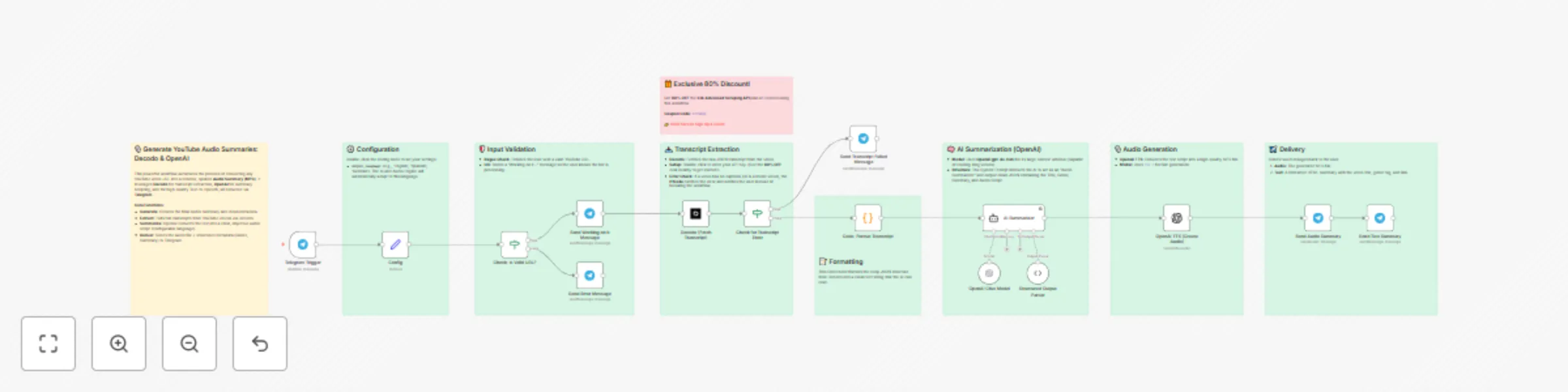
  1. Trigger: You send a YouTube URL to your Telegram Bot.
  2. Validate: The workflow checks the URL pattern using Regex.
  3. Extract: Decodo scrapes the video page to retrieve the full transcript JSON.
  4. Process: A Code node flattens the complex JSON into a readable text format.
  5. Summarize: OpenAI (gpt-4o-mini) analyzes the text and writes a script optimized for listening.
  6. Speak: OpenAI converts the script into a high-definition MP3 file.
  7. Deliver: The bot replies with the Audio File and a formatted text summary including the genre tags and original link.

📥 Decodo Node Installation

The Decodo node is used in this workflow for fetching the YouTube Transcript.

  1. Find the Node: Click the + button in your n8n canvas.
  2. Search: Search for the Decodo node and select it.
  3. Credentials: When configuring the first Decodo node, use your API key (obtained with the 80% discount coupon).
  4. Setup: Open the Decodo (Fetch YouTube Transcript) node to ensure it is correctly targeting the YouTube service.

🎁 Exclusive Deal for n8n Users

To run this workflow, you require a robust scraping provider. We have secured a massive discount for Decodo users:


➕ How to Adapt the Template

This workflow is highly flexible and can be modified for various content tasks:

  • Change AI Model: Easily swap the OpenAI Chat Model node with an OpenAI or Anthropic (Claude) node without altering the core logic.
  • Create Long-Form Drafts: Modify the AI System Prompt to generate a full 1,000-word blog post draft or a set of social media updates instead of a short audio script.
  • Change Destination: Replace the Telegram nodes with Slack, Microsoft Teams, Email (Gmail/SMTP), or Discord to deliver the audio and summary to your preferred channel.
  • Create an Archive: Connect the successful output to a Google Sheets or Airtable node to keep a searchable archive of every video summary created.

1.2 Logical Blocks

This catalog entry is organized from the workflow JSON. The node-level section below shows the executable blocks available for review before importing the template.

2. Block-by-Block Analysis

Block 1 - Send Working on it Message

Type / Role
n8n-nodes-base.telegram - telegram
Config choices
Version 1.2

Block 2 - Structured Output Parser

Type / Role
@n8n/n8n-nodes-langchain.outputParserStructured - outputParserStructured
Config choices
Version 1.3

Block 3 - Check for Transcript Error

Type / Role
n8n-nodes-base.if - if
Config choices
Version 2.2

Block 4 - Send Error Message

Type / Role
n8n-nodes-base.telegram - telegram
Config choices
Version 1.2

Block 5 - Send Transcript Failed Message

Type / Role
n8n-nodes-base.telegram - telegram
Config choices
Version 1.2

Block 6 - Send Text Summary

Type / Role
n8n-nodes-base.telegram - telegram
Config choices
Version 1.2

Block 7 - Telegram Trigger

Type / Role
n8n-nodes-base.telegramTrigger - telegramTrigger
Config choices
Version 1.2

Block 8 - Check: Is Valid URL?

Type / Role
n8n-nodes-base.if - if
Config choices
Version 2.2

Block 9 - Decodo (Fetch Transcript)

Type / Role
@decodo/n8n-nodes-decodo.decodo - decodo
Config choices
Version 1

Block 10 - Code: Format Transcript

Type / Role
n8n-nodes-base.code - code
Config choices
Version 2

Block 11 - AI Summarizer

Type / Role
@n8n/n8n-nodes-langchain.agent - agent
Config choices
Version 3

Block 12 - OpenAI TTS (Create Audio)

Type / Role
@n8n/n8n-nodes-langchain.openAi - openAi
Config choices
Version 2

Block 13 - Send Audio Summary

Type / Role
n8n-nodes-base.telegram - telegram
Config choices
Version 1.2

Block 14 - Config

Type / Role
n8n-nodes-base.set - set
Config choices
Version 3.4

Block 15 - Sticky Note

Type / Role
n8n-nodes-base.stickyNote - stickyNote
Config choices
Version 1

Block 16 - Sticky Note1

Type / Role
n8n-nodes-base.stickyNote - stickyNote
Config choices
Version 1

Block 17 - Sticky Note2

Type / Role
n8n-nodes-base.stickyNote - stickyNote
Config choices
Version 1

Block 18 - Sticky Note3

Type / Role
n8n-nodes-base.stickyNote - stickyNote
Config choices
Version 1

Block 19 - Sticky Note4

Type / Role
n8n-nodes-base.stickyNote - stickyNote
Config choices
Version 1

Block 20 - Sticky Note5

Type / Role
n8n-nodes-base.stickyNote - stickyNote
Config choices
Version 1

Block 21 - Sticky Note6

Type / Role
n8n-nodes-base.stickyNote - stickyNote
Config choices
Version 1

Block 22 - Sticky Note7

Type / Role
n8n-nodes-base.stickyNote - stickyNote
Config choices
Version 1

Block 23 - Sticky Note8

Type / Role
n8n-nodes-base.stickyNote - stickyNote
Config choices
Version 1

Block 24 - OpenAI Chat Model

Type / Role
@n8n/n8n-nodes-langchain.lmChatOpenAi - lmChatOpenAi
Config choices
Version 1.3

3. Summary Table

Workflow Convert YouTube videos to audio summaries with Decodo, OpenAI & Telegram
Complexity advanced
Nodes 24
Categories Content Creation, Multimodal AI
Author Atta
Published 18 Nov 2025

4. Reproducing the Workflow from Scratch

  1. 1. Download the workflow JSON

    Use the JSON export at /data/workflows/10981/10981.json as the source template for this automation.

  2. 2. Import the template into n8n

    Open n8n, import the downloaded JSON, and review each node before activating the workflow.

  3. 3. Configure credentials and variables

    Replace placeholder credentials, API keys, webhook URLs, account IDs, and environment-specific values with your own settings.

  4. 4. Test with sample data

    Run the workflow manually or in a staging workspace, inspect node output, and confirm downstream systems receive the expected data.

  5. 5. Activate and monitor

    Enable the workflow only after testing, then monitor executions, errors, and rate limits during the first production runs.

5. General Notes & Resources

Review imported nodes carefully before activation. This catalog entry is intended to help you inspect the workflow structure, understand required services, and find related templates faster.

Node names, credentials, schedules, webhook paths, and external service limits may need adjustment for your workspace.

Frequently asked questions

What does Convert YouTube videos to audio summaries with Decodo, OpenAI & Telegram do?

Stop watching long videos, start listening to concise summaries. This workflow transforms any YouTube video URL sent via Telegram into a high quality, spoken audio summary (MP3) and a structured te...

What do I need before importing this workflow?

Review the workflow JSON, configure any required credentials in n8n, and test the automation in a safe workspace before using it in production.

Can I customize this workflow?

Yes. Use the block-by-block analysis and the downloadable JSON to inspect each node, then adjust credentials, prompts, schedules, filters, or destinations for your Content Creation, Multimodal AI use case.