Block 1 - Receive Video URL
- Type / Role
- n8n-nodes-base.webhook - webhook
- Config choices
- Version 2.1


 Early Deal
Description Automatically convert any video URL into a fully structured, publish ready SEO blog post using WayinVideo AI transcription , GPT 4o mini , and Google Sheets — zero manual writing requir...
n8n-nodes-base.webhook, n8n-nodes-base.httprequest, n8n-nodes-base.wait, n8n-nodes-base.if, n8n-nodes-base.code, @n8n/n8n-nodes-langchain.agent, @n8n/n8n-nodes-langchain.lmchatopenai, @n8n/n8n-nodes-langchain.outputparserstructured
This workflow is cataloged by N8N Workflows and links back to its original n8n.io source page by isaWOW.
Original n8n.io sourceAutomatically convert any video URL into a fully structured, publish-ready SEO blog post using WayinVideo AI transcription, GPT-4o-mini, and Google Sheets — zero manual writing required.
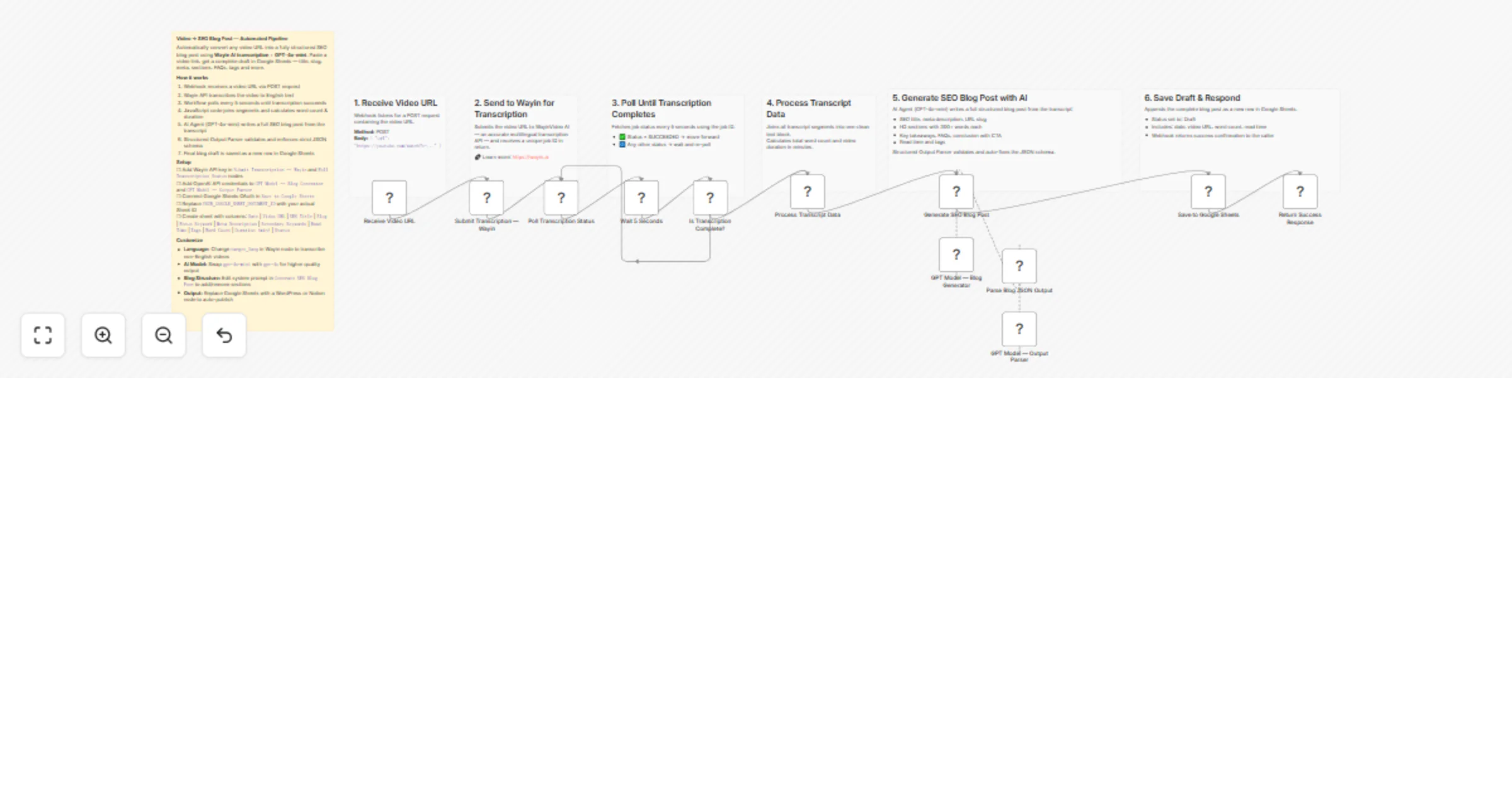
This workflow takes a single video URL and does everything for you. It transcribes the video using WayinVideo — a powerful multilingual video transcription API that accurately converts spoken content into clean, structured text — then passes that transcript to an AI Agent that writes a complete SEO blog post with title, meta description, slug, sections, FAQs, key takeaways, and tags. The final output is saved directly as a draft row in Google Sheets, ready for review and publishing.
Perfect for content marketers, YouTubers, agencies, and SEO teams who want to repurpose video content at scale without touching a keyboard.
AI-powered transcription via Wayin: Uses the WayinVideo API to transcribe any video URL into clean, timestamped text segments with word count and duration metadata — supporting multilingual content.
Smart polling loop: Automatically polls Wayin every 5 seconds until transcription is complete — no manual waiting or webhook setup needed.
Structured SEO output: GPT-4o-mini generates a complete blog post with H2 sections (300+ words each), meta description (155 chars), URL slug, focus keyword, secondary keywords, FAQs, and a CTA conclusion.
Strict JSON schema enforcement: A Structured Output Parser validates every AI response — no broken outputs, no missing fields.
Google Sheets auto-logging: Every blog post is instantly saved as a draft row with date, video URL, word count, read time, tags, and status.
Webhook-triggered: Works as part of any larger pipeline — trigger it from Make, Zapier, or your own frontend.
{"url": "your-video-link"}SUCCEEDED → move forward, ELSE → re-pollTools you'll need:
Estimated setup time: 10–15 minutes
1. Add credentials in n8n:
2. Add your WayinVideo API Key:
Submit Transcription — Wayin node → replace YOUR_WAYIN_API_KEY in the Authorization headerPoll Transcription Status node → replace YOUR_WAYIN_API_KEY in the Authorization header3. Set up your Google Sheet: Create a sheet with these exact column headers:
Date | Video URL | SEO Title | Slug | Focus Keyword | Meta Description | Secondary Keywords | Read Time | Tags | Word Count | Duration (min) | Status
4. Update Sheet Document ID:
Save to Google Sheets nodeYOUR_GOOGLE_SHEET_DOCUMENT_ID with your actual Sheet ID (found in the Google Sheet URL)5. Test the workflow:
POST https://your-n8n-domain/webhook/43129e0a-...
Body: {"url": "https://youtube.com/watch?v=example"}
Content marketers: Repurpose every YouTube video, webinar, or podcast episode into an SEO blog post automatically — 10x your content output without extra writing.
SEO agencies: Generate first-draft blog posts for clients from recorded calls, demos, or training videos in minutes.
Course creators: Turn every lesson or tutorial video into a standalone blog post to drive organic search traffic.
YouTubers & podcasters: Build a content library of written posts from existing video content with zero extra effort.
Change the AI model: Replace gpt-4o-mini with gpt-4o or gpt-4-turbo in both OpenAI nodes for higher quality output on complex topics.
Add WordPress publishing: Connect a WordPress REST API node after Save to Google Sheets to auto-publish instead of saving as draft.
Change output language: Modify the WayinVideo API target_lang parameter and GPT system prompt to generate blog posts in any language.
Adjust blog structure: Edit the system prompt in Generate SEO Blog Post to change section count, word targets, tone, or add custom fields like author bio or schema markup.
Add Slack/email notifications: Insert a Slack or Gmail node after Return Success Response to notify your team when a new draft is ready.
Transcription stuck in polling loop: Check your WayinVideo API key is valid and the video URL is publicly accessible. Private or age-restricted videos may fail.
AI output missing fields: The Structured Output Parser auto-fixes most issues. If errors persist, add explicit field instructions to the GPT system prompt.
Google Sheets not updating: Verify OAuth credentials are connected and the Sheet Document ID is correct (not the full URL, just the ID string between /d/ and /edit).
Webhook not triggering: Make sure the workflow is activated (toggle ON) before sending test requests. Test mode webhooks use a different URL than production.
Need help setting up or want a custom version built for your use case?
📧 Email: [email protected] 🌐 Website: https://isawow.com/
This catalog entry is organized from the workflow JSON. The node-level section below shows the executable blocks available for review before importing the template.
| Workflow | Convert YouTube videos into SEO blog posts using WayinVideo and GPT-4o-mini |
|---|---|
| Complexity | advanced |
| Nodes | 19 |
| Categories | Content Creation, Multimodal AI |
| Author | isaWOW |
| Published | 23 Mar 2026 |
Use the JSON export at /data/workflows/14263/14263.json as the source template for this automation.
Open n8n, import the downloaded JSON, and review each node before activating the workflow.
Replace placeholder credentials, API keys, webhook URLs, account IDs, and environment-specific values with your own settings.
Run the workflow manually or in a staging workspace, inspect node output, and confirm downstream systems receive the expected data.
Enable the workflow only after testing, then monitor executions, errors, and rate limits during the first production runs.
Review imported nodes carefully before activation. This catalog entry is intended to help you inspect the workflow structure, understand required services, and find related templates faster.
Node names, credentials, schedules, webhook paths, and external service limits may need adjustment for your workspace.
Description Automatically convert any video URL into a fully structured, publish ready SEO blog post using WayinVideo AI transcription , GPT 4o mini , and Google Sheets — zero manual writing requir...
Review the workflow JSON, configure any required credentials in n8n, and test the automation in a safe workspace before using it in production.
Yes. Use the block-by-block analysis and the downloadable JSON to inspect each node, then adjust credentials, prompts, schedules, filters, or destinations for your Content Creation, Multimodal AI use case.