Block 1 - Run python script
- Type / Role
- n8n-nodes-base.executeCommand - executeCommand
- Config choices
- Version 1


 Early Deal
This workflow is provided as-is. Please review and test before using in production.
Disclaimer The Execute Command node is only supported on self hosted (local) instances of n8n. Introduction KOKORO TTS Kokoro TTS is a compact yet powerful text to speech mode...
n8n-nodes-base.executecommand, n8n-nodes-base.set, n8n-nodes-base.manualtrigger, n8n-nodes-base.readbinaryfiles
This workflow is cataloged by N8N Workflows and links back to its original n8n.io source page by bswlife.
Original n8n.io sourceThe Execute Command node is only supported on self-hosted (local) instances of n8n.
KOKORO TTS - Kokoro TTS is a compact yet powerful text-to-speech model, currently available on Hugging Face and GitHub. Despite its modest size—trained on less than 100 hours of audio—it delivers impressive results, consistently topping the TTS leaderboard on Hugging Face. Unlike larger systems, Kokoro TTS offers the advantage of running locally, even on devices without GPUs, making it accessible for a wide range of users.
Who will benefit from this integration?
This will be useful for video bloggers, TikTokers, and it will also enable the creation of a free voice chat bot. Currently, TTS models are mostly paid, but this integration will allow for fully free voice generation. The possibilities are limited only by your imagination.
Unfortunately, we can't interact with the KOKORO API via browser URL (GET/POST), but we can run a Python script through n8n and pass any variables to it.
In the tutorial, the D drive is used, but you can rewrite this for any paths, including the C drive.
You need to have Python installed. link Also, download and extract the portable version of KOKORO from GitHub.
Create a file named voicegen.py with the following code in the KOKORO folder: (C:\KOKORO). As you can see, the output path is: (D:\output.mp3).
import sys
import shutil
from gradio_client import Client

# Set UTF-8 encoding for stdout
sys.stdout.reconfigure(encoding='utf-8')

# Get arguments from command line
text = sys.argv[1] # First argument: input text
voice = sys.argv[2] # Second argument: voice
speed = float(sys.argv[3]) # Third argument: speed (converted to float)

print(f"Received text: {text}")
print(f"Voice: {voice}")
print(f"Speed: {speed}")

# Connect to local Gradio server
client = Client("http://localhost:7860/")

# Generate speech using the API
result = client.predict(
text=text,
voice=voice,
speed=speed,
api_name="/generate_speech"
)

# Define output path
output_path = r"D:\output.mp3"

# Move the generated file
shutil.move(result[1], output_path)

# Print output path
print(output_path)
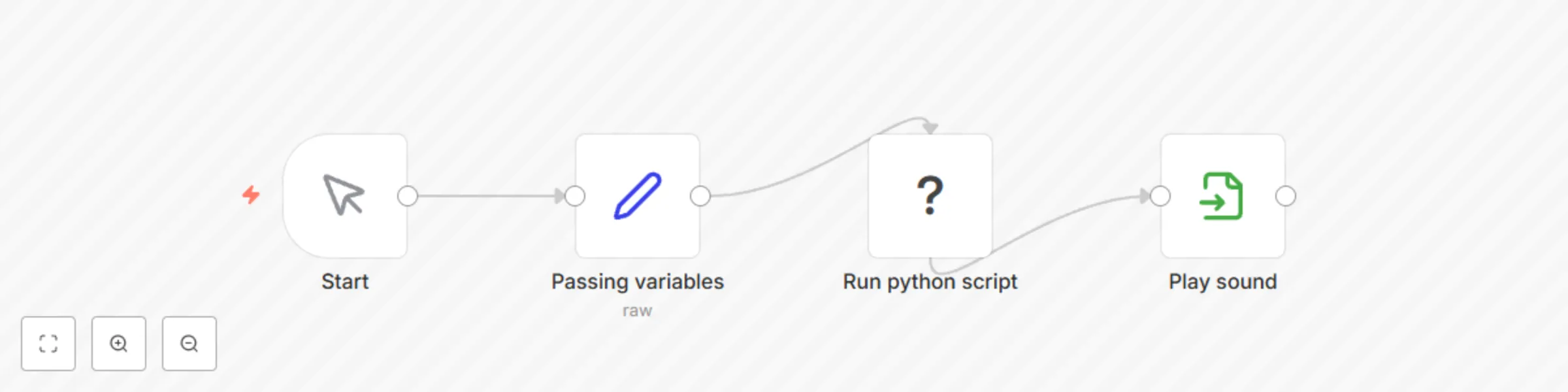
Go to n8n and create the following workflow.
Edit Field Module.
{
  "voice": "af_sarah",
  "text": "Hello world!"
}
We’ll need an Execute Command module with the command: python
C:\KOKORO\voicegen.py “{{ $json.text }}” “{{ $json.voice }}” 1
The script is already working, but to listen to it, you can connect a Binary module with the path to the generated MP3 file
D:/output.mp3
Click “Text workflow” and enjoy the result.
There are more voices and accents than in ChatGPT, plus it’s free.
If you want, there is a detailed tutorial on my blog.
This catalog entry is organized from the workflow JSON. The node-level section below shows the executable blocks available for review before importing the template.
| Workflow | Convert text to speech with local KOKORO TTS |
|---|---|
| Complexity | beginner |
| Nodes | 4 |
| Categories | Content Creation, Multimodal AI |
| Author | bswlife |
| Published | 14 Apr 2025 |
Use the JSON export at /data/workflows/3547/3547.json as the source template for this automation.
Open n8n, import the downloaded JSON, and review each node before activating the workflow.
Replace placeholder credentials, API keys, webhook URLs, account IDs, and environment-specific values with your own settings.
Run the workflow manually or in a staging workspace, inspect node output, and confirm downstream systems receive the expected data.
Enable the workflow only after testing, then monitor executions, errors, and rate limits during the first production runs.
Review imported nodes carefully before activation. This catalog entry is intended to help you inspect the workflow structure, understand required services, and find related templates faster.
Node names, credentials, schedules, webhook paths, and external service limits may need adjustment for your workspace.
Disclaimer The Execute Command node is only supported on self hosted (local) instances of n8n. Introduction KOKORO TTS Kokoro TTS is a compact yet powerful text to speech mode...
Review the workflow JSON, configure any required credentials in n8n, and test the automation in a safe workspace before using it in production.
Yes. Use the block-by-block analysis and the downloadable JSON to inspect each node, then adjust credentials, prompts, schedules, filters, or destinations for your Content Creation, Multimodal AI use case.