Block 1 - Generate a video
- Type / Role
- @n8n/n8n-nodes-langchain.googleGemini - googleGemini
- Config choices
- Version 1


 Early Deal
This workflow is provided as-is. Please review and test before using in production.
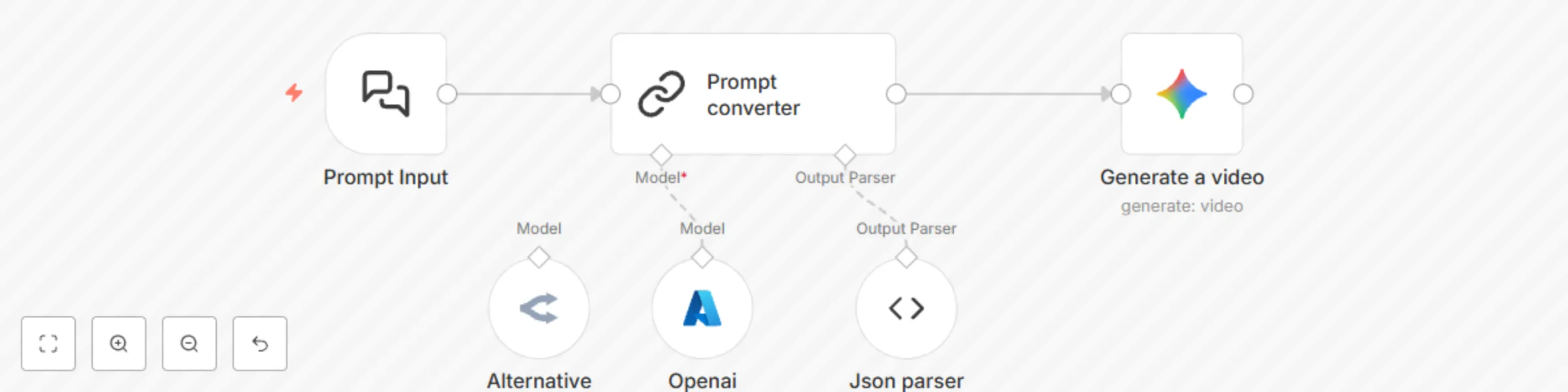
The Prompt converter workflow tackles the challenge of turning your natural language video ideas into perfectly formatted JSON prompts tailored for Veo 3 video generation. By leveraging Langchain A...
@n8n/n8n-nodes-langchain.googlegemini, @n8n/n8n-nodes-langchain.outputparserstructured, @n8n/n8n-nodes-langchain.lmchatazureopenai, @n8n/n8n-nodes-langchain.chattrigger, @n8n/n8n-nodes-langchain.chainllm, @n8n/n8n-nodes-langchain.lmchatopenrouter
This workflow is cataloged by N8N Workflows and links back to its original n8n.io source page by Khairul Muhtadin.
Original n8n.io sourceThe Prompt converter workflow tackles the challenge of turning your natural language video ideas into perfectly formatted JSON prompts tailored for Veo 3 video generation.
By leveraging Langchain AI nodes and Google Gemini, this workflow automates and refines your input to help you create high-quality videos faster and with more precision—think of it as your personal video prompt translator that speaks fluent cinematic!
Save time: Automate converting complex video prompts into structured JSON, cutting manual formatting headaches and boosting productivity.
Avoid guesswork: Eliminate unclear video prompt details by generating detailed, cinematic descriptions that align perfectly with Veo 3 specs.
Improve output quality: Optimize every parameter for Veo 3's video generation model to get realistic and stunning results every time.
Gain a creative edge: Turn vague ideas into vivid video concepts with AI-powered enhancement—your video project's secret weapon.
Video creators: Content developers wanting quick, precise video prompt formatting without coding hassles.
AI enthusiasts: Developers and hobbyists exploring Langchain and Google Gemini for media generation.
Marketing teams: Professionals creating video ads or visuals who need consistent prompt structuring that saves time.
⏱ Trigger: User submits a free text prompt via message or webhook.
📎 Process: The text goes through an AI model that understands and reworks it into detailed JSON parameters tailored for Veo 3.
🤖 Smart Logic: Langchain nodes parse and optimize the prompt with cinematic details, set reasonable defaults, and structure the data precisely.
💌 Output: The refined JSON prompt is sent to Google Gemini for video generation with optimized settings.
Made by: Khaisa Studio
Tags: video generation, AI, Langchain, automation, Google Gemini
Category: Video Production
Need custom work? Contact me
This catalog entry is organized from the workflow JSON. The node-level section below shows the executable blocks available for review before importing the template.
| Workflow | Convert natural language to video JSON prompts with GPT and Gemini for Veo 3 |
|---|---|
| Complexity | intermediate |
| Nodes | 6 |
| Categories | Content Creation, Multimodal AI |
| Author | Khairul Muhtadin |
| Published | 02 Aug 2025 |
Use the JSON export at /data/workflows/6832/6832.json as the source template for this automation.
Open n8n, import the downloaded JSON, and review each node before activating the workflow.
Replace placeholder credentials, API keys, webhook URLs, account IDs, and environment-specific values with your own settings.
Run the workflow manually or in a staging workspace, inspect node output, and confirm downstream systems receive the expected data.
Enable the workflow only after testing, then monitor executions, errors, and rate limits during the first production runs.
Review imported nodes carefully before activation. This catalog entry is intended to help you inspect the workflow structure, understand required services, and find related templates faster.
Node names, credentials, schedules, webhook paths, and external service limits may need adjustment for your workspace.
The Prompt converter workflow tackles the challenge of turning your natural language video ideas into perfectly formatted JSON prompts tailored for Veo 3 video generation. By leveraging Langchain A...
Review the workflow JSON, configure any required credentials in n8n, and test the automation in a safe workspace before using it in production.
Yes. Use the block-by-block analysis and the downloadable JSON to inspect each node, then adjust credentials, prompts, schedules, filters, or destinations for your Content Creation, Multimodal AI use case.