Block 1 - Google Drive Trigger
- Type / Role
- n8n-nodes-base.googleDriveTrigger - googleDriveTrigger
- Config choices
- Version 1


 Early Deal
This workflow is provided as-is. Please review and test before using in production.
This workflow contains community nodes that are only compatible with the self hosted version of n8n. What it does This n8n workflow delivers a comprehensive, automated solution for transforming wri...
n8n-nodes-base.googledrivetrigger, n8n-nodes-base.googledrive, @n8n/n8n-nodes-langchain.lmchatopenai, @n8n/n8n-nodes-langchain.outputparserstructured, n8n-nodes-base.splitout, n8n-nodes-base.stickynote, @n8n/n8n-nodes-langchain.chainllm, n8n-nodes-base.set
This workflow is cataloged by N8N Workflows and links back to its original n8n.io source page by NanaB.
Original n8n.io sourceThis workflow contains community nodes that are only compatible with the self-hosted version of n8n.
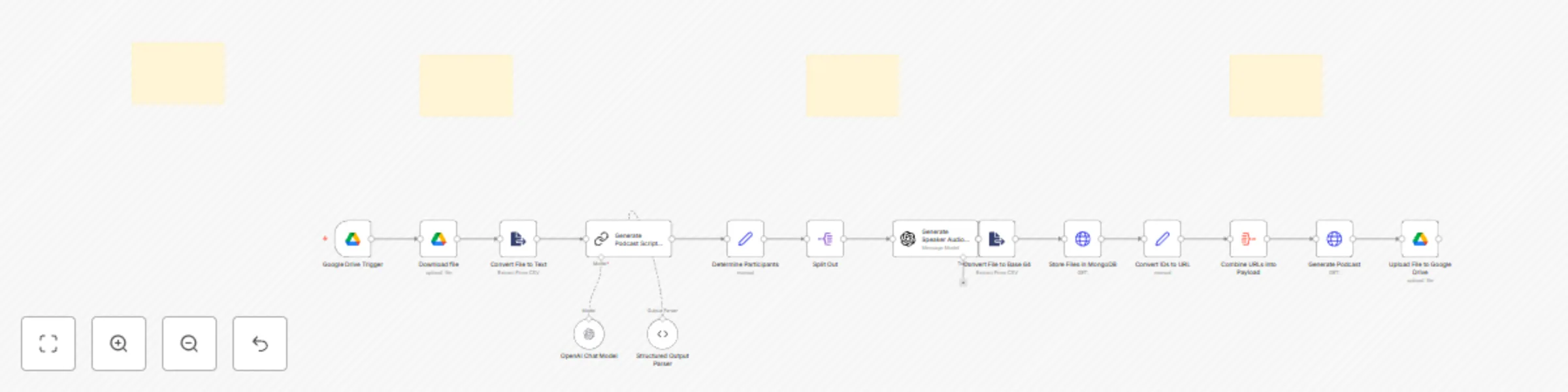
This n8n workflow delivers a comprehensive, automated solution for transforming written content into dynamic, multi-speaker podcast audio. It automatically detects new documents in Google Drive, leverages advanced AI to craft a detailed podcast script, generates individual audio segments for each speaker, uploads these segments to a dedicated file storage, seamlessly concatenates them into a full episode, and finally, saves the completed audio back into Google Drive. This end-to-end pipeline significantly streamlines your content-to-audio production process.
The workflow is a powerful orchestration of AI and automation, designed to take your raw document and deliver a polished audio product.
Your journey begins when you simply place a document in a designated Google Drive folder.
With the text extracted, the workflow hands it over to an AI scriptwriter.
Once the script is ready, each piece of dialogue is brought to life with distinct voices.
Finally, all the individual audio pieces are assembled into one complete podcast episode.
Getting this workflow running requires a few key configurations and external service dependencies.
Create Google Drive Folder: Designate a specific Google Drive folder (e.g., "AIAGENTDEMO") that will serve as both the input (where you drop source documents) and output (where the final podcast audio lands). Make note of its ID or name.
n8n Google Drive Credential: In your n8n instance, add a new Google Drive OAuth2 API credential. Give it a clear name (e.g., "My Google Drive Account") and authenticate it with your Google account, ensuring it has the necessary permissions for the designated folder.
Obtain OpenAI API Key: Log in to your OpenAI account and generate a new API key.
n8n OpenAI Credential: Within n8n, create a new OpenAI API credential. Name it appropriately (e.g., "My OpenAI Key for TTS & LLM") and paste your API key. This single credential will be used by both the AI scriptwriter (OpenAI Chat Model) and the audio generation (Generate audio files) nodes.
MongoDB File Storage API: Ensure a file storage API is fully operational and accessible from your n8n instance. This API must accept POST requests with filename and Base64 file_data in the body, returning a file_id upon successful upload.
Audio Concatenation API: Verify that your audio concatenation service is live and reachable. This API should expect a POST request with an audio_urls array in the request body and provide the concatenated audio file in return.
This workflow offers numerous avenues for advanced customization and expansion:
Flexible Document Ingestion: Expand the Google Drive Trigger to monitor multiple folders or integrate with other cloud storage services (like Dropbox, OneDrive) or even local file systems. Broaden the Extract from File node's capabilities (or add pre-processing) to handle a wider range of document types beyond just PDFs, such as Word documents, markdown files, or even raw text.
Expanded Speaker & Voice Control: Move beyond simple "host" and "guest" roles. Define an arbitrary number of speakers (e.g., "Narrator," "Expert A," "Interviewer B") and assign unique, distinct voices to each. This could involve a lookup table within n8n to map speaker roles to specific voice IDs from your TTS provider, allowing for granular control over more speakers and diverse voices.
Multilingual Podcast Production: Implement language detection services (e.g., Google Cloud Language API) to automatically identify the language of your input document. This detected language can then be passed to the OpenAI TTS node (if supported) to enable the generation of podcast audio in multiple languages, broadening your audience reach.
Dynamic LLM Prompting: Add parameters to the initial trigger or an earlier node to allow users to configure aspects of the podcast, such as desired length, specific tone, or a list of key discussion points, all of which can dynamically adjust the LLM's prompt.
Alternative Text-to-Speech Engines: Easily swap out OpenAI's TTS with other leading providers like Google Cloud Text-to-Speech, AWS Polly, or ElevenLabs by simply changing the Generate audio files node and its associated credentials.
Versatile File Storage: Replace the current MongoDB file storage with your preferred cloud storage solution, such as AWS S3 or Google Cloud Storage, by utilizing dedicated n8n nodes for those services.
Advanced Audio Post-Processing: Introduce more sophisticated audio post-production steps directly within the workflow. This could include adding intros/outros, integrating background music, applying sound effects, or performing volume normalization before the final concatenation.
Notification and Reporting: Implement robust error handling (e.g., retries for failed API calls) and add notification systems (e.g., email, Slack, Discord messages) to alert you to workflow completions, successes, or failures, including links to the generated podcast file.
Direct Playback Integration: After the final audio is concatenated and uploaded, consider integrating with a media player or a sharing platform to immediately provide a public link for easy listening and distribution.
Direct Publishing to Podcast Sites: Integrate with podcast hosting platforms that offer API access (e.g., Podbean, Libsyn, Captivate, Transistor). This would involve adding an HTTP Request node after the Upload file step to publish the newly generated podcast episode directly to your chosen podcast host via their API, including episode metadata (title, description, artwork). This bypasses manual uploads and pushes your content to all major podcast directories (Apple Podcasts, Spotify, Google Podcasts, etc.) that your hosting platform distributes to.#
Need assistance setting this up, adapting it to a unique use case, or exploring more advanced customizations? Don't hesitate to reach out! You can contact me directly at [email protected]. Also, feel free to check out my YouTube Channel where I discuss other n8n templates, as well as Innovation and automation solutions.
This catalog entry is organized from the workflow JSON. The node-level section below shows the executable blocks available for review before importing the template.
| Workflow | Convert documents to podcast audio with GPT-4o & OpenAI TTS |
|---|---|
| Complexity | advanced |
| Nodes | 19 |
| Categories | Content Creation, Multimodal AI |
| Author | NanaB |
| Published | 18 Jul 2025 |
Use the JSON export at /data/workflows/6138/6138.json as the source template for this automation.
Open n8n, import the downloaded JSON, and review each node before activating the workflow.
Replace placeholder credentials, API keys, webhook URLs, account IDs, and environment-specific values with your own settings.
Run the workflow manually or in a staging workspace, inspect node output, and confirm downstream systems receive the expected data.
Enable the workflow only after testing, then monitor executions, errors, and rate limits during the first production runs.
Review imported nodes carefully before activation. This catalog entry is intended to help you inspect the workflow structure, understand required services, and find related templates faster.
Node names, credentials, schedules, webhook paths, and external service limits may need adjustment for your workspace.
This workflow contains community nodes that are only compatible with the self hosted version of n8n. What it does This n8n workflow delivers a comprehensive, automated solution for transforming wri...
Review the workflow JSON, configure any required credentials in n8n, and test the automation in a safe workspace before using it in production.
Yes. Use the block-by-block analysis and the downloadable JSON to inspect each node, then adjust credentials, prompts, schedules, filters, or destinations for your Content Creation, Multimodal AI use case.