Control AlphaInsider stock and crypto portfolios from Telegram text and voice

Workflow preview

Workflow preview
100%
Control AlphaInsider stock and crypto portfolios from Telegram text and voice preview
Open on n8n.io

1. Workflow Overview

AlphaInsider Telegram Chat Bot Automate trading on AlphaInsider by monitoring Telegram messages. Uses AI to analyze signals and execute trades, create posts, or answer q...

Best for

  • Crypto Trading automation workflows
  • AI Chatbot automation workflows
  • advanced n8n builders looking for reusable templates

Tools used

n8n-nodes-base.stickynote, @n8n/n8n-nodes-langchain.openai, n8n-nodes-base.telegram, n8n-nodes-base.if, n8n-nodes-base.set, n8n-nodes-base.switch, n8n-nodes-base.httprequest, n8n-nodes-base.code

Source and attribution

This workflow is cataloged by N8N Workflows and links back to its original n8n.io source page by AlphaInsider.

Original n8n.io source

1.1 Workflow description

Title
Control AlphaInsider stock and crypto portfolios from Telegram text and voice
Workflow name
Control AlphaInsider stock and crypto portfolios from Telegram text and voice

AlphaInsider Telegram Chat Bot

Automate trading on AlphaInsider by monitoring Telegram messages. Uses AI to analyze signals and execute trades, create posts, or answer questions.

How It Works

Message Flow:

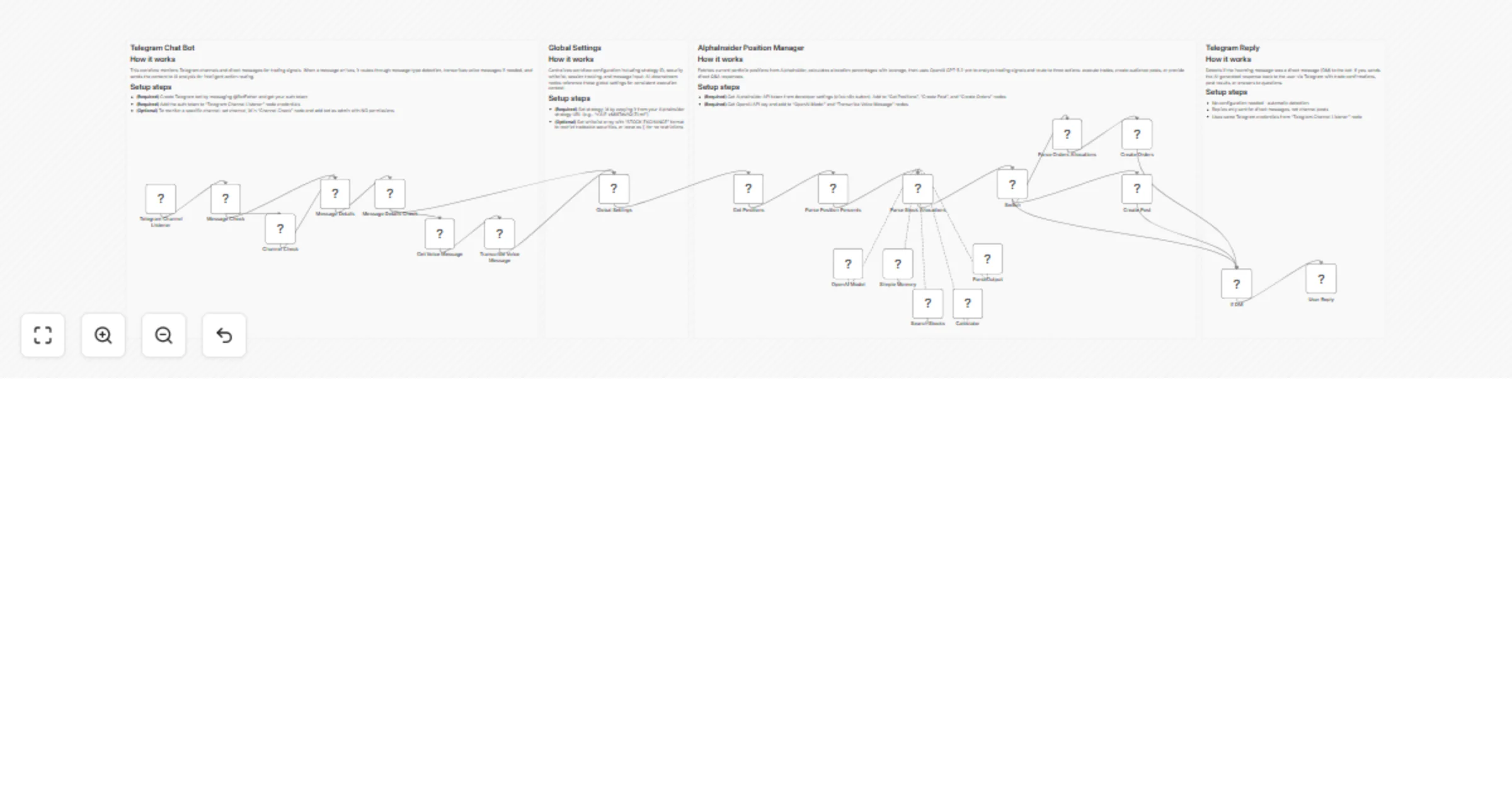
Telegram → Route (DM/Channel) → Detect Type (Text/Voice) → Transcribe (if voice) →
Global Settings → Fetch Positions → AI Analysis → Route Action (Trade/Post/Q&A) →
Execute → Reply (if DM)

Three AI Actions:

  1. Trade - Executes orders on AlphaInsider based on clear trading signals
  2. Post - Creates audience posts on AlphaInsider from commentary or analysis
  3. Q&A - Responds to direct questions about positions or trading

The AI agent analyzes messages with current portfolio context, determines intent, and routes to the appropriate action.

Prerequisites

  • n8n instance (self-hosted or cloud)
  • AlphaInsider account with API access - Sign up
  • OpenAI API key - Get key
  • Telegram Bot - Create via @BotFather

Quick Setup

1. Configure Credentials

Telegram API:

  • Create bot with @BotFather and copy auth token
  • Add token to Telegram Channel Listener node
  • (Optional) Add bot as admin to channel with no permissions

OpenAI API:

  • Get API key from OpenAI Platform
  • Add to OpenAI Model and Transcribe Voice Message nodes

AlphaInsider API:

  • Go to Developer Settings
  • Click n8n button and copy API key
  • Add to Get Positions, Search Stocks, and Create Orders nodes

2. Configure Workflow

Global Settings Node:

  • strategy_id (required): Copy from AlphaInsider strategy URL (e.g. URL: https://alphainsider.com/strategy/niAlE-cMI8TdsYQllZLmf, Strategy ID: niAlE-cMI8TdsYQllZLmf)
  • whitelist (optional): Restrict trading to specific securities using ["SYMBOL:EXCHANGE"] format, or leave as [] for all

Channel Check Node (optional):

  • Set channel_id to monitor specific channel (e.g., -1001234567890)
  • Leave default to monitor all messages

3. Activate

Toggle Active in the workflow editor. Your bot is now monitoring Telegram.

Features

  • Real-time monitoring via webhook for instant processing
  • Dual input modes: Direct messages and channel posts
  • Voice message support: Automatic transcription with OpenAI Whisper
  • Portfolio context: Considers existing positions before trading
  • Leverage support: Up to 2x (200%) portfolio leverage
  • Security whitelist: Optional restriction to approved securities
  • Interactive replies: Responds to DMs with confirmations or answers

Trading Logic

Trade Signals (action = trade):

  • Long: buy, bullish, loading up, moon, strong buy
  • Short: sell, dumping, overvalued, bearish, exiting
  • Close: take profit, exiting, holding cash, getting out

Posts (action = post):

  • Broadcasting information or analysis to followers
  • No explicit trading intention

Q&A (action = none):

  • Position queries and trading questions
  • Pure observation or technical analysis
  • Weak/ambiguous signals

Allocation Rules:

  • Percentages: 0 to 2.0 (1.5 = 150% leverage)
  • Total must not exceed 2.0
  • Cannot mix stocks and crypto
  • Conservative approach - only acts on clear signals

Example Usage

Buy Signal:

Message: "Extremely bullish on Nvidia. Adding more NVDA"
Current: 50% TSLA
Result: 150% NVDA + 50% TSLA = 200%

Reallocation:

Message: "Selling Tesla to buy Microsoft"
Current: 100% TSLA
Result: 100% MSFT (TSLA closed)

Post to Audience:

Message: "Bitcoin breaking key resistance at $45k!"
Result: Post created on AlphaInsider

Position Query:

Message: "What are my current positions?"
Reply: "Your current positions are: TSLA:NASDAQ long 100%, MSFT:NASDAQ long 50%."

Supported Exchanges

  • COINBASE - Cryptocurrencies
  • NYSE - New York Stock Exchange
  • NASDAQ - NASDAQ Stock Market

Troubleshooting

Issue Solution
Webhook not triggering Verify bot is admin in channel with correct permissions
AI not trading Ensure messages contain clear action words (buying, selling, closing)
Trades not executing Verify AlphaInsider credentials and strategy_id
Voice messages failing Check OpenAI API key in Transcribe Voice Message node
Wrong channel messages Update channel_id in Channel Check node
Not replying to DMs Verify Telegram credentials in User Reply node

Customization

Open Parse Stock Allocations node to modify trading logic:

  • Signal recognition keywords
  • Leverage limits (default: 2.0)
  • Allocation strategies
  • Risk filters

Disclaimer

Trading involves risk. Always test thoroughly before using with real money. Start with small allocations and security whitelists. Users are responsible for their own trading decisions and risk management.

1.2 Logical Blocks

This catalog entry is organized from the workflow JSON. The node-level section below shows the executable blocks available for review before importing the template.

2. Block-by-Block Analysis

Block 1 - Sticky Note

Type / Role
n8n-nodes-base.stickyNote - stickyNote
Config choices
Version 1

Block 2 - Sticky Note2

Type / Role
n8n-nodes-base.stickyNote - stickyNote
Config choices
Version 1

Block 3 - Transcribe Voice Message

Type / Role
@n8n/n8n-nodes-langchain.openAi - openAi
Config choices
Version 2.1

Block 4 - Get Voice Message

Type / Role
n8n-nodes-base.telegram - telegram
Config choices
Version 1.2

Block 5 - Channel Check

Type / Role
n8n-nodes-base.if - if
Config choices
Version 2.3

Block 6 - Global Settings

Type / Role
n8n-nodes-base.set - set
Config choices
Version 3.4

Block 7 - Message Details

Type / Role
n8n-nodes-base.set - set
Config choices
Version 3.4

Block 8 - Message Details Check

Type / Role
n8n-nodes-base.switch - switch
Config choices
Version 3.4

Block 9 - Message Check

Type / Role
n8n-nodes-base.switch - switch
Config choices
Version 3.4

Block 10 - Sticky Note3

Type / Role
n8n-nodes-base.stickyNote - stickyNote
Config choices
Version 1

Block 11 - Get Positions

Type / Role
n8n-nodes-base.httpRequest - httpRequest
Config choices
Version 4.3

Block 12 - Parse Position Percents

Type / Role
n8n-nodes-base.code - code
Config choices
Version 2

Block 13 - Parse Stock Allocations

Type / Role
@n8n/n8n-nodes-langchain.agent - agent
Config choices
Version 3.1

Block 14 - OpenAI Model

Type / Role
@n8n/n8n-nodes-langchain.lmChatOpenAi - lmChatOpenAi
Config choices
Version 1.3

Block 15 - Simple Memory

Type / Role
@n8n/n8n-nodes-langchain.memoryBufferWindow - memoryBufferWindow
Config choices
Version 1.3

Block 16 - Search Stocks

Type / Role
n8n-nodes-base.httpRequestTool - httpRequestTool
Config choices
Version 4.3

Block 17 - Calculator

Type / Role
@n8n/n8n-nodes-langchain.toolCalculator - toolCalculator
Config choices
Version 1

Block 18 - ParseOutput

Type / Role
@n8n/n8n-nodes-langchain.outputParserStructured - outputParserStructured
Config choices
Version 1.3

Block 19 - Parse Orders Allocations

Type / Role
n8n-nodes-base.code - code
Config choices
Version 2

Block 20 - Create Orders

Type / Role
n8n-nodes-base.httpRequest - httpRequest
Config choices
Version 4.3

Block 21 - Switch

Type / Role
n8n-nodes-base.switch - switch
Config choices
Version 3.4

Block 22 - Create Post

Type / Role
n8n-nodes-base.httpRequest - httpRequest
Config choices
Version 4.4

Block 23 - Sticky Note1

Type / Role
n8n-nodes-base.stickyNote - stickyNote
Config choices
Version 1

Block 24 - User Reply

Type / Role
n8n-nodes-base.telegram - telegram
Config choices
Version 1.2

Showing the first 24 of 26 workflow blocks. Download the JSON for the full node graph.

3. Summary Table

Workflow Control AlphaInsider stock and crypto portfolios from Telegram text and voice
Complexity advanced
Nodes 26
Categories Crypto Trading, AI Chatbot
Author AlphaInsider
Published 02 Mar 2026

4. Reproducing the Workflow from Scratch

  1. 1. Download the workflow JSON

    Use the JSON export at /data/workflows/13816/13816.json as the source template for this automation.

  2. 2. Import the template into n8n

    Open n8n, import the downloaded JSON, and review each node before activating the workflow.

  3. 3. Configure credentials and variables

    Replace placeholder credentials, API keys, webhook URLs, account IDs, and environment-specific values with your own settings.

  4. 4. Test with sample data

    Run the workflow manually or in a staging workspace, inspect node output, and confirm downstream systems receive the expected data.

  5. 5. Activate and monitor

    Enable the workflow only after testing, then monitor executions, errors, and rate limits during the first production runs.

5. General Notes & Resources

Review imported nodes carefully before activation. This catalog entry is intended to help you inspect the workflow structure, understand required services, and find related templates faster.

Node names, credentials, schedules, webhook paths, and external service limits may need adjustment for your workspace.

Frequently asked questions

What does Control AlphaInsider stock and crypto portfolios from Telegram text and voice do?

AlphaInsider Telegram Chat Bot Automate trading on AlphaInsider by monitoring Telegram messages. Uses AI to analyze signals and execute trades, create posts, or answer q...

What do I need before importing this workflow?

Review the workflow JSON, configure any required credentials in n8n, and test the automation in a safe workspace before using it in production.

Can I customize this workflow?

Yes. Use the block-by-block analysis and the downloadable JSON to inspect each node, then adjust credentials, prompts, schedules, filters, or destinations for your Crypto Trading, AI Chatbot use case.