Clone viral TikToks with AI avatars & auto-post to 9 platforms using Perplexity & Blotato

Workflow preview

Workflow preview
100%
Clone viral TikToks with AI avatars & auto-post to 9 platforms using Perplexity & Blotato preview
Open on n8n.io

Important notice

This workflow is provided as-is. Please review and test before using in production.

1. Workflow Overview

Clone a viral TikTok with AI and auto post it to 9 platforms using Perplexity & Blotato Who is this for? This workflow is per...

Best for

  • Content Creation automation workflows
  • Multimodal AI automation workflows
  • advanced n8n builders looking for reusable templates

Tools used

n8n-nodes-base.set, n8n-nodes-base.httprequest, n8n-nodes-base.stickynote, n8n-nodes-base.telegramtrigger, @n8n/n8n-nodes-langchain.openai, n8n-nodes-base.code, n8n-nodes-base.googlesheets, n8n-nodes-base.wait

Source and attribution

This workflow is cataloged by N8N Workflows and links back to its original n8n.io source page by Dr. Firas.

Original n8n.io source

1.1 Workflow description

Title
Clone viral TikToks with AI avatars & auto-post to 9 platforms using Perplexity & Blotato
Workflow name
Clone viral TikToks with AI avatars & auto-post to 9 platforms using Perplexity & Blotato

Clone a viral TikTok with AI and auto-post it to 9 platforms using Perplexity & Blotato

Who is this for?

This workflow is perfect for:

  • Content creators looking to repurpose viral content
  • Social media managers who want to scale short-form content across multiple platforms
  • Entrepreneurs and marketers aiming to save time and boost visibility with AI-powered automation

What problem is this workflow solving?

Reproducing viral video formats with your own branding and pushing them to multiple platforms is time-consuming and hard to scale. This workflow solves that by:

  • Cloning a viral TikTok video’s structure
  • Generating a new version with your avatar
  • Rewriting the script, caption, and overlay text
  • Auto-posting it to 9 social media platforms — without manual uploads

What this workflow does

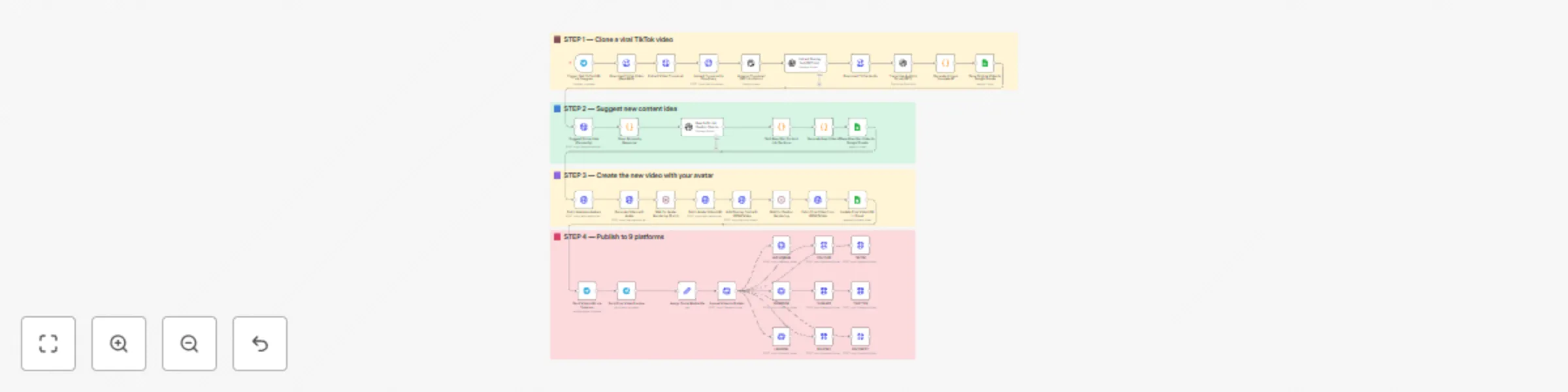
From a simple Telegram message with a TikTok link, the workflow:

  1. Downloads a TikTok video and extracts its thumbnail, audio, and caption
  2. Transcribes the audio and saves original text into Google Sheets
  3. Uses Perplexity AI to suggest a new content idea in the same niche
  4. Rewrites the script, caption, and overlay using GPT-4o
  5. Generates a new video with your avatar using Captions.ai
  6. Adds subtitles and overlay text with JSON2Video
  7. Saves metadata to Google Sheets for tracking
  8. Sends the final video to Telegram for preview
  9. Auto-publishes the video to Instagram, YouTube, TikTok, Facebook, LinkedIn, Threads, X (Twitter), Pinterest, and Bluesky via Blotato

Setup

  1. Connect your Telegram bot to the trigger node.
  2. Add your OpenAI, Perplexity, Cloudinary, Captions.ai, and Blotato API keys.
  3. Make sure your Google Sheet is ready with the appropriate columns.
  4. Replace the default avatar name in the Captions.ai node with yours.
  5. Fill in your social media account IDs in the "Assign Platform IDs" node.
  6. Test by sending a TikTok URL to your Telegram bot.

How to customize this workflow to your needs

  • Change avatar output style: adjust resolution, voice, or avatar ID.
  • Refine script structure: tweak GPT instructions for different tone/format.
  • Swap Perplexity with ChatGPT or Claude if needed.
  • Filter by platform: disable any Blotato nodes you don’t need.
  • Add approval step: insert a Telegram confirmation node before publishing.
  • Adjust subtitle style or overlay text font in JSON2Video.

📄 Documentation: Notion Guide


Need help customizing?

Contact me for consulting and support : Linkedin / Youtube

1.2 Logical Blocks

This catalog entry is organized from the workflow JSON. The node-level section below shows the executable blocks available for review before importing the template.

2. Block-by-Block Analysis

Block 1 - Assign Social Media IDs

Type / Role
n8n-nodes-base.set - set
Config choices
Version 3.4

Block 2 - Upload Video to Blotato

Type / Role
n8n-nodes-base.httpRequest - httpRequest
Config choices
Version 4.2

Block 3 - INSTAGRAM

Type / Role
n8n-nodes-base.httpRequest - httpRequest
Config choices
Version 4.2

Block 4 - YOUTUBE

Type / Role
n8n-nodes-base.httpRequest - httpRequest
Config choices
Version 4.2

Block 5 - TIKTOK

Type / Role
n8n-nodes-base.httpRequest - httpRequest
Config choices
Version 4.2

Block 6 - FACEBOOK

Type / Role
n8n-nodes-base.httpRequest - httpRequest
Config choices
Version 4.2

Block 7 - THREADS

Type / Role
n8n-nodes-base.httpRequest - httpRequest
Config choices
Version 4.2

Block 8 - TWETTER

Type / Role
n8n-nodes-base.httpRequest - httpRequest
Config choices
Version 4.2

Block 9 - LINKEDIN

Type / Role
n8n-nodes-base.httpRequest - httpRequest
Config choices
Version 4.2

Block 10 - BLUESKY

Type / Role
n8n-nodes-base.httpRequest - httpRequest
Config choices
Version 4.2

Block 11 - PINTEREST

Type / Role
n8n-nodes-base.httpRequest - httpRequest
Config choices
Version 4.2

Block 12 - Sticky Note

Type / Role
n8n-nodes-base.stickyNote - stickyNote
Config choices
Version 1

Block 13 - Sticky Note1

Type / Role
n8n-nodes-base.stickyNote - stickyNote
Config choices
Version 1

Block 14 - Sticky Note2

Type / Role
n8n-nodes-base.stickyNote - stickyNote
Config choices
Version 1

Block 15 - Sticky Note3

Type / Role
n8n-nodes-base.stickyNote - stickyNote
Config choices
Version 1

Block 16 - Trigger: Get TikTok URL via Telegram

Type / Role
n8n-nodes-base.telegramTrigger - telegramTrigger
Config choices
Version 1.1

Block 17 - Download TikTok Video (RapidAPI)

Type / Role
n8n-nodes-base.httpRequest - httpRequest
Config choices
Version 4.2

Block 18 - Extract Video Thumbnail

Type / Role
n8n-nodes-base.httpRequest - httpRequest
Config choices
Version 4.2

Block 19 - Upload Thumbnail to Cloudinary

Type / Role
n8n-nodes-base.httpRequest - httpRequest
Config choices
Version 4.2

Block 20 - Analyze Thumbnail (GPT-4o Vision)

Type / Role
@n8n/n8n-nodes-langchain.openAi - openAi
Config choices
Version 1.8

Block 21 - Extract Overlay Text (GPT-4o)

Type / Role
@n8n/n8n-nodes-langchain.openAi - openAi
Config choices
Version 1.8

Block 22 - Download TikTok Audio

Type / Role
n8n-nodes-base.httpRequest - httpRequest
Config choices
Version 4.2

Block 23 - Transcribe Audio to Script (GPT)

Type / Role
@n8n/n8n-nodes-langchain.openAi - openAi
Config choices
Version 1.8

Block 24 - Generate Unique Template ID

Type / Role
n8n-nodes-base.code - code
Config choices
Version 2

Showing the first 24 of 41 workflow blocks. Download the JSON for the full node graph.

3. Summary Table

Workflow Clone viral TikToks with AI avatars & auto-post to 9 platforms using Perplexity & Blotato
Complexity advanced
Nodes 41
Categories Content Creation, Multimodal AI
Author Dr. Firas
Published 16 May 2025

4. Reproducing the Workflow from Scratch

  1. 1. Download the workflow JSON

    Use the JSON export at /data/workflows/4110/4110.json as the source template for this automation.

  2. 2. Import the template into n8n

    Open n8n, import the downloaded JSON, and review each node before activating the workflow.

  3. 3. Configure credentials and variables

    Replace placeholder credentials, API keys, webhook URLs, account IDs, and environment-specific values with your own settings.

  4. 4. Test with sample data

    Run the workflow manually or in a staging workspace, inspect node output, and confirm downstream systems receive the expected data.

  5. 5. Activate and monitor

    Enable the workflow only after testing, then monitor executions, errors, and rate limits during the first production runs.

5. General Notes & Resources

Review imported nodes carefully before activation. This catalog entry is intended to help you inspect the workflow structure, understand required services, and find related templates faster.

Node names, credentials, schedules, webhook paths, and external service limits may need adjustment for your workspace.

Frequently asked questions

What does Clone viral TikToks with AI avatars & auto-post to 9 platforms using Perplexity & Blotato do?

Clone a viral TikTok with AI and auto post it to 9 platforms using Perplexity & Blotato Who is this for? This workflow is per...

What do I need before importing this workflow?

Review the workflow JSON, configure any required credentials in n8n, and test the automation in a safe workspace before using it in production.

Can I customize this workflow?

Yes. Use the block-by-block analysis and the downloadable JSON to inspect each node, then adjust credentials, prompts, schedules, filters, or destinations for your Content Creation, Multimodal AI use case.