Block 1 - 📌 START HERE
- Type / Role
- n8n-nodes-base.stickyNote - stickyNote
- Config choices
- Version 1


 Early Deal
This workflow is provided as-is. Please review and test before using in production.
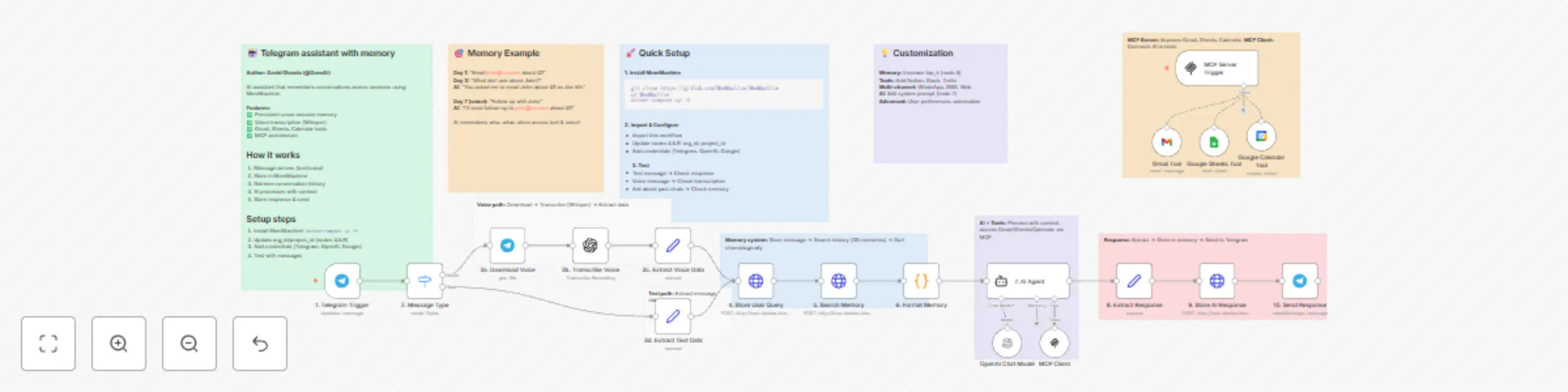
Build a Telegram assistant with MemMachine and voice support An AI assistant that NEVER forgets using MemMachine for persistent cross session memory, with voice transcription support and productivi...
n8n-nodes-base.stickynote, n8n-nodes-base.telegramtrigger, n8n-nodes-base.switch, n8n-nodes-base.telegram, @n8n/n8n-nodes-langchain.openai, n8n-nodes-base.set, n8n-nodes-base.httprequest, n8n-nodes-base.code
This workflow is cataloged by N8N Workflows and links back to its original n8n.io source page by David Olusola.
Original n8n.io sourceAn AI assistant that NEVER forgets using MemMachine for persistent cross-session memory, with voice transcription support and productivity tools.
⚠️ Important Deployment Note: This workflow is designed for self-hosted n8n instances. If you're using n8n Cloud, you'll need to deploy MemMachine to a cloud server and update the HTTP Request URLs in nodes 4, 5, and 9.
This workflow creates an intelligent personal assistant that maintains perfect memory across all conversations, whether you message today or weeks from now. It supports both text and voice messages, automatically transcribes voice using OpenAI Whisper, and provides tools for Gmail, Google Sheets, and Google Calendar.
Day 1 - Text Message:
Day 3 - Voice Message:
Day 7 - Text Message:
The AI remembers who John is, what you discussed, and when it happened - all without you having to repeat yourself!
For Text Messages:
For Voice Messages:
# Clone and start MemMachine
git clone https://github.com/MemMachine/MemMachine
cd MemMachine
docker-compose up -d

# Verify it's running
curl http://localhost:8080/health
This workflow supports two deployment scenarios:
Option 1: Self-Hosted n8n (Recommended)
docker-compose up -dhttp://host.docker.internal:8080 in HTTP Request nodes (if n8n in Docker)http://localhost:8080 (if n8n installed directly)Option 2: n8n Cloud
https://your-memmachine-domain.comImport this template into your n8n instance
Update MemMachine URLs (nodes 4, 5, 9):
http://host.docker.internal:8080http://localhost:8080https://your-memmachine-domain.comSet Organization IDs (nodes 4, 5, 9):
your-org-id to your organization nameyour-project-id to your project nameAdd Credentials:
In Node 5 (Search Memory), adjust:
"top_k": 30 // Increase for more context (costs more tokens)
In Node 7 (AI Agent), edit the system prompt to:
Connect additional n8n tool nodes to the AI Agent:
Create similar workflows for:
All channels can share the same memory by using consistent customer_email identifiers!
Every message is stored with:
{
  "content": "message text",
  "producer": "[email protected]",
  "role": "user" or "assistant",
  "metadata": {
    "customer_email": "[email protected]",
    "channel": "telegram",
    "username": "john_doe",
    "timestamp": "2026-01-07T12:00:00Z"
  }
}
Monthly estimate for 1,000 messages (mix of text/voice):
n8n Cloud: Can't connect to MemMachine
curl https://your-domain.com/healthSelf-Hosted: Can't connect to MemMachine
docker pscurl http://localhost:8080/healthorg_id and project_id match in nodes 4, 5, 9customer_email is consistentIf you're using n8n Cloud, follow these steps to deploy MemMachine:
1. Choose a Cloud Provider
2. Deploy MemMachine
For DigitalOcean/AWS/GCP:
# SSH into your server
ssh root@your-server-ip

# Install Docker
curl -fsSL https://get.docker.com -o get-docker.sh
sh get-docker.sh

# Clone and start MemMachine
git clone https://github.com/MemMachine/MemMachine
cd MemMachine
docker-compose up -d
3. Configure HTTPS (Required for n8n Cloud)
# Install Caddy for automatic HTTPS
apt install caddy

# Create Caddyfile
cat > /etc/caddy/Caddyfile << 'CADDYEND'
your-domain.com {
    reverse_proxy localhost:8080
}
CADDYEND

# Start Caddy
systemctl start caddy
4. Update Workflow
https://your-domain.com/api/v2/memories part is already in the path5. Security Best Practices
ufw allow 80,443/tcpMemMachine automatically extracts semantic facts from conversations for better recall of important information.
Memories are sorted by timestamp, not relevance, to maintain natural conversation flow.
Unlike session-based chatbots, this assistant remembers across days, weeks, or months.
Seamlessly handles both text and voice, storing transcriptions alongside text messages.
Author: David Olusola
Version: 1.0.0
Created: January 2026
Found a bug or have an improvement? Contribute to the template or share your modifications with the n8n community!
Start building your perfect-memory AI assistant today! 🚀
This catalog entry is organized from the workflow JSON. The node-level section below shows the executable blocks available for review before importing the template.
Showing the first 24 of 29 workflow blocks. Download the JSON for the full node graph.
| Workflow | Build a Telegram AI assistant with MemMachine, OpenAI, and voice support |
|---|---|
| Complexity | advanced |
| Nodes | 29 |
| Categories | Personal Productivity, AI Chatbot |
| Author | David Olusola |
| Published | 08 Jan 2026 |
Use the JSON export at /data/workflows/12568/12568.json as the source template for this automation.
Open n8n, import the downloaded JSON, and review each node before activating the workflow.
Replace placeholder credentials, API keys, webhook URLs, account IDs, and environment-specific values with your own settings.
Run the workflow manually or in a staging workspace, inspect node output, and confirm downstream systems receive the expected data.
Enable the workflow only after testing, then monitor executions, errors, and rate limits during the first production runs.
Review imported nodes carefully before activation. This catalog entry is intended to help you inspect the workflow structure, understand required services, and find related templates faster.
Node names, credentials, schedules, webhook paths, and external service limits may need adjustment for your workspace.
Build a Telegram assistant with MemMachine and voice support An AI assistant that NEVER forgets using MemMachine for persistent cross session memory, with voice transcription support and productivi...
Review the workflow JSON, configure any required credentials in n8n, and test the automation in a safe workspace before using it in production.
Yes. Use the block-by-block analysis and the downloadable JSON to inspect each node, then adjust credentials, prompts, schedules, filters, or destinations for your Personal Productivity, AI Chatbot use case.