Build a ServiceNow knowledge chatbot with OpenAI and Qdrant RAG

Workflow preview

Workflow preview
100%
Build a ServiceNow knowledge chatbot with OpenAI and Qdrant RAG preview
Open on n8n.io

Important notice

This workflow is provided as-is. Please review and test before using in production.

1. Workflow Overview

1. Data Ingestion Workflow (Left Panel – Pink Section) This part collects data from the ServiceNow Knowledge Article table, processes it into embeddings, and stores it in Qdrant. Steps: 1. Trigger:...

Best for

  • Content Creation automation workflows
  • Multimodal AI automation workflows
  • intermediate n8n builders looking for reusable templates

Tools used

@n8n/n8n-nodes-langchain.vectorstoreqdrant, @n8n/n8n-nodes-langchain.documentdefaultdataloader, @n8n/n8n-nodes-langchain.textsplitterrecursivecharactertextsplitter, n8n-nodes-base.stickynote, @n8n/n8n-nodes-langchain.chattrigger, @n8n/n8n-nodes-langchain.agent, @n8n/n8n-nodes-langchain.memorybufferwindow, @n8n/n8n-nodes-langchain.embeddingsopenai

Source and attribution

This workflow is cataloged by N8N Workflows and links back to its original n8n.io source page by Tushar Mishra.

Original n8n.io source

1.1 Workflow description

Title
Build a ServiceNow knowledge chatbot with OpenAI and Qdrant RAG
Workflow name
Build a ServiceNow knowledge chatbot with OpenAI and Qdrant RAG

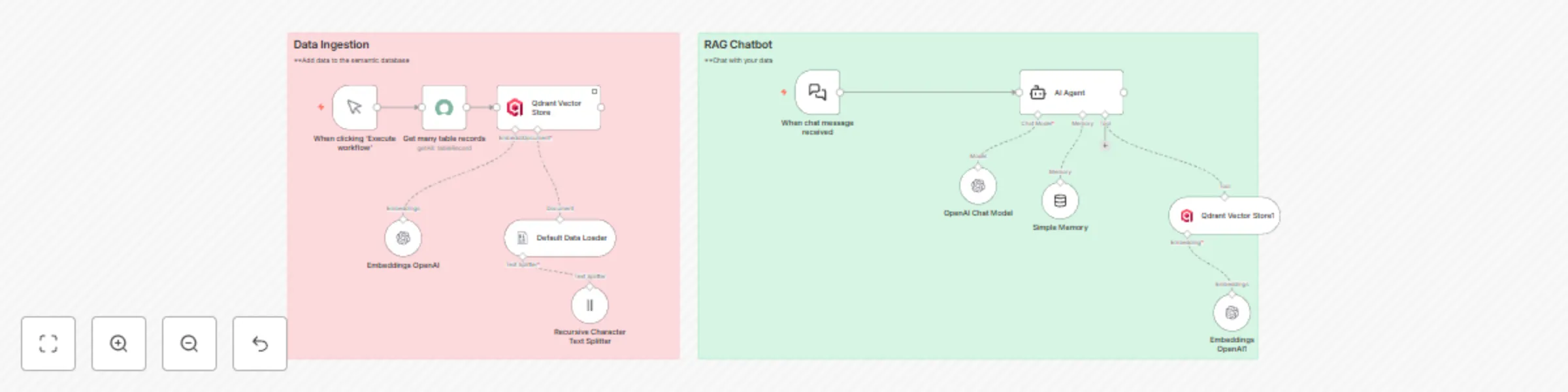
1. Data Ingestion Workflow (Left Panel – Pink Section)

This part collects data from the ServiceNow Knowledge Article table, processes it into embeddings, and stores it in Qdrant.

Steps:
  1. Trigger: When clicking ‘Execute workflow’

    • The workflow starts manually when you click Execute workflow in n8n.
  2. Get Many Table Records

    • Fetches multiple records from the ServiceNow Knowledge Article table.
    • Each record typically contains knowledge article content that needs to be indexed.
  3. Default Data Loader

    • Takes the fetched data and structures it into a format suitable for text splitting and embedding generation.
  4. Recursive Character Text Splitter

    • Splits large text (e.g., long knowledge articles) into smaller, manageable chunks for embeddings.
    • This step ensures that each text chunk can be properly processed by the embedding model.
  5. Embeddings OpenAI

    • Uses OpenAI’s Embeddings API to convert each text chunk into a high-dimensional vector representation.
    • These embeddings are essential for semantic search in the vector database.
  6. Qdrant Vector Store

    • Stores the generated embeddings along with metadata (e.g., article ID, title) in the Qdrant vector database.
    • This database will later be used for similarity searches during chatbot interactions.

2. RAG Chatbot Workflow (Right Panel – Green Section)

This section powers the Retrieval-Augmented Generation (RAG) chatbot that retrieves relevant information from Qdrant and responds intelligently.

Steps:
  1. Trigger: When chat message received

    • Starts when a user sends a chat message to the system.
  2. AI Agent

    • Acts as the orchestrator, combining memory, tools, and LLM reasoning.
    • Connects to the OpenAI Chat Model and Qdrant Vector Store.
  3. OpenAI Chat Model

    • Processes user messages and generates responses, enriched with context retrieved from Qdrant.
  4. Simple Memory

    • Stores conversational history or context to ensure continuity in multi-turn conversations.
  5. Qdrant Vector Store1

    • Performs a similarity search on stored embeddings using the user’s query.
    • Retrieves the most relevant knowledge article chunks for the chatbot.
  6. Embeddings OpenAI

    • Converts user query into embeddings for vector search in Qdrant.

1.2 Logical Blocks

This catalog entry is organized from the workflow JSON. The node-level section below shows the executable blocks available for review before importing the template.

2. Block-by-Block Analysis

Block 1 - Qdrant Vector Store

Type / Role
@n8n/n8n-nodes-langchain.vectorStoreQdrant - vectorStoreQdrant
Config choices
Version 1.2

Block 2 - Default Data Loader

Type / Role
@n8n/n8n-nodes-langchain.documentDefaultDataLoader - documentDefaultDataLoader
Config choices
Version 1

Block 3 - Recursive Character Text Splitter

Type / Role
@n8n/n8n-nodes-langchain.textSplitterRecursiveCharacterTextSplitter - textSplitterRecursiveCharacterTextSplitter
Config choices
Version 1

Block 4 - Sticky Note

Type / Role
n8n-nodes-base.stickyNote - stickyNote
Config choices
Version 1

Block 5 - When chat message received

Type / Role
@n8n/n8n-nodes-langchain.chatTrigger - chatTrigger
Config choices
Version 1.1

Block 6 - AI Agent

Type / Role
@n8n/n8n-nodes-langchain.agent - agent
Config choices
Version 2

Block 7 - Simple Memory

Type / Role
@n8n/n8n-nodes-langchain.memoryBufferWindow - memoryBufferWindow
Config choices
Version 1.3

Block 8 - Qdrant Vector Store1

Type / Role
@n8n/n8n-nodes-langchain.vectorStoreQdrant - vectorStoreQdrant
Config choices
Version 1.2

Block 9 - Sticky Note1

Type / Role
n8n-nodes-base.stickyNote - stickyNote
Config choices
Version 1

Block 10 - Embeddings OpenAI

Type / Role
@n8n/n8n-nodes-langchain.embeddingsOpenAi - embeddingsOpenAi
Config choices
Version 1.2

Block 11 - OpenAI Chat Model

Type / Role
@n8n/n8n-nodes-langchain.lmChatOpenAi - lmChatOpenAi
Config choices
Version 1.2

Block 12 - Embeddings OpenAI1

Type / Role
@n8n/n8n-nodes-langchain.embeddingsOpenAi - embeddingsOpenAi
Config choices
Version 1.2

Block 13 - Get many table records

Type / Role
n8n-nodes-base.serviceNow - serviceNow
Config choices
Version 1

Block 14 - When clicking ‘Execute workflow’

Type / Role
n8n-nodes-base.manualTrigger - manualTrigger
Config choices
Version 1

3. Summary Table

Workflow Build a ServiceNow knowledge chatbot with OpenAI and Qdrant RAG
Complexity intermediate
Nodes 14
Categories Content Creation, Multimodal AI
Author Tushar Mishra
Published 20 Jul 2025

4. Reproducing the Workflow from Scratch

  1. 1. Download the workflow JSON

    Use the JSON export at /data/workflows/6206/6206.json as the source template for this automation.

  2. 2. Import the template into n8n

    Open n8n, import the downloaded JSON, and review each node before activating the workflow.

  3. 3. Configure credentials and variables

    Replace placeholder credentials, API keys, webhook URLs, account IDs, and environment-specific values with your own settings.

  4. 4. Test with sample data

    Run the workflow manually or in a staging workspace, inspect node output, and confirm downstream systems receive the expected data.

  5. 5. Activate and monitor

    Enable the workflow only after testing, then monitor executions, errors, and rate limits during the first production runs.

5. General Notes & Resources

Review imported nodes carefully before activation. This catalog entry is intended to help you inspect the workflow structure, understand required services, and find related templates faster.

Node names, credentials, schedules, webhook paths, and external service limits may need adjustment for your workspace.

Frequently asked questions

What does Build a ServiceNow knowledge chatbot with OpenAI and Qdrant RAG do?

1. Data Ingestion Workflow (Left Panel – Pink Section) This part collects data from the ServiceNow Knowledge Article table, processes it into embeddings, and stores it in Qdrant. Steps: 1. Trigger:...

What do I need before importing this workflow?

Review the workflow JSON, configure any required credentials in n8n, and test the automation in a safe workspace before using it in production.

Can I customize this workflow?

Yes. Use the block-by-block analysis and the downloadable JSON to inspect each node, then adjust credentials, prompts, schedules, filters, or destinations for your Content Creation, Multimodal AI use case.