Breakdown documents into study notes using templating MistralAI and Qdrant

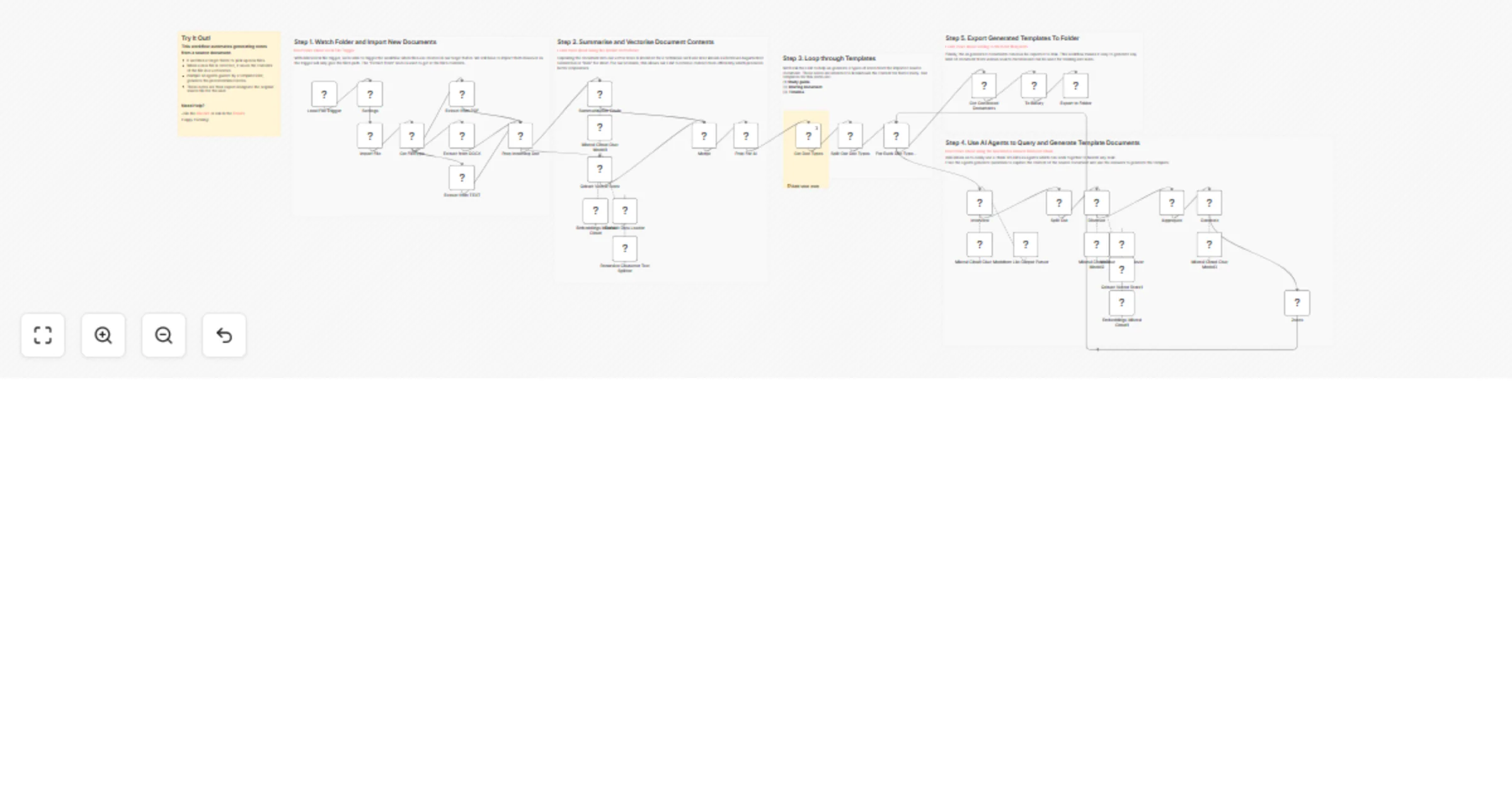
Workflow preview

Workflow preview
100%
Breakdown documents into study notes using templating MistralAI and Qdrant preview
Open on n8n.io

Important notice

This workflow is provided as-is. Please review and test before using in production.

1. Workflow Overview

This n8n workflow takes in a document such as a research paper, marketing or sales deck or company filings, and breaks them down into 3 templates: study guide, briefing doc and timeline. These temp...

Best for

  • Document Extraction automation workflows
  • AI RAG automation workflows
  • advanced n8n builders looking for reusable templates

Tools used

n8n-nodes-base.localfiletrigger, @n8n/n8n-nodes-langchain.documentdefaultdataloader, @n8n/n8n-nodes-langchain.textsplitterrecursivecharactertextsplitter, @n8n/n8n-nodes-langchain.embeddingsmistralcloud, @n8n/n8n-nodes-langchain.lmchatmistralcloud, n8n-nodes-base.set, n8n-nodes-base.merge, n8n-nodes-base.splitout

Source and attribution

This workflow is cataloged by N8N Workflows and links back to its original n8n.io source page by Jimleuk.

Original n8n.io source

1.1 Workflow description

Title
Breakdown documents into study notes using templating MistralAI and Qdrant
Workflow name
Breakdown documents into study notes using templating MistralAI and Qdrant

This n8n workflow takes in a document such as a research paper, marketing or sales deck or company filings, and breaks them down into 3 templates: study guide, briefing doc and timeline.

These templates are designed to help a student, associate or clerk quickly summarise, learn and understand the contents to be more productive.

  • Study guide - a short quiz of questions and answered generated by the AI Agent using the contents of the document.
  • Briefing Doc - key information and insights are extracted by the AI into a digestable form.
  • Timeline - key events, durations and people are identified and listed into a simple to understand timeline by the AI

How it works

  • A local file trigger watches a local network directory for new documents.
  • New documents are imported into the workflow, its contents extracted and vectorised into a Qdrant vector store to build a mini-knowledgebase.
  • The document then passes through a series of template generating prompts where the AI will perform "research" on the knowledgebase to generate the template contents.
  • Generated study guide, briefing and timeline documents are exported to a designated folder for the user.

Requirements

  • Self-hosted version of n8n.
  • Qdrant instance for knowledgebase.
  • Mistral.ai account for embeddings and AI model.

Customising your workflow

Try adding your own templates or adjusting the existing templates to suit your unique use-case. Anything is quite possible and limited only by your imagination!

Want to go fully local?

A version of this workflow is available which uses Ollama instead. You can download this template here: https://drive.google.com/file/d/1VV5R2nW-IhVcFP_k8uEks4LsLRZrHSNG/view?usp=sharing

1.2 Logical Blocks

This catalog entry is organized from the workflow JSON. The node-level section below shows the executable blocks available for review before importing the template.

2. Block-by-Block Analysis

Block 1 - Local File Trigger

Type / Role
n8n-nodes-base.localFileTrigger - localFileTrigger
Config choices
Version 1

Block 2 - Default Data Loader

Type / Role
@n8n/n8n-nodes-langchain.documentDefaultDataLoader - documentDefaultDataLoader
Config choices
Version 1

Block 3 - Recursive Character Text Splitter

Type / Role
@n8n/n8n-nodes-langchain.textSplitterRecursiveCharacterTextSplitter - textSplitterRecursiveCharacterTextSplitter
Config choices
Version 1

Block 4 - Embeddings Mistral Cloud

Type / Role
@n8n/n8n-nodes-langchain.embeddingsMistralCloud - embeddingsMistralCloud
Config choices
Version 1

Block 5 - Mistral Cloud Chat Model

Type / Role
@n8n/n8n-nodes-langchain.lmChatMistralCloud - lmChatMistralCloud
Config choices
Version 1

Block 6 - Mistral Cloud Chat Model1

Type / Role
@n8n/n8n-nodes-langchain.lmChatMistralCloud - lmChatMistralCloud
Config choices
Version 1

Block 7 - Prep Incoming Doc

Type / Role
n8n-nodes-base.set - set
Config choices
Version 3.3

Block 8 - Settings

Type / Role
n8n-nodes-base.set - set
Config choices
Version 3.3

Block 9 - Merge

Type / Role
n8n-nodes-base.merge - merge
Config choices
Version 2.1

Block 10 - Get Doc Types

Type / Role
n8n-nodes-base.set - set
Config choices
Version 3.3

Block 11 - Split Out Doc Types

Type / Role
n8n-nodes-base.splitOut - splitOut
Config choices
Version 1

Block 12 - For Each Doc Type...

Type / Role
n8n-nodes-base.splitInBatches - splitInBatches
Config choices
Version 3

Block 13 - Item List Output Parser

Type / Role
@n8n/n8n-nodes-langchain.outputParserItemList - outputParserItemList
Config choices
Version 1

Block 14 - Vector Store Retriever

Type / Role
@n8n/n8n-nodes-langchain.retrieverVectorStore - retrieverVectorStore
Config choices
Version 1

Block 15 - Embeddings Mistral Cloud1

Type / Role
@n8n/n8n-nodes-langchain.embeddingsMistralCloud - embeddingsMistralCloud
Config choices
Version 1

Block 16 - Qdrant Vector Store1

Type / Role
@n8n/n8n-nodes-langchain.vectorStoreQdrant - vectorStoreQdrant
Config choices
Version 1

Block 17 - Mistral Cloud Chat Model2

Type / Role
@n8n/n8n-nodes-langchain.lmChatMistralCloud - lmChatMistralCloud
Config choices
Version 1

Block 18 - Split Out

Type / Role
n8n-nodes-base.splitOut - splitOut
Config choices
Version 1

Block 19 - Aggregate

Type / Role
n8n-nodes-base.aggregate - aggregate
Config choices
Version 1

Block 20 - Mistral Cloud Chat Model3

Type / Role
@n8n/n8n-nodes-langchain.lmChatMistralCloud - lmChatMistralCloud
Config choices
Version 1

Block 21 - Discover

Type / Role
@n8n/n8n-nodes-langchain.chainRetrievalQa - chainRetrievalQa
Config choices
Version 1.3

Block 22 - 2secs

Type / Role
n8n-nodes-base.wait - wait
Config choices
Version 1.1

Block 23 - Get Generated Documents

Type / Role
n8n-nodes-base.set - set
Config choices
Version 3.3

Block 24 - Generate

Type / Role
@n8n/n8n-nodes-langchain.chainLlm - chainLlm
Config choices
Version 1.4

Showing the first 24 of 42 workflow blocks. Download the JSON for the full node graph.

3. Summary Table

Workflow Breakdown documents into study notes using templating MistralAI and Qdrant
Complexity advanced
Nodes 42
Categories Document Extraction, AI RAG
Author Jimleuk
Published 11 Jul 2024

4. Reproducing the Workflow from Scratch

  1. 1. Download the workflow JSON

    Use the JSON export at /data/workflows/2339/2339.json as the source template for this automation.

  2. 2. Import the template into n8n

    Open n8n, import the downloaded JSON, and review each node before activating the workflow.

  3. 3. Configure credentials and variables

    Replace placeholder credentials, API keys, webhook URLs, account IDs, and environment-specific values with your own settings.

  4. 4. Test with sample data

    Run the workflow manually or in a staging workspace, inspect node output, and confirm downstream systems receive the expected data.

  5. 5. Activate and monitor

    Enable the workflow only after testing, then monitor executions, errors, and rate limits during the first production runs.

5. General Notes & Resources

Review imported nodes carefully before activation. This catalog entry is intended to help you inspect the workflow structure, understand required services, and find related templates faster.

Node names, credentials, schedules, webhook paths, and external service limits may need adjustment for your workspace.

Frequently asked questions

What does Breakdown documents into study notes using templating MistralAI and Qdrant do?

This n8n workflow takes in a document such as a research paper, marketing or sales deck or company filings, and breaks them down into 3 templates: study guide, briefing doc and timeline. These temp...

What do I need before importing this workflow?

Review the workflow JSON, configure any required credentials in n8n, and test the automation in a safe workspace before using it in production.

Can I customize this workflow?

Yes. Use the block-by-block analysis and the downloadable JSON to inspect each node, then adjust credentials, prompts, schedules, filters, or destinations for your Document Extraction, AI RAG use case.