Block 1 - When Executed by Another Workflow
- Type / Role
- n8n-nodes-base.executeWorkflowTrigger - executeWorkflowTrigger
- Config choices
- Version 1.1


 Early Deal
This workflow is provided as-is. Please review and test before using in production.
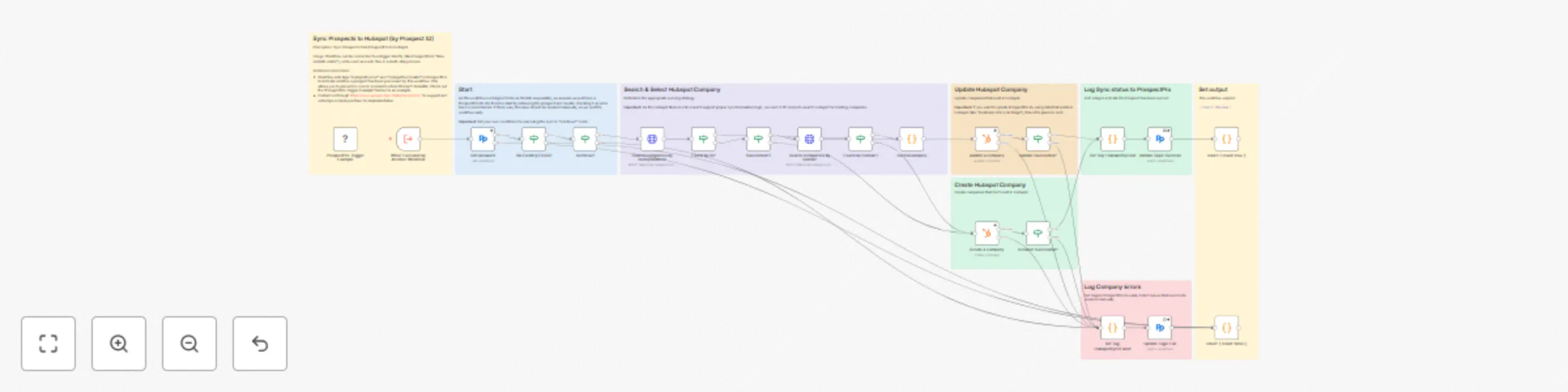
This template syncs prospects from ProspectPro into HubSpot. It checks if a company already exists in HubSpot (by ProspectPro ID or domain), then updates the record or creates a new one. Sync resul...
n8n-nodes-base.executeworkflowtrigger, @bedrijfsdatanl/n8n-nodes-prospectpro.prospectpro, n8n-nodes-base.stickynote, n8n-nodes-base.if, n8n-nodes-base.httprequest, n8n-nodes-base.code, n8n-nodes-base.hubspot, @bedrijfsdatanl/n8n-nodes-prospectpro.prospectprotrigger
This workflow is cataloged by N8N Workflows and links back to its original n8n.io source page by Olivier.
Original n8n.io sourceThis template syncs prospects from ProspectPro into HubSpot. It checks if a company already exists in HubSpot (by ProspectPro ID or domain), then updates the record or creates a new one. Sync results are logged back in ProspectPro with tags to prevent duplicates and mark errors, ensuring reliable and repeatable integrations.
Automatically sync ProspectPro prospects to HubSpot companies
Smart search logic: match by ProspectPro ID first, then by domain
Creates new HubSpot companies when no match is found
Updates existing HubSpot companies with latest ProspectPro data
Logs sync results back into ProspectPro with tags (HubspotSynced, HubspotSyncFailed)
Extendable and modular: use as a trigger workflow or callable sub-flow
n8n instance or cloud workspace
Install the ProspectPro Verified Community Node
ProspectPro account & API credentials (14-day free trial)
HubSpot account with OAuth2 app and API credentials
Import the template and set your credentials (ProspectPro, HubSpot).
Connect to a trigger (e.g., ProspectPro "New website visitor") or call as a sub-workflow.
Add a propery to Hubspot for the ProspectPro ID if you don't already have one
Adjust sync logic in the "Continue?"-node and HubSpot fields to match your setup.
Optional: extend error handling, add Slack/CRM notifications, or sync back HubSpot data into ProspectPro.
Prevents re-processing of failed syncs using the HubspotSyncFailed tag
Error branches included for failed updates/creates
Manual resolution required if sync errors persist
Run with a ProspectPro ID of a company with a known domain
Check HubSpot for creation or update of the company record
Verify updated tags (HubspotSynced / HubspotSyncFailed) in ProspectPro
ProspectPro is a B2B Prospecting Platform for Dutch SMEs. It helps sales teams identify prospects, track website visitors, and streamline sales without a full CRM.
Website: https://www.prospectpro.nl Platform: https://mijn.prospectpro.nl API docs: https://www.docs.bedrijfsdata.nl Support: https://www.prospectpro.nl/klantenservice
Support hours: Monday–Friday, 09:00–17:00 CET
HubSpot is a leading CRM platform offering marketing, sales, and customer service tools. It helps companies manage contacts, automate workflows, and grow their customer base.
Website: https://www.hubspot.com Developer Docs: https://developers.hubspot.com
This catalog entry is organized from the workflow JSON. The node-level section below shows the executable blocks available for review before importing the template.
Showing the first 24 of 29 workflow blocks. Download the JSON for the full node graph.
| Workflow | Bidirectional company sync between ProspectPro and HubSpot with status tracking |
|---|---|
| Complexity | advanced |
| Nodes | 29 |
| Categories | CRM |
| Author | Olivier |
| Published | 11 Sept 2025 |
Use the JSON export at /data/workflows/8471/8471.json as the source template for this automation.
Open n8n, import the downloaded JSON, and review each node before activating the workflow.
Replace placeholder credentials, API keys, webhook URLs, account IDs, and environment-specific values with your own settings.
Run the workflow manually or in a staging workspace, inspect node output, and confirm downstream systems receive the expected data.
Enable the workflow only after testing, then monitor executions, errors, and rate limits during the first production runs.
Review imported nodes carefully before activation. This catalog entry is intended to help you inspect the workflow structure, understand required services, and find related templates faster.
Node names, credentials, schedules, webhook paths, and external service limits may need adjustment for your workspace.
This template syncs prospects from ProspectPro into HubSpot. It checks if a company already exists in HubSpot (by ProspectPro ID or domain), then updates the record or creates a new one. Sync resul...
Review the workflow JSON, configure any required credentials in n8n, and test the automation in a safe workspace before using it in production.
Yes. Use the block-by-block analysis and the downloadable JSON to inspect each node, then adjust credentials, prompts, schedules, filters, or destinations for your CRM use case.