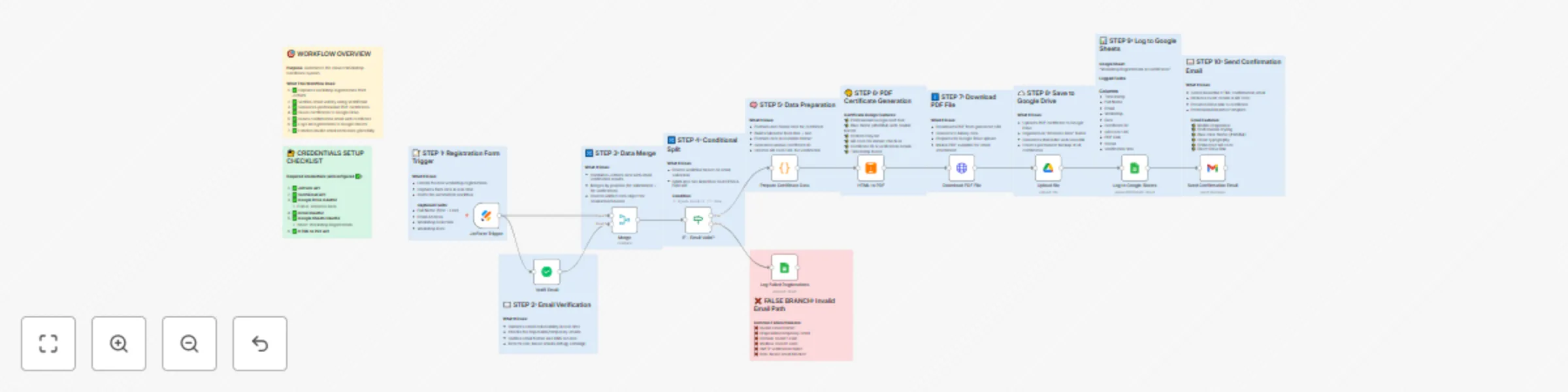
Automated workshop certificate system with JotForm, email verification & Google Workspace

Workflow preview

Workflow preview
100%
Automated workshop certificate system with JotForm, email verification & Google Workspace preview
Open on n8n.io

Important notice

This workflow is provided as-is. Please review and test before using in production.

1. Workflow Overview

Workshop Certificate Pre Issuance System Description Transform your event registration process with this comprehensive automation that eliminates manual certificate creation and ensures only veri...

Best for

  • Document Extraction automation workflows
  • advanced n8n builders looking for reusable templates

Tools used

n8n-nodes-base.if, n8n-nodes-base.code, n8n-nodes-base.httprequest, n8n-nodes-base.gmail, n8n-nodes-base.googlesheets, n8n-nodes-base.jotformtrigger, n8n-nodes-verifiemail.verifiemail, n8n-nodes-base.merge

Source and attribution

This workflow is cataloged by N8N Workflows and links back to its original n8n.io source page by Jitesh Dugar.

Original n8n.io source

1.1 Workflow description

Title
Automated workshop certificate system with JotForm, email verification & Google Workspace
Workflow name
Automated workshop certificate system with JotForm, email verification & Google Workspace

Workshop Certificate Pre-Issuance System

🎯Description

Transform your event registration process with this comprehensive automation that eliminates manual certificate creation and ensures only verified attendees receive credentials.

✨ What This Workflow Does

This powerful automation takes workshop/event registrations from Jotform and:

  1. Validates Email Addresses - Real-time verification using VerifiEmail API to prevent bounced emails and spam registrations
  2. Generates Professional PDF Certificates - Creates beautifully designed certificates with attendee name, event details, and unique QR code
  3. Saves to Google Drive - Automatically organizes all certificates in a dedicated folder with searchable filenames
  4. Sends Confirmation Emails - Delivers professional HTML emails with embedded certificate preview and download link
  5. Maintains Complete Records - Logs all successful and failed registrations in Google Sheets for reporting and follow-up

🎯 Perfect For

  • Workshop Organizers - Pre-issue attendance confirmations
  • Training Companies - Automate enrollment certificates
  • Conference Managers - Streamline attendee credentialing
  • Event Planners - Reduce check-in time with QR codes
  • Educational Institutions - Issue course registration confirmations
  • Webinar Hosts - Send instant confirmation certificates

πŸ’‘ Key Features

πŸ”’ Email Verification

  • Validates deliverability before issuing certificates
  • Detects disposable/temporary emails
  • Prevents spam and fake registrations
  • Reduces bounce rates to near-zero

🎨 Beautiful PDF Certificates

  • Professional Georgia serif design
  • Customizable colors and branding
  • Unique QR code for event check-in
  • Unique certificate ID for tracking
  • Print-ready A4 format

πŸ“§ Professional Email Delivery

  • Mobile-responsive HTML design
  • Embedded QR code preview
  • Direct link to Google Drive PDF
  • Branded confirmation message
  • Event details and instructions

πŸ“Š Complete Tracking

  • All registrations logged in Google Sheets
  • Separate tracking for failed validations
  • Export data for check-in lists
  • Real-time registration counts
  • Deduplication by email

⚑ Lightning Fast

  • Average execution: 15-30 seconds
  • Instant delivery after registration
  • No manual intervention required
  • Scales automatically

πŸ”§ Technical Highlights

  • Conditional Logic - Smart routing based on email validity
  • Data Transformation - Clean formatting of form data
  • Error Handling - Graceful handling of invalid emails
  • Merge Operations - Combines form data with verification results
  • Dynamic QR Codes - Generated with verification URLs
  • Secure Storage - Certificates backed up in Google Drive

πŸ“¦ What You'll Need

Required Services:

  1. Jotform - For registration forms
  2. VerifiEmail API - Email verification service
  3. Google Account - For Gmail, Drive, and Sheets
  4. HTMLCSStoPDF - PDF generation service

Estimated Setup Time: 20 minutes

πŸš€ Use Cases

Workshop Series

  • Issue certificates immediately after registration
  • Reduce no-shows with professional confirmation
  • Easy check-in with QR code scanning

Virtual Events

  • Instant confirmation for webinar attendees
  • Digital certificates for participants
  • Automated follow-up communication

Training Programs

  • Pre-enrollment certificates
  • Attendance confirmations
  • Course registration verification

Conferences & Meetups

  • Early bird confirmation certificates
  • Attendee badge preparation
  • Venue capacity management

πŸ“ˆ Benefits

βœ… Save Hours of Manual Work - No more creating certificates one by one βœ… Increase Attendance - Professional confirmations boost show-up rates βœ… Prevent Fraud - Email verification stops fake registrations βœ… Improve Experience - Instant delivery delights attendees βœ… Stay Organized - All data tracked in one central location βœ… Scale Effortlessly - Handle 10 or 10,000 registrations the same way

🎨 Customization Options

The workflow is fully customizable:

  • Certificate Design - Modify HTML template colors, fonts, layout
  • Email Template - Adjust branding and messaging
  • Form Fields - Adapt to your specific registration needs
  • QR Code Content - Customize verification data
  • Storage Location - Choose different Drive folders
  • Tracking Fields - Add custom data to Google Sheets

πŸ” Privacy & Security

  • Email addresses verified before certificate issuance
  • Secure OAuth2 authentication for all Google services
  • No sensitive data stored in workflow
  • GDPR-compliant data handling
  • Certificates stored in private Google Drive

πŸ“± Mobile Responsive

  • Professional emails display perfectly on all devices
  • QR codes optimized for mobile scanning
  • Certificates viewable on phones and tablets
  • Download links work seamlessly everywhere

πŸ† Why This Workflow Stands Out

Unlike basic registration confirmations, this workflow:

  • Validates emails before generating certificates (saves resources)
  • Creates actual PDF documents (not just email confirmations)
  • Includes QR codes for event check-in (reduces venue queues)
  • Maintains dual tracking (successful + failed attempts)
  • Provides shareable Drive links (easy resending)
  • Works 24/7 automatically (no manual intervention)

πŸŽ“ Learning Opportunities

This workflow demonstrates:

  • Conditional branching based on API responses
  • Data merging from multiple sources
  • HTML to PDF conversion
  • Dynamic content generation
  • Error handling and logging
  • Professional email template design
  • QR code integration
  • Cloud storage automation

πŸ’¬ Support & Customization

Perfect for n8n beginners and experts alike:

  • Detailed sticky notes explain every step
  • Clear node naming makes it easy to understand
  • Modular design allows easy modifications
  • Well-documented code in function nodes
  • Example data included for testing

🌟 Get Started

  1. Import the workflow JSON
  2. Connect your credentials (Jotform, VerifiEmail, Google)
  3. Create your registration form
  4. Customize the certificate design
  5. Test with a sample registration
  6. Activate and watch it work!

Tags: #events #certificates #automation #email-verification #pdf-generation #registration #workshops #training #conferences #qr-codes

Category: Marketing & Events

Difficulty: Intermediate

1.2 Logical Blocks

This catalog entry is organized from the workflow JSON. The node-level section below shows the executable blocks available for review before importing the template.

2. Block-by-Block Analysis

Block 1 - IF - Email Valid?

Type / Role
n8n-nodes-base.if - if
Config choices
Version 1

Block 2 - Prepare Certificate Data

Type / Role
n8n-nodes-base.code - code
Config choices
Version 2

Block 3 - Download PDF File

Type / Role
n8n-nodes-base.httpRequest - httpRequest
Config choices
Version 4.2

Block 4 - Send Confirmation Email

Type / Role
n8n-nodes-base.gmail - gmail
Config choices
Version 2.1

Block 5 - Log to Google Sheets

Type / Role
n8n-nodes-base.googleSheets - googleSheets
Config choices
Version 4.4

Block 6 - Log Failed Registrations

Type / Role
n8n-nodes-base.googleSheets - googleSheets
Config choices
Version 4.4

Block 7 - JotForm Trigger

Type / Role
n8n-nodes-base.jotFormTrigger - jotFormTrigger
Config choices
Version 1

Block 8 - Verifi Email

Type / Role
n8n-nodes-verifiemail.verifiEmail - verifiEmail
Config choices
Version 1

Block 9 - Merge

Type / Role
n8n-nodes-base.merge - merge
Config choices
Version 3.2

Block 10 - HTML to PDF

Type / Role
n8n-nodes-htmlcsstopdf.htmlcsstopdf - htmlcsstopdf
Config choices
Version 1

Block 11 - Upload file

Type / Role
n8n-nodes-base.googleDrive - googleDrive
Config choices
Version 3

Block 12 - Sticky Note

Type / Role
n8n-nodes-base.stickyNote - stickyNote
Config choices
Version 1

Block 13 - Sticky Note - Step 3 Merge

Type / Role
n8n-nodes-base.stickyNote - stickyNote
Config choices
Version 1

Block 14 - Sticky Note - Step 5 Data Prep

Type / Role
n8n-nodes-base.stickyNote - stickyNote
Config choices
Version 1

Block 15 - Sticky Note - Step 6 PDF Generation

Type / Role
n8n-nodes-base.stickyNote - stickyNote
Config choices
Version 1

Block 16 - Sticky Note - Step 7 Download PDF

Type / Role
n8n-nodes-base.stickyNote - stickyNote
Config choices
Version 1

Block 17 - Sticky Note - Step 8 Google Drive

Type / Role
n8n-nodes-base.stickyNote - stickyNote
Config choices
Version 1

Block 18 - Sticky Note - Step 9 Google Sheets

Type / Role
n8n-nodes-base.stickyNote - stickyNote
Config choices
Version 1

Block 19 - Sticky Note - Step 10 Gmail

Type / Role
n8n-nodes-base.stickyNote - stickyNote
Config choices
Version 1

Block 20 - Sticky Note - False Branch

Type / Role
n8n-nodes-base.stickyNote - stickyNote
Config choices
Version 1

Block 21 - Sticky Note - Credentials Status

Type / Role
n8n-nodes-base.stickyNote - stickyNote
Config choices
Version 1

Block 22 - Sticky Note - Step 1 Jotform

Type / Role
n8n-nodes-base.stickyNote - stickyNote
Config choices
Version 1

Block 23 - Sticky Note - Step 2 Email Verification

Type / Role
n8n-nodes-base.stickyNote - stickyNote
Config choices
Version 1

Block 24 - Sticky Note - Step 4 IF Condition

Type / Role
n8n-nodes-base.stickyNote - stickyNote
Config choices
Version 1

3. Summary Table

Workflow Automated workshop certificate system with JotForm, email verification & Google Workspace
Complexity advanced
Nodes 24
Categories Document Extraction
Author Jitesh Dugar
Published 31 Oct 2025

4. Reproducing the Workflow from Scratch

  1. 1. Download the workflow JSON

    Use the JSON export at /data/workflows/10397/10397.json as the source template for this automation.

  2. 2. Import the template into n8n

    Open n8n, import the downloaded JSON, and review each node before activating the workflow.

  3. 3. Configure credentials and variables

    Replace placeholder credentials, API keys, webhook URLs, account IDs, and environment-specific values with your own settings.

  4. 4. Test with sample data

    Run the workflow manually or in a staging workspace, inspect node output, and confirm downstream systems receive the expected data.

  5. 5. Activate and monitor

    Enable the workflow only after testing, then monitor executions, errors, and rate limits during the first production runs.

5. General Notes & Resources

Review imported nodes carefully before activation. This catalog entry is intended to help you inspect the workflow structure, understand required services, and find related templates faster.

Node names, credentials, schedules, webhook paths, and external service limits may need adjustment for your workspace.

Frequently asked questions

What does Automated workshop certificate system with JotForm, email verification & Google Workspace do?

Workshop Certificate Pre Issuance System Description Transform your event registration process with this comprehensive automation that eliminates manual certificate creation and ensures only veri...

What do I need before importing this workflow?

Review the workflow JSON, configure any required credentials in n8n, and test the automation in a safe workspace before using it in production.

Can I customize this workflow?

Yes. Use the block-by-block analysis and the downloadable JSON to inspect each node, then adjust credentials, prompts, schedules, filters, or destinations for your Document Extraction use case.