Block 1 - If1
- Type / Role
- n8n-nodes-base.if - if
- Config choices
- Version 2.2


 Early Deal
This workflow is provided as-is. Please review and test before using in production.
How it works This workflow for trip weather forecasting is event driven, starting when a calendar event is created or updated, and provides timely weather alerts and forecasts tailored to your trav...
n8n-nodes-base.if, n8n-nodes-base.code, n8n-nodes-base.wait, n8n-nodes-base.stickynote, n8n-nodes-base.googlecalendartrigger, n8n-nodes-base.telegram, n8n-nodes-base.httprequest
This workflow is cataloged by N8N Workflows and links back to its original n8n.io source page by Razvan Bara.
Original n8n.io sourceThis workflow for trip weather forecasting is event-driven, starting when a calendar event is created or updated, and provides timely weather alerts and forecasts tailored to your travel dates and locations.
Overall, this workflow efficiently integrates calendar travel plans with real-time and updated weather intelligence for ultimate travel preparedness and peace of mind.
If you’re jetting off frequently, bouncing between time zones, juggling meetings, and squeezing every drop of life out of travel, you need this flow. This ain’t your grandma’s weather app. It’s a bulletproof system that scans your calendar, mines your trips, and delivers laser-targeted weather intel and urgent alerts, right when you need it.
Just real-time weather mastery that saves your schedule.
You’re not just traveling: you’re dominating. This flow makes sure the only thing you worry about is your next move, not whether the weather’s gonna ruin it. Time to upgrade from a tourist to a boss.
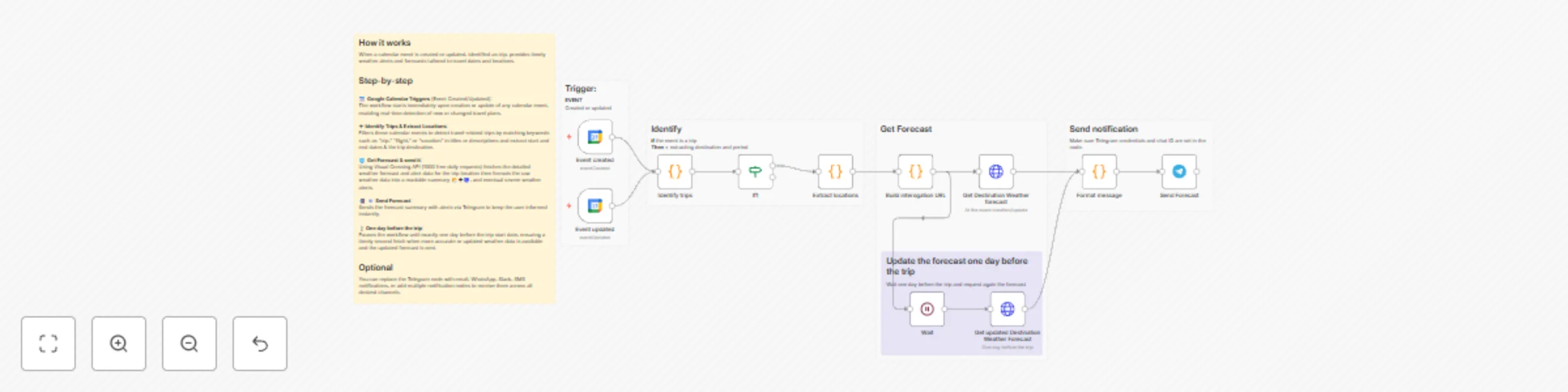
📅 Google Calendar Triggers (Event Created/Updated): The workflow starts immediately upon creation or update of any calendar event, enabling real-time detection of new or changed travel plans.
✈ Identify Trips: Filters these calendar events to detect travel-related trips by matching keywords such as "trip," "flight," or "vacation" in titles or descriptions.
📍Extract Locations: Parses each trip event’s details to extract start and end dates and the trip destination from the summary/description/location fields.
🌐 Build interrogation URL: Constructs a Visual Crossing API request URL dynamically based on the extracted trip location and dates, including daily forecasts and alerts. Fetches the detailed weather forecast and alert data for the trip location and duration right after detecting the event. Formats the raw weather data into a readable summary 🌤️🌪🌀 including temperatures, precipitation probabilities, conditions, and eventual severe weather alerts.
📲 📧 Send Forecast: Sends the forecast summary with alerts via Telegram to keep the user informed instantly.
⌛One day before the trip: Pauses the workflow until exactly one day before the trip start date, ensuring a timely second fetch when more accurate or updated weather data is available and the updated forecast is sent.
You can replace the Telegram node with email, WhatsApp, Slack, SMS notifications, or add multiple notification nodes to receive them across all desired channels.
This catalog entry is organized from the workflow JSON. The node-level section below shows the executable blocks available for review before importing the template.
| Workflow | Automated trip weather forecasts from Google Calendar to Telegram |
|---|---|
| Complexity | advanced |
| Nodes | 17 |
| Categories | Personal Productivity |
| Author | Razvan Bara |
| Published | 03 Nov 2025 |
Use the JSON export at /data/workflows/10481/10481.json as the source template for this automation.
Open n8n, import the downloaded JSON, and review each node before activating the workflow.
Replace placeholder credentials, API keys, webhook URLs, account IDs, and environment-specific values with your own settings.
Run the workflow manually or in a staging workspace, inspect node output, and confirm downstream systems receive the expected data.
Enable the workflow only after testing, then monitor executions, errors, and rate limits during the first production runs.
Review imported nodes carefully before activation. This catalog entry is intended to help you inspect the workflow structure, understand required services, and find related templates faster.
Node names, credentials, schedules, webhook paths, and external service limits may need adjustment for your workspace.
How it works This workflow for trip weather forecasting is event driven, starting when a calendar event is created or updated, and provides timely weather alerts and forecasts tailored to your trav...
Review the workflow JSON, configure any required credentials in n8n, and test the automation in a safe workspace before using it in production.
Yes. Use the block-by-block analysis and the downloadable JSON to inspect each node, then adjust credentials, prompts, schedules, filters, or destinations for your Personal Productivity use case.