Automated stock trading with AI: integrating Alpaca and Google Sheets

Workflow preview

Workflow preview
100%
Automated stock trading with AI: integrating Alpaca and Google Sheets preview
Open on n8n.io

Important notice

This workflow is provided as-is. Please review and test before using in production.

1. Workflow Overview

Description Transform your investment strategy with a fully automated, AI driven trading bot. This workflow bridges the gap between AI powered market insights and real world trading by executing bu...

Best for

  • Crypto Trading automation workflows
  • advanced n8n builders looking for reusable templates

Tools used

n8n-nodes-base.httprequest, n8n-nodes-base.code, n8n-nodes-base.googlesheets, n8n-nodes-base.splitout, n8n-nodes-base.merge, n8n-nodes-base.stickynote, n8n-nodes-base.wait, n8n-nodes-base.scheduletrigger

Source and attribution

This workflow is cataloged by N8N Workflows and links back to its original n8n.io source page by Raz Hadas.

Original n8n.io source

1.1 Workflow description

Title
Automated stock trading with AI: integrating Alpaca and Google Sheets
Workflow name
Automated stock trading with AI: integrating Alpaca and Google Sheets

Description

Transform your investment strategy with a fully automated, AI-driven trading bot. This workflow bridges the gap between AI-powered market insights and real-world trading by executing buy and sell orders directly through the Alpaca paper trading API.

Designed to work in tandem with the Automated Stock Sentiment Analysis workflow, this solution takes the top-performing stocks based on daily news sentiment and automatically rebalances your portfolio. It's perfect for algorithmic traders, data-driven investors, and n8n enthusiasts who want to see their AI analysis translate into tangible actions, all while maintaining a comprehensive log of every transaction in Google Sheets.

Key Features & Benefits

  • Automated Trading Execution: Automatically places buy and sell orders on the Alpaca paper trading platform without manual intervention.
  • Sentiment-Driven Decisions: Leverages the output from the sentiment analysis workflow to make informed decisions, selling positions with waning sentiment and buying into those with high positive sentiment.
  • Dynamic Portfolio Rebalancing: Intelligently calculates which positions to close and how to allocate the resulting funds into new, high-potential stocks.
  • Paper Trading Ready: Safely test and refine your trading strategies in a risk-free environment using Alpaca's paper trading API.
  • Daily Performance Tracking: Automatically logs your account equity and daily percentage change to a Google Sheet, giving you a clear view of your portfolio's performance.
  • Detailed Trade Logging: Every buy and sell order is meticulously recorded in a Google Sheet for easy review and historical analysis.
  • Scheduled and Autonomous: The entire process runs on a daily schedule, making it a "set and forget" solution for systematic trading.

How It Works

This workflow executes a sophisticated, automated trading strategy in a few key stages:

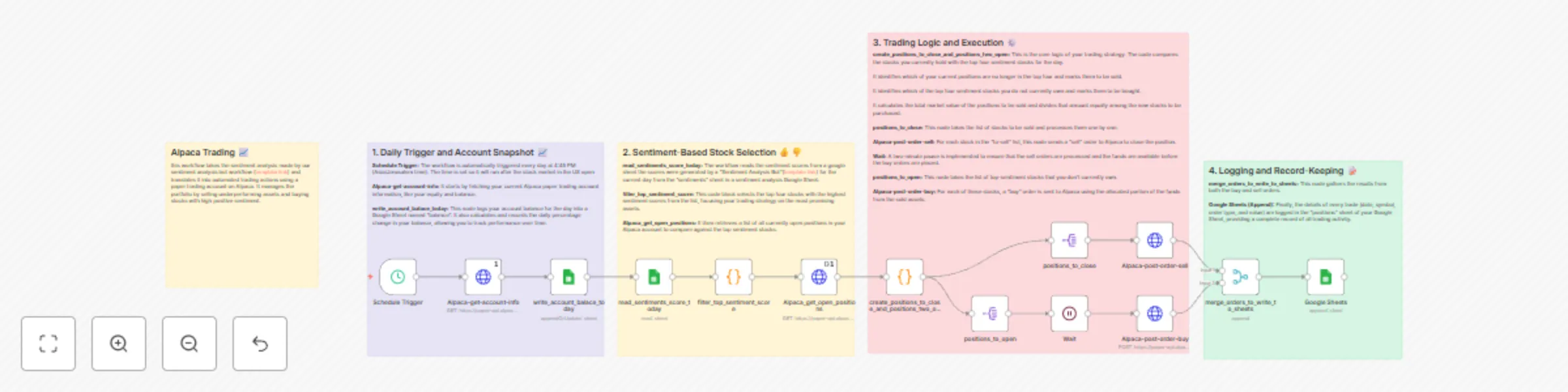
  1. Daily Kick-off & Snapshot: The workflow triggers on a daily schedule, first fetching your current Alpaca account balance and logging it to a Google Sheet to track daily performance.
  2. Strategy Formulation: It then reads the daily sentiment scores produced by the accompanying "Stock Sentiment Analysis" workflow. A Code node filters these results to identify the top four stocks with the highest positive sentiment.
  3. The Decision Engine: The core of the workflow is a custom Code node that acts as the trading brain. It:
    • Retrieves your currently open positions from Alpaca.
    • Compares your holdings against the day's top four sentiment stocks.
    • Generates a "sell list" of positions you hold that are no longer in the top four.
    • Generates a "buy list" of top-sentiment stocks that you don't yet own.
    • Calculates the total cash value from the "sell list" and determines the exact notional value to invest in each stock on the "buy list."
  4. Trade Execution:
    • The workflow first iterates through the "sell list" and executes a DELETE request to Alpaca for each, closing the positions.
    • A Wait node pauses the workflow for two minutes to ensure the sell orders are filled and the account balance is updated.
    • It then iterates through the "buy list," executing POST requests to Alpaca to purchase the new assets with the calculated funds.
  5. Record Keeping: All executed orders (both buys and sells) are merged and logged in a dedicated Google Sheet, giving you a permanent and detailed transaction history.

Nodes Used

  • Schedule Trigger
  • HttpRequest (Alpaca API)
  • Google Sheets
  • Code (JavaScript)
  • SplitOut
  • Wait
  • Merge

This workflow is the perfect next step for anyone looking to take their AI analysis to the next level. Take the emotion out of your trading and let this bot systematically execute your data-driven strategy.

1.2 Logical Blocks

This catalog entry is organized from the workflow JSON. The node-level section below shows the executable blocks available for review before importing the template.

2. Block-by-Block Analysis

Block 1 - Alpaca-get-account-info

Type / Role
n8n-nodes-base.httpRequest - httpRequest
Config choices
Version 4.2

Block 2 - Alpaca-post-order-sell

Type / Role
n8n-nodes-base.httpRequest - httpRequest
Config choices
Version 4.2

Block 3 - Alpaca-post-order-buy

Type / Role
n8n-nodes-base.httpRequest - httpRequest
Config choices
Version 4.2

Block 4 - filter_top_sentiment_score

Type / Role
n8n-nodes-base.code - code
Config choices
Version 2

Block 5 - read_sentiments_score_today

Type / Role
n8n-nodes-base.googleSheets - googleSheets
Config choices
Version 4.6

Block 6 - write_account_balace_today

Type / Role
n8n-nodes-base.googleSheets - googleSheets
Config choices
Version 4.6

Block 7 - Alpaca_get_open_positions

Type / Role
n8n-nodes-base.httpRequest - httpRequest
Config choices
Version 4.2

Block 8 - create_positions_to_close_and_positions_two_open

Type / Role
n8n-nodes-base.code - code
Config choices
Version 2

Block 9 - positions_to_open

Type / Role
n8n-nodes-base.splitOut - splitOut
Config choices
Version 1

Block 10 - positions_to_close

Type / Role
n8n-nodes-base.splitOut - splitOut
Config choices
Version 1

Block 11 - merge_orders_to_write_to_sheets

Type / Role
n8n-nodes-base.merge - merge
Config choices
Version 3.2

Block 12 - Sticky Note2

Type / Role
n8n-nodes-base.stickyNote - stickyNote
Config choices
Version 1

Block 13 - Google Sheets

Type / Role
n8n-nodes-base.googleSheets - googleSheets
Config choices
Version 4.6

Block 14 - Wait

Type / Role
n8n-nodes-base.wait - wait
Config choices
Version 1.1

Block 15 - Schedule Trigger

Type / Role
n8n-nodes-base.scheduleTrigger - scheduleTrigger
Config choices
Version 1.2

Block 16 - Sticky Note1

Type / Role
n8n-nodes-base.stickyNote - stickyNote
Config choices
Version 1

Block 17 - Sticky Note3

Type / Role
n8n-nodes-base.stickyNote - stickyNote
Config choices
Version 1

Block 18 - Sticky Note4

Type / Role
n8n-nodes-base.stickyNote - stickyNote
Config choices
Version 1

Block 19 - Sticky Note5

Type / Role
n8n-nodes-base.stickyNote - stickyNote
Config choices
Version 1

3. Summary Table

Workflow Automated stock trading with AI: integrating Alpaca and Google Sheets
Complexity advanced
Nodes 19
Categories Crypto Trading
Author Raz Hadas
Published 06 Jul 2025

4. Reproducing the Workflow from Scratch

  1. 1. Download the workflow JSON

    Use the JSON export at /data/workflows/5711/5711.json as the source template for this automation.

  2. 2. Import the template into n8n

    Open n8n, import the downloaded JSON, and review each node before activating the workflow.

  3. 3. Configure credentials and variables

    Replace placeholder credentials, API keys, webhook URLs, account IDs, and environment-specific values with your own settings.

  4. 4. Test with sample data

    Run the workflow manually or in a staging workspace, inspect node output, and confirm downstream systems receive the expected data.

  5. 5. Activate and monitor

    Enable the workflow only after testing, then monitor executions, errors, and rate limits during the first production runs.

5. General Notes & Resources

Review imported nodes carefully before activation. This catalog entry is intended to help you inspect the workflow structure, understand required services, and find related templates faster.

Node names, credentials, schedules, webhook paths, and external service limits may need adjustment for your workspace.

Frequently asked questions

What does Automated stock trading with AI: integrating Alpaca and Google Sheets do?

Description Transform your investment strategy with a fully automated, AI driven trading bot. This workflow bridges the gap between AI powered market insights and real world trading by executing bu...

What do I need before importing this workflow?

Review the workflow JSON, configure any required credentials in n8n, and test the automation in a safe workspace before using it in production.

Can I customize this workflow?

Yes. Use the block-by-block analysis and the downloadable JSON to inspect each node, then adjust credentials, prompts, schedules, filters, or destinations for your Crypto Trading use case.