Block 1 - info
- Type / Role
- n8n-nodes-base.set - set
- Config choices
- Version 3.4


 Early Deal
This workflow is provided as-is. Please review and test before using in production.
What is this? This is an n8n workflow designed to supercharge your Sonarr setup. Instead of just waiting for releases to appear in your RSS feed, this workflow proactively runs on a schedule, finds...
n8n-nodes-base.set, n8n-nodes-base.splitout, n8n-nodes-base.scheduletrigger, n8n-nodes-base.httprequest, n8n-nodes-base.if, n8n-nodes-base.code, n8n-nodes-base.splitinbatches
This workflow is cataloged by N8N Workflows and links back to its original n8n.io source page by Nícolas Pastorello.
Original n8n.io sourceWhat is this? This is an n8n workflow designed to supercharge your Sonarr setup. Instead of just waiting for releases to appear in your RSS feed, this workflow proactively runs on a schedule, finds what's missing, actively searches for it, and grabs the best result based on your specific criteria.
It's a "set it and forget it" solution to ensure your library is always complete.
Key Features 🚀 Proactive Searching: Doesn't wait for content to come to you. It actively triggers a search for missing episodes.
🗓️ Fully Automated & Scheduled: Runs every 12 hours by default to check for anything new that's missing.
🧠 Smart & Efficient: Searches only once per season, even if multiple episodes from that season are missing, preventing unnecessary API calls.
🎯 Precise Release Filtering: It validates search results against the exact quality name and language you define before telling Sonarr to grab it. This gives you more control than standard quality profiles.
✅ Automatic Download: Once a valid release is found, it's automatically pushed to your download client via Sonarr.
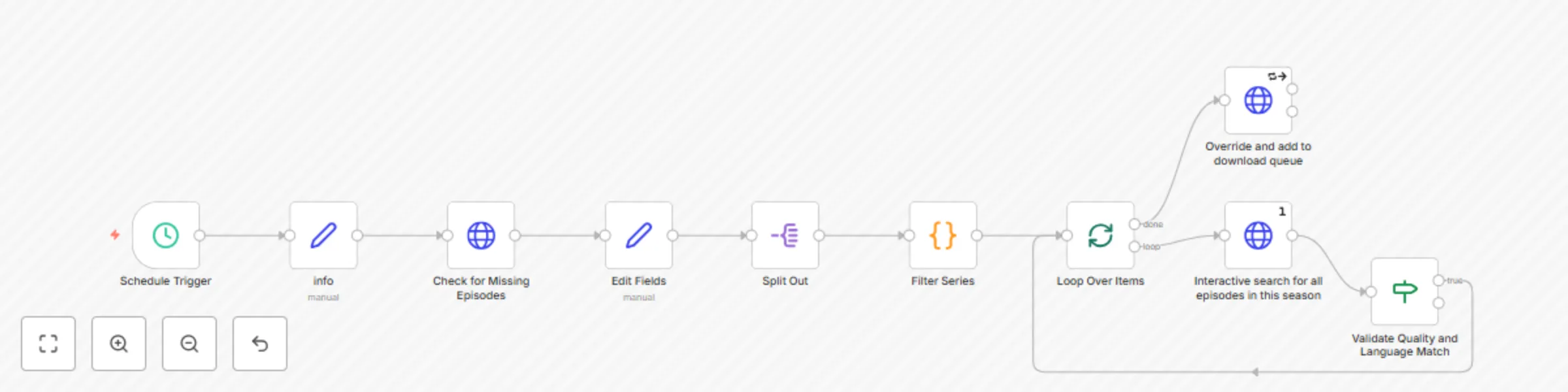
How It Works Trigger: The workflow starts automatically on a schedule.
Fetch Missing: It connects to your Sonarr instance and gets a list of all monitored, "wanted" episodes.
Filter & Group: It intelligently creates a unique list of seasons that need searching.
Search: It loops through each unique season and tells Sonarr to perform an interactive search.
Validate: It inspects the search results and only allows releases that match both the pre-defined quality AND language.
Grab: If a perfect match is found, it sends a final command to Sonarr to grab that specific release and begin the download.
How to Use This Template Import the JSON file into your n8n instance.
Find the node named "info" (it's a "Set" node near the beginning). This is your main configuration area.
Update the following values in the "info" node:
urlSonar: Change http://192.168.31.204:8989 to your Sonarr's URL.
apikey: Paste your Sonarr API key here.
quality: Set the exact quality name you want to match (e.g., WEBDL-1080p).
languages: Set the exact language name you want to match (e.g., English, Spanish).
Activate the workflow. That's it!
You can also change the schedule by editing the "Schedule Trigger" node.
This catalog entry is organized from the workflow JSON. The node-level section below shows the executable blocks available for review before importing the template.
| Workflow | Automated Sonarr missing episode finder with quality & language filtering |
|---|---|
| Complexity | intermediate |
| Nodes | 10 |
| Categories | Personal Productivity |
| Author | Nícolas Pastorello |
| Published | 13 Jul 2025 |
Use the JSON export at /data/workflows/5927/5927.json as the source template for this automation.
Open n8n, import the downloaded JSON, and review each node before activating the workflow.
Replace placeholder credentials, API keys, webhook URLs, account IDs, and environment-specific values with your own settings.
Run the workflow manually or in a staging workspace, inspect node output, and confirm downstream systems receive the expected data.
Enable the workflow only after testing, then monitor executions, errors, and rate limits during the first production runs.
Review imported nodes carefully before activation. This catalog entry is intended to help you inspect the workflow structure, understand required services, and find related templates faster.
Node names, credentials, schedules, webhook paths, and external service limits may need adjustment for your workspace.
What is this? This is an n8n workflow designed to supercharge your Sonarr setup. Instead of just waiting for releases to appear in your RSS feed, this workflow proactively runs on a schedule, finds...
Review the workflow JSON, configure any required credentials in n8n, and test the automation in a safe workspace before using it in production.
Yes. Use the block-by-block analysis and the downloadable JSON to inspect each node, then adjust credentials, prompts, schedules, filters, or destinations for your Personal Productivity use case.