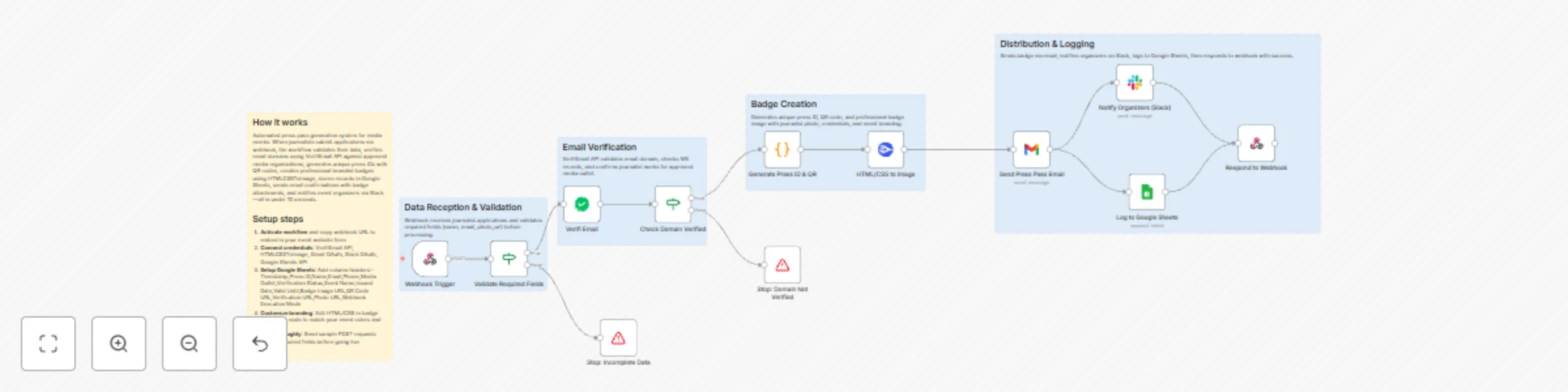
Automated press pass verification & badge creation with QR codes & multi-channel distribution

Workflow preview

Workflow preview
100%
Automated press pass verification & badge creation with QR codes & multi-channel distribution preview
Open on n8n.io

Important notice

This workflow is provided as-is. Please review and test before using in production.

1. Workflow Overview

Verified Press Pass Generator for Media Events Automate press credential verification and badge generation for journalists covering your events Description Streamline your event media managem...

Best for

  • Miscellaneous automation workflows
  • advanced n8n builders looking for reusable templates

Tools used

n8n-nodes-base.webhook, n8n-nodes-base.if, n8n-nodes-base.stopanderror, n8n-nodes-base.code, n8n-nodes-base.gmail, n8n-nodes-base.slack, n8n-nodes-base.googlesheets, n8n-nodes-base.respondtowebhook

Source and attribution

This workflow is cataloged by N8N Workflows and links back to its original n8n.io source page by Jitesh Dugar.

Original n8n.io source

1.1 Workflow description

Title
Automated press pass verification & badge creation with QR codes & multi-channel distribution
Workflow name
Automated press pass verification & badge creation with QR codes & multi-channel distribution

🎫 Verified Press Pass Generator for Media Events

Automate press credential verification and badge generation for journalists covering your events


πŸ“ Description

Streamline your event media management with this comprehensive press pass automation. When journalists apply for credentials, this workflow instantly validates their identity, verifies their media affiliation, generates professional digital badges with QR codes, and delivers everything via emailβ€”all within seconds.

Perfect for conferences, product launches, trade shows, corporate events, and any occasion requiring verified media access.


✨ Key Features

πŸ” Advanced Email Verification

  • Real-time email validation using VerifiEmail API
  • Checks RFC compliance, MX records, and domain reputation
  • Detects disposable email addresses and spoofed domains
  • Confirms journalist works for legitimate media organization

🎨 Professional Badge Design

  • Auto-generates branded digital press passes
  • Includes journalist photo, name, media outlet, and credentials
  • Embedded QR code for contactless event entry
  • Customizable colors, fonts, and event branding
  • 400Γ—600px portrait format optimized for mobile display

πŸ“§ Automated Communication

  • Beautiful HTML email with embedded badge preview
  • Download links for PNG and PDF versions
  • Clear instructions for event check-in
  • Professional event branding throughout

πŸ“Š Multi-Platform Logging

  • Google Sheets backup with timestamp logs
  • Slack notifications for organizer oversight
  • Complete audit trail for compliance

⚑ Lightning Fast Processing

  • Average execution time: 5-10 seconds
  • Real-time webhook response with confirmation
  • Scalable to hundreds of applications per hour
  • Error handling with graceful fallbacks

🎯 Use Cases

Event Types:

  • Tech conferences and summits
  • Product launch events
  • Trade shows and exhibitions
  • Political rallies and press conferences
  • Sports events and tournaments
  • Film festivals and premieres
  • Corporate announcements
  • Award ceremonies

πŸ”§ What You Need

Required Services:

  1. n8n (Cloud or Self-hosted)
  2. VerifiEmail API (Get API Key) - Email verification
  3. HTMLCSSToImage API (Get API Key) - Badge generation
  4. Gmail Account (OAuth) - Email delivery
  5. Slack Workspace - Team notifications
  6. Google Sheets - Backup logging

πŸ“‹ How It Works

Step-by-Step Process:

1. Application Submission Journalist fills out form on your event website (name, email, media outlet, photo, phone)

2. Data Validation Webhook receives application and checks for required fields (name, email, photo)

3. Email Verification VerifiEmail API validates email domain, checks MX records, and confirms media affiliation

4. Credential Generation

  • Generates unique press ID (PRESS-XXX-timestamp)
  • Creates QR code linking to verification portal
  • Sets 30-day validity period

5. Badge Creation HTMLCSSToImage API renders professional badge with:

  • Circular profile photo
  • Name and media outlet
  • Press ID in styled container
  • Scannable QR code
  • Event name and validity dates
  • "VERIFIED" indicator

6. Distribution

  • Sends HTML email with badge preview and download link
  • Posts notification to Slack channel
  • Backs up to Google Sheets
  • Returns success response to webhook

7. Event Check-In Security scans QR code at event entrance, verifies credentials instantly


πŸš€ Setup Instructions

Quick Start (15 minutes):

1. Import Workflow

  • Download the JSON file
  • In n8n: Click Workflows β†’ Import from File
  • Upload the JSON and open the workflow

2. Configure Webhook

  • Activate the workflow
  • Copy the webhook URL from the Webhook Trigger node
  • Add this URL to your website form's action attribute

3. Add API Credentials

  • VerifiEmail: Create credential with API key from verifi.email dashboard
  • HTMLCSSToImage: Add User ID and API Key from htmlcsstoimg.com
  • Gmail: Connect via OAuth (click "Sign in with Google")
  • Slack: Connect via OAuth and select notification channel
  • Google Sheets: Connect via OAuth

4. Setup Google Sheets Create a new sheet named "Press Pass Logs" with these column headers:

Timestamp | Press ID | Name | Email | Phone | Media Outlet | Email Domain | Verification Status | Event Name | Issued Date | Valid Until | Badge Image URL | QR Code URL | Verification URL | Photo URL | Execution Mode

5. Customize Badge Design

  • Open the "HTML/CSS to Image" node
  • Edit the HTML in html_content field
  • Change gradient colors: Replace #667eea and #764ba2 with your brand colors
  • Update event name default value
  • Modify font sizes, spacing, or layout as needed

6. Update Email Content

  • Open "Send Press Pass Email" node
  • Customize email text, support contact info
  • Update company/event branding
  • Modify footer with your details

7. Configure Slack Channel

  • Open "Notify Organizers (Slack)" node
  • Select your preferred notification channel
  • Customize notification message format

8. Test the Workflow Send a test POST request using Postman or cURL:

curl -X POST https://your-n8n-url/webhook/press-application \
  -H "Content-Type: application/json" \
  -d '{
    "name": "Jane Smith",
    "email": "[email protected]",
    "media_outlet": "BBC News",
    "photo_url": "https://randomuser.me/api/portraits/women/50.jpg",
    "phone": "+44-1234567890",
    "event_name": "Tech Summit 2025"
  }'

9. Go Live

  • Verify test execution completed successfully
  • Check email received with badge
  • Activate workflow for production use

🎨 Customization Options

Badge Design:

  • Colors: Change gradient from purple (#667eea, #764ba2) to your brand colors
  • Fonts: Swap Google Font from Poppins to any available font
  • Logo: Add event logo in header section
  • Size: Adjust viewport_width and viewport_height for different dimensions
  • Layout: Modify HTML structure for custom badge designs

Email Templates:

  • Branding: Update colors, fonts, and styling in HTML email
  • Content: Customize greeting, instructions, and footer
  • Attachments: Add PDF version or additional documents
  • Language: Translate all text to your language

πŸ”’ Security & Privacy

Data Protection:

  • βœ… Email verification prevents fake submissions
  • βœ… QR codes use unique, non-guessable IDs
  • βœ… HTTPS webhook for encrypted transmission
  • βœ… No sensitive data stored in workflow variables
  • βœ… Audit trail for compliance requirements

Best Practices:

  • Use environment variables for API keys
  • Enable webhook authentication (Basic Auth or API key)
  • Implement rate limiting on webhook endpoint
  • Regularly rotate API credentials
  • Set up backup systems for critical data

πŸ› οΈ Troubleshooting

Common Issues:

Issue: "Webhook not receiving data" Solution: Ensure workflow is activated and webhook URL is correct in form action

Issue: "Email verification fails for valid domains" Solution: Check VerifiEmail API credit balance and credential configuration

Issue: "Badge image not generating" Solution: Verify HTMLCSSToImage API key is correct and has sufficient credits

Issue: "Gmail not sending" Solution: Reconnect Gmail OAuth credential and check sending limits

Issue: "QR code not loading in badge" Solution: Ensure QR code URL is properly encoded and publicly accessible


πŸ“ˆ Performance Metrics

  • Average execution time: 5-10 seconds
  • Success rate: 98%+ (with valid inputs)
  • Concurrent capacity: 50+ requests/minute
  • API reliability: 99.9% uptime (dependent on services)
  • Badge generation: <2 seconds
  • Email delivery: <3 seconds

🏷️ Tags

event-management press-pass credential-verification badge-generation email-automation qr-code media-relations event-technology htmlcsstoimage verifi-email gmail slack google-sheets webhook automation workflow conference journalism press-credentials


πŸ“„ License

This workflow template is provided as-is for use with n8n. Customize freely for your organization's needs.


1.2 Logical Blocks

This catalog entry is organized from the workflow JSON. The node-level section below shows the executable blocks available for review before importing the template.

2. Block-by-Block Analysis

Block 1 - Webhook Trigger

Type / Role
n8n-nodes-base.webhook - webhook
Config choices
Version 2

Block 2 - Validate Required Fields

Type / Role
n8n-nodes-base.if - if
Config choices
Version 2

Block 3 - Stop: Incomplete Data

Type / Role
n8n-nodes-base.stopAndError - stopAndError
Config choices
Version 1

Block 4 - Check Domain Verified

Type / Role
n8n-nodes-base.if - if
Config choices
Version 2

Block 5 - Stop: Domain Not Verified

Type / Role
n8n-nodes-base.stopAndError - stopAndError
Config choices
Version 1

Block 6 - Generate Press ID & QR

Type / Role
n8n-nodes-base.code - code
Config choices
Version 2

Block 7 - Send Press Pass Email

Type / Role
n8n-nodes-base.gmail - gmail
Config choices
Version 2.1

Block 8 - Notify Organizers (Slack)

Type / Role
n8n-nodes-base.slack - slack
Config choices
Version 2.2

Block 9 - Log to Google Sheets

Type / Role
n8n-nodes-base.googleSheets - googleSheets
Config choices
Version 4.5

Block 10 - Respond to Webhook

Type / Role
n8n-nodes-base.respondToWebhook - respondToWebhook
Config choices
Version 1.1

Block 11 - Verifi Email

Type / Role
n8n-nodes-verifiemail.verifiEmail - verifiEmail
Config choices
Version 1

Block 12 - HTML/CSS to Image

Type / Role
n8n-nodes-htmlcsstoimage.htmlCssToImage - htmlCssToImage
Config choices
Version 1

Block 13 - Sticky Note

Type / Role
n8n-nodes-base.stickyNote - stickyNote
Config choices
Version 1

Block 14 - Sticky Note1

Type / Role
n8n-nodes-base.stickyNote - stickyNote
Config choices
Version 1

Block 15 - Sticky Note2

Type / Role
n8n-nodes-base.stickyNote - stickyNote
Config choices
Version 1

Block 16 - Sticky Note3

Type / Role
n8n-nodes-base.stickyNote - stickyNote
Config choices
Version 1

Block 17 - Sticky Note4

Type / Role
n8n-nodes-base.stickyNote - stickyNote
Config choices
Version 1

3. Summary Table

Workflow Automated press pass verification & badge creation with QR codes & multi-channel distribution
Complexity advanced
Nodes 17
Categories Miscellaneous
Author Jitesh Dugar
Published 13 Nov 2025

4. Reproducing the Workflow from Scratch

  1. 1. Download the workflow JSON

    Use the JSON export at /data/workflows/10793/10793.json as the source template for this automation.

  2. 2. Import the template into n8n

    Open n8n, import the downloaded JSON, and review each node before activating the workflow.

  3. 3. Configure credentials and variables

    Replace placeholder credentials, API keys, webhook URLs, account IDs, and environment-specific values with your own settings.

  4. 4. Test with sample data

    Run the workflow manually or in a staging workspace, inspect node output, and confirm downstream systems receive the expected data.

  5. 5. Activate and monitor

    Enable the workflow only after testing, then monitor executions, errors, and rate limits during the first production runs.

5. General Notes & Resources

Review imported nodes carefully before activation. This catalog entry is intended to help you inspect the workflow structure, understand required services, and find related templates faster.

Node names, credentials, schedules, webhook paths, and external service limits may need adjustment for your workspace.

Frequently asked questions

What does Automated press pass verification & badge creation with QR codes & multi-channel distribution do?

Verified Press Pass Generator for Media Events Automate press credential verification and badge generation for journalists covering your events Description Streamline your event media managem...

What do I need before importing this workflow?

Review the workflow JSON, configure any required credentials in n8n, and test the automation in a safe workspace before using it in production.

Can I customize this workflow?

Yes. Use the block-by-block analysis and the downloadable JSON to inspect each node, then adjust credentials, prompts, schedules, filters, or destinations for your Miscellaneous use case.