Automated meeting recording & AI summaries with Google Calendar, Vexa & Llama 3.2

Workflow preview

Workflow preview
100%
Automated meeting recording & AI summaries with Google Calendar, Vexa & Llama 3.2 preview
Open on n8n.io

Important notice

This workflow is provided as-is. Please review and test before using in production.

1. Workflow Overview

Transform your meetings into actionable insights automatically! This workflow captures meeting audio, transcribes conversations, generates AI summaries, and emails the results to participants—all w...

Best for

  • Document Extraction automation workflows
  • AI Summarization automation workflows
  • advanced n8n builders looking for reusable templates

Tools used

n8n-nodes-base.googlecalendartrigger, n8n-nodes-base.httprequest, n8n-nodes-base.set, @n8n/n8n-nodes-langchain.chainllm, @n8n/n8n-nodes-langchain.lmollama, n8n-nodes-base.emailsend, n8n-nodes-base.stickynote

Source and attribution

This workflow is cataloged by N8N Workflows and links back to its original n8n.io source page by Oneclick AI Squad.

Original n8n.io source

1.1 Workflow description

Title
Automated meeting recording & AI summaries with Google Calendar, Vexa & Llama 3.2
Workflow name
Automated meeting recording & AI summaries with Google Calendar, Vexa & Llama 3.2

Transform your meetings into actionable insights automatically! This workflow captures meeting audio, transcribes conversations, generates AI summaries, and emails the results to participants—all without manual intervention.

What's the Goal?

  • Auto-record meetings when they start and stop when they end
  • Transcribe audio to text using Vexa Bot integration
  • Generate intelligent summaries with AI-powered analysis
  • Email summaries to meeting participants automatically
  • Eliminate manual note-taking and post-meeting admin work
  • Never miss important discussions or action items again

Why Does It Matter?

  • Save 90% of Post-Meeting Time: No more manual transcription or summary writing
  • Never Lose Key Information: Automatic capture ensures nothing falls through cracks
  • Improve Team Productivity: Focus on discussions, not note-taking
  • Perfect Meeting Records: Searchable transcripts and summaries for future reference
  • Instant Distribution: Summaries reach all participants immediately after meetings

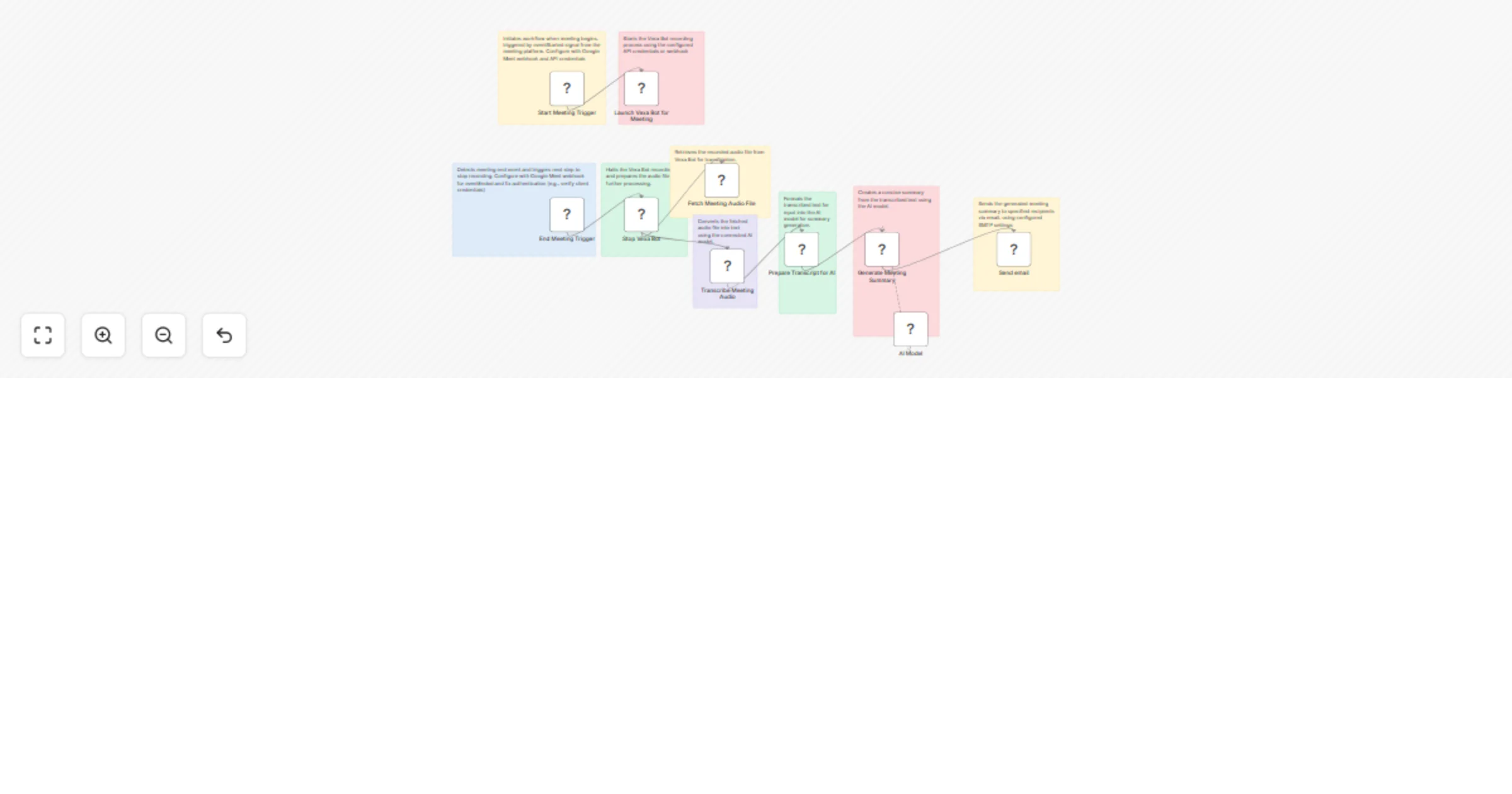
How It Works

Step 1: Meeting Detection & Recording

  • Start Meeting Trigger: Detects when meeting begins via Google Meet webhook
  • Launch Vexa Bot: Automatically joins meeting and starts recording
  • End Meeting Trigger: Detects meeting end and stops recording

Step 2: Audio Processing & Transcription

  • Stop Vexa Bot: Ends recording and retrieves audio file
  • Fetch Meeting Audio: Downloads recorded audio from Vexa Bot
  • Transcribe Audio: Converts speech to text using AI transcription

Step 3: AI Summary Generation

  • Prepare Transcript: Formats transcribed text for AI processing
  • Generate Summary: AI model creates concise meeting summary with:
    • Key discussion points
    • Decisions made
    • Action items assigned
    • Next steps identified

Step 4: Distribution

  • Send Email: Automatically emails summary to all meeting participants

Setup Requirements

Google Meet Integration:

  • Configure Google Meet webhook and API credentials
  • Set up meeting detection triggers
  • Test with sample meeting

Vexa Bot Configuration:

  • Add Vexa Bot API credentials for recording
  • Configure audio file retrieval settings
  • Set recording quality and format preferences

AI Model Setup:

  • Configure AI transcription service (e.g., OpenAI Whisper, Google Speech-to-Text)
  • Set up AI summary generation with custom prompts
  • Define summary format and length preferences

Email Configuration:

  • Set up SMTP credentials for email distribution
  • Create email templates for meeting summaries
  • Configure participant list extraction from meeting metadata

Import Instructions

  1. Get Workflow JSON: Copy the workflow JSON code
  2. Open n8n Editor: Navigate to your n8n dashboard
  3. Import Workflow: Click menu (⋯) → "Import from Clipboard" → Paste JSON → Import
  4. Configure Credentials: Add API keys for Google Meet, Vexa Bot, AI services, and SMTP
  5. Test Workflow: Run a test meeting to verify end-to-end functionality

Your meetings will now automatically transform into actionable summaries delivered to your inbox!

1.2 Logical Blocks

This catalog entry is organized from the workflow JSON. The node-level section below shows the executable blocks available for review before importing the template.

2. Block-by-Block Analysis

Block 1 - Start Meeting Trigger

Type / Role
n8n-nodes-base.googleCalendarTrigger - googleCalendarTrigger
Config choices
Version 1

Block 2 - Launch Vexa Bot for Meeting

Type / Role
n8n-nodes-base.httpRequest - httpRequest
Config choices
Version 4.2

Block 3 - End Meeting Trigger

Type / Role
n8n-nodes-base.googleCalendarTrigger - googleCalendarTrigger
Config choices
Version 1

Block 4 - Stop Vexa Bot

Type / Role
n8n-nodes-base.httpRequest - httpRequest
Config choices
Version 4.2

Block 5 - Fetch Meeting Audio File

Type / Role
n8n-nodes-base.httpRequest - httpRequest
Config choices
Version 4.2

Block 6 - Transcribe Meeting Audio

Type / Role
n8n-nodes-base.httpRequest - httpRequest
Config choices
Version 4.2

Block 7 - Prepare Transcript for AI

Type / Role
n8n-nodes-base.set - set
Config choices
Version 3.4

Block 8 - Generate Meeting Summary

Type / Role
@n8n/n8n-nodes-langchain.chainLlm - chainLlm
Config choices
Version 1.6

Block 9 - AI Model

Type / Role
@n8n/n8n-nodes-langchain.lmOllama - lmOllama
Config choices
Version 1

Block 10 - Send email

Type / Role
n8n-nodes-base.emailSend - emailSend
Config choices
Version 2.1

Block 11 - Sticky Note

Type / Role
n8n-nodes-base.stickyNote - stickyNote
Config choices
Version 1

Block 12 - Sticky Note1

Type / Role
n8n-nodes-base.stickyNote - stickyNote
Config choices
Version 1

Block 13 - Sticky Note2

Type / Role
n8n-nodes-base.stickyNote - stickyNote
Config choices
Version 1

Block 14 - Sticky Note3

Type / Role
n8n-nodes-base.stickyNote - stickyNote
Config choices
Version 1

Block 15 - Sticky Note4

Type / Role
n8n-nodes-base.stickyNote - stickyNote
Config choices
Version 1

Block 16 - Sticky Note5

Type / Role
n8n-nodes-base.stickyNote - stickyNote
Config choices
Version 1

Block 17 - Sticky Note6

Type / Role
n8n-nodes-base.stickyNote - stickyNote
Config choices
Version 1

Block 18 - Sticky Note7

Type / Role
n8n-nodes-base.stickyNote - stickyNote
Config choices
Version 1

Block 19 - Sticky Note8

Type / Role
n8n-nodes-base.stickyNote - stickyNote
Config choices
Version 1

3. Summary Table

Workflow Automated meeting recording & AI summaries with Google Calendar, Vexa & Llama 3.2
Complexity advanced
Nodes 19
Categories Document Extraction, AI Summarization
Author Oneclick AI Squad
Published 24 Jun 2025

4. Reproducing the Workflow from Scratch

  1. 1. Download the workflow JSON

    Use the JSON export at /data/workflows/5197/5197.json as the source template for this automation.

  2. 2. Import the template into n8n

    Open n8n, import the downloaded JSON, and review each node before activating the workflow.

  3. 3. Configure credentials and variables

    Replace placeholder credentials, API keys, webhook URLs, account IDs, and environment-specific values with your own settings.

  4. 4. Test with sample data

    Run the workflow manually or in a staging workspace, inspect node output, and confirm downstream systems receive the expected data.

  5. 5. Activate and monitor

    Enable the workflow only after testing, then monitor executions, errors, and rate limits during the first production runs.

5. General Notes & Resources

Review imported nodes carefully before activation. This catalog entry is intended to help you inspect the workflow structure, understand required services, and find related templates faster.

Node names, credentials, schedules, webhook paths, and external service limits may need adjustment for your workspace.

Frequently asked questions

What does Automated meeting recording & AI summaries with Google Calendar, Vexa & Llama 3.2 do?

Transform your meetings into actionable insights automatically! This workflow captures meeting audio, transcribes conversations, generates AI summaries, and emails the results to participants—all w...

What do I need before importing this workflow?

Review the workflow JSON, configure any required credentials in n8n, and test the automation in a safe workspace before using it in production.

Can I customize this workflow?

Yes. Use the block-by-block analysis and the downloadable JSON to inspect each node, then adjust credentials, prompts, schedules, filters, or destinations for your Document Extraction, AI Summarization use case.