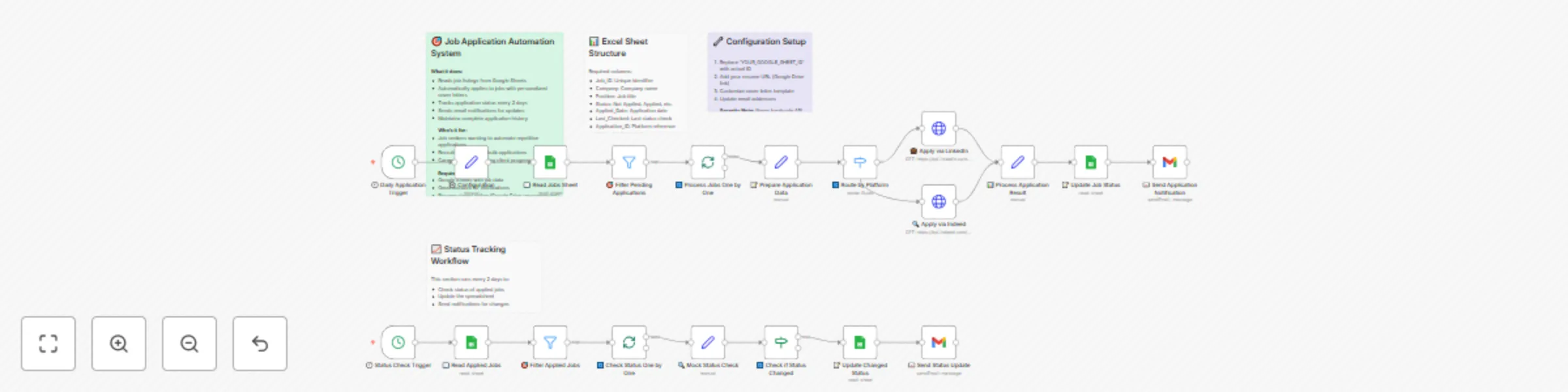
Automated job applications & status tracking with LinkedIn, Indeed & Google Sheets

Workflow preview

Workflow preview
100%
Automated job applications & status tracking with LinkedIn, Indeed & Google Sheets preview
Open on n8n.io

Important notice

This workflow is provided as-is. Please review and test before using in production.

1. Workflow Overview

Apply to jobs automatically from Google Sheets with status tracking Who's it for Job seekers who want to streamline their application process, save time on repetitive tasks, and never miss followin...

Best for

  • Personal Productivity automation workflows
  • Multimodal AI automation workflows
  • advanced n8n builders looking for reusable templates

Tools used

n8n-nodes-base.stickynote, n8n-nodes-base.cron, n8n-nodes-base.set, n8n-nodes-base.googlesheets, n8n-nodes-base.filter, n8n-nodes-base.splitinbatches, n8n-nodes-base.switch, n8n-nodes-base.httprequest

Source and attribution

This workflow is cataloged by N8N Workflows and links back to its original n8n.io source page by VipinW.

Original n8n.io source

1.1 Workflow description

Title
Automated job applications & status tracking with LinkedIn, Indeed & Google Sheets
Workflow name
Automated job applications & status tracking with LinkedIn, Indeed & Google Sheets

Apply to jobs automatically from Google Sheets with status tracking

Who's it for

Job seekers who want to streamline their application process, save time on repetitive tasks, and never miss following up on applications. Perfect for anyone managing multiple job applications across different platforms.

What it does

This workflow automatically applies to jobs from a Google Sheet, tracks application status, and keeps you updated with notifications. It handles the entire application lifecycle from submission to status monitoring.

Key features:

  • Reads job listings from Google Sheets with filtering by priority and status
  • Automatically applies to jobs on LinkedIn, Indeed, and other platforms
  • Updates application status in real-time
  • Checks application status every 2 days and notifies you of changes
  • Sends email notifications for successful applications and status updates
  • Prevents duplicate applications and manages rate limiting

How it works

The workflow runs on two main schedules:

Daily Application Process (9 AM, weekdays):

  1. Reads your job list from Google Sheets
  2. Filters for jobs marked as "Not Applied" with Medium/High priority
  3. Processes each job individually to prevent rate limiting
  4. Applies to jobs using platform-specific APIs (LinkedIn, Indeed, etc.)
  5. Updates the sheet with application status and reference ID
  6. Sends confirmation email for each application

Status Monitoring (Every 2 days at 10 AM):

  1. Checks all jobs with "Applied" status
  2. Queries job platforms for application status updates
  3. Updates the sheet if status has changed
  4. Sends notification emails for status changes (interviews, rejections, etc.)

Requirements

  • Google account with Google Sheets access
  • Gmail account for notifications
  • Resume stored online (Google Drive, Dropbox, etc.)
  • API access to job platforms (LinkedIn, Indeed) - optional for basic version
  • n8n instance (self-hosted or cloud)

How to set up

Step 1: Create Your Job Tracking Sheet

Create a Google Sheet with these exact column headers:

Job_ID Company Position Status Applied_Date Last_Checked Application_ID Notes Job_URL Priority
JOB001 Google Software Engineer Not Applied https://careers.google.com/jobs/123 High
JOB002 Microsoft Product Manager Not Applied https://careers.microsoft.com/jobs/456 Medium

Column explanations:

  • Job_ID: Unique identifier (JOB001, JOB002, etc.)
  • Company: Company name
  • Position: Job title
  • Status: Not Applied, Applied, Under Review, Interview Scheduled, Rejected, Offer
  • Applied_Date: Auto-filled when application is submitted
  • Last_Checked: Auto-updated during status checks
  • Application_ID: Platform reference ID (auto-generated)
  • Notes: Additional information or application notes
  • Job_URL: Direct link to job posting
  • Priority: High, Medium, Low (Low priority jobs are skipped)

Step 2: Configure Google Sheets Access

  1. In n8n, go to Credentials β†’ Add Credential
  2. Select Google Sheets OAuth2 API
  3. Follow the OAuth setup process to authorize n8n
  4. Test the connection with your job tracking sheet

Step 3: Set Up Gmail Notifications

  1. Add another credential for Gmail OAuth2 API
  2. Authorize n8n to send emails from your Gmail account
  3. Test by sending a sample email

Step 4: Update Workflow Configuration

In the "Set Configuration" node, update these values:

  • spreadsheetId: Your Google Sheet ID (found in the URL)
  • resumeUrl: Direct link to your resume (make sure it's publicly accessible)
  • yourEmail: Your email address for notifications
  • coverLetterTemplate: Customize your cover letter template

Step 5: Customize Application Logic

For basic version (no API access): The workflow includes placeholder HTTP requests that you can replace with actual job platform integrations.

For advanced version (with API access):

  • Replace LinkedIn/Indeed HTTP nodes with actual API calls
  • Add your API credentials to n8n's credential store
  • Update the platform detection logic for additional job boards

Step 6: Test and Activate

  1. Add 1-2 test jobs to your sheet with "Not Applied" status
  2. Run the workflow manually to test
  3. Check that the sheet gets updated and you receive notifications
  4. Activate the workflow to run automatically

How to customize the workflow

Adding New Job Platforms

  1. Update Platform Detection: Modify the "Check Platform Type" node to recognize new job board URLs
  2. Add New Application Node: Create HTTP request nodes for new platforms
  3. Update Status Checking: Add status check logic for the new platform

Customizing Application Strategy

  • Rate Limiting: Add "Wait" nodes between applications (recommended: 5-10 minutes)
  • Application Timing: Modify the cron schedule to apply during optimal hours
  • Priority Filtering: Adjust the filter conditions to match your criteria
  • Multiple Resumes: Use conditional logic to select different resumes based on job type

Enhanced Notifications

  • Slack Integration: Replace Gmail nodes with Slack for team notifications
  • Discord Webhooks: Send updates to Discord channels
  • SMS Notifications: Use Twilio for urgent status updates
  • Dashboard Updates: Connect to Notion, Airtable, or other productivity tools

Advanced Features

  • AI-Powered Personalization: Use OpenAI to generate custom cover letters
  • Job Scoring: Implement scoring logic based on job requirements vs. your skills
  • Interview Scheduling: Auto-schedule interviews when status changes
  • Follow-up Automation: Send follow-up emails after specific time periods

Important Notes

Platform Compliance

  • Always respect rate limits to avoid being blocked
  • Follow each platform's Terms of Service
  • Use official APIs when available instead of web scraping
  • Don't spam job boards with excessive applications

Data Privacy

  • Store credentials securely using n8n's credential store
  • Don't hardcode API keys or personal information in nodes
  • Regularly review and clean up old application data
  • Ensure your resume link is secure but accessible

Quality Control

  • Start with a small number of jobs to test the workflow
  • Review application success rates and adjust strategy
  • Monitor for errors and set up proper error handling
  • Keep your job list updated and remove expired postings

This workflow transforms job searching from a manual, time-consuming process into an automated system that maximizes your application efficiency while maintaining quality and compliance.

1.2 Logical Blocks

This catalog entry is organized from the workflow JSON. The node-level section below shows the executable blocks available for review before importing the template.

2. Block-by-Block Analysis

Block 1 - πŸ“‹ Template Overview

Type / Role
n8n-nodes-base.stickyNote - stickyNote
Config choices
Version 1

Block 2 - πŸ“Š Sheet Structure

Type / Role
n8n-nodes-base.stickyNote - stickyNote
Config choices
Version 1

Block 3 - βš™οΈ Setup Notes

Type / Role
n8n-nodes-base.stickyNote - stickyNote
Config choices
Version 1

Block 4 - πŸ•˜ Daily Application Trigger

Type / Role
n8n-nodes-base.cron - cron
Config choices
Version 1

Block 5 - βš™οΈ Configuration

Type / Role
n8n-nodes-base.set - set
Config choices
Version 3

Block 6 - πŸ“– Read Jobs Sheet

Type / Role
n8n-nodes-base.googleSheets - googleSheets
Config choices
Version 4

Block 7 - 🎯 Filter Pending Applications

Type / Role
n8n-nodes-base.filter - filter
Config choices
Version 2

Block 8 - πŸ”„ Process Jobs One by One

Type / Role
n8n-nodes-base.splitInBatches - splitInBatches
Config choices
Version 3

Block 9 - πŸ“ Prepare Application Data

Type / Role
n8n-nodes-base.set - set
Config choices
Version 3

Block 10 - πŸ”€ Route by Platform

Type / Role
n8n-nodes-base.switch - switch
Config choices
Version 3

Block 11 - πŸ’Ό Apply via LinkedIn

Type / Role
n8n-nodes-base.httpRequest - httpRequest
Config choices
Version 4

Block 12 - πŸ” Apply via Indeed

Type / Role
n8n-nodes-base.httpRequest - httpRequest
Config choices
Version 4

Block 13 - πŸ“Š Process Application Result

Type / Role
n8n-nodes-base.set - set
Config choices
Version 3

Block 14 - πŸ“ Update Job Status

Type / Role
n8n-nodes-base.googleSheets - googleSheets
Config choices
Version 4

Block 15 - πŸ“§ Send Application Notification

Type / Role
n8n-nodes-base.gmail - gmail
Config choices
Version 2

Block 16 - πŸ“Š Status Tracking Info

Type / Role
n8n-nodes-base.stickyNote - stickyNote
Config choices
Version 1

Block 17 - πŸ• Status Check Trigger

Type / Role
n8n-nodes-base.cron - cron
Config choices
Version 1

Block 18 - πŸ“– Read Applied Jobs

Type / Role
n8n-nodes-base.googleSheets - googleSheets
Config choices
Version 4

Block 19 - 🎯 Filter Applied Jobs

Type / Role
n8n-nodes-base.filter - filter
Config choices
Version 2

Block 20 - πŸ”„ Check Status One by One

Type / Role
n8n-nodes-base.splitInBatches - splitInBatches
Config choices
Version 3

Block 21 - πŸ” Mock Status Check

Type / Role
n8n-nodes-base.set - set
Config choices
Version 3

Block 22 - πŸ”„ Check if Status Changed

Type / Role
n8n-nodes-base.if - if
Config choices
Version 2

Block 23 - πŸ“ Update Changed Status

Type / Role
n8n-nodes-base.googleSheets - googleSheets
Config choices
Version 4

Block 24 - πŸ“§ Send Status Update

Type / Role
n8n-nodes-base.gmail - gmail
Config choices
Version 2

3. Summary Table

Workflow Automated job applications & status tracking with LinkedIn, Indeed & Google Sheets
Complexity advanced
Nodes 24
Categories Personal Productivity, Multimodal AI
Author VipinW
Published 12 Jul 2025

4. Reproducing the Workflow from Scratch

  1. 1. Download the workflow JSON

    Use the JSON export at /data/workflows/5906/5906.json as the source template for this automation.

  2. 2. Import the template into n8n

    Open n8n, import the downloaded JSON, and review each node before activating the workflow.

  3. 3. Configure credentials and variables

    Replace placeholder credentials, API keys, webhook URLs, account IDs, and environment-specific values with your own settings.

  4. 4. Test with sample data

    Run the workflow manually or in a staging workspace, inspect node output, and confirm downstream systems receive the expected data.

  5. 5. Activate and monitor

    Enable the workflow only after testing, then monitor executions, errors, and rate limits during the first production runs.

5. General Notes & Resources

Review imported nodes carefully before activation. This catalog entry is intended to help you inspect the workflow structure, understand required services, and find related templates faster.

Node names, credentials, schedules, webhook paths, and external service limits may need adjustment for your workspace.

Frequently asked questions

What does Automated job applications & status tracking with LinkedIn, Indeed & Google Sheets do?

Apply to jobs automatically from Google Sheets with status tracking Who's it for Job seekers who want to streamline their application process, save time on repetitive tasks, and never miss followin...

What do I need before importing this workflow?

Review the workflow JSON, configure any required credentials in n8n, and test the automation in a safe workspace before using it in production.

Can I customize this workflow?

Yes. Use the block-by-block analysis and the downloadable JSON to inspect each node, then adjust credentials, prompts, schedules, filters, or destinations for your Personal Productivity, Multimodal AI use case.