Automated image editing with GPT-4 Vision & Gemini for Instagram posts from Airtable

Workflow preview

Workflow preview
100%
Automated image editing with GPT-4 Vision & Gemini for Instagram posts from Airtable preview
Open on n8n.io

Important notice

This workflow is provided as-is. Please review and test before using in production.

1. Workflow Overview

Who's it for Content creators, social media managers, and marketing teams who want to automate image editing and Instagram posting workflows using AI powered image analysis and generation. What it ...

Best for

  • Content Creation automation workflows
  • Multimodal AI automation workflows
  • intermediate n8n builders looking for reusable templates

Tools used

n8n-nodes-base.webhook, n8n-nodes-base.httprequest, n8n-nodes-base.airtable, @n8n/n8n-nodes-langchain.openai, @n8n/n8n-nodes-langchain.lmchatopenai, @n8n/n8n-nodes-langchain.chainllm

Source and attribution

This workflow is cataloged by N8N Workflows and links back to its original n8n.io source page by Jonathan Reeve.

Original n8n.io source

1.1 Workflow description

Title
Automated image editing with GPT-4 Vision & Gemini for Instagram posts from Airtable
Workflow name
Automated image editing with GPT-4 Vision & Gemini for Instagram posts from Airtable

Who's it for

Content creators, social media managers, and marketing teams who want to automate image editing and Instagram posting workflows using AI-powered image analysis and generation.

What it does

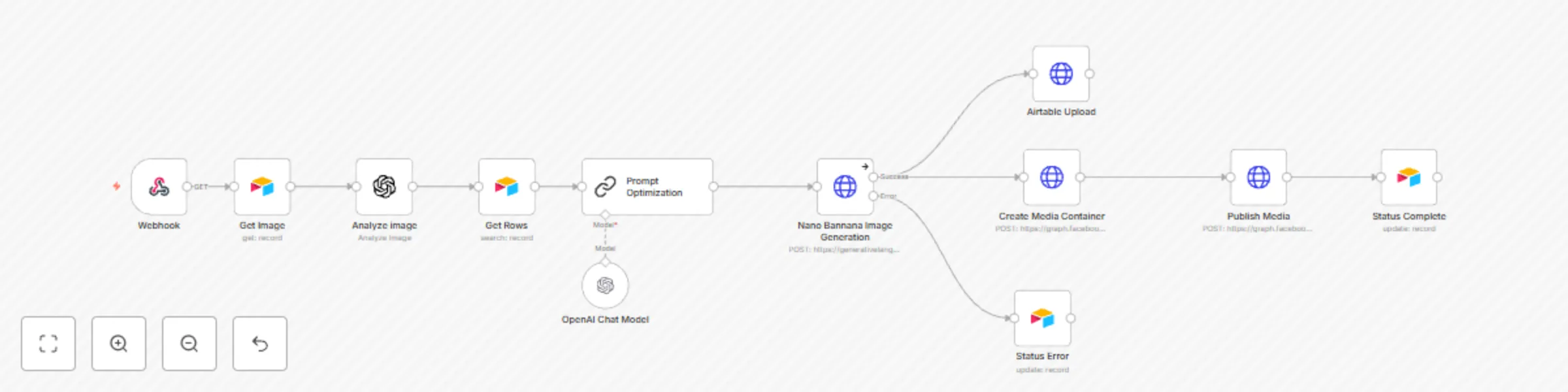
This workflow automatically processes images stored in Airtable, analyzes them using AI vision models, generates optimized editing prompts, creates new variations using Google's Gemini AI, and posts the results directly to Instagram. The entire process is triggered via webhook and includes comprehensive error handling and status tracking.

How it works

The workflow begins when triggered via webhook with an Airtable record ID. It fetches the original image, analyzes its visual elements using GPT-4 Vision, then uses that analysis along with user-specified editing parameters (composition, lighting, style, atmosphere, color palette, text overlay) to generate an optimized prompt. Google Gemini AI then creates a new image based on these specifications, which gets uploaded back to Airtable and posted to Instagram via the Graph API.

Requirements

  • Airtable account with configured base and tables
  • OpenAI API key for image analysis
  • Google Gemini API key for image generation
  • Meta Developer account with Instagram Graph API access
  • Instagram Business account connected to Facebook Page

How to set up

  1. Configure your Airtable base with the required fields: Status, Picture, Core Subject, Setting, Composition, Lighting, Style, Atmosphere, Color Palette, Text Overlay, Post Description
  2. Set up OpenAI credentials in n8n for the image analysis node
  3. Configure Google Gemini API credentials for image generation
  4. Set up Meta Graph API credentials for Instagram posting
  5. Update the Airtable base IDs and table IDs in all Airtable nodes
  6. Configure your Instagram Business Account ID in the Instagram posting nodes
  7. Test the webhook URL and ensure proper connectivity

How to customize

  • Modify the image analysis prompt in the "Analyze image" node to focus on different visual elements
  • Adjust the Gemini generation parameters (temperature, max tokens) for different creative outputs
  • Add additional social media platforms by duplicating the Instagram posting logic
  • Customize error handling and status updates based on your workflow needs
  • Add image format conversion or resizing nodes if needed for Instagram requirements

1.2 Logical Blocks

This catalog entry is organized from the workflow JSON. The node-level section below shows the executable blocks available for review before importing the template.

2. Block-by-Block Analysis

Block 1 - Webhook

Type / Role
n8n-nodes-base.webhook - webhook
Config choices
Version 2.1

Block 2 - Airtable Upload

Type / Role
n8n-nodes-base.httpRequest - httpRequest
Config choices
Version 4.2

Block 3 - Status Complete

Type / Role
n8n-nodes-base.airtable - airtable
Config choices
Version 2.1

Block 4 - Status Error

Type / Role
n8n-nodes-base.airtable - airtable
Config choices
Version 2.1

Block 5 - Analyze image

Type / Role
@n8n/n8n-nodes-langchain.openAi - openAi
Config choices
Version 1.8

Block 6 - OpenAI Chat Model

Type / Role
@n8n/n8n-nodes-langchain.lmChatOpenAi - lmChatOpenAi
Config choices
Version 1.2

Block 7 - Create Media Container

Type / Role
n8n-nodes-base.httpRequest - httpRequest
Config choices
Version 4.2

Block 8 - Publish Media

Type / Role
n8n-nodes-base.httpRequest - httpRequest
Config choices
Version 4.2

Block 9 - Get Image

Type / Role
n8n-nodes-base.airtable - airtable
Config choices
Version 2.1

Block 10 - Get Rows

Type / Role
n8n-nodes-base.airtable - airtable
Config choices
Version 2.1

Block 11 - Prompt Optimization

Type / Role
@n8n/n8n-nodes-langchain.chainLlm - chainLlm
Config choices
Version 1.7

Block 12 - Nano Bannana Image Generation

Type / Role
n8n-nodes-base.httpRequest - httpRequest
Config choices
Version 4.2

3. Summary Table

Workflow Automated image editing with GPT-4 Vision & Gemini for Instagram posts from Airtable
Complexity intermediate
Nodes 12
Categories Content Creation, Multimodal AI
Author Jonathan Reeve
Published 12 Sept 2025

4. Reproducing the Workflow from Scratch

  1. 1. Download the workflow JSON

    Use the JSON export at /data/workflows/8546/8546.json as the source template for this automation.

  2. 2. Import the template into n8n

    Open n8n, import the downloaded JSON, and review each node before activating the workflow.

  3. 3. Configure credentials and variables

    Replace placeholder credentials, API keys, webhook URLs, account IDs, and environment-specific values with your own settings.

  4. 4. Test with sample data

    Run the workflow manually or in a staging workspace, inspect node output, and confirm downstream systems receive the expected data.

  5. 5. Activate and monitor

    Enable the workflow only after testing, then monitor executions, errors, and rate limits during the first production runs.

5. General Notes & Resources

Review imported nodes carefully before activation. This catalog entry is intended to help you inspect the workflow structure, understand required services, and find related templates faster.

Node names, credentials, schedules, webhook paths, and external service limits may need adjustment for your workspace.

Frequently asked questions

What does Automated image editing with GPT-4 Vision & Gemini for Instagram posts from Airtable do?

Who's it for Content creators, social media managers, and marketing teams who want to automate image editing and Instagram posting workflows using AI powered image analysis and generation. What it ...

What do I need before importing this workflow?

Review the workflow JSON, configure any required credentials in n8n, and test the automation in a safe workspace before using it in production.

Can I customize this workflow?

Yes. Use the block-by-block analysis and the downloadable JSON to inspect each node, then adjust credentials, prompts, schedules, filters, or destinations for your Content Creation, Multimodal AI use case.