Automated expense tracking with Telegram, easybits & Google Sheets

Workflow preview

Workflow preview
100%
Automated expense tracking with Telegram, easybits & Google Sheets preview
Open on n8n.io

Important notice

This workflow is provided as-is. Please review and test before using in production.

1. Workflow Overview

How it works I wanted to avoid the rush at end of month to log expenses. I tried existing expense apps but found them either too expensive for what they offer, or frustrating with inconsistent extr...

Best for

  • Document Extraction automation workflows
  • AI Chatbot automation workflows
  • advanced n8n builders looking for reusable templates

Tools used

n8n-nodes-base.webhook, n8n-nodes-base.httprequest, n8n-nodes-base.code, n8n-nodes-base.if, n8n-nodes-base.respondtowebhook, n8n-nodes-base.telegram, n8n-nodes-base.stickynote

Source and attribution

This workflow is cataloged by N8N Workflows and links back to its original n8n.io source page by Felix.

Original n8n.io source

1.1 Workflow description

Title
Automated expense tracking with Telegram, easybits & Google Sheets
Workflow name
Automated expense tracking with Telegram, easybits & Google Sheets

How it works

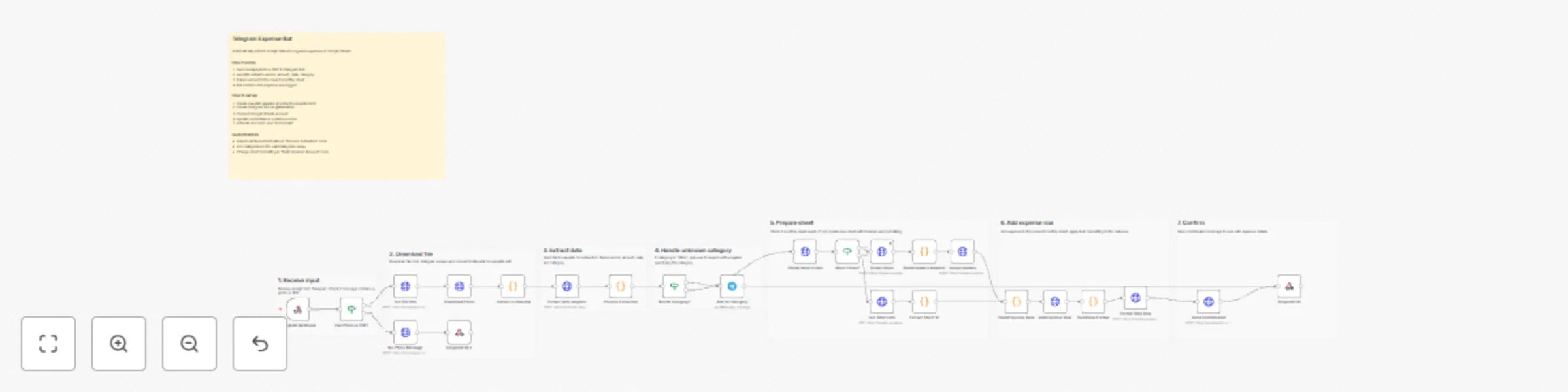
I wanted to avoid the rush at end of month to log expenses. I tried existing expense apps but found them either too expensive for what they offer, or frustrating with inconsistent extraction results. That is why I built my own Telegram expense bot that:

  • Lets users send receipt photos or PDFs via Telegram
  • Automatically extracts vendor, amount, date, and category using AI
  • Applies expense rules like partial reimbursement rates (for example, 80% for phone bills)
  • Organizes expenses into monthly Google Sheets tabs
  • Asks for clarification when the category is unclear
  • Supports flexible descriptions via Telegram caption
  • Sends a confirmation message with expense details

The whole extraction process takes about 10 seconds and is fully GDPR compliant. No coding. No manual typing. Just snap and send.

Step-by-step guide

Initial Setup

  1. Import the JSON workflow
  2. Sign up and log in to easybits at https://extractor.easybits.tech
  3. Create a pipeline by uploading an example receipt and mapping the fields you want to extract:
    -- vendor_name -- total_amount -- currency -- transaction_date -- category -- extraction_confidence
    For more details, visit our Quick Start Guide

Get Your easybits Credentials

  1. Once you have finalized your pipeline, go back to your dashboard and click Pipelines in the left sidebar
  2. Click View Pipeline on the pipeline you want to connect
  3. On the Pipeline Details page, you will find:
    -- API URL: https://extractor.easybits.tech/api/pipelines/[YOUR_PIPELINE_ID] -- API Key: Your unique authentication token

4. Copy both values and integrate them into the "Extract with easybits" HTTP Request node

To keep in mind: Each pipeline has its own API Key and Pipeline ID. If you have multiple pipelines (for example, one for receipts and one for invoices), you will need separate credentials for each.

Important: To integrate your API Key, make sure to set it up in the following format: > Bearer [YOUR_API_KEY]

Set Up Telegram Bot

  1. Open Telegram and search for @BotFather
  2. Send /newbot and follow the prompts
  3. Copy your Bot Token and add it to the Telegram credentials in n8n

Connect Google Sheets

  1. Create a new spreadsheet for expenses
  2. Copy the Spreadsheet ID from the URL
  3. Update the Google Sheets nodes with your Spreadsheet ID

Go Live

Activate the workflow and send your first receipt photo to your Telegram bot

1.2 Logical Blocks

This catalog entry is organized from the workflow JSON. The node-level section below shows the executable blocks available for review before importing the template.

2. Block-by-Block Analysis

Block 1 - Telegram Webhook

Type / Role
n8n-nodes-base.webhook - webhook
Config choices
Version 2

Block 2 - Get File Info

Type / Role
n8n-nodes-base.httpRequest - httpRequest
Config choices
Version 4.2

Block 3 - Download Photo

Type / Role
n8n-nodes-base.httpRequest - httpRequest
Config choices
Version 4.2

Block 4 - Convert to Base64

Type / Role
n8n-nodes-base.code - code
Config choices
Version 2

Block 5 - Extract with easybits

Type / Role
n8n-nodes-base.httpRequest - httpRequest
Config choices
Version 4.2

Block 6 - Process Extraction

Type / Role
n8n-nodes-base.code - code
Config choices
Version 2

Block 7 - Check Sheet Exists

Type / Role
n8n-nodes-base.httpRequest - httpRequest
Config choices
Version 4.2

Block 8 - Sheet Exists?

Type / Role
n8n-nodes-base.if - if
Config choices
Version 2

Block 9 - Create Sheet

Type / Role
n8n-nodes-base.httpRequest - httpRequest
Config choices
Version 4.2

Block 10 - Setup Headers

Type / Role
n8n-nodes-base.httpRequest - httpRequest
Config choices
Version 4.2

Block 11 - Add Expense Row

Type / Role
n8n-nodes-base.httpRequest - httpRequest
Config choices
Version 4.2

Block 12 - Send Confirmation

Type / Role
n8n-nodes-base.httpRequest - httpRequest
Config choices
Version 4.2

Block 13 - No Photo Message

Type / Role
n8n-nodes-base.httpRequest - httpRequest
Config choices
Version 4.2

Block 14 - Respond OK

Type / Role
n8n-nodes-base.respondToWebhook - respondToWebhook
Config choices
Version 1.1

Block 15 - Respond OK 2

Type / Role
n8n-nodes-base.respondToWebhook - respondToWebhook
Config choices
Version 1.1

Block 16 - Build Headers Request

Type / Role
n8n-nodes-base.code - code
Config choices
Version 2

Block 17 - Build Expense Data

Type / Role
n8n-nodes-base.code - code
Config choices
Version 2

Block 18 - Build Row Format

Type / Role
n8n-nodes-base.code - code
Config choices
Version 2

Block 19 - Format Data Row

Type / Role
n8n-nodes-base.httpRequest - httpRequest
Config choices
Version 4.3

Block 20 - Get Sheet Info

Type / Role
n8n-nodes-base.httpRequest - httpRequest
Config choices
Version 4.3

Block 21 - Extract Sheet ID

Type / Role
n8n-nodes-base.code - code
Config choices
Version 2

Block 22 - Needs Category?

Type / Role
n8n-nodes-base.if - if
Config choices
Version 2.2

Block 23 - Ask for Category

Type / Role
n8n-nodes-base.telegram - telegram
Config choices
Version 1.2

Block 24 - Has Photo or PDF?

Type / Role
n8n-nodes-base.if - if
Config choices
Version 2

Showing the first 24 of 32 workflow blocks. Download the JSON for the full node graph.

3. Summary Table

Workflow Automated expense tracking with Telegram, easybits & Google Sheets
Complexity advanced
Nodes 32
Categories Document Extraction, AI Chatbot
Author Felix
Published 10 Dec 2025

4. Reproducing the Workflow from Scratch

  1. 1. Download the workflow JSON

    Use the JSON export at /data/workflows/11659/11659.json as the source template for this automation.

  2. 2. Import the template into n8n

    Open n8n, import the downloaded JSON, and review each node before activating the workflow.

  3. 3. Configure credentials and variables

    Replace placeholder credentials, API keys, webhook URLs, account IDs, and environment-specific values with your own settings.

  4. 4. Test with sample data

    Run the workflow manually or in a staging workspace, inspect node output, and confirm downstream systems receive the expected data.

  5. 5. Activate and monitor

    Enable the workflow only after testing, then monitor executions, errors, and rate limits during the first production runs.

5. General Notes & Resources

Review imported nodes carefully before activation. This catalog entry is intended to help you inspect the workflow structure, understand required services, and find related templates faster.

Node names, credentials, schedules, webhook paths, and external service limits may need adjustment for your workspace.

Frequently asked questions

What does Automated expense tracking with Telegram, easybits & Google Sheets do?

How it works I wanted to avoid the rush at end of month to log expenses. I tried existing expense apps but found them either too expensive for what they offer, or frustrating with inconsistent extr...

What do I need before importing this workflow?

Review the workflow JSON, configure any required credentials in n8n, and test the automation in a safe workspace before using it in production.

Can I customize this workflow?

Yes. Use the block-by-block analysis and the downloadable JSON to inspect each node, then adjust credentials, prompts, schedules, filters, or destinations for your Document Extraction, AI Chatbot use case.