Block 1 - Main Config
- Type / Role
- n8n-nodes-base.set - set
- Config choices
- Version 3.4


 Early Deal
This workflow is provided as-is. Please review and test before using in production.
This n8n template demonstrates how to automatically generate and publish blog posts using trending keywords, AI generated content, and watermarked stock images. Use cases include maintaining an act...
n8n-nodes-base.set, n8n-nodes-base.httprequest, n8n-nodes-base.xml, n8n-nodes-base.code, n8n-nodes-base.googlesheets, n8n-nodes-base.splitinbatches, @n8n/n8n-nodes-langchain.agent, @n8n/n8n-nodes-langchain.outputparserstructured
This workflow is cataloged by N8N Workflows and links back to its original n8n.io source page by Cojocaru David.
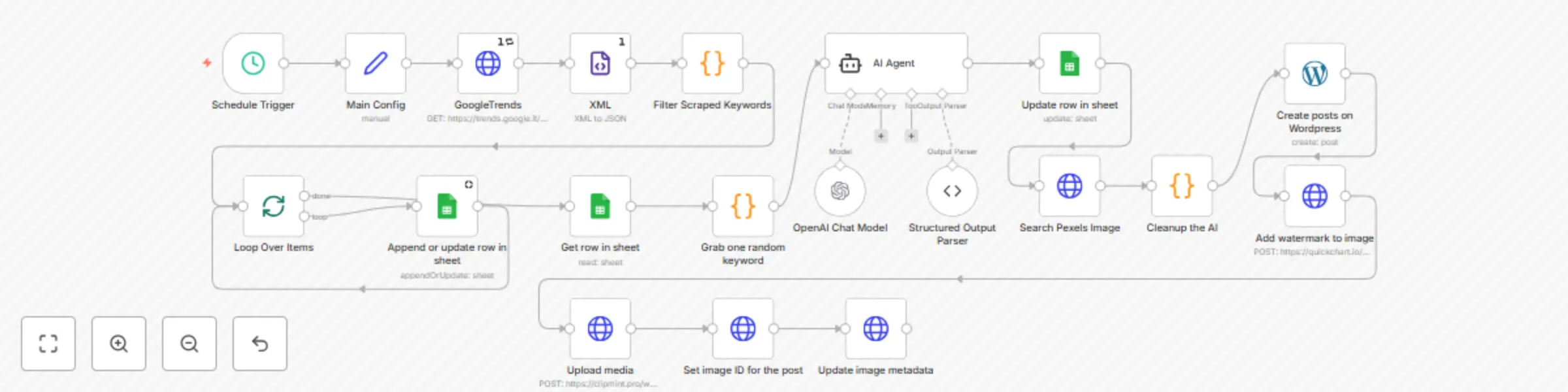
Original n8n.io sourceThis n8n template demonstrates how to automatically generate and publish blog posts using trending keywords, AI-generated content, and watermarked stock images. Use cases include maintaining an active blog with fresh SEO content, scaling content marketing without manual writing, and automating the full publishing pipeline from keyword research to WordPress posting.
At time of writing, each AI content generation step will incur costs depending on your OpenAI pricing plan. Image search is powered by Pexels, which provides free-to-use stock images. The workflow also applies a watermark for branding. Google Trends data may vary by region, and results depend on availability in your selected location.
The workflow begins with a scheduled trigger that fetches trending keywords from Google Trends. The XML feed is converted to JSON and filtered for relevant terms, which are logged into a Google Sheet for tracking. One random keyword is selected, and OpenAI is used to generate blog content around it. A structured output parser ensures the text is clean and well-formatted. The system then searches Pexels for a matching image, uploads it, adds metadata for SEO, and applies a watermark. Finally, the complete article (text and image) is published directly to WordPress.
The schedule trigger is provided as an example, but you can replace it with other triggers such as webhooks or manual inputs. You can also customize the AI prompt to match your niche, tone, or industry focus. For higher volumes, consider adjusting the keyword filtering and batching logic.
This automation can be adapted for different use cases. Try adjusting the prompts for technical blogs, fashion, finance, or product reviews. You can also replace the image source with other providers or integrate your own media library. The watermark feature ensures branding, but it can be modified or removed depending on your needs.
This catalog entry is organized from the workflow JSON. The node-level section below shows the executable blocks available for review before importing the template.
| Workflow | Automated blog publishing with Google Trends, GPT-4, Pexels & WordPress |
|---|---|
| Complexity | advanced |
| Nodes | 20 |
| Categories | Content Creation, Multimodal AI |
| Author | Cojocaru David |
| Published | 05 Sept 2025 |
Use the JSON export at /data/workflows/8296/8296.json as the source template for this automation.
Open n8n, import the downloaded JSON, and review each node before activating the workflow.
Replace placeholder credentials, API keys, webhook URLs, account IDs, and environment-specific values with your own settings.
Run the workflow manually or in a staging workspace, inspect node output, and confirm downstream systems receive the expected data.
Enable the workflow only after testing, then monitor executions, errors, and rate limits during the first production runs.
Review imported nodes carefully before activation. This catalog entry is intended to help you inspect the workflow structure, understand required services, and find related templates faster.
Node names, credentials, schedules, webhook paths, and external service limits may need adjustment for your workspace.
This n8n template demonstrates how to automatically generate and publish blog posts using trending keywords, AI generated content, and watermarked stock images. Use cases include maintaining an act...
Review the workflow JSON, configure any required credentials in n8n, and test the automation in a safe workspace before using it in production.
Yes. Use the block-by-block analysis and the downloadable JSON to inspect each node, then adjust credentials, prompts, schedules, filters, or destinations for your Content Creation, Multimodal AI use case.