Automated Blog Creation & Multi-Platform Publishing with GPT/Gemini & WordPress

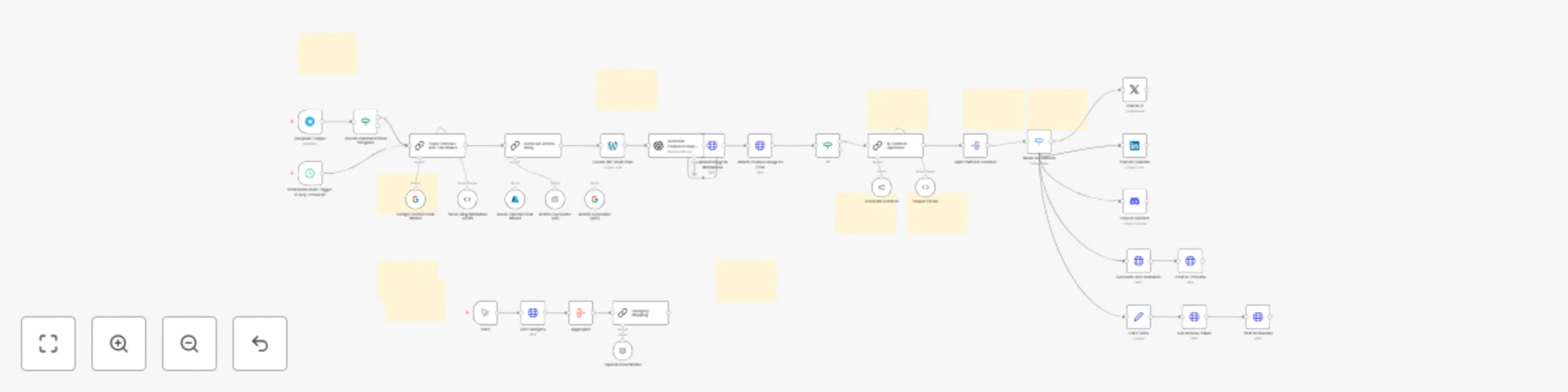
Workflow preview

Workflow preview
100%
Automated Blog Creation & Multi-Platform Publishing with GPT/Gemini & WordPress preview
Open on n8n.io

Important notice

This workflow is provided as-is. Please review and test before using in production.

1. Workflow Overview

Ultimate Blogblizt is a powerhouse workflow that solves the tedious task of crafting and publishing SEO optimized tech blog posts. It integrates AI models (OpenAI, Google Gemini), WordPress, and mu...

Best for

  • Content Creation automation workflows
  • Multimodal AI automation workflows
  • advanced n8n builders looking for reusable templates

Tools used

@n8n/n8n-nodes-langchain.chainllm, n8n-nodes-base.telegramtrigger, n8n-nodes-base.stickynote, n8n-nodes-base.if, n8n-nodes-base.scheduletrigger, @n8n/n8n-nodes-langchain.lmchatopenai, @n8n/n8n-nodes-langchain.lmchatgooglegemini, @n8n/n8n-nodes-langchain.outputparserstructured

Source and attribution

This workflow is cataloged by N8N Workflows and links back to its original n8n.io source page by Khairul Muhtadin.

Original n8n.io source

1.1 Workflow description

Title
Automated Blog Creation & Multi-Platform Publishing with GPT/Gemini & WordPress
Workflow name
Automated Blog Creation & Multi-Platform Publishing with GPT/Gemini & WordPress

Ultimate Blogblizt is a powerhouse workflow that solves the tedious task of crafting and publishing SEO-optimized tech blog posts. It integrates AI models (OpenAI, Google Gemini), WordPress, and multiple social media platforms to automate everything from topic selection and article writing to image creation and virality-driven social sharing—saving content creators hours while boosting online engagement and reach.

💡 Why Use Wp + Socmed?

  • Time saver: Cuts blog production time drastically by automating 100% of content creation, image generation, and publishing
  • Stress relief: No more writer's block or juggling multiple platforms—your n8n instance is your tireless content assistant
  • Boost engagement: Tailored social media posts optimized for X, LinkedIn, Discord, Threads, and Bluesky maximize your viral potential
  • Competitive edge: Combines multi-AI tech with multi-platform publishing to keep your blog ahead of the curve and your audience hooked
  • No 3rd Party Cost: This workflow use official API at no cost.

⚡ Perfect For

  • Content creators: Bloggers focused on technology and AI topics who want stress-free publishing
  • Small businesses: Teams needing consistent, SEO-rich content and social presence without extra hires
  • Marketing pros: Those craving seamless workflows connecting WordPress blogging and social channels effortlessly

🔧 How It Works

Step Phase Description
Trigger Automatically runs every 3 hours or manually via Telegram command "generate"
📎 Process AI picks a blog category and crafts a unique, SEO-friendly title plus metadata, then writes a 1,500–2,500 word article
🤖 Smart Logic Generates a lifelike featured image with OpenAI, uploads post and media to WordPress, and uses OpenRouter AI to create viral social media posts tailored by platform
💌 Output Publishes blog posts live and posts viral-ready content simultaneously to X, LinkedIn, Discord, Threads, and Bluesky

🔐 Quick Setup

  1. Import JSON file to your n8n instances
  2. Add credentials: WordPress API, OpenAI, Google Gemini, Twitter/X OAuth2, LinkedIn OAuth2, Discord Webhook, Threads API, Bluesky API, OpenRouter API, Telegram Bot
  3. Customize: Input your WordPress site URL, category mappings, social account IDs, and access tokens
  4. Update: Replace placeholder URLs/endpoints with your live WordPress and API URLs
  5. Test: Trigger manually via Telegram or run scheduled trigger and verify content creation and social posts

🧩 You'll Need

  • Active n8n instances
  • WordPress site with REST API enabled and credentials
  • API keys/accounts: OpenAI, Google Gemini, Twitter/X, LinkedIn, Discord Webhook, Threads, Bluesky, OpenRouter
  • Telegram Bot for manual triggering (optional but recommended)

🛠️ Level Up Ideas

  • Integrate newsletter automation for blog post digests
  • Customize social post templates to include trending hashtags or emojis automatically

Made by: khaisa Studio
Tags: automation, blogging, social media, AI, WordPress, SEO
Category: Content Creation & Social Sharing
Need custom work? Contact me

1.2 Logical Blocks

This catalog entry is organized from the workflow JSON. The node-level section below shows the executable blocks available for review before importing the template.

2. Block-by-Block Analysis

Block 1 - Topic Chooser and Title Maker

Type / Role
@n8n/n8n-nodes-langchain.chainLlm - chainLlm
Config choices
Version 1.6

Block 2 - Telegram Trigger

Type / Role
n8n-nodes-base.telegramTrigger - telegramTrigger
Config choices
Version 1.2

Block 3 - 🧠 Overview - What This Workflow Does

Type / Role
n8n-nodes-base.stickyNote - stickyNote
Config choices
Version 1

Block 4 - Check command from telegram

Type / Role
n8n-nodes-base.if - if
Config choices
Version 2.2

Block 5 - Scheduled Auto Trigger (Every 3 Hours)1

Type / Role
n8n-nodes-base.scheduleTrigger - scheduleTrigger
Config choices
Version 1.2

Block 6 - Article Generator (alt)

Type / Role
@n8n/n8n-nodes-langchain.lmChatOpenAi - lmChatOpenAi
Config choices
Version 1.2

Block 7 - Article Generator (alt2)

Type / Role
@n8n/n8n-nodes-langchain.lmChatGoogleGemini - lmChatGoogleGemini
Config choices
Version 1

Block 8 - Generate Article Body

Type / Role
@n8n/n8n-nodes-langchain.chainLlm - chainLlm
Config choices
Version 1.6

Block 9 - Parse Blog Metadata JSON

Type / Role
@n8n/n8n-nodes-langchain.outputParserStructured - outputParserStructured
Config choices
Version 1.2

Block 10 - Sticky - AI Optimizer

Type / Role
n8n-nodes-base.stickyNote - stickyNote
Config choices
Version 1

Block 11 - Sticky - OpenRouter

Type / Role
n8n-nodes-base.stickyNote - stickyNote
Config choices
Version 1

Block 12 - Sticky - Parser

Type / Role
n8n-nodes-base.stickyNote - stickyNote
Config choices
Version 1

Block 13 - Sticky - Split

Type / Role
n8n-nodes-base.stickyNote - stickyNote
Config choices
Version 1

Block 14 - Sticky - Switch

Type / Role
n8n-nodes-base.stickyNote - stickyNote
Config choices
Version 1

Block 15 - Generate Content

Type / Role
@n8n/n8n-nodes-langchain.lmChatOpenRouter - lmChatOpenRouter
Config choices
Version 1

Block 16 - Output Parser

Type / Role
@n8n/n8n-nodes-langchain.outputParserStructured - outputParserStructured
Config choices
Version 1.2

Block 17 - Split Platform Content

Type / Role
n8n-nodes-base.splitOut - splitOut
Config choices
Version 1

Block 18 - Route to Platform

Type / Role
n8n-nodes-base.switch - switch
Config choices
Version 3.2

Block 19 - Post to X

Type / Role
n8n-nodes-base.twitter - twitter
Config choices
Version 2

Block 20 - Post to LinkedIn

Type / Role
n8n-nodes-base.linkedIn - linkedIn
Config choices
Version 1

Block 21 - Post to Discord

Type / Role
n8n-nodes-base.discord - discord
Config choices
Version 2

Block 22 - AI Content Optimizer

Type / Role
@n8n/n8n-nodes-langchain.chainLlm - chainLlm
Config choices
Version 1.6

Block 23 - If

Type / Role
n8n-nodes-base.if - if
Config choices
Version 2.2

Block 24 - Create WP Draft Post

Type / Role
n8n-nodes-base.wordpress - wordpress
Config choices
Version 1

Showing the first 24 of 44 workflow blocks. Download the JSON for the full node graph.

3. Summary Table

Workflow Automated Blog Creation & Multi-Platform Publishing with GPT/Gemini & WordPress
Complexity advanced
Nodes 44
Categories Content Creation, Multimodal AI
Author Khairul Muhtadin
Published 28 Jul 2025

4. Reproducing the Workflow from Scratch

  1. 1. Download the workflow JSON

    Use the JSON export at /data/workflows/6547/6547.json as the source template for this automation.

  2. 2. Import the template into n8n

    Open n8n, import the downloaded JSON, and review each node before activating the workflow.

  3. 3. Configure credentials and variables

    Replace placeholder credentials, API keys, webhook URLs, account IDs, and environment-specific values with your own settings.

  4. 4. Test with sample data

    Run the workflow manually or in a staging workspace, inspect node output, and confirm downstream systems receive the expected data.

  5. 5. Activate and monitor

    Enable the workflow only after testing, then monitor executions, errors, and rate limits during the first production runs.

5. General Notes & Resources

Review imported nodes carefully before activation. This catalog entry is intended to help you inspect the workflow structure, understand required services, and find related templates faster.

Node names, credentials, schedules, webhook paths, and external service limits may need adjustment for your workspace.

Frequently asked questions

What does Automated Blog Creation & Multi-Platform Publishing with GPT/Gemini & WordPress do?

Ultimate Blogblizt is a powerhouse workflow that solves the tedious task of crafting and publishing SEO optimized tech blog posts. It integrates AI models (OpenAI, Google Gemini), WordPress, and mu...

What do I need before importing this workflow?

Review the workflow JSON, configure any required credentials in n8n, and test the automation in a safe workspace before using it in production.

Can I customize this workflow?

Yes. Use the block-by-block analysis and the downloadable JSON to inspect each node, then adjust credentials, prompts, schedules, filters, or destinations for your Content Creation, Multimodal AI use case.