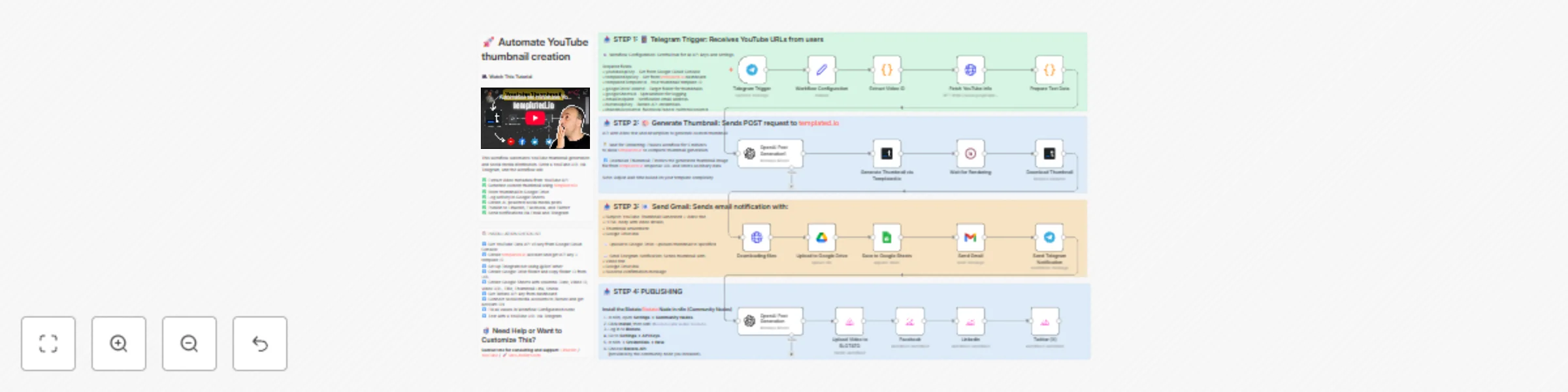
Automate YouTube thumbnail creation & social publishing with Templated.io & Blotato

Workflow preview

Workflow preview
100%
Automate YouTube thumbnail creation & social publishing with Templated.io & Blotato preview
Open on n8n.io

Important notice

This workflow is provided as-is. Please review and test before using in production.

1. Workflow Overview

Automate YouTube thumbnail creation from video links (with templated.io) Who is this for? This workflow is designed for content cr...

Best for

  • Content Creation automation workflows
  • Multimodal AI automation workflows
  • advanced n8n builders looking for reusable templates

Tools used

n8n-nodes-base.telegramtrigger, n8n-nodes-base.set, n8n-nodes-base.code, n8n-nodes-base.httprequest, n8n-nodes-base.wait, n8n-nodes-base.googledrive, n8n-nodes-base.gmail, n8n-nodes-base.telegram

Source and attribution

This workflow is cataloged by N8N Workflows and links back to its original n8n.io source page by Dr. Firas.

Original n8n.io source

1.1 Workflow description

Title
Automate YouTube thumbnail creation & social publishing with Templated.io & Blotato
Workflow name
Automate YouTube thumbnail creation & social publishing with Templated.io & Blotato

💥 Automate YouTube thumbnail creation from video links (with templated.io)

Who is this for?

This workflow is designed for content creators, YouTubers, and automation enthusiasts who want to automatically generate stunning YouTube thumbnails and streamline their publishing workflow — all within n8n.

If you regularly post videos and spend hours designing thumbnails manually, this automation is built for you.


What problem is this workflow solving?

Creating thumbnails is time-consuming — yet crucial for video performance.
This workflow completely automates that process:

  • No more manual design.
  • No more downloading screenshots.
  • No more repetitive uploads.

In less than 2 minutes, you can refresh your entire YouTube thumbnail library and make your channel look brand new.


What this workflow does

Once activated, this workflow can:

✅ Receive YouTube video links via Telegram
✅ Extract metadata (title, description, channel info) via YouTube API
✅ Generate a custom thumbnail automatically using Templated.io
✅ Upload the new thumbnail to Google Drive
✅ Log data in Google Sheets
✅ Send email and Telegram notifications when ready
✅ Create and publish AI-generated social posts on LinkedIn, Facebook, and Twitter via Blotato

Bonus: You can re-create dozens of YouTube covers in minutes — saving up to 5 hours per week and around $500/month in manual design effort.


Setup

1️⃣ Get a YouTube Data API v3 key from Google Cloud Console
2️⃣ Create a Templated.io account and get your API key + template ID
3️⃣ Set up a Telegram bot using @BotFather 4️⃣ Create a Google Drive folder and copy the folder ID
5️⃣ Create a Google Sheet with columns: Date, Video ID, Video URL, Title, Thumbnail Link, Status
6️⃣ Get your Blotato API key from the dashboard
7️⃣ Connect your social media accounts to Blotato
8️⃣ Fill all credentials in the Workflow Configuration node
9️⃣ Test by sending a YouTube URL to your Telegram bot


How to customize this workflow

  • Replace the Templated.io template ID with your own custom thumbnail layout
  • Modify the OpenAI node prompts to change text tone or style
  • Add or remove social platforms in the Blotato section
  • Adjust the wait time (default: 5 minutes) based on template complexity
  • Localize or translate the generated captions as needed

Expected Outcome

With one Telegram message, you’ll receive:

  • A professional custom thumbnail
  • An instant email + Telegram notification
  • A Google Drive link with your ready-to-use design

And your social networks will be automatically updated — no manual uploads.


Credits

  • Thumbnail generation powered by Templated.io
  • Social publishing powered by Blotato
  • Automation orchestrated via n8n

👋 Need help or want to customize this?

📩 Contact: LinkedIn
📺 YouTube: @DRFIRASS
🚀 Workshops: Mes Ateliers n8n

🎥 Watch This Tutorial


📄 Documentation: Notion Guide

Need help customizing?

Contact me for consulting and support : Linkedin / Youtube / 🚀 Mes Ateliers n8n

1.2 Logical Blocks

This catalog entry is organized from the workflow JSON. The node-level section below shows the executable blocks available for review before importing the template.

2. Block-by-Block Analysis

Block 1 - Telegram Trigger

Type / Role
n8n-nodes-base.telegramTrigger - telegramTrigger
Config choices
Version 1.2

Block 2 - Workflow Configuration

Type / Role
n8n-nodes-base.set - set
Config choices
Version 3.4

Block 3 - Extract Video ID

Type / Role
n8n-nodes-base.code - code
Config choices
Version 2

Block 4 - Fetch YouTube Info

Type / Role
n8n-nodes-base.httpRequest - httpRequest
Config choices
Version 4.2

Block 5 - Prepare Text Data

Type / Role
n8n-nodes-base.code - code
Config choices
Version 2

Block 6 - Wait for Rendering

Type / Role
n8n-nodes-base.wait - wait
Config choices
Version 1.1

Block 7 - Upload to Google Drive

Type / Role
n8n-nodes-base.googleDrive - googleDrive
Config choices
Version 3

Block 8 - Send Gmail

Type / Role
n8n-nodes-base.gmail - gmail
Config choices
Version 2.1

Block 9 - Send Telegram Notification

Type / Role
n8n-nodes-base.telegram - telegram
Config choices
Version 1.2

Block 10 - OpenAI Post Generation

Type / Role
@n8n/n8n-nodes-langchain.openAi - openAi
Config choices
Version 1.8

Block 11 - Upload Video to BLOTATO

Type / Role
@blotato/n8n-nodes-blotato.blotato - blotato
Config choices
Version 2

Block 12 - Linkedin

Type / Role
@blotato/n8n-nodes-blotato.blotato - blotato
Config choices
Version 2

Block 13 - Facebook

Type / Role
@blotato/n8n-nodes-blotato.blotato - blotato
Config choices
Version 2

Block 14 - Twitter (X)

Type / Role
@blotato/n8n-nodes-blotato.blotato - blotato
Config choices
Version 2

Block 15 - OpenAI Post Generation1

Type / Role
@n8n/n8n-nodes-langchain.openAi - openAi
Config choices
Version 1.8

Block 16 - Download Thumbnail

Type / Role
n8n-nodes-templated.templated - templated
Config choices
Version 1

Block 17 - Generate Thumbnail via Templated.io

Type / Role
n8n-nodes-templated.templated - templated
Config choices
Version 1

Block 18 - Downloading files

Type / Role
n8n-nodes-base.httpRequest - httpRequest
Config choices
Version 4.2

Block 19 - Save to Google Sheets

Type / Role
n8n-nodes-base.googleSheets - googleSheets
Config choices
Version 4.7

Block 20 - 📋 WORKFLOW OVERVIEW

Type / Role
n8n-nodes-base.stickyNote - stickyNote
Config choices
Version 1

Block 21 - 🔧 STEP 1: Configuration

Type / Role
n8n-nodes-base.stickyNote - stickyNote
Config choices
Version 1

Block 22 - 🎨 STEP 3: Thumbnail Generation

Type / Role
n8n-nodes-base.stickyNote - stickyNote
Config choices
Version 1

Block 23 - 📢 STEP 5: Notifications

Type / Role
n8n-nodes-base.stickyNote - stickyNote
Config choices
Version 1

Block 24 - ⚙️ INSTALLATION GUIDE

Type / Role
n8n-nodes-base.stickyNote - stickyNote
Config choices
Version 1

Showing the first 24 of 25 workflow blocks. Download the JSON for the full node graph.

3. Summary Table

Workflow Automate YouTube thumbnail creation & social publishing with Templated.io & Blotato
Complexity advanced
Nodes 25
Categories Content Creation, Multimodal AI
Author Dr. Firas
Published 24 Oct 2025

4. Reproducing the Workflow from Scratch

  1. 1. Download the workflow JSON

    Use the JSON export at /data/workflows/10126/10126.json as the source template for this automation.

  2. 2. Import the template into n8n

    Open n8n, import the downloaded JSON, and review each node before activating the workflow.

  3. 3. Configure credentials and variables

    Replace placeholder credentials, API keys, webhook URLs, account IDs, and environment-specific values with your own settings.

  4. 4. Test with sample data

    Run the workflow manually or in a staging workspace, inspect node output, and confirm downstream systems receive the expected data.

  5. 5. Activate and monitor

    Enable the workflow only after testing, then monitor executions, errors, and rate limits during the first production runs.

5. General Notes & Resources

Review imported nodes carefully before activation. This catalog entry is intended to help you inspect the workflow structure, understand required services, and find related templates faster.

Node names, credentials, schedules, webhook paths, and external service limits may need adjustment for your workspace.

Frequently asked questions

What does Automate YouTube thumbnail creation & social publishing with Templated.io & Blotato do?

Automate YouTube thumbnail creation from video links (with templated.io) Who is this for? This workflow is designed for content cr...

What do I need before importing this workflow?

Review the workflow JSON, configure any required credentials in n8n, and test the automation in a safe workspace before using it in production.

Can I customize this workflow?

Yes. Use the block-by-block analysis and the downloadable JSON to inspect each node, then adjust credentials, prompts, schedules, filters, or destinations for your Content Creation, Multimodal AI use case.