Automate WordPress category mapping with GPT-5 Mini (Azure OpenAI)

Workflow preview

Workflow preview
100%
Automate WordPress category mapping with GPT-5 Mini (Azure OpenAI) preview
Open on n8n.io

Important notice

This workflow is provided as-is. Please review and test before using in production.

1. Workflow Overview

WP Category Toolkit automates mapping content topics to your WordPress category IDs using your WordPress REST API and a GPT 5mini model. It repla...

Best for

  • Content Creation automation workflows
  • Multimodal AI automation workflows
  • intermediate n8n builders looking for reusable templates

Tools used

n8n-nodes-base.stickynote, n8n-nodes-base.manualtrigger, n8n-nodes-base.httprequest, n8n-nodes-base.aggregate, @n8n/n8n-nodes-langchain.chainllm, @n8n/n8n-nodes-langchain.lmchatazureopenai

Source and attribution

This workflow is cataloged by N8N Workflows and links back to its original n8n.io source page by Khairul Muhtadin.

Original n8n.io source

1.1 Workflow description

Title
Automate WordPress category mapping with GPT-5 Mini (Azure OpenAI)
Workflow name
Automate WordPress category mapping with GPT-5 Mini (Azure OpenAI)

WP Category Toolkit automates mapping content topics to your WordPress category IDs using your WordPress REST API and a GPT-5mini model.

It replaces manual copy-paste and guesswork when assigning categories, speeds up publishing, and reduces tagging errors so your site stays organized and search friendly without you learning new dev magic (just a bit of prompt craft).

💡 Why Use WP Category Toolkit?

  • Saves time: Cuts hours of manual category lookup and mapping—deploy batches of posts in minutes, not coffee breaks.
  • Stops messy tagging: Eliminates inconsistent category assignments so your archive and SEO behave themselves.
  • Measurable improvement: Expect faster publish cycles and fewer category fixes (reduce manual mapping errors by ~90%).
  • Competitive edge: Uses an LLM to interpret topic intent, so your categories align with content meaning, not guesswork—like having a librarian who understands your jokes.

⚡ Perfect For

  • Content Managers: Keep large WordPress catalogs neat without the spreadsheet gymnastics.
  • Agencies: Onboard client sites faster by automating taxonomy mapping across projects.
  • Developers & Automators: Add an LLM-powered mapping step to content pipelines without building custom classifiers.

🔧 How It Works

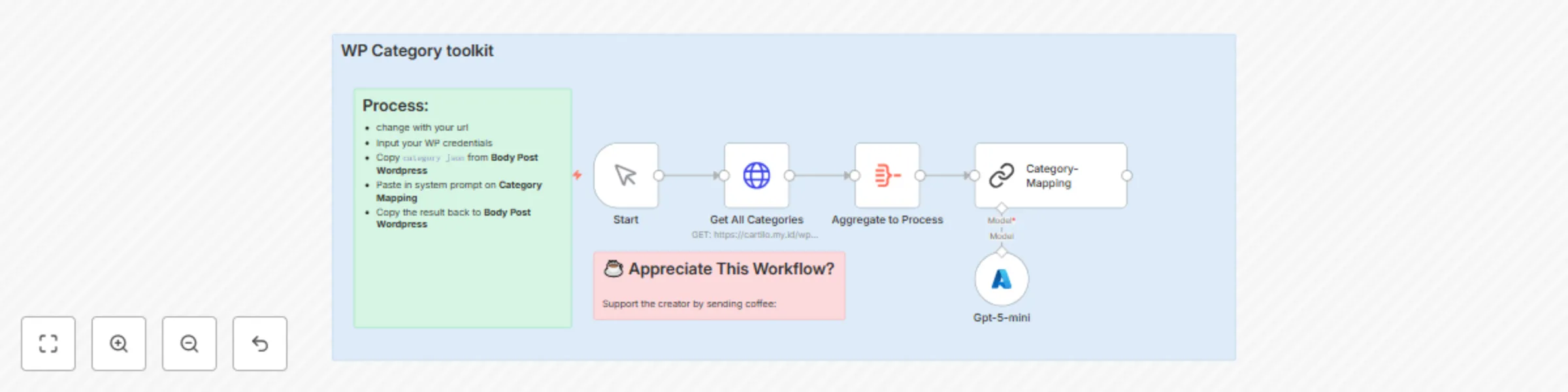
  1. ⏱ Trigger: Manual start (kick it off when you’re ready to map categories).
  2. 📎 Process: Pull all site categories from your WordPress REST endpoint, aggregate the list, and feed the source content + current topic into the mapping step.
  3. 🤖 Smart Logic: A Chain LLM node (Category-Mapping) uses a small prompt to decide which WordPress category IDs match the content topic (GPT5-mini handles the reasoning).
  4. 💌 Output: A clean category ID mapping you can paste into your Body Post WordPress node or use to patch posts automatically.

🔐 Quick Setup

  1. Import JSON file to your n8n instances → n8n Import Link
  2. Add credentials: WordPress API credential & Azure OpenAI (GPT5-mini) credential or you can use usual open AI node
  3. Update: Replace the WP endpoint URLand any post-body endpoints you’ll write back to
  4. Test: Run with a sample post and copy the output mapping into your Body Post WordPress node to confirm IDs match expected categories

🧩 You'll Need

  • Active n8n instances → n8n Partner Link
  • WordPress REST API access and credentials (wp-json access)
  • Azure OpenAI account with access to GPT5-mini
  • Integrations: WordPress API node, Chain LLM / Azure OpenAI node
  • (Optional) Staging WordPress site to test mappings safely

🛠️ Level Up Ideas

  • Auto-write category descriptions based on mapped content using the LLM. (It’ll sound smarter than your coffee.)
  • Patch posts automatically after mapping so mapping becomes truly zero-touch.
  • Add fallback heuristics: if the LLM is uncertain, route to a Slack/Microsoft Teams approval step.

Made by: Khairul
Tags: WordPress, Categories, AI, n8n
Category: WordPress
Need custom work? Contact me

1.2 Logical Blocks

This catalog entry is organized from the workflow JSON. The node-level section below shows the executable blocks available for review before importing the template.

2. Block-by-Block Analysis

Block 1 - Sticky Note4

Type / Role
n8n-nodes-base.stickyNote - stickyNote
Config choices
Version 1

Block 2 - Start

Type / Role
n8n-nodes-base.manualTrigger - manualTrigger
Config choices
Version 1

Block 3 - Sticky Note5

Type / Role
n8n-nodes-base.stickyNote - stickyNote
Config choices
Version 1

Block 4 - Get All Categories

Type / Role
n8n-nodes-base.httpRequest - httpRequest
Config choices
Version 4.2

Block 5 - Aggregate to Process

Type / Role
n8n-nodes-base.aggregate - aggregate
Config choices
Version 1

Block 6 - Category-Mapping

Type / Role
@n8n/n8n-nodes-langchain.chainLlm - chainLlm
Config choices
Version 1.7

Block 7 - Gpt-5-mini

Type / Role
@n8n/n8n-nodes-langchain.lmChatAzureOpenAi - lmChatAzureOpenAi
Config choices
Version 1

Block 8 - Sticky Note

Type / Role
n8n-nodes-base.stickyNote - stickyNote
Config choices
Version 1

3. Summary Table

Workflow Automate WordPress category mapping with GPT-5 Mini (Azure OpenAI)
Complexity intermediate
Nodes 8
Categories Content Creation, Multimodal AI
Author Khairul Muhtadin
Published 10 Aug 2025

4. Reproducing the Workflow from Scratch

  1. 1. Download the workflow JSON

    Use the JSON export at /data/workflows/7207/7207.json as the source template for this automation.

  2. 2. Import the template into n8n

    Open n8n, import the downloaded JSON, and review each node before activating the workflow.

  3. 3. Configure credentials and variables

    Replace placeholder credentials, API keys, webhook URLs, account IDs, and environment-specific values with your own settings.

  4. 4. Test with sample data

    Run the workflow manually or in a staging workspace, inspect node output, and confirm downstream systems receive the expected data.

  5. 5. Activate and monitor

    Enable the workflow only after testing, then monitor executions, errors, and rate limits during the first production runs.

5. General Notes & Resources

Review imported nodes carefully before activation. This catalog entry is intended to help you inspect the workflow structure, understand required services, and find related templates faster.

Node names, credentials, schedules, webhook paths, and external service limits may need adjustment for your workspace.

Frequently asked questions

What does Automate WordPress category mapping with GPT-5 Mini (Azure OpenAI) do?

WP Category Toolkit automates mapping content topics to your WordPress category IDs using your WordPress REST API and a GPT 5mini model. It repla...

What do I need before importing this workflow?

Review the workflow JSON, configure any required credentials in n8n, and test the automation in a safe workspace before using it in production.

Can I customize this workflow?

Yes. Use the block-by-block analysis and the downloadable JSON to inspect each node, then adjust credentials, prompts, schedules, filters, or destinations for your Content Creation, Multimodal AI use case.