Block 1 - Template Description
- Type / Role
- n8n-nodes-base.stickyNote - stickyNote
- Config choices
- Version 1


 Early Deal
This workflow is provided as-is. Please review and test before using in production.
Who’s it for This template is designed for Print on Demand (POD) business owners, independent artists, and e commerce managers who want to automate the process of turning raw design files into list...
n8n-nodes-base.stickynote, n8n-nodes-base.googledrivetrigger, n8n-nodes-base.set, @n8n/n8n-nodes-langchain.openai, n8n-nodes-base.httprequest, n8n-nodes-base.code, n8n-nodes-base.shopify, n8n-nodes-base.slack
This workflow is cataloged by N8N Workflows and links back to its original n8n.io source page by Takumi Oku.
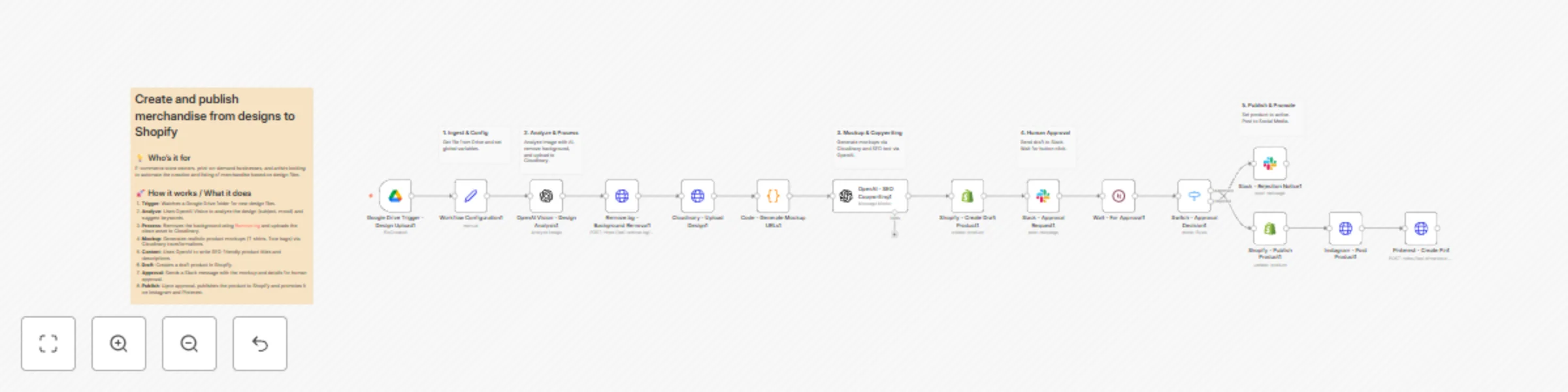
Original n8n.io sourceWho’s it for This template is designed for Print-on-Demand (POD) business owners, independent artists, and e-commerce managers who want to automate the process of turning raw design files into listed products without manual data entry. How it works This workflow acts as an automated merchandise factory that handles everything from image processing to marketing. Trigger: The workflow starts when a new design file is uploaded to a specific Google Drive folder. Analyze: OpenAI Vision analyzes the image to determine the subject, mood, and color palette, and assesses copyright risk. Process: The image background is removed using Remove.bg, and the clean asset is uploaded to Cloudinary. Mockup: The workflow generates realistic product mockups (e.g., T-shirts, Tote bags) by overlaying the design onto base product images using Cloudinary transformations. Copywriting: OpenAI writes an SEO-friendly product title, description, and tags based on the visual analysis. Draft: A draft product is created in Shopify with the generated details and mockup image. Approval: A message is sent to Slack with the product details and mockup. The workflow pauses and waits for a human to click "Approve" or "Reject". Publish & Promote: If approved, the product is published to Shopify and automatically posted to Instagram and Pinterest. If rejected, a notification is sent to Slack. How to set up Base Images: Upload your blank product images (e.g., a white t-shirt, a tote bag) to your Cloudinary account and note their Public IDs. Configuration: Open the Workflow Configuration node and fill in all the required fields, including your API keys and the Cloudinary Public IDs for your base products. Credentials: Configure the credentials for Google Drive, OpenAI, Shopify, Slack, Instagram, and Pinterest in their respective nodes. Folder ID: Update the Google Drive Trigger node with the ID of the folder you want to watch. Requirements n8n (Self-hosted or Cloud) Google Drive account OpenAI API key (Access to GPT-4o model recommended for Vision capabilities) Remove.bg API key Cloudinary account Shopify store Slack workspace Instagram Business account Pinterest account How to customize Mockups: You can modify the Code - Generate Mockup URLs node to add more product types (e.g., Hoodies, Mugs) by adding their Cloudinary Public IDs. Prompt Engineering: Adjust the system prompt in the OpenAI - SEO Copywriting node to match your brand voice or language style. Social Channels: Add or remove nodes to support other platforms like Twitter (X) or Facebook Pages.
This catalog entry is organized from the workflow JSON. The node-level section below shows the executable blocks available for review before importing the template.
| Workflow | Automate print-on-demand: design to Shopify with AI, mockups & social promotion |
|---|---|
| Complexity | advanced |
| Nodes | 21 |
| Categories | Content Creation, Multimodal AI |
| Author | Takumi Oku |
| Published | 24 Nov 2025 |
Use the JSON export at /data/workflows/11181/11181.json as the source template for this automation.
Open n8n, import the downloaded JSON, and review each node before activating the workflow.
Replace placeholder credentials, API keys, webhook URLs, account IDs, and environment-specific values with your own settings.
Run the workflow manually or in a staging workspace, inspect node output, and confirm downstream systems receive the expected data.
Enable the workflow only after testing, then monitor executions, errors, and rate limits during the first production runs.
Review imported nodes carefully before activation. This catalog entry is intended to help you inspect the workflow structure, understand required services, and find related templates faster.
Node names, credentials, schedules, webhook paths, and external service limits may need adjustment for your workspace.
Who’s it for This template is designed for Print on Demand (POD) business owners, independent artists, and e commerce managers who want to automate the process of turning raw design files into list...
Review the workflow JSON, configure any required credentials in n8n, and test the automation in a safe workspace before using it in production.
Yes. Use the block-by-block analysis and the downloadable JSON to inspect each node, then adjust credentials, prompts, schedules, filters, or destinations for your Content Creation, Multimodal AI use case.