Block 1 - Sticky Note
- Type / Role
- n8n-nodes-base.stickyNote - stickyNote
- Config choices
- Version 1


 Early Deal
This workflow is provided as-is. Please review and test before using in production.
This enterprise grade n8n workflow automates the Pharmaceutical Raw Material COA Verification & Vendor Quality Scoring System — from upload to final reporting — using AI powered document extraction...
n8n-nodes-base.stickynote, n8n-nodes-base.code, n8n-nodes-base.if, n8n-nodes-base.airtable, n8n-nodes-base.emailsend, n8n-nodes-base.webhook
This workflow is cataloged by N8N Workflows and links back to its original n8n.io source page by Oneclick AI Squad.
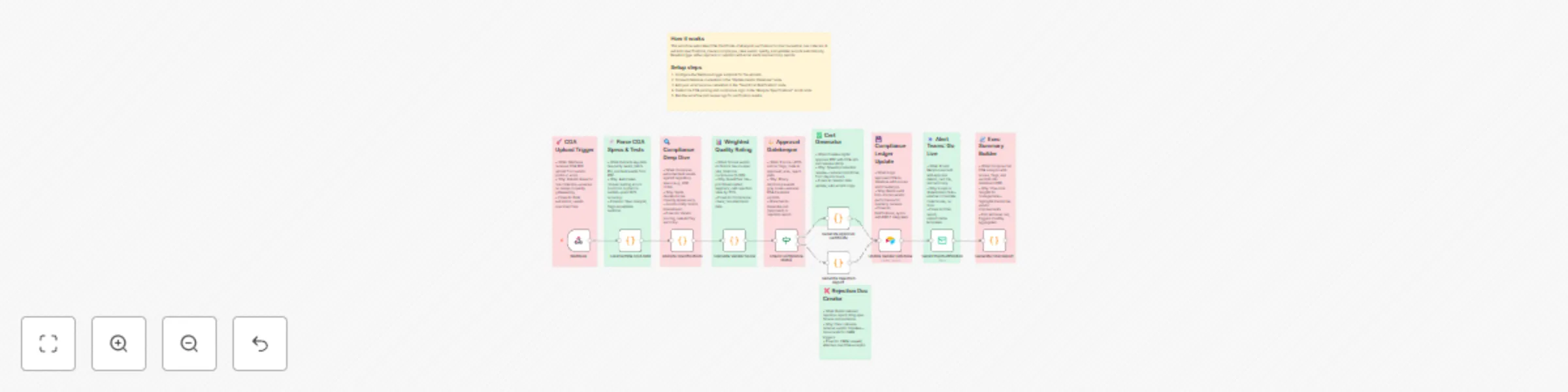
Original n8n.io sourceThis enterprise-grade n8n workflow automates the Pharmaceutical Raw Material COA Verification & Vendor Quality Scoring System — from upload to final reporting — using AI-powered document extraction, specification matching, and dynamic vendor scoring. It processes Certificates of Analysis (COAs) to validate compliance, assign quality scores, generate approvals or CAPA requests, and notify stakeholders, ensuring regulatory adherence and vendor accountability with full audit trails and zero manual data entry.
| Step | Node | Description |
|---|---|---|
| 1 | START: Upload COA | Webhook trigger receives uploaded COA file for verification process |
| 2 | EXTRACT: Parse COA | Extracts test results and data from the COA document using AI parsing |
| 3 | ANALYZE: Vendor Compliance | Compares extracted data against specifications and flags deviations |
| 4 | SCORE: Vendor Quality Rating | Calculates weighted compliance score based on test results and history |
| 5 | DECISION: Compliance Route | Evaluates score/status: Branches to approve (green) or reject (red) path |
| 6 | APPROVED: Generate Approval Cert (Approved Path) | Creates digital approval certificate for compliant materials |
| 7 | Update Vendor Database | Saves verification record, score, and status to vendor database |
| 8 | NOTIFY: Email Alert | Sends detailed notifications to QA/production teams |
| 9 | REPORT: Final Report | Generates executive summary with COA scores and verifications |
| 10 | REJECT: Generate Rejection Report (Reject Path) | Produces rejection report with deviation details |
| 11 | Request CAPA | Initiates Corrective and Preventive Action (CAPA) process |
| 12 | PATH REJECTED | Terminates rejected branch with audit log entry |
| Integration | Details |
|---|---|
| File Storage (e.g., Google Drive/AWS S3) | API key or OAuth for COA upload handling |
| AI Extraction (e.g., Claude or OCR Tool) | API key for document parsing (e.g., claude-3-5-sonnet-20241022) |
| Database (e.g., PostgreSQL/Airtable) | Connection string for vendor records and specs |
| Email (SMTP/Gmail) | SMTP credentials or OAuth for notifications |
Ensure your database or Google Sheets include:
VendorDatabase for scores and historySpecifications for quality standards/coa-verification (for real-time file uploads)Use manual execution to confirm:
| vendorId | coaId | score | complianceStatus | lastVerified | deviations | capaRequested | |--------------|-------------|----------|--------------------|--------------------|--------|--------------------|---------------| | VEND-123456 | COA-789012 | 92.5 | Approved | 2025-11-04T14:30:00Z | None | No |
| materialType | testParam | specMin | specMax | weight | |--------------|-------------|----------|--------------------|--------------------|--------|--------------------|---------------|----------| | API Excipient | Purity (%) | 98.0 | 102.0 | 0.4 |
| Requirement | Version/Access |
|---|---|
| n8n | v1.50+ (AI and database integrations supported) |
| AI Parsing API | claude-3-5-sonnet-20241022 or equivalent OCR |
| Database API | SQL connection or Google Sheets API |
| Email API | https://www.googleapis.com/auth/gmail or SMTP |
| File Storage | AWS S3 or Google Drive API access |
Result:
A fully automated quality assurance pipeline that verifies COAs, scores vendors, and drives compliance decisions — ensuring pharmaceutical safety and efficiency with AI precision and complete traceability.
Explore More AI Workflows: Get in touch with us for custom n8n automation!
This catalog entry is organized from the workflow JSON. The node-level section below shows the executable blocks available for review before importing the template.
| Workflow | Automate pharmaceutical COA verification & vendor scoring with AI document analysis |
|---|---|
| Complexity | advanced |
| Nodes | 21 |
| Categories | Document Extraction, AI Summarization |
| Author | Oneclick AI Squad |
| Published | 04 Nov 2025 |
Use the JSON export at /data/workflows/10491/10491.json as the source template for this automation.
Open n8n, import the downloaded JSON, and review each node before activating the workflow.
Replace placeholder credentials, API keys, webhook URLs, account IDs, and environment-specific values with your own settings.
Run the workflow manually or in a staging workspace, inspect node output, and confirm downstream systems receive the expected data.
Enable the workflow only after testing, then monitor executions, errors, and rate limits during the first production runs.
Review imported nodes carefully before activation. This catalog entry is intended to help you inspect the workflow structure, understand required services, and find related templates faster.
Node names, credentials, schedules, webhook paths, and external service limits may need adjustment for your workspace.
This enterprise grade n8n workflow automates the Pharmaceutical Raw Material COA Verification & Vendor Quality Scoring System — from upload to final reporting — using AI powered document extraction...
Review the workflow JSON, configure any required credentials in n8n, and test the automation in a safe workspace before using it in production.
Yes. Use the block-by-block analysis and the downloadable JSON to inspect each node, then adjust credentials, prompts, schedules, filters, or destinations for your Document Extraction, AI Summarization use case.