Automate meeting summaries & action items with Google Meet, AssemblyAI & Claude AI

Workflow preview

Workflow preview
100%
Automate meeting summaries & action items with Google Meet, AssemblyAI & Claude AI preview
Open on n8n.io

Important notice

This workflow is provided as-is. Please review and test before using in production.

1. Workflow Overview

The Google Meet AI Assistant workflow provides intelligent meeting analysis by integrating Google Calendar, Google Drive, AssemblyAI transcription, Anthropic Claude AI, Slack, and Notion. It automa...

Best for

  • AI Summarization automation workflows
  • advanced n8n builders looking for reusable templates

Tools used

n8n-nodes-base.manualtrigger, n8n-nodes-base.googlecalendar, n8n-nodes-base.filter, n8n-nodes-base.set, n8n-nodes-base.googledrive, n8n-nodes-base.if, n8n-nodes-base.stopanderror, n8n-nodes-base.httprequest

Source and attribution

This workflow is cataloged by N8N Workflows and links back to its original n8n.io source page by Dominic GS.

Original n8n.io source

1.1 Workflow description

Title
Automate meeting summaries & action items with Google Meet, AssemblyAI & Claude AI
Workflow name
Automate meeting summaries & action items with Google Meet, AssemblyAI & Claude AI

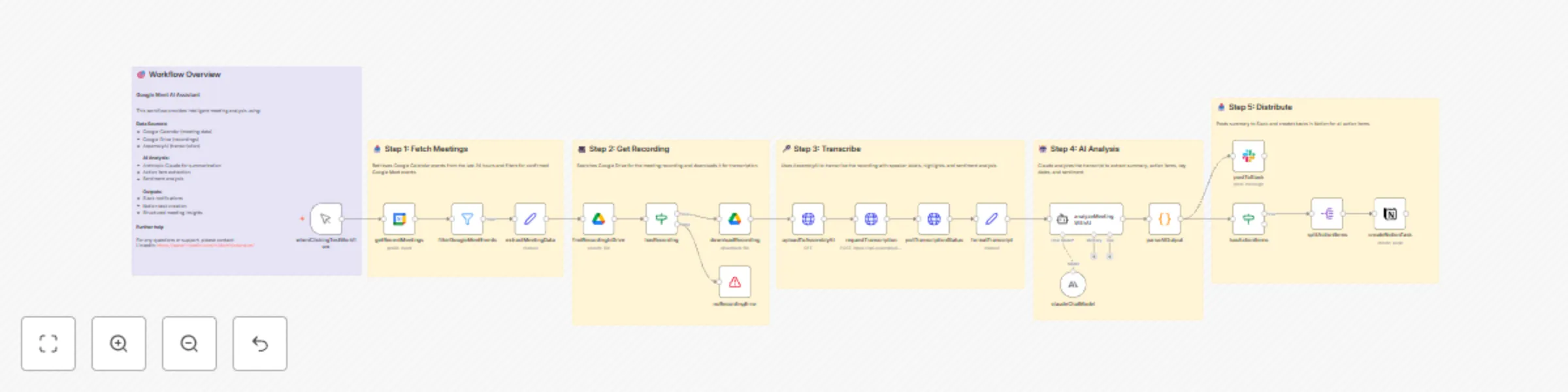
The Google Meet AI Assistant workflow provides intelligent meeting analysis by integrating Google Calendar, Google Drive, AssemblyAI transcription, Anthropic Claude AI, Slack, and Notion. It automates the complete process of fetching meeting data, retrieving recordings, transcribing conversations, analyzing with AI, and distributing actionable insights.

Workflow Steps

Step 1: Fetch Meetings

  • Retrieves Google Calendar events from the last 24 hours.
  • Filters for confirmed meetings with Google Meet conference links.

Step 2: Get Recording

  • Searches for the meeting recording file saved in Google Drive.
  • Downloads the recording for transcription purposes.

Step 3: Transcribe Recording

  • Uses AssemblyAI to transcribe the recording.
  • Transcription includes speaker labels, highlights, and sentiment analysis.

Step 4: AI Analysis

  • Analyzes the transcript with Anthropic Claude AI.
  • Extracts: Meeting summary (2-3 paragraphs) Action items with responsible parties Mentioned dates or deadlines Overall meeting sentiment

Step 5: Distribute Summary

  • Posts meeting summary and insights to a Slack channel.
  • Creates tasks for action items in Notion.

Integration Overview

  • Google Calendar: Event retrieval and filtering of Google Meet meetings.
  • Google Drive: Recording search and download.
  • AssemblyAI: Audio transcription with advanced features.
  • Anthropic Claude (Langchain): AI-driven analysis of transcripts.
  • Slack: Notification distribution for meeting summaries.
  • Notion: Task creation for actionable items.

Error Handling If a recording is not found, stops execution and returns an error message: "No recording found for this meeting. Please ensure the meeting was recorded and saved to Google Drive."

Summary This workflow fully automates the end-to-end process of meeting analysis from calendar event detection to action item task creation using AI, enabling productivity gains for meeting-heavy teams.

If further use or support is needed, you can contact me via LinkedIn.

If you want, I can also help create a detailed documentation or a formatted description ready for sharing or integration guides. Let me know!

1.2 Logical Blocks

This catalog entry is organized from the workflow JSON. The node-level section below shows the executable blocks available for review before importing the template.

2. Block-by-Block Analysis

Block 1 - whenClickingTestWorkflow

Type / Role
n8n-nodes-base.manualTrigger - manualTrigger
Config choices
Version 1

Block 2 - getRecentMeetings

Type / Role
n8n-nodes-base.googleCalendar - googleCalendar
Config choices
Version 1

Block 3 - filterGoogleMeetEvents

Type / Role
n8n-nodes-base.filter - filter
Config choices
Version 2.2

Block 4 - extractMeetingData

Type / Role
n8n-nodes-base.set - set
Config choices
Version 3.4

Block 5 - findRecordingInDrive

Type / Role
n8n-nodes-base.googleDrive - googleDrive
Config choices
Version 3

Block 6 - hasRecording

Type / Role
n8n-nodes-base.if - if
Config choices
Version 2

Block 7 - noRecordingError

Type / Role
n8n-nodes-base.stopAndError - stopAndError
Config choices
Version 1

Block 8 - downloadRecording

Type / Role
n8n-nodes-base.googleDrive - googleDrive
Config choices
Version 3

Block 9 - uploadToAssemblyAI

Type / Role
n8n-nodes-base.httpRequest - httpRequest
Config choices
Version 4.2

Block 10 - requestTranscription

Type / Role
n8n-nodes-base.httpRequest - httpRequest
Config choices
Version 4.2

Block 11 - pollTranscriptionStatus

Type / Role
n8n-nodes-base.httpRequest - httpRequest
Config choices
Version 4.2

Block 12 - formatTranscript

Type / Role
n8n-nodes-base.set - set
Config choices
Version 3.4

Block 13 - claudeChatModel

Type / Role
@n8n/n8n-nodes-langchain.lmChatAnthropic - lmChatAnthropic
Config choices
Version 1

Block 14 - analyzeMeetingWithAI

Type / Role
@n8n/n8n-nodes-langchain.agent - agent
Config choices
Version 1.7

Block 15 - parseAIOutput

Type / Role
n8n-nodes-base.code - code
Config choices
Version 2

Block 16 - postToSlack

Type / Role
n8n-nodes-base.slack - slack
Config choices
Version 2.2

Block 17 - splitActionItems

Type / Role
n8n-nodes-base.splitOut - splitOut
Config choices
Version 1

Block 18 - hasActionItems

Type / Role
n8n-nodes-base.if - if
Config choices
Version 2

Block 19 - createNotionTask

Type / Role
n8n-nodes-base.notion - notion
Config choices
Version 2

Block 20 - stickyNoteOverview

Type / Role
n8n-nodes-base.stickyNote - stickyNote
Config choices
Version 1

Block 21 - stickyNoteStep1

Type / Role
n8n-nodes-base.stickyNote - stickyNote
Config choices
Version 1

Block 22 - stickyNoteStep2

Type / Role
n8n-nodes-base.stickyNote - stickyNote
Config choices
Version 1

Block 23 - stickyNoteStep3

Type / Role
n8n-nodes-base.stickyNote - stickyNote
Config choices
Version 1

Block 24 - stickyNoteStep4

Type / Role
n8n-nodes-base.stickyNote - stickyNote
Config choices
Version 1

Showing the first 24 of 25 workflow blocks. Download the JSON for the full node graph.

3. Summary Table

Workflow Automate meeting summaries & action items with Google Meet, AssemblyAI & Claude AI
Complexity advanced
Nodes 25
Categories AI Summarization
Author Dominic GS
Published 05 Oct 2025

4. Reproducing the Workflow from Scratch

  1. 1. Download the workflow JSON

    Use the JSON export at /data/workflows/9284/9284.json as the source template for this automation.

  2. 2. Import the template into n8n

    Open n8n, import the downloaded JSON, and review each node before activating the workflow.

  3. 3. Configure credentials and variables

    Replace placeholder credentials, API keys, webhook URLs, account IDs, and environment-specific values with your own settings.

  4. 4. Test with sample data

    Run the workflow manually or in a staging workspace, inspect node output, and confirm downstream systems receive the expected data.

  5. 5. Activate and monitor

    Enable the workflow only after testing, then monitor executions, errors, and rate limits during the first production runs.

5. General Notes & Resources

Review imported nodes carefully before activation. This catalog entry is intended to help you inspect the workflow structure, understand required services, and find related templates faster.

Node names, credentials, schedules, webhook paths, and external service limits may need adjustment for your workspace.

Frequently asked questions

What does Automate meeting summaries & action items with Google Meet, AssemblyAI & Claude AI do?

The Google Meet AI Assistant workflow provides intelligent meeting analysis by integrating Google Calendar, Google Drive, AssemblyAI transcription, Anthropic Claude AI, Slack, and Notion. It automa...

What do I need before importing this workflow?

Review the workflow JSON, configure any required credentials in n8n, and test the automation in a safe workspace before using it in production.

Can I customize this workflow?

Yes. Use the block-by-block analysis and the downloadable JSON to inspect each node, then adjust credentials, prompts, schedules, filters, or destinations for your AI Summarization use case.