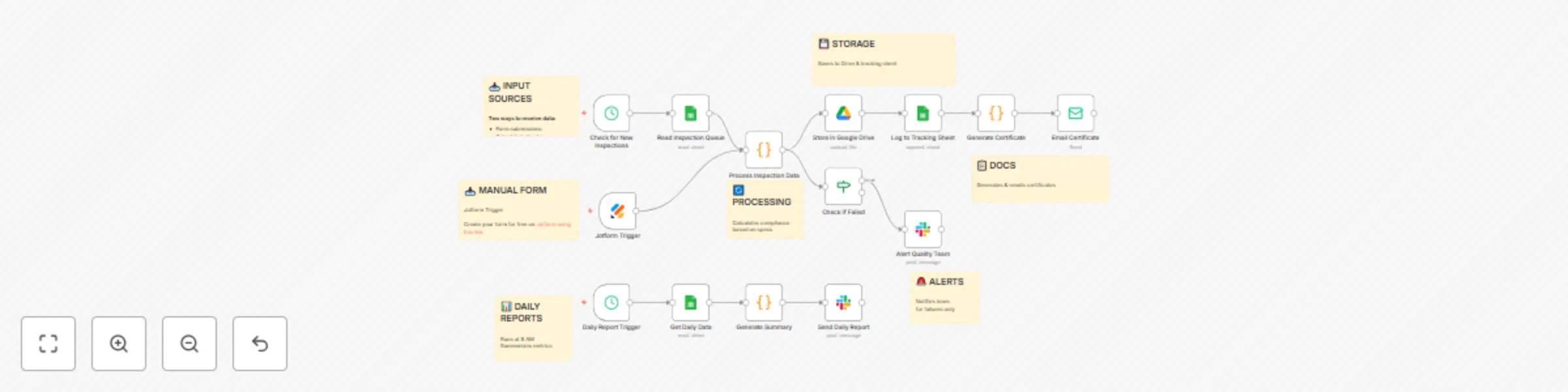
Automate manufacturing QC documentation & compliance with Jotform

Workflow preview

Workflow preview
100%
Automate manufacturing QC documentation & compliance with Jotform preview
Open on n8n.io

Important notice

This workflow is provided as-is. Please review and test before using in production.

1. Workflow Overview

Streamline your manufacturing quality control process with automated inspection tracking, compliance documentation, and real time alerts. This workflow eliminates manual QC paperwork while ensuring...

Best for

  • Document Extraction automation workflows
  • advanced n8n builders looking for reusable templates

Tools used

n8n-nodes-base.scheduletrigger, n8n-nodes-base.googlesheets, n8n-nodes-base.code, n8n-nodes-base.googledrive, n8n-nodes-base.if, n8n-nodes-base.slack, n8n-nodes-base.emailsend, n8n-nodes-base.stickynote

Source and attribution

This workflow is cataloged by N8N Workflows and links back to its original n8n.io source page by Jitesh Dugar.

Original n8n.io source

1.1 Workflow description

Title
Automate manufacturing QC documentation & compliance with Jotform
Workflow name
Automate manufacturing QC documentation & compliance with Jotform

Streamline your manufacturing quality control process with automated inspection tracking, compliance documentation, and real-time alerts. This workflow eliminates manual QC paperwork while ensuring ISO compliance and instant visibility into product quality.

🎯 Use Case

Perfect for manufacturing facilities that need to:

  • Document quality inspections for compliance audits
  • Track product defects and non-conformities
  • Generate certificates of compliance automatically
  • Alert teams instantly when products fail inspection
  • Maintain ISO 9001:2015 documentation requirements

✨ Key Features

Automated Data Collection

  • Accepts inspection data from web forms (Typeform) or Google Sheets
  • Processes measurements against predefined specifications
  • Calculates PASS/FAIL status automatically

Smart Documentation

  • Stores all inspection records in Google Drive
  • Maintains searchable tracking spreadsheet
  • Generates HTML compliance certificates
  • Creates audit-ready documentation trail

Real-Time Alerts

  • Instant Slack notifications for failed inspections
  • Detailed non-conformity reporting
  • Escalation to quality managers

Daily Analytics

  • Automated daily quality summaries at 8 AM
  • Pass rate calculations and trend analysis
  • Product and inspector performance metrics

🔧 Setup Requirements

  1. Google Workspace - For Sheets and Drive storage
  2. Slack - For team notifications
  3. Jotform (optional) - For web-based inspection forms
  4. Email (SMTP) - For sending compliance certificates

📝 Customization Tips

  • Modify specifications in the "Process Inspection Data" node to match your products
  • Add custom fields for industry-specific requirements
  • Adjust alert thresholds and notification channels
  • Extend certificate templates with your company branding

🏭 Industries

Ideal for: Electronics, Automotive Parts, Medical Devices, Consumer Goods, Food & Beverage, Aerospace Components

💡 Example Scenario

A electronics manufacturer uses this workflow to inspect PCB assemblies. When an inspector submits measurements via Jotform, the workflow automatically checks if dimensions and weight meet specifications, stores the report, and generates a certificate. If any board fails, the quality manager receives an immediate Slack alert with details.


Time Saved: ~2 hours daily on documentation and reporting
Error Reduction: 90% fewer data entry mistakes
Compliance: 100% audit-ready documentation

1.2 Logical Blocks

This catalog entry is organized from the workflow JSON. The node-level section below shows the executable blocks available for review before importing the template.

2. Block-by-Block Analysis

Block 1 - Check for New Inspections

Type / Role
n8n-nodes-base.scheduleTrigger - scheduleTrigger
Config choices
Version 1.1

Block 2 - Read Inspection Queue

Type / Role
n8n-nodes-base.googleSheets - googleSheets
Config choices
Version 4

Block 3 - Process Inspection Data

Type / Role
n8n-nodes-base.code - code
Config choices
Version 2

Block 4 - Store in Google Drive

Type / Role
n8n-nodes-base.googleDrive - googleDrive
Config choices
Version 3

Block 5 - Log to Tracking Sheet

Type / Role
n8n-nodes-base.googleSheets - googleSheets
Config choices
Version 4

Block 6 - Check if Failed

Type / Role
n8n-nodes-base.if - if
Config choices
Version 1

Block 7 - Alert Quality Team

Type / Role
n8n-nodes-base.slack - slack
Config choices
Version 2.1

Block 8 - Generate Certificate

Type / Role
n8n-nodes-base.code - code
Config choices
Version 2

Block 9 - Email Certificate

Type / Role
n8n-nodes-base.emailSend - emailSend
Config choices
Version 2.1

Block 10 - Daily Report Trigger

Type / Role
n8n-nodes-base.scheduleTrigger - scheduleTrigger
Config choices
Version 1.1

Block 11 - Get Daily Data

Type / Role
n8n-nodes-base.googleSheets - googleSheets
Config choices
Version 4

Block 12 - Generate Summary

Type / Role
n8n-nodes-base.code - code
Config choices
Version 2

Block 13 - Send Daily Report

Type / Role
n8n-nodes-base.slack - slack
Config choices
Version 2.1

Block 14 - Note

Type / Role
n8n-nodes-base.stickyNote - stickyNote
Config choices
Version 1

Block 15 - Note 2

Type / Role
n8n-nodes-base.stickyNote - stickyNote
Config choices
Version 1

Block 16 - Note 3

Type / Role
n8n-nodes-base.stickyNote - stickyNote
Config choices
Version 1

Block 17 - Note 4

Type / Role
n8n-nodes-base.stickyNote - stickyNote
Config choices
Version 1

Block 18 - Note 5

Type / Role
n8n-nodes-base.stickyNote - stickyNote
Config choices
Version 1

Block 19 - Note 6

Type / Role
n8n-nodes-base.stickyNote - stickyNote
Config choices
Version 1

Block 20 - Note1

Type / Role
n8n-nodes-base.stickyNote - stickyNote
Config choices
Version 1

Block 21 - Jotform Trigger

Type / Role
n8n-nodes-base.jotFormTrigger - jotFormTrigger
Config choices
Version 1

3. Summary Table

Workflow Automate manufacturing QC documentation & compliance with Jotform
Complexity advanced
Nodes 21
Categories Document Extraction
Author Jitesh Dugar
Published 16 Oct 2025

4. Reproducing the Workflow from Scratch

  1. 1. Download the workflow JSON

    Use the JSON export at /data/workflows/9761/9761.json as the source template for this automation.

  2. 2. Import the template into n8n

    Open n8n, import the downloaded JSON, and review each node before activating the workflow.

  3. 3. Configure credentials and variables

    Replace placeholder credentials, API keys, webhook URLs, account IDs, and environment-specific values with your own settings.

  4. 4. Test with sample data

    Run the workflow manually or in a staging workspace, inspect node output, and confirm downstream systems receive the expected data.

  5. 5. Activate and monitor

    Enable the workflow only after testing, then monitor executions, errors, and rate limits during the first production runs.

5. General Notes & Resources

Review imported nodes carefully before activation. This catalog entry is intended to help you inspect the workflow structure, understand required services, and find related templates faster.

Node names, credentials, schedules, webhook paths, and external service limits may need adjustment for your workspace.

Frequently asked questions

What does Automate manufacturing QC documentation & compliance with Jotform do?

Streamline your manufacturing quality control process with automated inspection tracking, compliance documentation, and real time alerts. This workflow eliminates manual QC paperwork while ensuring...

What do I need before importing this workflow?

Review the workflow JSON, configure any required credentials in n8n, and test the automation in a safe workspace before using it in production.

Can I customize this workflow?

Yes. Use the block-by-block analysis and the downloadable JSON to inspect each node, then adjust credentials, prompts, schedules, filters, or destinations for your Document Extraction use case.