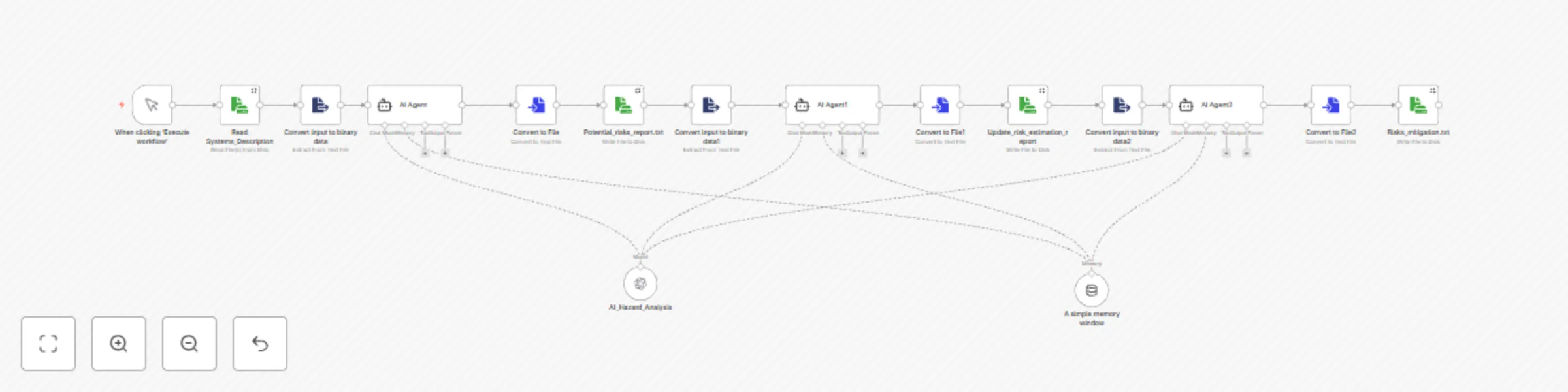
Automate ISO 26262 compliance with GPT-4 for automotive safety analysis

Workflow preview

Workflow preview
100%
Automate ISO 26262 compliance with GPT-4 for automotive safety analysis preview
Open on n8n.io

Important notice

This workflow is provided as-is. Please review and test before using in production.

1. Workflow Overview

:car: Business Value Proposition Accelerates ISO 26262 compliance for automotive/industrial systems by automating safety analysis while maintaining rigorous audit standards. :gear: How It Works :ch...

Best for

  • Engineering automation workflows
  • AI Summarization automation workflows
  • advanced n8n builders looking for reusable templates

Tools used

n8n-nodes-base.manualtrigger, @n8n/n8n-nodes-langchain.agent, @n8n/n8n-nodes-langchain.lmchatopenai, @n8n/n8n-nodes-langchain.memorybufferwindow, n8n-nodes-base.readwritefile, n8n-nodes-base.extractfromfile, n8n-nodes-base.converttofile

Source and attribution

This workflow is cataloged by N8N Workflows and links back to its original n8n.io source page by MRJ.

Original n8n.io source

1.1 Workflow description

Title
Automate ISO 26262 compliance with GPT-4 for automotive safety analysis
Workflow name
Automate ISO 26262 compliance with GPT-4 for automotive safety analysis

:car: Business Value Proposition

Accelerates ISO 26262 compliance for automotive/industrial systems by automating safety analysis while maintaining rigorous audit standards.

:gear: How It Works

graph TD
    A[Engineer uploads<br>system description] --&gt; B(LLM identifies hazards)
    B --&gt; C(LLM scores risks per ISO 26262)
    C --&gt; D(Generates mitigation strategies)
    D --&gt; E(Produces audit-ready reports)

:chart_with_upwards_trend: Key Benefits

  • Time

    • 50-70% faster than manual HAZOP/FMEA sessions
    • Instant report generation vs. weeks of documentation
  • Risk Mitigation

    • Pre-validated templates reduce human error
    • Auto-generated traceability simplifies audits

:warning: Governance Controls

  • Human-in-the-loop: All LLM outputs require engineer sign-off
  • Version tracking: Full history of modifications
  • Audit mode: Export all decision rationales

:computer: Technical Requirements

  • Runs on existing n8n instances
  • Docker deployment (<1hr setup)
  • Integrates with JAMA/DOORS (optional)

:wrench: Setup and Usage

Prerequisites

Enterprise-ready deployment: When supported by IT infrastructure teams, this solution transforms into a scalable AI safety assistant, providing real-time HARA guidance akin to engineering Co-pilot tools.

:arrow_down: Installation and :play_or_pause_button: Running the Workflow

For installation procedures and usage of workflow, refer the repository

:warning: Validation & Limitations

AI-Assisted Analysis Considerations

Advantage Mitigation Strategy Implementation Example
Rapid hazard identification Human validation layer Manual review nodes in workflow
Consistent S/E/C scoring Rule-based validation ASIL-D → Redundancy check
Edge case coverage Cross-reference with historical data Integration with incident databases

Critical Validation Steps

  1. AI Output Review node in n8n
    Example: (by code)

    {
      "type": "function",
      "parameters": {
        "functionCode": "if ($input.item.json.ASIL === 'D' && !$input.item.json.redundancy) throw new Error('ASIL D requires redundancy');"
      }
    }
    
  2. Version Control

  • Prompt versions tied to ISO standard editions (e.g., ISO26262:2018-v1.2)
  • Git-tracked changes to ai_models/training_data/
  1. Audit trails
  • Providing a log structure for audit trails
# Log structure
/logs/
└── YYYY-MM-DD/
  ├── hazards_approved.log
  └── hazards_rejected.log

1.2 Logical Blocks

This catalog entry is organized from the workflow JSON. The node-level section below shows the executable blocks available for review before importing the template.

2. Block-by-Block Analysis

Block 1 - When clicking ‘Execute workflow’

Type / Role
n8n-nodes-base.manualTrigger - manualTrigger
Config choices
Version 1

Block 2 - AI Agent

Type / Role
@n8n/n8n-nodes-langchain.agent - agent
Config choices
Version 2

Block 3 - AI_Hazard_Analysis

Type / Role
@n8n/n8n-nodes-langchain.lmChatOpenAi - lmChatOpenAi
Config choices
Version 1.2

Block 4 - A simple memory window

Type / Role
@n8n/n8n-nodes-langchain.memoryBufferWindow - memoryBufferWindow
Config choices
Version 1.3

Block 5 - Read Systems_Description

Type / Role
n8n-nodes-base.readWriteFile - readWriteFile
Config choices
Version 1

Block 6 - Convert input to binary data

Type / Role
n8n-nodes-base.extractFromFile - extractFromFile
Config choices
Version 1

Block 7 - Convert to File

Type / Role
n8n-nodes-base.convertToFile - convertToFile
Config choices
Version 1.1

Block 8 - Potential_risks_report.txt

Type / Role
n8n-nodes-base.readWriteFile - readWriteFile
Config choices
Version 1

Block 9 - Update_risk_estimation_report

Type / Role
n8n-nodes-base.readWriteFile - readWriteFile
Config choices
Version 1

Block 10 - AI Agent1

Type / Role
@n8n/n8n-nodes-langchain.agent - agent
Config choices
Version 2

Block 11 - Convert input to binary data1

Type / Role
n8n-nodes-base.extractFromFile - extractFromFile
Config choices
Version 1

Block 12 - Convert to File1

Type / Role
n8n-nodes-base.convertToFile - convertToFile
Config choices
Version 1.1

Block 13 - Risks_mitigation.txt

Type / Role
n8n-nodes-base.readWriteFile - readWriteFile
Config choices
Version 1

Block 14 - AI Agent2

Type / Role
@n8n/n8n-nodes-langchain.agent - agent
Config choices
Version 2

Block 15 - Convert input to binary data2

Type / Role
n8n-nodes-base.extractFromFile - extractFromFile
Config choices
Version 1

Block 16 - Convert to File2

Type / Role
n8n-nodes-base.convertToFile - convertToFile
Config choices
Version 1.1

3. Summary Table

Workflow Automate ISO 26262 compliance with GPT-4 for automotive safety analysis
Complexity advanced
Nodes 16
Categories Engineering, AI Summarization
Author MRJ
Published 20 Jul 2025

4. Reproducing the Workflow from Scratch

  1. 1. Download the workflow JSON

    Use the JSON export at /data/workflows/6208/6208.json as the source template for this automation.

  2. 2. Import the template into n8n

    Open n8n, import the downloaded JSON, and review each node before activating the workflow.

  3. 3. Configure credentials and variables

    Replace placeholder credentials, API keys, webhook URLs, account IDs, and environment-specific values with your own settings.

  4. 4. Test with sample data

    Run the workflow manually or in a staging workspace, inspect node output, and confirm downstream systems receive the expected data.

  5. 5. Activate and monitor

    Enable the workflow only after testing, then monitor executions, errors, and rate limits during the first production runs.

5. General Notes & Resources

Review imported nodes carefully before activation. This catalog entry is intended to help you inspect the workflow structure, understand required services, and find related templates faster.

Node names, credentials, schedules, webhook paths, and external service limits may need adjustment for your workspace.

Frequently asked questions

What does Automate ISO 26262 compliance with GPT-4 for automotive safety analysis do?

:car: Business Value Proposition Accelerates ISO 26262 compliance for automotive/industrial systems by automating safety analysis while maintaining rigorous audit standards. :gear: How It Works :ch...

What do I need before importing this workflow?

Review the workflow JSON, configure any required credentials in n8n, and test the automation in a safe workspace before using it in production.

Can I customize this workflow?

Yes. Use the block-by-block analysis and the downloadable JSON to inspect each node, then adjust credentials, prompts, schedules, filters, or destinations for your Engineering, AI Summarization use case.