Block 1 - 📖 SETUP GUIDE
- Type / Role
- n8n-nodes-base.stickyNote - stickyNote
- Config choices
- Version 1


 Early Deal
This workflow is provided as-is. Please review and test before using in production.
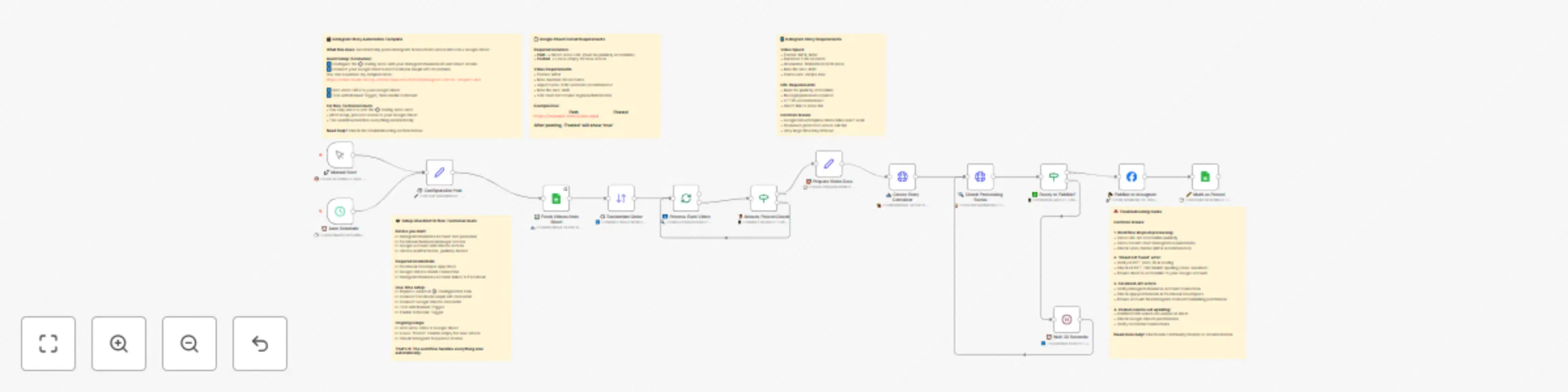
Automated Instagram Stories from Google Sheets What it Does This workflow automates posting Instagram Stories directly from a list of video URLs in a Google Sheet. Simply add a video link to the...
n8n-nodes-base.stickynote, n8n-nodes-base.set, n8n-nodes-base.manualtrigger, n8n-nodes-base.scheduletrigger, n8n-nodes-base.googlesheets, n8n-nodes-base.sort, n8n-nodes-base.splitinbatches, n8n-nodes-base.if
This workflow is cataloged by N8N Workflows and links back to its original n8n.io source page by iMan.
Original n8n.io sourceThis workflow automates posting Instagram Stories directly from a list of video URLs in a Google Sheet. Simply add a video link to the sheet, and this template will schedule and post it for you. It's designed to be a "set it and forget it" solution for your content strategy.
Key Features:
Before you start, you'll need a few things. This is the most important part of the setup!
https://...).Follow these three parts carefully. Once done, you won't have to touch the configuration again.
This section generates the keys and IDs you need to allow n8n to communicate with Instagram.
Create a Meta App:
Configure App Permissions:
instagram_basic, instagram_content_publish, pages_show_list, and pages_read_engagement.Find Your Instagram Business Account ID:
3.1. Log in: to your Instagram account.
3.2. Click on your Profile: in the menu on the left.
3.3. Click: "Edit Profile" at the top.
3.4. Under the "Settings" heading, click "See more in Accounts Center".
3.5. Select: your intended Instagram profile.
3.6. In the URL, your Instagram Business Account ID will be displayed after /profiles in a numerical format.
Example:
https://accountscenter.instagram.com/profiles/[YOUR_ID]/?theme=dark
Generate a Long-Lived Access Token:
This is where you'll manage your video content.
source_url: This is where you will paste the direct URL to your video file.posted_story: Leave this column empty. The workflow will automatically fill it with true after a video is successfully posted.https://docs.google.com/spreadsheets/d/[THIS_IS_THE_SHEET_ID]/editNow, let's connect everything inside your n8n workflow.
Fill the ⚙️ Configuration Hub Node:
Connect Your Credentials:
📊 Fetch Videos from Sheet node, create a new credential and connect your Google Account.📤 Create Story Container node, create a new credential. Use the App ID, App Secret, and the Long-Lived Access Token you generated in Part 1. You will use this same credential for the other Facebook/Instagram nodes.Activate the Workflow:
🚀 Manual Start node.⏰ Auto Schedule node is set to run daily by default, but you can change the time to whatever you like.SHEET_DOC_ID and SHEET_TAB_NAME in the Config node are perfectly correct (it's case-sensitive!).posted_story column is empty. If all are marked true, it has nothing new to post.@iMan https://imanetworks.ch/
This catalog entry is organized from the workflow JSON. The node-level section below shows the executable blocks available for review before importing the template.
| Workflow | Automate Instagram stories publishing from Google Sheets with Meta Graph API |
|---|---|
| Complexity | advanced |
| Nodes | 19 |
| Categories | Content Creation, Social Media |
| Author | iMan |
| Published | 20 Sept 2025 |
Use the JSON export at /data/workflows/8785/8785.json as the source template for this automation.
Open n8n, import the downloaded JSON, and review each node before activating the workflow.
Replace placeholder credentials, API keys, webhook URLs, account IDs, and environment-specific values with your own settings.
Run the workflow manually or in a staging workspace, inspect node output, and confirm downstream systems receive the expected data.
Enable the workflow only after testing, then monitor executions, errors, and rate limits during the first production runs.
Review imported nodes carefully before activation. This catalog entry is intended to help you inspect the workflow structure, understand required services, and find related templates faster.
Node names, credentials, schedules, webhook paths, and external service limits may need adjustment for your workspace.
Automated Instagram Stories from Google Sheets What it Does This workflow automates posting Instagram Stories directly from a list of video URLs in a Google Sheet. Simply add a video link to the...
Review the workflow JSON, configure any required credentials in n8n, and test the automation in a safe workspace before using it in production.
Yes. Use the block-by-block analysis and the downloadable JSON to inspect each node, then adjust credentials, prompts, schedules, filters, or destinations for your Content Creation, Social Media use case.