Automate Incident Management with PagerDuty, Port AI, Jira & Slack

Workflow preview

Workflow preview
100%
Automate Incident Management with PagerDuty, Port AI, Jira & Slack preview
Open on n8n.io

Important notice

This workflow is provided as-is. Please review and test before using in production.

1. Workflow Overview

Complete incident workflow from detection through resolution to post mortem, with full organizational context from Port's catalog. This template handles both incident triggered and resolved events ...

Best for

  • DevOps automation workflows
  • AI RAG automation workflows
  • advanced n8n builders looking for reusable templates

Tools used

n8n-nodes-base.webhook, n8n-nodes-base.switch, custom.portio, n8n-nodes-base.openai, n8n-nodes-base.if, n8n-nodes-base.slack, n8n-nodes-base.jira, n8n-nodes-base.stickynote

Source and attribution

This workflow is cataloged by N8N Workflows and links back to its original n8n.io source page by Port IO.

Original n8n.io source

1.1 Workflow description

Title
Automate Incident Management with PagerDuty, Port AI, Jira & Slack
Workflow name
Automate Incident Management with PagerDuty, Port AI, Jira & Slack

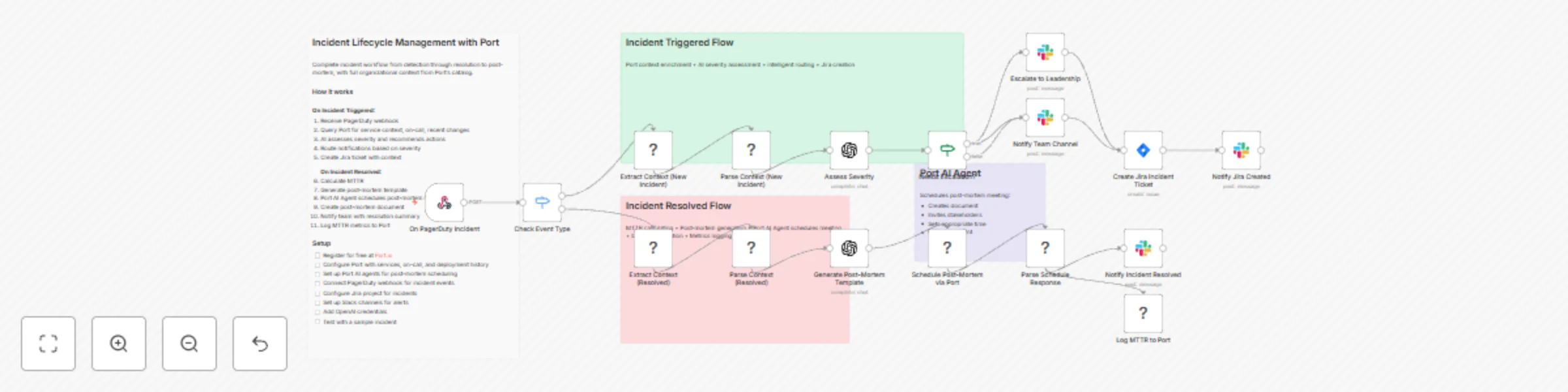
Complete incident workflow from detection through resolution to post-mortem, with full organizational context from Port's catalog. This template handles both incident triggered and resolved events from PagerDuty, automatically creating Jira tickets with context, notifying teams via Slack, calculating MTTR, and using Port AI Agents to schedule post-mortem meetings and create documentation.

How it works

The n8n workflow orchestrates the following steps:

On Incident Triggered:

  • PagerDuty webhook — Receives incident events from PagerDuty via POST request.
  • Event routing — Routes to triggered or resolved flow based on event type.
  • Port context enrichment — Uses Port's n8n node to query your software catalog for service context, on-call engineers, recent deployments, runbooks, and past incidents.
  • AI severity assessment — OpenAI assesses severity based on Port context and recommends investigation actions.
  • Escalation routing — Critical incidents automatically escalate to leadership Slack channel.
  • Jira ticket creation — Creates incident ticket with full context, investigation checklist, and recommended actions.
  • Team notification — Notifies the team's Slack channel with incident details and resources.

On Incident Resolved:

  • Port context extraction — Gets post-incident context from Port including stakeholders and documentation spaces.
  • MTTR calculation — Calculates mean time to resolution from incident timestamps.
  • Post-mortem generation — AI generates a structured post-mortem template with timeline.
  • Port AI Agent scheduling — Triggers Port AI Agent to schedule post-mortem meeting, invite stakeholders, and create documentation.
  • Resolution notification — Notifies team with MTTR, post-mortem document link, and meeting details.
  • Metrics logging — Logs MTTR metrics back to Port for service reliability tracking.

Setup

  • Register for free on Port.io
  • Configure Port with services, on-call schedules, and deployment history
  • Set up Port AI agents for post-mortem scheduling
  • Connect PagerDuty webhook for incident events
  • Configure Jira project for incident tickets (use project key 'INC' or customize)
  • Set up Slack channels for alerts (#incidents and #leadership-alerts)
  • Add OpenAI credentials for severity assessment
  • Test with a sample incident event
  • You should be good to go!

Prerequisites

  • You have a Port account and have completed the onboarding process.
  • Port's integrations are configured (GitHub, Jira, PagerDuty if available).
  • You have a working n8n instance (Cloud or self-hosted) with Port's n8n custom node installed.
  • PagerDuty account with webhook capabilities.
  • Jira Cloud account with appropriate project permissions.
  • Slack workspace with bot permissions to post messages.
  • OpenAI API key for severity assessment and post-mortem generation.

⚠️ This template is intended for Self-Hosted instances only.

1.2 Logical Blocks

This catalog entry is organized from the workflow JSON. The node-level section below shows the executable blocks available for review before importing the template.

2. Block-by-Block Analysis

Block 1 - On PagerDuty Incident

Type / Role
n8n-nodes-base.webhook - webhook
Config choices
Version 1

Block 2 - Check Event Type

Type / Role
n8n-nodes-base.switch - switch
Config choices
Version 2

Block 3 - Extract Context (New Incident)

Type / Role
CUSTOM.portIo - portIo
Config choices
Version 1

Block 4 - Parse Context (New Incident)

Type / Role
CUSTOM.portIo - portIo
Config choices
Version 1

Block 5 - Assess Severity

Type / Role
n8n-nodes-base.openAi - openAi
Config choices
Version 1

Block 6 - Needs Escalation?

Type / Role
n8n-nodes-base.if - if
Config choices
Version 1

Block 7 - Notify Team Channel

Type / Role
n8n-nodes-base.slack - slack
Config choices
Version 1

Block 8 - Escalate to Leadership

Type / Role
n8n-nodes-base.slack - slack
Config choices
Version 1

Block 9 - Create Jira Incident Ticket

Type / Role
n8n-nodes-base.jira - jira
Config choices
Version 1

Block 10 - Notify Jira Created

Type / Role
n8n-nodes-base.slack - slack
Config choices
Version 1

Block 11 - Extract Context (Resolved)

Type / Role
CUSTOM.portIo - portIo
Config choices
Version 1

Block 12 - Parse Context (Resolved)

Type / Role
CUSTOM.portIo - portIo
Config choices
Version 1

Block 13 - Generate Post-Mortem Template

Type / Role
n8n-nodes-base.openAi - openAi
Config choices
Version 1

Block 14 - Schedule Post-Mortem via Port

Type / Role
CUSTOM.portIo - portIo
Config choices
Version 1

Block 15 - Parse Schedule Response

Type / Role
CUSTOM.portIo - portIo
Config choices
Version 1

Block 16 - Notify Incident Resolved

Type / Role
n8n-nodes-base.slack - slack
Config choices
Version 1

Block 17 - Log MTTR to Port

Type / Role
CUSTOM.portIo - portIo
Config choices
Version 1

Block 18 - Sticky Note

Type / Role
n8n-nodes-base.stickyNote - stickyNote
Config choices
Version 1

Block 19 - Sticky Note1

Type / Role
n8n-nodes-base.stickyNote - stickyNote
Config choices
Version 1

Block 20 - Sticky Note2

Type / Role
n8n-nodes-base.stickyNote - stickyNote
Config choices
Version 1

Block 21 - Sticky Note3

Type / Role
n8n-nodes-base.stickyNote - stickyNote
Config choices
Version 1

3. Summary Table

Workflow Automate Incident Management with PagerDuty, Port AI, Jira & Slack
Complexity advanced
Nodes 21
Categories DevOps, AI RAG
Author Port IO
Published 08 Dec 2025

4. Reproducing the Workflow from Scratch

  1. 1. Download the workflow JSON

    Use the JSON export at /data/workflows/11610/11610.json as the source template for this automation.

  2. 2. Import the template into n8n

    Open n8n, import the downloaded JSON, and review each node before activating the workflow.

  3. 3. Configure credentials and variables

    Replace placeholder credentials, API keys, webhook URLs, account IDs, and environment-specific values with your own settings.

  4. 4. Test with sample data

    Run the workflow manually or in a staging workspace, inspect node output, and confirm downstream systems receive the expected data.

  5. 5. Activate and monitor

    Enable the workflow only after testing, then monitor executions, errors, and rate limits during the first production runs.

5. General Notes & Resources

Review imported nodes carefully before activation. This catalog entry is intended to help you inspect the workflow structure, understand required services, and find related templates faster.

Node names, credentials, schedules, webhook paths, and external service limits may need adjustment for your workspace.

Frequently asked questions

What does Automate Incident Management with PagerDuty, Port AI, Jira & Slack do?

Complete incident workflow from detection through resolution to post mortem, with full organizational context from Port's catalog. This template handles both incident triggered and resolved events ...

What do I need before importing this workflow?

Review the workflow JSON, configure any required credentials in n8n, and test the automation in a safe workspace before using it in production.

Can I customize this workflow?

Yes. Use the block-by-block analysis and the downloadable JSON to inspect each node, then adjust credentials, prompts, schedules, filters, or destinations for your DevOps, AI RAG use case.