Automate Google OAuth2 credential creation in n8n

Workflow preview

Workflow preview
100%
Automate Google OAuth2 credential creation in n8n preview
Open on n8n.io

Important notice

This workflow is provided as-is. Please review and test before using in production.

1. Workflow Overview

Overview: Automate Your Google OAuth2 Credential Creation This workflow template streamlines the process of creating and naming individual Google OAuth2 credentials for multiple Google services wit...

Best for

  • DevOps automation workflows
  • intermediate n8n builders looking for reusable templates

Tools used

n8n-nodes-base.manualtrigger, n8n-nodes-base.set, n8n-nodes-base.splitout, n8n-nodes-base.n8n, n8n-nodes-base.stickynote

Source and attribution

This workflow is cataloged by N8N Workflows and links back to its original n8n.io source page by Jordan Haisley.

Original n8n.io source

1.1 Workflow description

Title
Automate Google OAuth2 credential creation in n8n
Workflow name
Automate Google OAuth2 credential creation in n8n

Overview: Automate Your Google OAuth2 Credential Creation

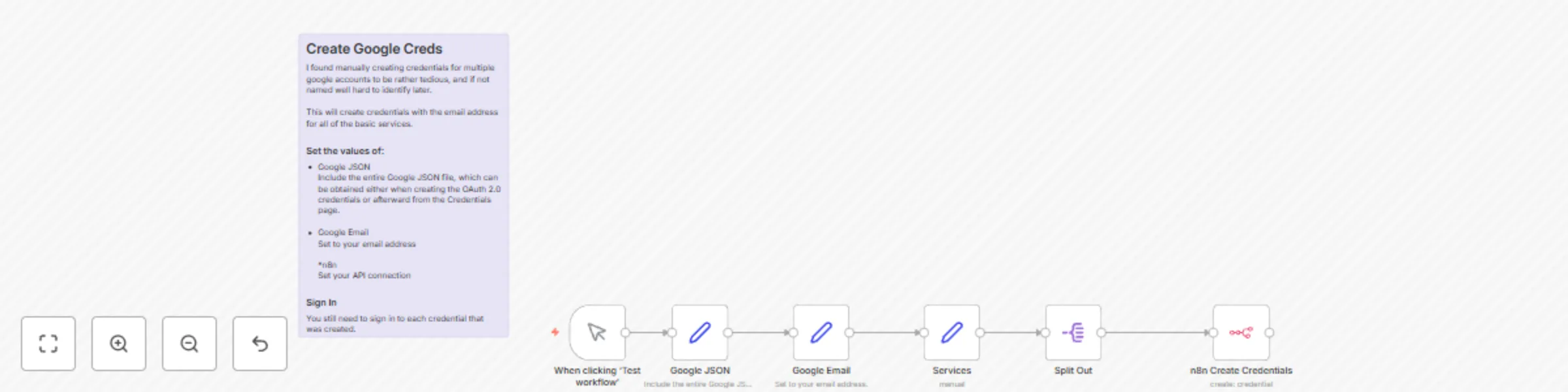
This workflow template streamlines the process of creating and naming individual Google OAuth2 credentials for multiple Google services within n8n. By automating tasks typically done manually, it saves significant time and reduces the risk of errors.

Who Is This For?

This template is perfect for:

  • Marketers who frequently use Google Docs, Google Sheets, Google Slides, and Google Drive for document automation.
  • Developers or technical users who manage numerous integrations and need to minimize credential creation overhead.
  • Teams or solo users with multiple Google accounts who want to eliminate repetitive Google OAuth2 credential creation tasks.

Prerequisite Knowledge

• Basic familiarity with n8n, including how to configure nodes and connect services.
• A Google OAuth JSON file (client ID, client secret, etc.) already set up in your Google Cloud Console.
• An understanding of Google services (Docs, Sheets, Slides, Drive, Gmail, Calendar, Contacts and others) and which you may need for your use cases

What Problem Does It Solve?

Manually creating and naming separate OAuth2 credentials for each Google service can be time-consuming and prone to errors. For instance, if you manage 16 Google accounts, you might need to create 112 credentials manually. This workflow automates that process by using your Google OAuth JSON file and email address, generating uniquely named OAuth2 credentials for each Google service in just a single run per account.

Key Features

  1. Manual Trigger – Start the workflow on demand to generate new credentials.
  2. Set Node for Google OAuth Details – Store your client ID, client secret, and other JSON info securely in one place.
  3. Automated Naming Convention – Use your Google email address to create distinct names for each credential, simplifying organization.
  4. Array of Google Services – Customize which services to create credentials for, such as Docs, Sheets, Slides, Drive, Gmail, Calendar, or Contacts.
  5. Batch Credential Creation – Split the array of Google services and automatically create separate OAuth2 credentials for each.
  6. Seamless OAuth2 Integration – Effortlessly authenticate all generated credentials within n8n.

How to Set Up

  1. Insert Your JSON Details – Paste your Google OAuth 2.0 JSON data into the “Google JSON” node.
  2. Add Your Google Email Address – Specify your email address in the “Google Email” node to personalize the naming convention.
  3. Configure n8n Account Credentials – In the “n8n Create Credentials” node, select or add proper credentials (e.g., n8n API credentials).
  4. Execute the Workflow – Run the workflow to automatically generate individual OAuth2 credentials.
  5. Finalize in n8n – Visit your n8n Credentials dashboard to complete the OAuth sign-in for each newly created credential.

Customization Options

  • Modify the Services Array – Easily add or remove Google products based on your workspace needs by editing the array in the “Services” node.
  • Adjust Naming Logic – Tailor the credential naming convention in the “n8n Create Credentials” node to match your organization’s style or best practices.
  • Set Role-Based Access – In n8n, control who can view and use these automatically generated credentials by adjusting user permissions.

Time-Saving Example

I initially had 16 Google accounts, requiring 112 credentials if done manually. With this workflow, I needed just one run per account—saving around two hours of repetitive data entry. Yes, I spent three hours building and documenting this, but it pays off quickly for anyone managing multiple accounts or large teams.

1.2 Logical Blocks

This catalog entry is organized from the workflow JSON. The node-level section below shows the executable blocks available for review before importing the template.

2. Block-by-Block Analysis

Block 1 - When clicking ‘Test workflow’

Type / Role
n8n-nodes-base.manualTrigger - manualTrigger
Config choices
Version 1

Block 2 - Services

Type / Role
n8n-nodes-base.set - set
Config choices
Version 3.4

Block 3 - Google JSON

Type / Role
n8n-nodes-base.set - set
Config choices
Version 3.4

Block 4 - Split Out

Type / Role
n8n-nodes-base.splitOut - splitOut
Config choices
Version 1

Block 5 - Google Email

Type / Role
n8n-nodes-base.set - set
Config choices
Version 3.4

Block 6 - n8n Create Credentials

Type / Role
n8n-nodes-base.n8n - n8n
Config choices
Version 1

Block 7 - Sticky Note

Type / Role
n8n-nodes-base.stickyNote - stickyNote
Config choices
Version 1

3. Summary Table

Workflow Automate Google OAuth2 credential creation in n8n
Complexity intermediate
Nodes 7
Categories DevOps
Author Jordan Haisley
Published 14 Feb 2025

4. Reproducing the Workflow from Scratch

  1. 1. Download the workflow JSON

    Use the JSON export at /data/workflows/2909/2909.json as the source template for this automation.

  2. 2. Import the template into n8n

    Open n8n, import the downloaded JSON, and review each node before activating the workflow.

  3. 3. Configure credentials and variables

    Replace placeholder credentials, API keys, webhook URLs, account IDs, and environment-specific values with your own settings.

  4. 4. Test with sample data

    Run the workflow manually or in a staging workspace, inspect node output, and confirm downstream systems receive the expected data.

  5. 5. Activate and monitor

    Enable the workflow only after testing, then monitor executions, errors, and rate limits during the first production runs.

5. General Notes & Resources

Review imported nodes carefully before activation. This catalog entry is intended to help you inspect the workflow structure, understand required services, and find related templates faster.

Node names, credentials, schedules, webhook paths, and external service limits may need adjustment for your workspace.

Frequently asked questions

What does Automate Google OAuth2 credential creation in n8n do?

Overview: Automate Your Google OAuth2 Credential Creation This workflow template streamlines the process of creating and naming individual Google OAuth2 credentials for multiple Google services wit...

What do I need before importing this workflow?

Review the workflow JSON, configure any required credentials in n8n, and test the automation in a safe workspace before using it in production.

Can I customize this workflow?

Yes. Use the block-by-block analysis and the downloadable JSON to inspect each node, then adjust credentials, prompts, schedules, filters, or destinations for your DevOps use case.