Block 1 - When clicking ‘Execute workflow’
- Type / Role
- n8n-nodes-base.manualTrigger - manualTrigger
- Config choices
- Version 1


 Early Deal
This workflow is provided as-is. Please review and test before using in production.
Overview of the n8n Workflow This n8n workflow automates the translation of text in Google Slides presentations from one language to another using AI. It retrieves a specified presentation from Goo...
n8n-nodes-base.manualtrigger, n8n-nodes-base.googleslides, n8n-nodes-base.googledrive, @n8n/n8n-nodes-langchain.agent, n8n-nodes-base.googleslidestool, n8n-nodes-base.code, n8n-nodes-base.splitout, n8n-nodes-base.splitinbatches
This workflow is cataloged by N8N Workflows and links back to its original n8n.io source page by Sebastian/OptiLever.
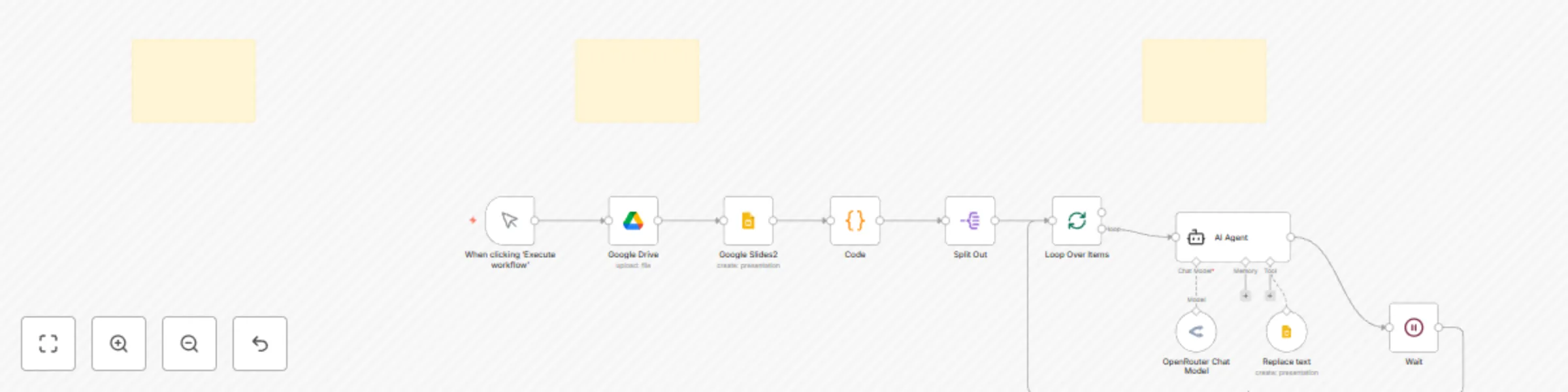
Original n8n.io sourceThis n8n workflow automates the translation of text in Google Slides presentations from one language to another using AI. It retrieves a specified presentation from Google Drive, extracts text from the slides, translates it in batches, and updates the presentation with the translated text. The workflow includes sticky notes with setup instructions and guidance on editable fields, formatted in Markdown for clarity.
Here’s how the workflow operates, node by node, based on the JSON and image descriptions:
Manual Trigger
Search for Google Slides Presentation
Retrieve Presentation Data
Extract Text from Slides
Split Text Array
extracted array into individual items.Process Text in Batches
Translate Text with AI
Provide AI Model
Replace Text in Slides
Delay Between Batches
The workflow includes three sticky notes with Markdown formatting, providing essential instructions:
To use this workflow in n8n:
queryString to match your presentation’s name or ID (default is "slides"). You can adapt the workflow for different needs:
batchSize (e.g., to 10) or the "Wait" node’s amount (e.g., to 1 second) for performance tuning. limit: 1 in the "Google Drive" node and add a loop to handle multiple files.This n8n workflow efficiently automates the translation in Google Slides, leveraging Google Drive, Google Slides, and AI via OpenRouter. It’s well-documented with sticky notes and easy to set up with proper credentials. While robust for its purpose, it could benefit from error handling and broader text extraction. You can customize it for different languages, models, or file types by tweaking the relevant nodes as outlined.
If you have a specific question or need help with a modification, let me know! OptiLever
This catalog entry is organized from the workflow JSON. The node-level section below shows the executable blocks available for review before importing the template.
| Workflow | Automate Chinese to English translation in Google Slides with Openrouter AI |
|---|---|
| Complexity | intermediate |
| Nodes | 13 |
| Categories | Document Extraction, Multimodal AI |
| Author | Sebastian/OptiLever |
| Published | 16 Jul 2025 |
Use the JSON export at /data/workflows/6060/6060.json as the source template for this automation.
Open n8n, import the downloaded JSON, and review each node before activating the workflow.
Replace placeholder credentials, API keys, webhook URLs, account IDs, and environment-specific values with your own settings.
Run the workflow manually or in a staging workspace, inspect node output, and confirm downstream systems receive the expected data.
Enable the workflow only after testing, then monitor executions, errors, and rate limits during the first production runs.
Review imported nodes carefully before activation. This catalog entry is intended to help you inspect the workflow structure, understand required services, and find related templates faster.
Node names, credentials, schedules, webhook paths, and external service limits may need adjustment for your workspace.
Overview of the n8n Workflow This n8n workflow automates the translation of text in Google Slides presentations from one language to another using AI. It retrieves a specified presentation from Goo...
Review the workflow JSON, configure any required credentials in n8n, and test the automation in a safe workspace before using it in production.
Yes. Use the block-by-block analysis and the downloadable JSON to inspect each node, then adjust credentials, prompts, schedules, filters, or destinations for your Document Extraction, Multimodal AI use case.