Automate business card management with LINE, AI, and Google Sheets

Workflow preview

Workflow preview
100%
Automate business card management with LINE, AI, and Google Sheets preview
Open on n8n.io

Important notice

This workflow is provided as-is. Please review and test before using in production.

1. Workflow Overview

Automate Business Card Management with LINE, AI, and Google Sheets Who's it for This workflow is designed for business professionals and sales teams who receive business card images via LINE and wa...

Best for

  • Document Extraction automation workflows
  • AI Summarization automation workflows
  • advanced n8n builders looking for reusable templates

Tools used

n8n-nodes-base.stickynote, n8n-nodes-base.set, n8n-nodes-base.webhook, @n8n/n8n-nodes-langchain.lmchatgooglegemini, n8n-nodes-base.switch, n8n-nodes-base.httprequest, @n8n/n8n-nodes-langchain.chainllm, n8n-nodes-base.code

Source and attribution

This workflow is cataloged by N8N Workflows and links back to its original n8n.io source page by Oka Hironobu.

Original n8n.io source

1.1 Workflow description

Title
Automate business card management with LINE, AI, and Google Sheets
Workflow name
Automate business card management with LINE, AI, and Google Sheets

Automate Business Card Management with LINE, AI, and Google Sheets

Who's it for

This workflow is designed for business professionals and sales teams who receive business card images via LINE and want to quickly digitize contact information with minimal manual work.

It is best suited for users who process business cards one image at a time and want a simple, reliable automation rather than a high-volume ingestion pipeline.

What it does

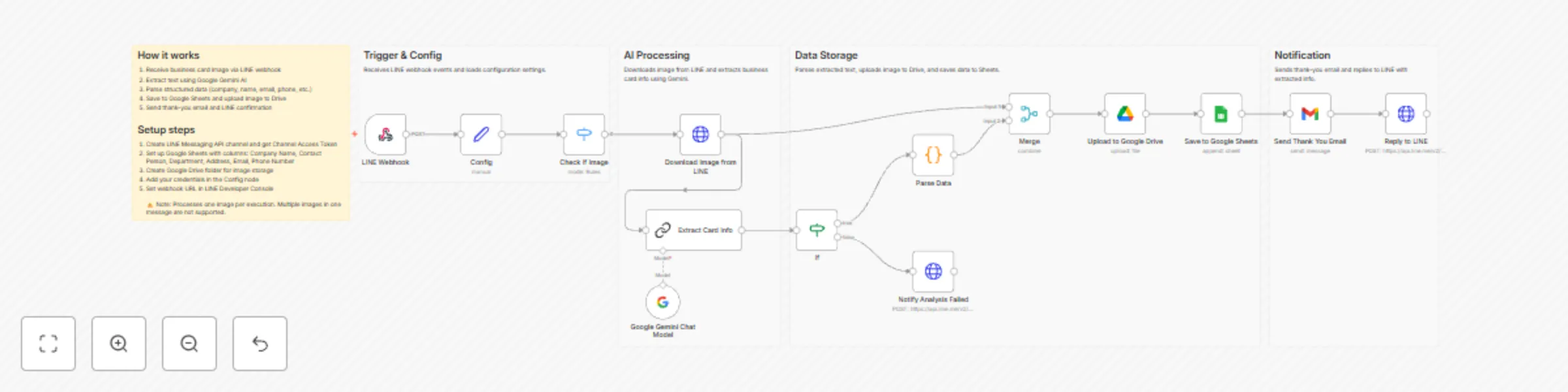
This workflow processes a single business card image sent via LINE, extracts text using Google Gemini AI, and stores the structured contact information in Google Sheets.

The workflow focuses on simplicity and clarity: it receives an image, performs AI-based OCR, parses the extracted text, saves the result, uploads the original image for reference, sends a thank-you email, and replies with the extracted data on LINE.

How it works

  1. A single business card image is sent to the LINE bot.
  2. The workflow is triggered via a LINE webhook.
  3. The image file is downloaded and sent to Google Gemini AI for OCR.
  4. The extracted text is parsed into structured fields.
  5. The data is appended to Google Sheets.
  6. The image is uploaded to Google Drive.
  7. A thank-you email is sent via Gmail.
  8. The extracted information is sent back as a LINE reply.

This workflow is intentionally designed to handle one image per execution.

Requirements

To use this workflow, you will need:

  • A LINE Messaging API account
  • A Google Gemini API key
  • A Google account with access to Google Sheets and Google Drive
  • A Gmail account for sending thank-you emails
  • A Google Sheets document with the following column names:
    • Company Name
    • Contact Name
    • Department
    • Address
    • Email Address
    • Phone Number

Important limitations

  • This workflow does not support multiple images sent in a single message.
  • Sending images in quick succession may trigger multiple executions and lead to unexpected results.
  • Only the first image in an event payload is processed.
  • OCR accuracy depends on image quality, lighting, and card design.

These limitations are intentional to keep the workflow simple and easy to understand.

How to set up

  1. Create a LINE Messaging API channel and obtain a Channel Access Token.
  2. Generate a Google Gemini API key.
  3. Update the Config node with your LINE token, Google Sheets ID, and Google Drive folder ID.
  4. Configure credentials for LINE, Google Gemini, Google Sheets, Google Drive, and Gmail.
  5. Register the n8n webhook URL in your LINE channel settings.
  6. Activate the workflow in n8n and test it with a single business card image.

How to customize

  • Modify the AI prompt in the “Extract Card Info” node to support different languages or fields.
  • Adjust the parsing logic to match different business card layouts.
  • Replace Google Sheets with a CRM or database.
  • Add queueing or locking logic if you want to support batch or sequential image uploads.

Note:
This workflow was tested using real business card images sent individually via the LINE Messaging API.
For production use, testing with your own card samples is strongly recommended.

1.2 Logical Blocks

This catalog entry is organized from the workflow JSON. The node-level section below shows the executable blocks available for review before importing the template.

2. Block-by-Block Analysis

Block 1 - Workflow Overview

Type / Role
n8n-nodes-base.stickyNote - stickyNote
Config choices
Version 1

Block 2 - Step 1 Note

Type / Role
n8n-nodes-base.stickyNote - stickyNote
Config choices
Version 1

Block 3 - Step 2 Note

Type / Role
n8n-nodes-base.stickyNote - stickyNote
Config choices
Version 1

Block 4 - Step 3 Note

Type / Role
n8n-nodes-base.stickyNote - stickyNote
Config choices
Version 1

Block 5 - Step 4 Note

Type / Role
n8n-nodes-base.stickyNote - stickyNote
Config choices
Version 1

Block 6 - Config

Type / Role
n8n-nodes-base.set - set
Config choices
Version 3.4

Block 7 - LINE Webhook

Type / Role
n8n-nodes-base.webhook - webhook
Config choices
Version 2.1

Block 8 - Google Gemini Chat Model

Type / Role
@n8n/n8n-nodes-langchain.lmChatGoogleGemini - lmChatGoogleGemini
Config choices
Version 1

Block 9 - Check If Image

Type / Role
n8n-nodes-base.switch - switch
Config choices
Version 3.3

Block 10 - Download Image from LINE

Type / Role
n8n-nodes-base.httpRequest - httpRequest
Config choices
Version 4.3

Block 11 - Extract Card Info

Type / Role
@n8n/n8n-nodes-langchain.chainLlm - chainLlm
Config choices
Version 1.7

Block 12 - Parse Data

Type / Role
n8n-nodes-base.code - code
Config choices
Version 2

Block 13 - Save to Google Sheets

Type / Role
n8n-nodes-base.googleSheets - googleSheets
Config choices
Version 4.5

Block 14 - Merge

Type / Role
n8n-nodes-base.merge - merge
Config choices
Version 3

Block 15 - Notify Analysis Failed

Type / Role
n8n-nodes-base.httpRequest - httpRequest
Config choices
Version 4.3

Block 16 - Upload to Google Drive

Type / Role
n8n-nodes-base.googleDrive - googleDrive
Config choices
Version 3

Block 17 - Reply to LINE

Type / Role
n8n-nodes-base.httpRequest - httpRequest
Config choices
Version 4.3

Block 18 - Send Thank You Email

Type / Role
n8n-nodes-base.gmail - gmail
Config choices
Version 2.1

Block 19 - If

Type / Role
n8n-nodes-base.if - if
Config choices
Version 2.2

3. Summary Table

Workflow Automate business card management with LINE, AI, and Google Sheets
Complexity advanced
Nodes 19
Categories Document Extraction, AI Summarization
Author Oka Hironobu
Published 23 Dec 2025

4. Reproducing the Workflow from Scratch

  1. 1. Download the workflow JSON

    Use the JSON export at /data/workflows/12058/12058.json as the source template for this automation.

  2. 2. Import the template into n8n

    Open n8n, import the downloaded JSON, and review each node before activating the workflow.

  3. 3. Configure credentials and variables

    Replace placeholder credentials, API keys, webhook URLs, account IDs, and environment-specific values with your own settings.

  4. 4. Test with sample data

    Run the workflow manually or in a staging workspace, inspect node output, and confirm downstream systems receive the expected data.

  5. 5. Activate and monitor

    Enable the workflow only after testing, then monitor executions, errors, and rate limits during the first production runs.

5. General Notes & Resources

Review imported nodes carefully before activation. This catalog entry is intended to help you inspect the workflow structure, understand required services, and find related templates faster.

Node names, credentials, schedules, webhook paths, and external service limits may need adjustment for your workspace.

Frequently asked questions

What does Automate business card management with LINE, AI, and Google Sheets do?

Automate Business Card Management with LINE, AI, and Google Sheets Who's it for This workflow is designed for business professionals and sales teams who receive business card images via LINE and wa...

What do I need before importing this workflow?

Review the workflow JSON, configure any required credentials in n8n, and test the automation in a safe workspace before using it in production.

Can I customize this workflow?

Yes. Use the block-by-block analysis and the downloadable JSON to inspect each node, then adjust credentials, prompts, schedules, filters, or destinations for your Document Extraction, AI Summarization use case.