Block 1 - Manual Trigger
- Type / Role
- n8n-nodes-base.manualTrigger - manualTrigger
- Config choices
- Version 1


 Early Deal
This workflow is provided as-is. Please review and test before using in production.
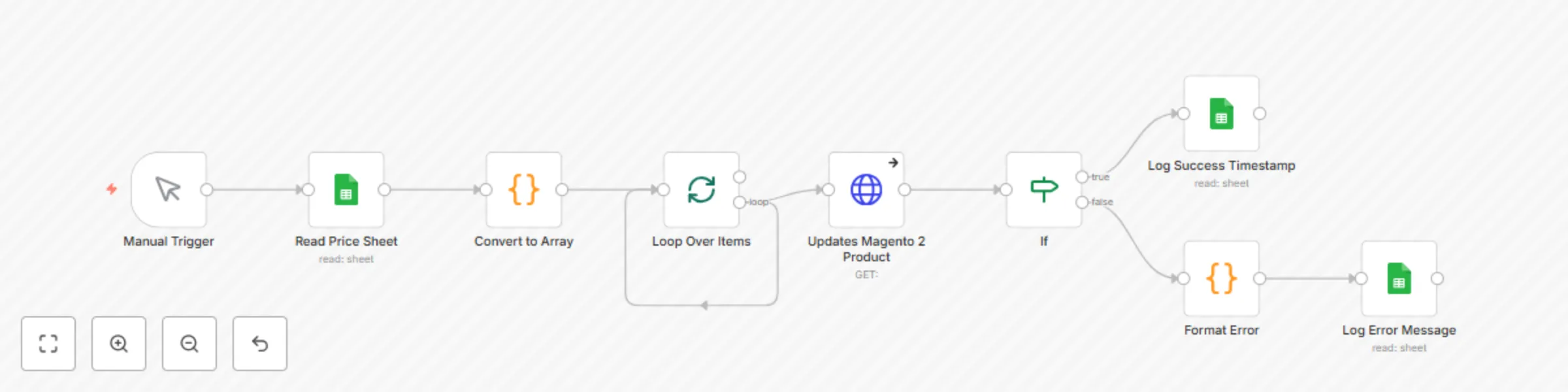
This workflow automates bulk price updates for Magento 2 products using data from a Google Sheet. It reads SKUs and new prices, cleans and validates the data, and updates each product via the Magen...
n8n-nodes-base.manualtrigger, n8n-nodes-base.splitinbatches, n8n-nodes-base.if, n8n-nodes-base.googlesheets, n8n-nodes-base.code, n8n-nodes-base.httprequest
This workflow is cataloged by N8N Workflows and links back to its original n8n.io source page by Kanaka Kishore Kandregula.
Original n8n.io sourceError messages from failed updates are parsed and logged clearly, making it easy to monitor and correct issues directly from the spreadsheet. Ideal for store managers and merchandisers who need a faster, error-resistant alternative to manual updates in the admin panel.
Automatically updates Magento 2 product prices in bulk using values from a Google Sheet. It reads SKU and price values, processes the data, and uses the Magento 2 REST API to push updates directly—without ever logging into the Magento admin panel.
E-Commerce / Magento 2 / Automation / Google Sheets
Having trouble setting it up or want to customize this workflow further? Feel free to reach out — I’m happy to help with setup, customization, or Magento 2 API integration issues.
or
Please feel free to contact Auther. Happy to help.
Contact: Author
👤 Author Kanaka Kishore Kandregula Certified Magento 2 Developer https://gravatar.com/kmyprojects https://www.linkedin.com/in/kanakakishore
This catalog entry is organized from the workflow JSON. The node-level section below shows the executable blocks available for review before importing the template.
| Workflow | Automate bulk update Magento 2 product prices via Google Sheets |
|---|---|
| Complexity | intermediate |
| Nodes | 9 |
| Categories | Content Creation, Multimodal AI |
| Author | Kanaka Kishore Kandregula |
| Published | 03 Aug 2025 |
Use the JSON export at /data/workflows/6933/6933.json as the source template for this automation.
Open n8n, import the downloaded JSON, and review each node before activating the workflow.
Replace placeholder credentials, API keys, webhook URLs, account IDs, and environment-specific values with your own settings.
Run the workflow manually or in a staging workspace, inspect node output, and confirm downstream systems receive the expected data.
Enable the workflow only after testing, then monitor executions, errors, and rate limits during the first production runs.
Review imported nodes carefully before activation. This catalog entry is intended to help you inspect the workflow structure, understand required services, and find related templates faster.
Node names, credentials, schedules, webhook paths, and external service limits may need adjustment for your workspace.
This workflow automates bulk price updates for Magento 2 products using data from a Google Sheet. It reads SKUs and new prices, cleans and validates the data, and updates each product via the Magen...
Review the workflow JSON, configure any required credentials in n8n, and test the automation in a safe workspace before using it in production.
Yes. Use the block-by-block analysis and the downloadable JSON to inspect each node, then adjust credentials, prompts, schedules, filters, or destinations for your Content Creation, Multimodal AI use case.