Block 1 - Get Past Objects
- Type / Role
- n8n-nodes-base.googleSheets - googleSheets
- Config choices
- Version 4.6


 Early Deal
This workflow is provided as-is. Please review and test before using in production.
Veo Machine Reels Factory — Full User Guide Introduction The Veo Machine Reels Factory is an automated content creation system built in n8n that turns creative ideas into fully rendered ASMR ...
n8n-nodes-base.googlesheets, @n8n/n8n-nodes-langchain.agent, n8n-nodes-base.aggregate, n8n-nodes-base.set, @n8n/n8n-nodes-langchain.outputparserstructured, n8n-nodes-base.manualtrigger, @n8n/n8n-nodes-langchain.lmchatopenai, n8n-nodes-base.jwt
This workflow is cataloged by N8N Workflows and links back to its original n8n.io source page by Ayoub Boutouil.
Original n8n.io source🎥 Veo Machine Reels Factory — Full User Guide 🧭 Introduction
The Veo Machine Reels Factory is an automated content creation system built in n8n that turns creative ideas into fully rendered ASMR-style glass fruit reels, ready to post on TikTok, YouTube Shorts, and Instagram Reels.
This template connects multiple AI and automation services into a single, repeatable pipeline. It eliminates manual steps — from concept brainstorming to posting — allowing creators or marketing teams to produce viral short-form videos hands-free.
⚙️ How It Works (In Short)
The workflow starts automatically every 8 hours (or manually when triggered).
It checks a Google Sheet to see which fruits have already been used.
An AI “Idea Agent” selects a new, unique glass fruit concept.
Another AI “Prompt Agent” writes a cinematic Google Veo 3 prompt describing the video.
The system sends that prompt to Google Veo, which generates the actual video file.
The video is automatically:
Converted to 9:16 vertical format via Shotstack
Uploaded to Google Cloud Storage
Posted to TikTok, YouTube, and Instagram through Postiz API
🧱 Requirements
Before running this workflow, make sure you have the following ready:
Category Requirement
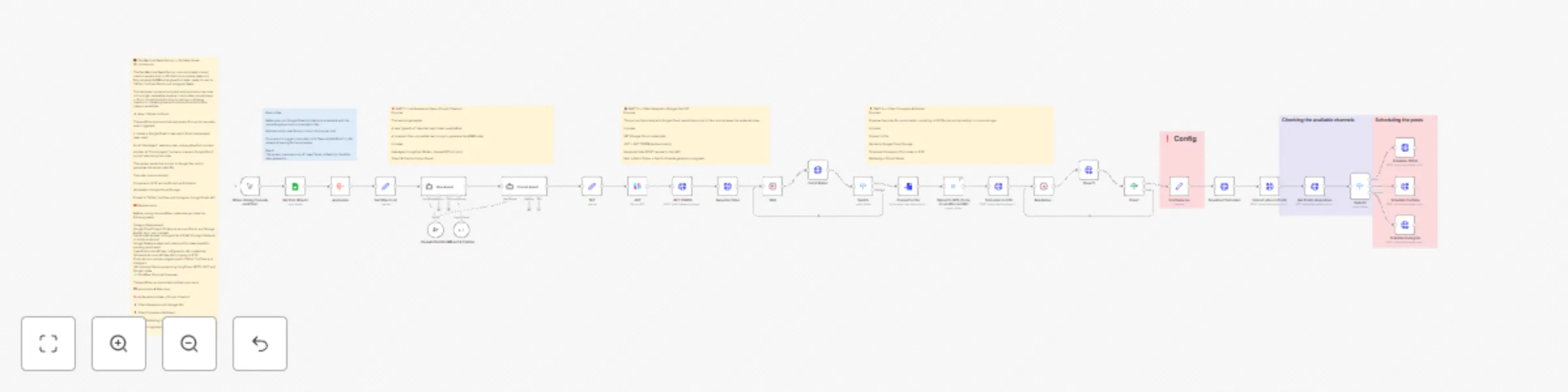
🧩 Workflow Structure Overview
The workflow can be divided into five main parts:
🕒 Automation & Data Input
🧠 AI Generation (Idea + Prompt Creation)
🎬 Video Generation with Google Veo
📱 Video Conversion & Upload
🚀 Auto-Publishing to Social Media
This catalog entry is organized from the workflow JSON. The node-level section below shows the executable blocks available for review before importing the template.
Showing the first 24 of 37 workflow blocks. Download the JSON for the full node graph.
| Workflow | Automate ASMR glass fruit video creation & publishing with Veo, Shotstack & Postiz |
|---|---|
| Complexity | advanced |
| Nodes | 37 |
| Categories | Content Creation, Multimodal AI |
| Author | Ayoub Boutouil |
| Published | 25 Oct 2025 |
Use the JSON export at /data/workflows/10175/10175.json as the source template for this automation.
Open n8n, import the downloaded JSON, and review each node before activating the workflow.
Replace placeholder credentials, API keys, webhook URLs, account IDs, and environment-specific values with your own settings.
Run the workflow manually or in a staging workspace, inspect node output, and confirm downstream systems receive the expected data.
Enable the workflow only after testing, then monitor executions, errors, and rate limits during the first production runs.
Review imported nodes carefully before activation. This catalog entry is intended to help you inspect the workflow structure, understand required services, and find related templates faster.
Node names, credentials, schedules, webhook paths, and external service limits may need adjustment for your workspace.
Veo Machine Reels Factory — Full User Guide Introduction The Veo Machine Reels Factory is an automated content creation system built in n8n that turns creative ideas into fully rendered ASMR ...
Review the workflow JSON, configure any required credentials in n8n, and test the automation in a safe workspace before using it in production.
Yes. Use the block-by-block analysis and the downloadable JSON to inspect each node, then adjust credentials, prompts, schedules, filters, or destinations for your Content Creation, Multimodal AI use case.