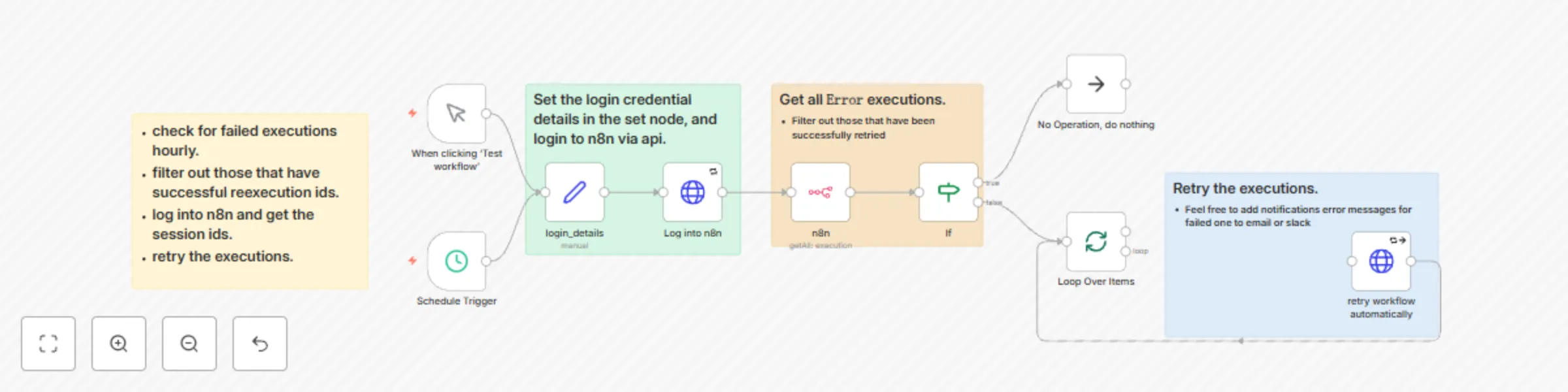
Auto-retry engine: error recovery workflow

Workflow preview

Workflow preview
100%
Auto-retry engine: error recovery workflow preview
Open on n8n.io

Important notice

This workflow is provided as-is. Please review and test before using in production.

1. Workflow Overview

Workflow Documentation: Auto Retry Engine – Error Recovery Workflow Detailed Description The Auto Retry Engine: Error Recovery Workflow is designed to automate the process of identifying and retryi...

Best for

  • DevOps automation workflows
  • intermediate n8n builders looking for reusable templates

Tools used

n8n-nodes-base.manualtrigger, n8n-nodes-base.n8n, n8n-nodes-base.httprequest, n8n-nodes-base.if, n8n-nodes-base.noop, n8n-nodes-base.stickynote, n8n-nodes-base.set, n8n-nodes-base.splitinbatches

Source and attribution

This workflow is cataloged by N8N Workflows and links back to its original n8n.io source page by Francis Njenga.

Original n8n.io source

1.1 Workflow description

Title
Auto-retry engine: error recovery workflow
Workflow name
Auto-retry engine: error recovery workflow

Workflow Documentation: Auto-Retry Engine – Error Recovery Workflow

Detailed Description

The Auto-Retry Engine: Error Recovery Workflow is designed to automate the process of identifying and retrying failed executions in n8n workflows. By leveraging scheduled triggers, API integrations, and conditional logic, this workflow ensures that any failed executions are automatically retried on an hourly basis. This reduces manual intervention, improves system reliability, and ensures smoother workflow operations.

Who is this for?

This workflow is ideal for:

  • Automation Engineers: Managing and maintaining workflows with minimal manual intervention.
  • DevOps Teams: Ensuring high availability and reliability of automated processes.
  • IT Administrators: Reducing downtime and improving system performance by automating error recovery.

What problem does this workflow solve?

  • Manual Error Handling: Eliminates the need for manual monitoring and retrying of failed executions.
  • Improved Reliability: Automatically retries failed executions, reducing downtime and improving workflow success rates.
  • Time Efficiency: Saves time by automating repetitive error recovery tasks, allowing teams to focus on higher-priority work.

What this workflow does

This workflow automates the following steps:

  1. Scheduled Monitoring: Checks for failed executions hourly using a schedule trigger.
  2. Error Filtering: Identifies executions that have failed and filters out those that have already been successfully retried.
  3. Authentication: Logs into the n8n instance using API credentials to retrieve session details.
  4. Automatic Retry: Retries the failed executions using the n8n API.
  5. Batch Processing: Processes multiple failed executions in batches to avoid overloading the system.

Setup

Prerequisites

To use this workflow, you’ll need:

  • n8n Account: To create and run the workflow.
  • n8n API Credentials: For logging into the n8n instance and retrying executions.
  • HTTP Request Node: Configured to interact with the n8n API.
  • Schedule Trigger: Set to run the workflow hourly.

Setup Process

  1. Configure Schedule Trigger

    • Set the trigger to run hourly to check for failed executions.
  2. Set Login Credentials

    • Add your n8n instance URL, username, and password in the Set Node.
  3. Integrate n8n API

    • Use the HTTP Request node to log into the n8n instance and retrieve session details.
  4. Retry Failed Executions

    • Configure the HTTP Request node to retry failed executions using the session details.
  5. Batch Processing

    • Use the Split in Batches node to process multiple failed executions in batches.

How to customize this workflow

Tailor the workflow to fit your specific needs:

  • Adjust Schedule Frequency

    • Modify the schedule trigger to run at different intervals (e.g., every 30 minutes).
  • Add Notifications

    • Integrate email or Slack notifications to alert teams about failed retries.
  • Refine Error Filtering

    • Customize the filtering logic to exclude specific types of failed executions.
  • Scale Batch Size

    • Adjust the batch size in the Split in Batches node to optimize performance.

Conclusion

The Auto-Retry Engine: Error Recovery Workflow is a powerful tool for automating error recovery in n8n workflows. By reducing manual intervention and ensuring failed executions are retried automatically, this workflow enhances system reliability and operational efficiency. Whether you're managing a few workflows or a complex automation ecosystem, this workflow ensures your processes run smoothly and consistently.

1.2 Logical Blocks

This catalog entry is organized from the workflow JSON. The node-level section below shows the executable blocks available for review before importing the template.

2. Block-by-Block Analysis

Block 1 - When clicking ‘Test workflow’

Type / Role
n8n-nodes-base.manualTrigger - manualTrigger
Config choices
Version 1

Block 2 - n8n

Type / Role
n8n-nodes-base.n8n - n8n
Config choices
Version 1

Block 3 - Log into n8n

Type / Role
n8n-nodes-base.httpRequest - httpRequest
Config choices
Version 4.2

Block 4 - retry workflow automatically

Type / Role
n8n-nodes-base.httpRequest - httpRequest
Config choices
Version 4.2

Block 5 - If

Type / Role
n8n-nodes-base.if - if
Config choices
Version 2.2

Block 6 - No Operation, do nothing

Type / Role
n8n-nodes-base.noOp - noOp
Config choices
Version 1

Block 7 - Sticky Note

Type / Role
n8n-nodes-base.stickyNote - stickyNote
Config choices
Version 1

Block 8 - login_details

Type / Role
n8n-nodes-base.set - set
Config choices
Version 3.4

Block 9 - Loop Over Items

Type / Role
n8n-nodes-base.splitInBatches - splitInBatches
Config choices
Version 3

Block 10 - Schedule Trigger

Type / Role
n8n-nodes-base.scheduleTrigger - scheduleTrigger
Config choices
Version 1.2

Block 11 - Sticky Note1

Type / Role
n8n-nodes-base.stickyNote - stickyNote
Config choices
Version 1

Block 12 - Sticky Note2

Type / Role
n8n-nodes-base.stickyNote - stickyNote
Config choices
Version 1

Block 13 - Sticky Note3

Type / Role
n8n-nodes-base.stickyNote - stickyNote
Config choices
Version 1

3. Summary Table

Workflow Auto-retry engine: error recovery workflow
Complexity intermediate
Nodes 13
Categories DevOps
Author Francis Njenga
Published 12 Mar 2025

4. Reproducing the Workflow from Scratch

  1. 1. Download the workflow JSON

    Use the JSON export at /data/workflows/3144/3144.json as the source template for this automation.

  2. 2. Import the template into n8n

    Open n8n, import the downloaded JSON, and review each node before activating the workflow.

  3. 3. Configure credentials and variables

    Replace placeholder credentials, API keys, webhook URLs, account IDs, and environment-specific values with your own settings.

  4. 4. Test with sample data

    Run the workflow manually or in a staging workspace, inspect node output, and confirm downstream systems receive the expected data.

  5. 5. Activate and monitor

    Enable the workflow only after testing, then monitor executions, errors, and rate limits during the first production runs.

5. General Notes & Resources

Review imported nodes carefully before activation. This catalog entry is intended to help you inspect the workflow structure, understand required services, and find related templates faster.

Node names, credentials, schedules, webhook paths, and external service limits may need adjustment for your workspace.

Frequently asked questions

What does Auto-retry engine: error recovery workflow do?

Workflow Documentation: Auto Retry Engine – Error Recovery Workflow Detailed Description The Auto Retry Engine: Error Recovery Workflow is designed to automate the process of identifying and retryi...

What do I need before importing this workflow?

Review the workflow JSON, configure any required credentials in n8n, and test the automation in a safe workspace before using it in production.

Can I customize this workflow?

Yes. Use the block-by-block analysis and the downloadable JSON to inspect each node, then adjust credentials, prompts, schedules, filters, or destinations for your DevOps use case.