Block 1 - HTTP Request
- Type / Role
- n8n-nodes-base.httpRequest - httpRequest
- Config choices
- Version 4.2


 Early Deal
This workflow is provided as-is. Please review and test before using in production.
How it works • Automatically detects when new pages are created in your Notion workspace • Uses AI to generate contextually relevant icons based on page titles for perfect visual representation • F...
n8n-nodes-base.httprequest, n8n-nodes-base.code, n8n-nodes-base.splitinbatches, n8n-nodes-base.webhook, @n8n/n8n-nodes-langchain.lmchatopenrouter, @n8n/n8n-nodes-langchain.chainllm, n8n-nodes-base.stickynote
This workflow is cataloged by N8N Workflows and links back to its original n8n.io source page by TreyDong.
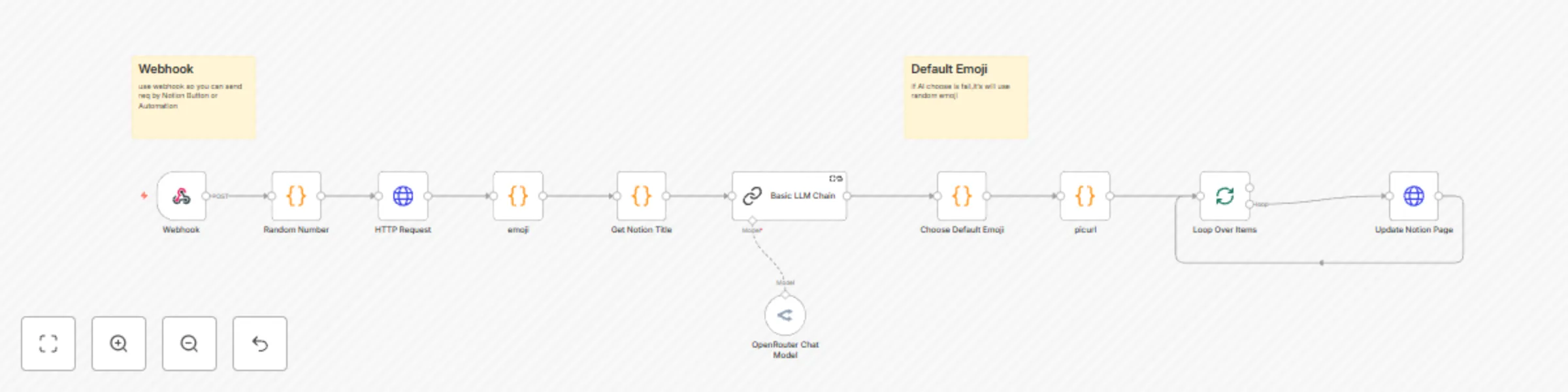
Original n8n.io sourceHow it works • Automatically detects when new pages are created in your Notion workspace • Uses AI to generate contextually relevant icons based on page titles for perfect visual representation • Fetches random high-quality cover images from Unsplash to add visual appeal to each page • Seamlessly integrates with your existing Notion workflow without manual intervention
Set up steps • Connect your Notion workspace using API credentials - takes about 5 minutes to configure • Set up AI service integration for intelligent icon generation based on page titles • Configure Unsplash API access for random cover image fetching • Configure webhook triggers to monitor new page creation events • Test the workflow with a sample page to ensure proper functionality • Keep detailed setup instructions and troubleshooting tips in the workflow notes for future reference
This template helps streamline your Notion workspace by automatically beautifying new pages with AI-generated icons and stunning Unsplash covers, saving you time while maintaining a visually appealing and professional appearance across your knowledge base.
This catalog entry is organized from the workflow JSON. The node-level section below shows the executable blocks available for review before importing the template.
| Workflow | Auto icon & cover for new Notion pages |
|---|---|
| Complexity | intermediate |
| Nodes | 13 |
| Categories | Personal Productivity, Multimodal AI |
| Author | TreyDong |
| Published | 23 Jun 2025 |
Use the JSON export at /data/workflows/5141/5141.json as the source template for this automation.
Open n8n, import the downloaded JSON, and review each node before activating the workflow.
Replace placeholder credentials, API keys, webhook URLs, account IDs, and environment-specific values with your own settings.
Run the workflow manually or in a staging workspace, inspect node output, and confirm downstream systems receive the expected data.
Enable the workflow only after testing, then monitor executions, errors, and rate limits during the first production runs.
Review imported nodes carefully before activation. This catalog entry is intended to help you inspect the workflow structure, understand required services, and find related templates faster.
Node names, credentials, schedules, webhook paths, and external service limits may need adjustment for your workspace.
How it works • Automatically detects when new pages are created in your Notion workspace • Uses AI to generate contextually relevant icons based on page titles for perfect visual representation • F...
Review the workflow JSON, configure any required credentials in n8n, and test the automation in a safe workspace before using it in production.
Yes. Use the block-by-block analysis and the downloadable JSON to inspect each node, then adjust credentials, prompts, schedules, filters, or destinations for your Personal Productivity, Multimodal AI use case.